dumpstool logo

200-301 Question Includes: Single Choice Questions: 989, Multiple Choice Questions: 136, Drag Drop: 118, Simulation: 14,
Refer the exhibit.
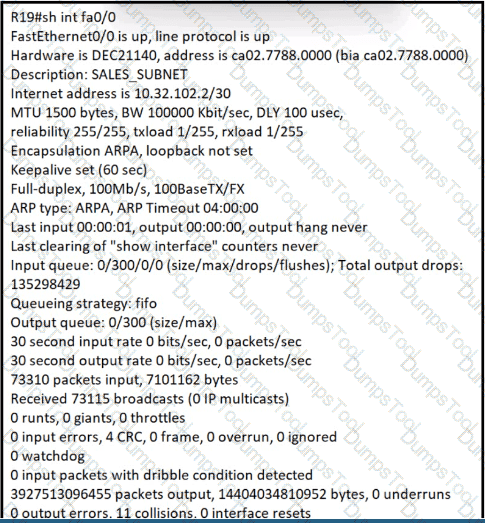
What is the cause of poor performance on router R19?
Refer to the exhibit.
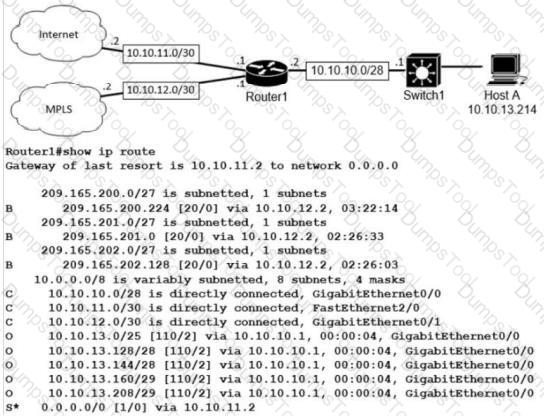
What is the prefix length for the route that router1 will use to reach host A?
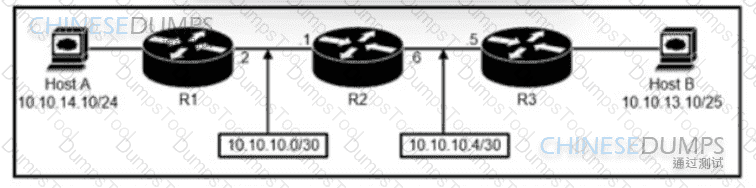
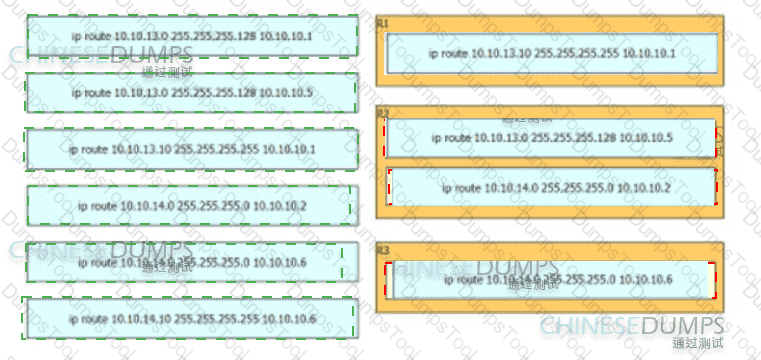
Refer to the exhibit. An engineer must configure a static network route between two networks so that host A communicates with host B. Drag and drop the commands from the left onto the routers where they must be configuredd on the right. Not all commands are used.
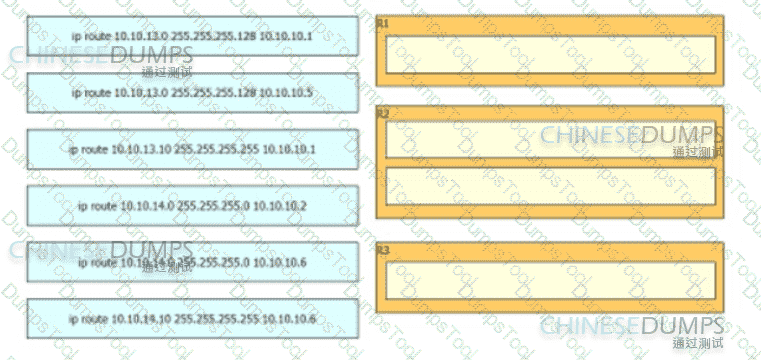
Refer to the exhibit.
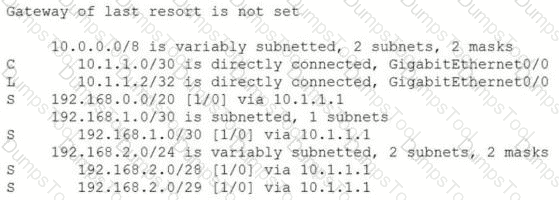
An engineer is checking the routing table in the main router to identify the path to a server on the network. Which route does the router use to reach the server at 192.168.2.2?
Refer to the exhibit.
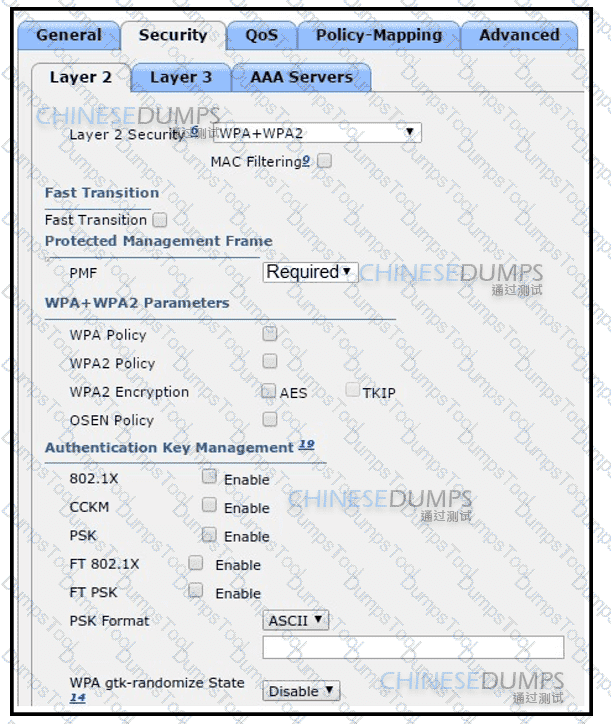
The network engineer is configuring a new WLAN and is told to use a preshared key for authentication instead of the RADIUS servers. Which additional set of tasks must the engineer perform to complete the configuration?
Customers Passed
Cisco 200-301
Average Score In Real
Exam At Testing Centre
Questions came word by
word from this dump
DumpsTool Practice Questions provide you with the ultimate pathway to achieve your targeted Cisco Exam 200-301 IT certification. The innovative questions with their interactive and to the point content make your learning of the syllabus far easier than you could ever imagine.
DumpsTool Practice Questions are information-packed and prove to be the best supportive study material for all exam candidates. They have been designed especially keeping in view your actual exam requirements. Hence they prove to be the best individual support and guidance to ace exam in first go!
Cisco CCNA 200-301 PDF file of Practice Questions is easily downloadable on all devices and systems. This you can continue your studies as per your convenience and preferred schedule. Where as testing engine can be downloaded and install to any windows based machine.
DumpsTool Practice Questions ensure your exam success with 100% money back guarantee. There virtually no possibility of losing Cisco CCNA 200-301 Exam, if you grasp the information contained in the questions.
DumpsTool professional guidance is always available to its worthy clients on all issues related to exam and DumpsTool products. Feel free to contact us at your own preferred time. Your queries will be responded with prompt response.
DumpsTool tires its level best to entertain its clients with the most affordable products. They are never a burden on your budget. The prices are far less than the vendor tutorials, online coaching and study material. With their lower price, the advantage of DumpsTool 200-301 Implementing and Administering Cisco Solutions (200-301 CCNA) v1.1 Practice Questions is enormous and unmatched!

Yes. DumpsTool’s concentration is to provide you with the state of the art products at affordable prices. Round the year, special packages and discounted prices are also introduced.
DumpsTool 200-301 Testing Engine delivers you practice tests that have been made to introduce you to the real exam format. Taking these tests also helps you to revise the syllabus and maximize your success prospects.
The money back guarantee is the best proof of our most relevant and rewarding products. DumpsTool’s claim is the 100% success of its clients. If they don’t succeed, they can take back their money.
DumpsTool offers a variety of products to its clients to cater to their individual needs. DumpsTool Study Guides, 200-301 Exam Dumps, Practice Questions answers in pdf and Testing Engine are the products that have been created by the best industry professionals.
DumpsTool’s products are absolutely exam-oriented. They contain 200-301 study material that is Q&As based and comprises only the information that can be asked in actual exam. The information is abridged and up to the task, devoid of all irrelevant and unnecessary detail. This outstanding content is easy to learn and memorize.
DumpsTool products focus each and every aspect of the 200-301 certification exam. You’ll find them absolutely relevant to your needs.
The Cisco 200-301 Exam, also known as CCNA (Cisco Certified Network Associate), evaluates your knowledge and skills related to network fundamentals, network access, IP connectivity, IP services, security fundamentals, and automation and programmability.
The Cisco 200-301 exam is ideal for individuals seeking a foundational certification in Cisco networking technologies. It's particularly relevant for network technicians, entry-level network administrators, and those pursuing careers in IT support.
The Cisco 200-301 exam covers the following areas:
The Cisco 200-301 exam duration is approximately 120 minutes.
The Cisco 200-301 exam consists of approximately 100-120 questions.
There are no formal prerequisites for taking the Cisco 200-301 exam. However, possessing a strong foundation in networking concepts is highly recommended.
Dumpstool offers a comprehensive set of 200-301 practice exam questions, including detailed explanations for each question, to help you understand the concepts and principles tested in the exam.
Dumpstool offers a user-friendly purchasing process. Simply add your desired study materials such as, 200-301 testing engine or 200-301 PDFs to your cart, proceed with payment, and gain instant access.
Yes, Dumpstool offers a money-back guarantee if you fail the CCNA Certification despite using our 200-301 preparation materials. Please refer to our refund policy for more details.

 Precious pearlposted on 26-Sep-2026
I saw many 200-301 questions are relevant. Great job! I will go for these dumps again in the future. This is really helpful. I got 92%
 Walkerposted on 26-Sep-2026
I started my preparation by downloading the Cisco 200-301 exam study guide from dumpstool.com. The study guide provided a comprehensive overview of the topics and was well-organized and easy to understand. I spent few weeks going through the study guide, and passed the exam with 85% marks. Thanks a ton!!!
 Ash87posted on 25-Sep-2026
These are performance-based 200-301 questions. You can make up your mind to go thru these scenarios when you work hard. Good job. I got 87%
 Joshuaposted on 25-Sep-2026
Highly recommended! dumpstool's PDF + exam software package is the perfect training combination for passing 200-301 exam. I learnt all the real exam questions with answers using clear and concise PDFs study guide, then tested my score using the realistic exam simulator. It gave me real confidence to pass CCNA 200-301 exam and become Cisco Certified Network Associate.
 Jaysonposted on 20-Sep-2026
 Eliposted on 19-Sep-2026
100% reliable study guide to pass 200-301 exam is available at dumpstool.com. I used this platform to pass this test and it came up to the task. On my huge success I can recommend dumpstool pdf exam guide to pass 200-301 exam with 100% reliability.
 Patricia K.posted on 17-Sep-2026
Dumpstool support team is one of the best in the business. Live sales agents not only helped me find out the best training materials but also granted me additional discount to facilitate me. 100% real 200-301 exam questions answers let me score more than 93% marks and grab a good career fitting job.
Aaronposted on 14-Sep-2026Depression mounted when I could not manage time for my 200-301 exam during work days. One of my colleagues told me about Dumpstool.com. I used its updated pdf exam guide and passed the 200-301 exam straight away. The material was phenomenal.
 Fahad khan Londonposted on 14-Sep-2026
Good work! I like the website format. I cleared the 200-301 exam. I scored 88%.
 Bellaposted on 10-Sep-2026
Thanks dumpstool for offering 100% real exam questions and answers to pass 200-301 exam. 90% marks I obtained within least preparation time as well as spending least amount of energy. Once again thanks and highly recommended from me.
 Ramboposted on 07-Sep-2026
I passed this exam recently. I was surprised to see questions that are from 200-301 dumps. It was a good experience. I got 94%
 Bentleyposted on 06-Sep-2026
Miraculous stuff, once to come to the authority and accuracy of the dumps. Dumpstool offers the best solution to pass 200-301 exam in very first attempt. I am the latest example of that and I can recommend this site to anyone who want to score big.
 Veer ZWposted on 05-Sep-2026
Good work! I like the website format. I cleared the 200-301 exam. I scored 88%.
 Connorposted on 04-Sep-2026
People ask if anyone prepared the test using dumpstool products and passed. Yes, I am here. Yesterday I passed the 200-301 test using dumpstool real exam dumps. It took only two weeks to prepare and pass it straight away, moreover results were amazing. You can also go 90% plus.
 Stefano Fieldposted on 04-Sep-2026
I passed my Cisco 200-301 exam with two weeks of full-time study, using DumpsTool study guide and detailed questions and answers. The study guide was very comprehensible and helpful in providing complete explanations. Many thanks

TESTED 01 Oct 2026