dumpstool logo

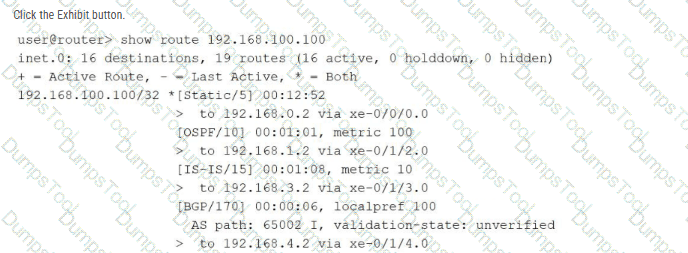
Referring to the exhibit using the show route 192.168.100.100 command output, over which interface will the traffic be forwarded?
xe-0/1/3.0
xe-0/0/0.0
xe-0/1/4.0
xe-0/1/2.0
In the Junos OS architecture, the Routing Engine (RE) manages path selection by evaluating multiple potential routes to a specific destination found within the Routing Information Base (RIB). When multiple routing sources (such as static configuration, OSPF, IS-IS, and BGP) provide information for the exact same destination prefix—in this case, 192.168.100.100/32 —the device utilizes route preference as the primary tie-breaker to determine which entry becomes the " active " route.
The provided exhibit displays the default preference values for each protocol: Static is 5 , OSPF is 10 , IS-IS is 15 , and BGP is 170 . Junos OS follows a " lower is better " logic for preference; therefore, the Static route is selected as the most trustworthy path. In the command output, the active route is explicitly identified by the asterisk (*) and plus sign (+) symbols located next to the [Static/5] entry. Looking at the specific next-hop information for this active static route, the output indicates the traffic is sent to 192.168.0.2 via xe-0/0/0.0 . Consequently, the Packet Forwarding Engine (PFE) will install this specific path into the forwarding table, causing all traffic destined for 192.168.100.100 to be egressed over the xe-0/0/0.0 interface.
Which two statements describe the result when you enter ? at the command-line prompt? (Choose two.)
It lists the available commands and options.
It lists tips for the help menu.
It displays help about a text string contained in a statement.
It displays summary information about the commands and options.
The Junos Command Line Interface (CLI) is designed with an intuitive, context-sensitive help system that assists users in navigating the command hierarchy. When an administrator enters a question mark (?) at the prompt, the CLI provides immediate feedback based on the current location within the hierarchy. First, it lists all available commands and options that are valid at that specific point. This allows the user to see the breadth of possible next steps without needing to refer to external documentation.
Second, the ? character triggers the display of summary information for each of those commands and options. This brief descriptive text provides a clinical overview of what each command achieves, helping the user select the appropriate tool for their task. This " help-on-demand " feature is functional in both operational and configuration modes. It is important to distinguish this from the help command; while help (such as help topic or help reference) provides more exhaustive documentation and usage examples, the ? prompt is primarily a quick-reference tool for command completion and syntax discovery. This mechanism ensures that even complex configurations can be built accurately by exploring the available options and their summarized purposes directly within the terminal environment. Reference: User Interfaces, CLI Help Facilities, Command Discovery.
==========
Which two types of traffic are processed by the Routing Engine? (Choose two.)
transit traffic
management traffic
line-card traffic
control traffic
The Routing Engine (RE) is the control-plane component of a Junos OS device. Its primary responsibilities include routing protocol processing, system management, maintaining routing tables, running Junos OS processes, and providing administrative access. Consequently, management traffic and control traffic are processed by the Routing Engine. Juniper specifically describes the Routing Engine as controlling routing updates and system management , while routing protocol packets from the network are directed to the Routing Engine.
Management traffic includes traffic associated with services such as SSH, Telnet, SNMP, and other traffic whose destination is the device itself. Control traffic includes routing protocol communications such as OSPF, BGP, and other protocol packets required to establish and maintain the device ' s control-plane state. Juniper categorizes these as local packets , which are handled by the Routing Engine.
By contrast, transit traffic enters one physical interface and is forwarded toward another destination. This forwarding operation is normally handled by the Packet Forwarding Engine (PFE) rather than the Routing Engine. The separation of forwarding and control functions is fundamental to Junos OS architecture.
Study Guide Reference Topics: Junos OS Fundamentals — Routing Engine and Packet Forwarding Engine; control plane versus forwarding plane; management and protocol traffic.
===============
What does the user@router > clear log ospf-trace command accomplish?
The ospf-trace file is deleted.
Trace parameters are removed from the OSPF protocol configuration.
Logging data into ospf-trace is stopped.
Data in the ospf-trace file is removed and logging continues.
The clear log command is a vital operational utility within the Junos OS used to manage the size and relevance of log files without interrupting the system ' s logging processes. When a Senior Architect executes the clear log ospf-trace command, the Junos kernel truncates the specified file, effectively removing all existing text and resetting the file size to zero bytes. Crucially, the file itself is not deleted from the /var/log directory, nor is the underlying traceoptions configuration modified in any way.
Because tracing is often used for real-time debugging of protocol behaviors like OSPF, trace files can rapidly grow to several megabytes, making it difficult to find specific events. By clearing the log, the administrator ensures that any subsequent OSPF events—such as adjacency changes, LSA flooding, or SPF calculations—are recorded at the very beginning of the file, free from historical clutter. The OSPF process (rpd) continues to write to the file immediately after the truncation occurs. This operational behavior distinguishes the clear command from the file delete command, which would remove the file entirely, or the set protocols ospf traceoptions configuration command, which defines which specific events the device should record. Utilizing clear log is a standard best practice during intensive troubleshooting sessions to maintain a clean and chronologically relevant diagnostic environment.
Which statement accurately describes the Junos OS CLI?
The operational mode CLI is used to make persistent changes.
Changes made in configuration mode immediately affect the active configuration.
The commit confirmed 5 command activates the candidate configuration and automatically reverts if not confirmed in 5 minutes.
The rollback 0 command restores the device to factory defaults.
The statement describing commit confirmed 5 is correct. In Junos OS, configuration changes are first made to a candidate configuration . They do not become the active operational configuration merely because they have been entered in configuration mode. A commit operation is required to validate and activate those changes.
The commit confirmed mechanism provides an important administrative safety feature. When the administrator enters:
commit confirmed 5
Junos OS activates the candidate configuration but requires confirmation within 5 minutes . If the configuration is not confirmed before the timer expires, Junos OS automatically rolls back to the previously committed configuration. Juniper explicitly documents that the optional number following commit confirmed specifies the confirmation period in minutes.
Option A is incorrect because operational mode is primarily used for monitoring, troubleshooting, maintenance, and operational commands rather than making persistent configuration changes. Option B is incorrect because configuration-mode edits remain candidate changes until committed. Option D is also incorrect: rollback 0 does not restore factory defaults . It loads the most recently committed configuration and effectively removes pending uncommitted modifications.
Study Guide Reference Topics: Configuration Basics — candidate versus active configuration, commit operations, confirmed commits, configuration rollback, and Junos CLI modes.
Which command is used to view real-time traffic statistics for all interfaces?
show interfaces extensive
monitor interface traffic
monitor traffic interface all
show interfaces statistics
In Junos OS, there is a distinct difference between show commands and monitor commands. While show commands provide a static snapshot of the current state of the device or its interfaces at the moment the command is executed, monitor commands provide dynamic, real-time updates. To view live traffic statistics across all physical and logical interfaces, the correct command is monitor interface traffic.
When this command is executed, the CLI enters an interactive text-based interface (TUI) that displays a list of interfaces along with their input and output rates in bits per second (bps) and packets per second (pps). The display refreshes automatically (usually every few seconds), allowing an administrator to observe traffic spikes or drops as they occur without manually re-running a command. This is an invaluable tool for troubleshooting congestion or verifying that traffic is flowing as expected after a configuration change. Commands like show interfaces extensive provide significantly more detail—including error counters and physical layer parameters—but they are not real-time and require manual execution to update the statistics. The monitor interface traffic command simplifies the view to focus specifically on throughput metrics across the entire device. Reference: Operational Monitoring and Maintenance, Interface Monitoring, Real-time Statistics.
What are two fiber-optic connector types? (Choose two.)
LC
RJ-45
SC
BNC
Physical layer connectivity for Junos devices involves a variety of media types, with fiber-optic cabling being the standard for high-speed, long-distance, or high-density uplink requirements. Two of the most prevalent connector types used in these environments are the LC (Lucent Connector) and the SC (Subscriber Connector) .
The LC connector is a small-form-factor (SFF) connector that uses a 1.25 mm ferrule. Due to its compact size and " push-and-latch " mechanism, it is the primary connector type found on SFP, SFP+, and XFP transceivers used in Juniper EX, MX, and QFX series hardware. Its high-density design allows for more ports in a limited space on a line card or chassis. The SC connector , often referred to as a " square connector, " utilizes a larger 2.5 mm ferrule and a " push-pull " snapping mechanism. While it was highly common in older legacy hardware and fiber patch panels, it has largely been superseded by the LC in modern data center and enterprise switching environments.
In contrast, the RJ-45 is a standard copper Ethernet connector (typically used with Category 5e/6 cables), and the BNC (Bayonet Neill–Concelman) is a miniature quick connect/disconnect RF connector used for coaxial cable. As a Senior Architect, distinguishing between these physical interfaces is critical when specifying the correct Small Form-factor Pluggable (SFP) modules and patch cables required to bring a Junos interface into an operational up/up state.
Exhibit:
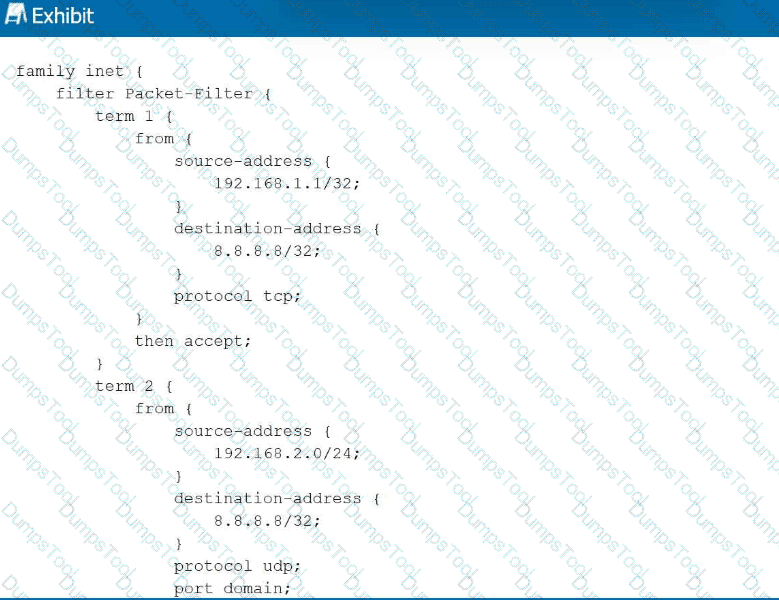
Referring to the exhibit, with firewall filter Packet-Filter attached to an interface, if traffic is sent from 192.168.1.1 to 8.8.8.8 for a UDP DNS query, what will happen to the traffic?
The traffic will match term 1 and be forwarded.
The traffic will match the default last term and be forwarded.
The traffic will match the default last term and be discarded.
The traffic will match term 3 and be forwarded.
Junos OS firewall filters operate on a first-match basis, evaluating terms sequentially from top to bottom. In this scenario, a UDP DNS packet (destination port 53) is sent from 192.168.1.1 to 8.8.8.8. Evaluation begins with term 1 , which matches the correct source and destination IP addresses but specifies protocol tcp . Because the actual traffic uses UDP, term 1 is not a match. Evaluation then moves to term 2 . While term 2 correctly identifies protocol udp and port domain (port 53), it requires the source-address to reside within the 192.168.2.0/24 subnet. Since the source is 192.168.1.1 , term 2 also fails to match.
When a packet fails to match any explicitly defined terms in a Junos firewall filter, it is subject to the implicit deny action. This default " last term " is a hardcoded safety mechanism that automatically discards all traffic that has not been explicitly permitted. Consequently, because neither term provides a match for the specific combination of source IP, protocol, and destination port, the DNS query is silently dropped by the Packet Forwarding Engine. This behavior ensures that Junos devices maintain a " deny-by-default " security posture, requiring administrators to define precise permit statements for all required transit or management traffic. Reference: Routing Policy and Firewall Filters, Firewall Filter Evaluation, Implicit Discard.
==========
You are configuring a new router and want to ensure that you can recover from future misconfigurations. In this scenario, what should you do after completing the initial configuration?
Update the firmware on the router.
Save the configuration as rollback 0.
Create a rescue configuration.
Enable automatic rollback after 10 minutes.
In the Junos OS architecture, maintaining a reliable recovery point is a critical post-installation task. While the system automatically archives previous configurations as " rollback " files every time a commit is performed, these files are transient and can eventually be rotated out of the default 50-file history as new changes are made. To ensure a permanent and reliable recovery state, a Senior Architect should manually create a rescue configuration .
The rescue configuration is a specifically designated file used to restore a device to a known-working state if it becomes unreachable or the configuration becomes corrupted. Unlike standard rollbacks, the rescue configuration is only created or updated when an administrator explicitly issues the operational mode command request system configuration rescue save. This ensures that even if several subsequent commits flush the desired initial state from the standard rollback archive, the " safe harbor " configuration remains intact on the storage media. This state can then be re-activated via the rollback rescue command in configuration mode followed by a commit. Setting a rescue configuration after the initial setup is a foundational best practice for disaster recovery and operational stability, providing a " last resort " configuration that is immune to the automated rotation of the commit history.
Which command would you use to gracefully power off a Junos device?
request system reboot
shutdown now
request system logout
request system halt
Maintaining the integrity of the Junos OS file system is a critical operational requirement, especially during maintenance that involves removing power from the hardware. To achieve a graceful power-down, the request system halt command must be used. This command initiates a systematic shutdown of all running software processes and daemons, flushes any pending data from the system ' s volatile memory (RAM) to the solid-state storage or hard disk, and unmounts the file systems correctly. Once the software has safely shut down, the console will typically display a message indicating that it is safe to turn off the physical power switch or remove the power cables.
Using request system halt prevents potential file system corruption that can occur if power is abruptly cut while the OS is actively writing logs or configuration data. This is distinct from request system reboot, which restarts the OS, or request system logout, which merely terminates the current CLI session. As a Senior Architect, it is essential to follow this procedure to ensure that the device remains in a reliable state for its next power-on cycle. For devices equipped with dual Routing Engines, the command can often be directed to a specific member or both simultaneously to ensure a synchronized and safe shutdown of the entire chassis. Reference: Operational Monitoring and Maintenance, System Halt and Reboot Procedures.
==========
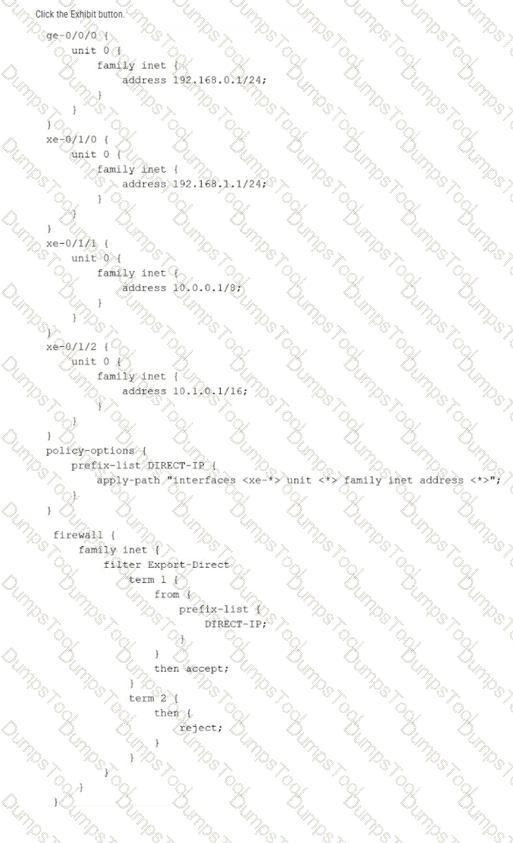
Referring to the exhibit, which command would be used to view the IP subnet addresses associated with prefix-list DIRECT-IP?
show policy-options prefix-list DIRECT-IP
show configuration policy-options prefix-list DIRECT-IP
show configuration policy-options prefix-list DIRECT-IP | display inheritance
show configuration policy-options prefix-list DIRECT-IP apply-path
The exhibit illustrates the use of the apply-path feature within a prefix list configuration. In Junos OS, apply-path is a dynamic configuration utility that allows a prefix list to be automatically populated with values derived from other parts of the configuration—in this case, all IPv4 addresses assigned to interfaces with the xe-* prefix. This is particularly useful for building automated firewall filters or routing policies that stay updated as interfaces are added or modified.
When viewing the standard configuration using show configuration, the CLI only displays the literal apply-path statement. To verify the actual list of IP addresses that the system has inherited and populated into the DIRECT-IP list, the administrator must use the | display inheritance pipe filter. This command instructs the Junos OS parser to expand all inherited values and dynamic paths, showing the effective configuration as it is seen by the Packet Forwarding Engine. Based on the exhibit, this would reveal the subnets associated with xe-0/1/0, xe-0/1/1, and xe-0/1/2, while ignoring ge-0/0/0 because it does not match the xe-* wildcard. This verification is a critical troubleshooting step before applying such a prefix list to a transit firewall filter like Export-Direct.
Click the Exhibit button.
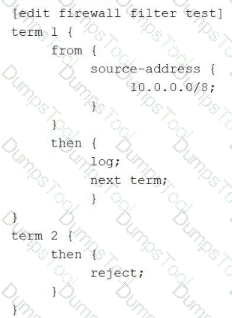
How is traffic, sourced from 10.0.0.0/8, treated by the firewall filter shown in the exhibit?
logged and discarded
logged and accepted
logged with no further action
logged and rejected
Junos OS firewall filters operate on a sequential, " first-match " logic, but their behavior is significantly influenced by the use of terminating versus non-terminating actions. In this exhibit, a packet with a source address of 10.0.0.0/8 is evaluated against the filter named test.
Evaluation begins with term 1 . The packet matches the source-address criteria, triggering the actions defined in the then statement. The first action is log, which sends the packet header information to the firewall task buffer for logging. The second action is next term . This is a critical non-terminating action ; it instructs the Packet Forwarding Engine (PFE) to continue the evaluation process using the subsequent term in the filter rather than stopping after the match.
Evaluation then moves to term 2 . Because term 2 contains no from match conditions, it acts as a " catch-all " for any traffic that reaches it. The action in this term is reject . This is a terminating action that discards the packet and sends an ICMP " destination unreachable " message back to the source. Therefore, the packet is first recorded by the logging process and is subsequently dropped by the rejection mechanism. If next term had not been present in term 1 , the packet would have been implicitly accepted (as any matched term without a terminating action like discard, reject, or accept defaults to an implicit accept in that specific term). However, the explicit instruction to move forward ensures the packet hits the reject statement.
Your switch01 device lost network connectivity after a configuration change. You must recover the device to a known working state using the rescue configuration that was previously saved. The device is only accessible using the console. In this scenario, which command sequence will successfully restore the rescue configuration?
user@switch01 > configure
[edit]
user@switch01# load override rescue
[edit]
user@switch01# commit
user@switch01 > request system configuration rescue delete
user@switch01 > reboot
user@switch01 > configure
[edit]
user@switch01# rollback rescue
load complete
[edit]
user@switch01# commit
user@switch01 > request system configuration rescue save
user@switch01 > configure
[edit]
user@switch01# commit
In Junos OS, the rescue configuration is a specifically designated file that stores a known-working configuration, intended to be used for emergency recovery when the device becomes unreachable or unstable due to recent changes. This configuration is not created automatically; an administrator must proactively save a stable state using the operational mode command request system configuration rescue save. This differs from the standard rollback archive, which automatically stores up to 50 previous configurations but can eventually rotate out the specific " last known good " state needed for recovery.
When a device loses network connectivity, console access becomes the only viable management path. To restore the rescue configuration, the administrator must enter configuration mode using the configure command. Once inside the candidate configuration buffer, the rollback rescue command is issued. This command directs the Junos OS to locate the designated rescue file and load its contents over the current candidate configuration. Upon receiving the " load complete " confirmation, the administrator must execute a commit to promote the candidate configuration to the active, running state. Sequence C correctly follows this logic. Sequence A is technically incorrect for standard rescue restoration as load override typically targets specific file paths or URLs, whereas rollback rescue is the built-in mechanism for this function. Sequences B and D are destructive or counter-productive, either deleting the rescue file or overwriting it with the current, non-functional configuration state. Reference: Operational Monitoring and Maintenance, Configuration Recovery, Rescue Configuration.
==========
How many usable hosts are in a /24 subnet mask?
250
254
255
256
In the IPv4 addressing architecture, a /24 prefix length (standard Class C subnet mask of 255.255.255.0) signifies that the first 24 bits of the 32-bit address are reserved for the network portion, leaving 8 bits for the host portion. To calculate the total number of available IP addresses within this range, the formula $2^n$ is applied, where $n$ represents the number of host bits. For a /24 mask, $2^8$ results in 256 total addresses.
However, standard networking conventions—which Junos OS adheres to for interface configuration and routing—require the reservation of two specific addresses within any given subnet. The first address in the range is the network address (where all host bits are 0), used to identify the subnet itself in the routing table. The last address in the range is the directed broadcast address (where all host bits are 1), utilized to communicate with all hosts on that segment simultaneously. Therefore, the number of " usable " hosts that can be assigned to device interfaces, such as ge-0/0/0.0 or a workstation, is calculated as $2^n - 2$. In this instance, $256 - 2 = 254$. Understanding this calculation is fundamental for an architect when performing IP address management (IPAM) and ensuring that the Packet Forwarding Engine is configured with valid, assignable host addresses within a defined broadcast domain.
Exhibit:
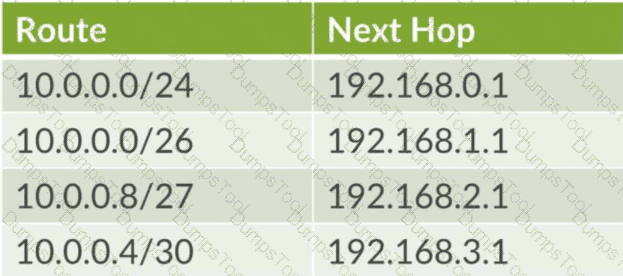
Referring to the exhibit, what is the next hop for IP address 10.0.0.9?
192.168.2.1
192.168.1.1
192.168.3.1
192.168.0.1
In Junos OS, the Packet Forwarding Engine (PFE) determines the next hop for a packet by performing a lookup in the forwarding table and identifying all valid matches for the destination IP address. When multiple routes encompass the same destination, the router strictly follows the Longest Prefix Match (LPM) rule to select the most specific entry.
For the destination address 10.0.0.9 , the following evaluation occurs based on the exhibit:
10.0.0.0/24 : This route matches, as the address falls within the 10.0.0.0–10.0.0.255 range.
10.0.0.0/26 : This route matches, as the address falls within the 10.0.0.0–10.0.0.63 range.
10.0.0.8/27 : This route matches, as the address falls within the 10.0.0.8–10.0.0.39 range.
10.0.0.4/30 : This route does not match, as its range ends at 10.0.0.7.
Among the matching entries, the prefix lengths are /24, /26, and /27. The longest prefix match is /27 , as it specifies the most granular network segment. Because 10.0.0.8/27 is the most specific match for the destination 10.0.0.9 , the router selects its associated next hop, which is 192.168.2.1 . This deterministic behavior ensures that traffic follows the most precise path calculated by the routing protocols or defined by the administrator, overriding broader routes like the default or summary advertisements.
Which protocol provides secure remote CLI access to a Junos device?
FTP
SNMP
Telnet
SSH
Securing the management plane is a core requirement for any Junos OS deployment. Secure Shell (SSH) is the industry-standard protocol used to provide encrypted, authenticated remote access to the Junos Command Line Interface (CLI). Unlike Telnet, which transmits both administrative credentials and command data in cleartext, SSH utilizes public-key cryptography to establish a secure tunnel, protecting the session from eavesdropping, man-in-the-middle attacks, and unauthorized interception.
In Junos OS, SSH is typically enabled within the [edit system services] hierarchy. Once active, it allows administrators to perform operational and configuration tasks with the assurance that their management traffic remains confidential. Beyond simple terminal access, SSH serves as the transport mechanism for other secure management functions, such as the NETCONF XML management protocol and Secure Copy (SCP) for file transfers. For high-security environments, Junos supports advanced SSH features including key-based authentication, strong cipher suites, and multi-factor authentication integration. Disabling insecure protocols like Telnet and FTP in favor of SSH and SFTP/SCP is a foundational best practice for hardening the Routing Engine against external threats.
Which statement is correct when Router R1 receives a packet from User A destined for User B as shown in the exhibit?

Router R1 replaces the destination IP address in the packet with the IP address of Router R2.
Router R1 leaves the packet unchanged.
Router R1 replaces the destination MAC address in the packet with the MAC address of Router R2.
Router R1 replaces the destination MAC address in the packet with the MAC address of User B.
Comprehensive and Detailed 150 to 250 words of Explanation From: In a routed environment like the one shown in the exhibit, traffic forwarding involves a constant interaction between Layer 3 (Network) and Layer 2 (Data Link) addressing. When User A generates a packet destined for User B, the source and destination IP addresses remain static throughout the entire journey across the network (assuming no Network Address Translation is performed). However, the Layer 2 Ethernet headers must be rewritten at every hop because MAC addresses have only local significance on a physical segment.
As Router R1 receives the packet from User A, it performs a lookup in its Forwarding Information Base (FIB) and identifies that the path to User B requires forwarding the packet to Router R2. R1 decapsulates the incoming frame, stripping away the original Ethernet header that contained User A ' s source MAC and R1 ' s own destination MAC. To forward the packet to the next hop, R1 creates a new Ethernet header. The source MAC address becomes the MAC address of R1’s egress interface, and the destination MAC address is replaced with the MAC address of Router R2 . R1 cannot use User B ' s MAC address at this point because User B is not on a directly connected segment. This hop-by-hop MAC address replacement is essential for the Packet Forwarding Engine to successfully deliver the frame to the next Layer 3 device in the path. Reference: Networking Fundamentals, Packet Forwarding, Layer 2 and Layer 3 Addressing.
You must view the forwarding table on your Junos device to troubleshoot a packet forwarding issue. In this scenario, which command would display the forwarding table?
show route table
show route forwarding-table
show ip forwarding
show forwarding-options
To effectively troubleshoot packet forwarding in a Junos environment, an architect must distinguish between the control plane ' s Routing Information Base (RIB) and the data plane ' s Forwarding Information Base (FIB). While the command show route displays the RIB (the master routing table maintained by the Routing Engine), it does not necessarily reflect the actual instructions being executed by the hardware. The definitive command for viewing the data plane ' s active path selection is show route forwarding-table.
Executing this command reveals the contents of the FIB as it has been pushed from the Routing Engine to the Packet Forwarding Engine (PFE). The output provides critical diagnostic data, including the destination prefix, the specific next-hop IP address, the interface through which the packet will egress, and the type of route (such as unicast or broadcast). This is the " ground truth " for packet movement; if a route exists in the RIB but is missing from the forwarding table, it indicates a failure in the communication between the RE and PFE. Utilizing this command is the primary method for identifying black holes, incorrect next-hop resolution, or issues with hardware-level filter applications that might be impacting transit traffic flow at wire speed.
What information would you find using the CLI help command?
a URL for accessing the technical documentation
message of the day
hyperlinks for remediation actions
an explanation for specific system log error messages
The Junos OS CLI is engineered with an extensive, self-contained help subsystem designed to provide immediate technical guidance without requiring constant reference to external manuals. The help command is a versatile tool that operates through several key sub-commands: topic, reference, and log. While help topic provides conceptual overviews and help reference displays specific configuration syntax and hierarchical requirements, the help log command is specifically tailored for system maintenance and troubleshooting.
The primary purpose of help log is to provide a detailed explanation for specific system log error messages generated by the device. When a Junos daemon or process writes an entry to the syslog, it includes a unique message identifier or " tag. " By executing help log < message-tag > , an architect can retrieve a clinical breakdown of why the message was generated, the severity of the event, and often the recommended action to resolve the underlying issue. This capability is vital for rapid interpretation of complex system events in real-time. It ensures that administrators have authoritative, context-aware information directly at the terminal, effectively bridging the gap between raw diagnostic output and actionable technical intelligence within the Junos environment. Reference: User Interfaces, CLI Help Facilities, help log.
==========
What are two functions of the Routing Engine? (Choose two.)
It evaluates firewall filters for transit traffic.
It runs Junos OS.
It processes all management traffic.
It processes transit traffic.
The Routing Engine (RE) is the " brains " of a Juniper device, representing the control plane in the Junos dual-plane architecture. One of its primary functions is that it runs the Junos OS . The RE is essentially a high-performance workstation running a specialized version of FreeBSD that hosts the various software daemons responsible for the device ' s logic, such as the Routing Protocol Process (rpd) and the Device Control Process (dcd).
The second core function is that the RE processes all management traffic . Any packet destined for the router itself—such as an SSH session, an SNMP poll, a NETCONF request, or an NTP update—is handled by the Routing Engine ' s CPU. The RE also maintains the master routing table, manages configuration commits, and provides the CLI environment for the administrator.
It is critical to distinguish these control-plane duties from the duties of the Packet Forwarding Engine (PFE) . The PFE is responsible for the " heavy lifting, " such as processing transit traffic (data passing through the router) and evaluating firewall filters at wire speed. While the RE defines the policies and routing tables, it hands off a streamlined version of this information to the PFE so the RE isn ' t bogged down by millions of individual packets. This separation ensures that a busy management session or a complex routing calculation on the RE doesn ' t impact the device ' s ability to forward traffic at maximum capacity.
An administrator wants to set up a remote user authentication service for the many users that access a Juniper security device. In this scenario, what are two supported authentication protocols? (Choose two.)
RADIUS
TACACS+
SHA
IPsec
For managing high volumes of administrative users, Junos OS supports externalizing the authentication, authorization, and accounting (AAA) process. The two primary industry-standard protocols supported for this purpose are RADIUS (Remote Authentication Dial-In User Service) and TACACS+ (Terminal Access Controller Access-Control System Plus).
Using these protocols allows an architect to maintain a centralized user database on an external server (like Cisco ACS, FreeRADIUS, or Microsoft NPS) rather than configuring every individual user account locally on every Junos device. When a user attempts to log in via SSH or the console, the Junos device acts as a client, forwarding the credentials to the remote server. RADIUS is often preferred for its broad compatibility and efficiency, while TACACS+ is frequently chosen for its ability to separate authentication from authorization and its support for granular command-level accounting. SHA (Secure Hash Algorithm) is a cryptographic hash function used within these processes but is not an authentication protocol itself. Similarly, IPsec is a suite for securing IP communications (VPNs) and is unrelated to the administrative login AAA sequence.
Your routing policy has three terms. A route matches the first term with an accept action. In this scenario, what happens next?
The route is rejected by default.
The route is evaluated by the second term.
The route is sent to the next policy chain.
The route is accepted and no further terms are evaluated.
Junos OS routing policies are evaluated using a sequential, " first-match " logic. When a route is compared against a policy, the system evaluates the terms in the order they are defined. Once a route meets all the match criteria (the from statement) in a term, the router executes the associated action (the then statement).
If the action is a terminating action —such as accept or reject—the evaluation of that specific route for that specific policy ends immediately. In this scenario, since the route matched the first term and the action was accept, the route is successfully processed and the policy evaluation is complete. The system will not proceed to evaluate the second or third terms. This behavior is critical for network architects to understand when ordering terms; more specific " exceptions " must be placed at the top of the policy, while broader " catch-all " terms must be placed at the bottom. If the administrator wanted the evaluation to continue to the next term despite a match, they would need to explicitly include the next term action, which is a non-terminating action. Without it, a match on an accept action signifies the final decision for that route within that policy context.
What are two requirements for root password recovery in Junos? (Choose two.)
You must have console access to the device.
You must have saved the rescue configuration in advance.
You must load the factory default configuration.
You must reboot the device.
Root password recovery in Junos OS is a critical administrative procedure designed to regain access to the management plane when the root credentials are lost. This process is fundamentally tied to the physical security of the device, as it requires two specific conditions that cannot be met over a standard network connection. First, the administrator must have direct console access to the device. Because the recovery process involves interrupting the Junos boot sequence before the operating system kernel and its associated security services (such as SSH) are fully initialized, it must be performed through the serial management port.
Second, a system reboot is mandatory. The recovery mechanism is triggered by interrupting the boot loader (typically the " Loader " or " U-Boot " stage) by pressing the Space bar or a specific key sequence during power-on. This allows the administrator to enter " single-user mode " or boot into a " recovery " state. Once in this restricted environment, the device mounts its internal storage in a way that permits the modification of the root authentication parameters without requiring the existing password. This workflow intentionally bypasses the standard authentication database to restore management control while preserving the rest of the device configuration. This procedure underscores the importance of securing physical access to the chassis, as anyone with console access and the ability to cycle power can eventually gain root-level authority over the system.
You must add a large hierarchical configuration to your Junos device. You also want to completely replace the existing candidate configuration with a new configuration file. Which command would allow you to accomplish these tasks?
load merge terminal
load override terminal
load factory default
load set terminal
The load command in Junos OS provides several operational methods for importing configuration data into the candidate buffer. When an administrator needs to perform a " clean slate " update—where the objective is to completely replace the existing candidate configuration with a new hierarchical file—the override option is the correct tool. Unlike load merge, which blends new data with the existing configuration, or load replace, which only updates specifically tagged sections, load override discards every statement currently in the candidate configuration and substitutes it entirely with the new content.
Using the terminal keyword in conjunction with override allows the architect to paste a large hierarchical configuration directly into the Command Line Interface (CLI). This is the most efficient method for applying validated templates, restoring full system backups, or migrating configurations between devices without having to manually delete existing parameters. After the data is pasted and the process is finalized (typically with a Ctrl+D sequence), the Junos OS kernel validates the new candidate configuration against the device ' s hardware and software capabilities. To make these changes active and operational, a subsequent commit command must be executed. This comprehensive replacement mechanism ensures configuration integrity by eliminating any potential remnants of previous, unwanted settings that might conflict with the new deployment.

TESTED 22 Sep 2026
Copyright © 2014-2026 DumpsTool. All Rights Reserved