Refer to the exhibit.

An SD-WAN zone configuration on the FortiGate GUI is shown. Based on the exhibit, which statement is true?
The Underlay zone contains no member.
The virtual-wan-link and overlay zones can be deleted
The Underlay zone is the zone by default.
port2 and port3 are not assigned to a zone.
According to the FortiOS 7.6 Administrator Guide and the specific behavior of the SD-WAN GUI, here is the technical breakdown:
SD-WAN Zone Hierarchy and UI Elements: In the FortiGate GUI, SD-WAN zones that contain member interfaces are displayed with a plus (+) icon next to the checkbox. This icon allows administrators to expand the zone and view the specific physical or logical interfaces assigned to it.
Analysis of the " Underlay " Zone: In the provided exhibit, the virtual-wan-link and overlay zones both feature the plus (+) expansion icon, indicating they have active members. The Underlay zone, however, lacks this icon and displays a red status icon. This is the visual indicator in FortiOS that the zone is currently empty and contains no member interfaces.
Mandatory Zone Membership: In FortiOS 7.x, every SD-WAN member interface must be assigned to a zone. It is not possible for an interface to be an " SD-WAN member " (as shown in the legend with port2 and port3) without being assigned to a zone. Since port2 and port3 are listed in the legend, they are indeed assigned to one of the other expanded zones (likely virtual-wan-link or overlay), making Option D incorrect.
Default Zone Behavior: While FortiOS 7.6 often creates default zones like virtual-wan-link, underlay, and overlay during certain configuration wizards or by default in newer versions, they are distinct entities. There is no single " default " zone that acts as a global catch-all in the way Option C suggests.
Immutability of System Zones: While certain system-defined zones have restrictions, the primary focus of this specific exhibit is the current membership state, which clearly shows the Underlay zone is empty.
Refer to the exhibits.

An administrator configured both members of an HA cluster at the same time. After one week of monitoring, the administrator wants to verify the HA failover performance. How can the administrator force a failover? (Choose one answer)
The administrator must reset the HA uptime on HQ-NGFW-1.
The administrator must set the parameter override to enable on HQ-NGFW-2.
The administrator must increase the HA priority on HQ-NGFW-2.
The administrator must set the monitored port1 to down on HQ-NGFW-1.
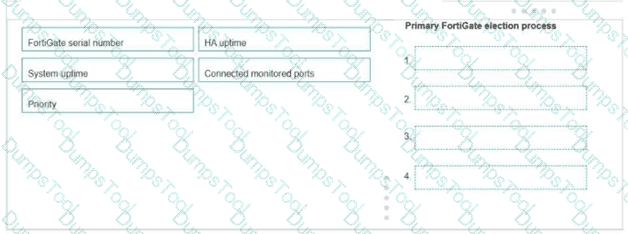
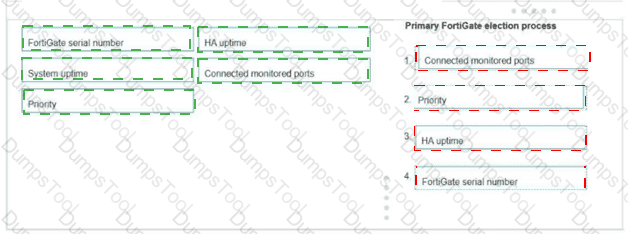
“This slide shows the order when the HA override setting is disabled, which is the default behavior.”
“1. The cluster compares the number of monitored interfaces that have a status of up. The member with the most available monitored interfaces becomes the primary.
2. The cluster compares the HA uptime of each member. The member with the highest HA uptime, by at least five minutes, becomes the primary.
3. The member with the highest priority becomes the primary.”
“When HA override is disabled, the HA uptime has precedence over the priority setting. This means that if you must manually fail over to a secondary device, you can do so by reducing the HA uptime of the primary FortiGate. You can do this by running the diagnose sys ha reset-uptime command on the primary FortiGate, which resets its HA uptime to 0.”
Technical Deep Dive:
The correct answer is A .
Both HA members are configured with set override disable , so FGCP does not prefer the higher-priority unit first. With override disabled, the election order is based on monitored interfaces , then HA uptime , then priority , and finally serial number . Since the cluster has been running for one week , the secondary unit will have a much higher HA uptime than a unit whose uptime is reset to zero. Therefore, if the administrator runs diagnose sys ha reset-uptime on the current primary HQ-NGFW-1 , FGCP re-evaluates election and the other member can take over.
Option B is wrong because enabling override only on HQ-NGFW-2 does not by itself force an immediate clean failover in this scenario and also changes election behavior rather than performing the documented manual failover action. Option C is wrong because with override disabled, priority does not beat HA uptime . Option D can simulate a link failover , but the study guide’s documented manual failover method for this exact override-disabled condition is to reset the primary’s HA uptime.
Relevant CLI:
diagnose sys ha reset-uptime
get system ha status
diagnose sys ha status
This is the clean exam-aligned method to trigger a controlled HA role change.
Refer to the exhibit
A firewall policy to enable active authentication is shown.

When attempting to access an external website using an active authentication method, the user is not presented with a login prompt. What is the most likely reason for this situation?
No matching user account exists for this user.
The Remote-users group must be set up correctly in the FSSO configuration.
The Remote-users group is not added to the Destination
The Service DNS is required in the firewall policy.
Based on the exhibit and FortiOS 7.6 Active Authentication (captive portal) behavior, the most likely reason the user is not presented with a login prompt is that DNS is missing from the firewall policy.
What the exhibit shows
The firewall policy configured for active authentication includes:
Source: HQ_SUBNET and Remote-users
Destination: all
Services:
HTTP
HTTPS
ALL_ICMP
Security Profiles: Web filter and SSL inspection enabled
Authentication: Active (user group referenced)
DNS is not included as a service in the policy.
Why DNS is required for active authentication
In FortiOS 7.6, active authentication (captive portal) works as follows:
The user attempts to access a website using a URL (for example, www.example.com).
The client must first perform a DNS lookup to resolve the domain name.
FortiGate intercepts the initial HTTP/HTTPS request and redirects the user to the authentication portal.
If DNS traffic is blocked or not allowed:
The hostname cannot be resolved.
The HTTP/HTTPS request never properly occurs.
FortiGate has nothing to intercept, so the login prompt is never triggered.
This is explicitly documented in the FortiOS 7.6 Authentication and Captive Portal requirements, which state that DNS must be permitted for captive portal–based authentication to function correctly.
Why the other options are incorrect
A. No matching user account exists for this user
Incorrect.
If the user account did not exist, the login page would still appear, but authentication would fail after credentials are entered.
B. The Remote-users group must be set up correctly in the FSSO configuration
Incorrect.
This policy is using active authentication, not FSSO.
FSSO configuration is irrelevant for active authentication login prompts.
C. The Remote-users group is not added to the Destination
Incorrect.
User groups are applied in the Source field for authentication-based policies.
Destination does not accept user groups.
You are onboarding an agentless, secure web gateway (SWG) endpoint for secure internet access (SIA). What will happen to the user ' s nonweb traffic? (Choose one answer)
All the nonweb traffic will bypass FortiSASE.
The endpoint will use split tunneling to redirect nonweb traffic to FortiSASE.
FortiSASE will use Firewall-as-a-Service (FWaaS) to redirect nonweb traffic.
FortiSASE will use SWG to redirect nonweb traffic to FortiExtender.
“In this use case, FortiSASE acts as an SWG and distributes a proxy auto-configuration (PAC) file to end users, enabling the FortiSASE SWG service as an explicit web proxy. SWG deployment secures only web traffic protocols, such as HTTP and HTTPS.”
“All other nonweb traffic bypasses FortiSASE and is forwarded directly to the internet.”
Technical Deep Dive:
The correct answer is A .
In agentless SWG-based SIA , FortiSASE is operating as an explicit web proxy using a PAC file . That model captures only web protocols , specifically HTTP and HTTPS . It does not create a full tunnel for the endpoint like agent-based FortiClient deployment does.
So the design implication is simple: nonweb traffic does not traverse FortiSASE in this onboarding model. It goes directly to the internet from the endpoint.
Why the other options are wrong:
B is wrong because this is not split-tunnel VPN behavior.
C is wrong because FWaaS does not automatically capture nonweb traffic in the agentless SWG model.
D is wrong because SWG does not redirect nonweb traffic to FortiExtender.
This is an important deployment distinction:
Agent-based SIA can steer broader endpoint traffic through FortiSASE.
Agentless SWG SIA secures only browser-based web traffic.
Refer to the exhibit.

An administrator has created a new firewall address to use as the destination for a static route. Why is the administrator not able to select the new address in the Destination field of the new static route? (Choose one answer)
In the new static route, the administrator must select Named Address.
In the new firewall address, the FQDN address must first be resolved.
In the new static route, the administrator must first set the interface to port2.
In the new firewall address, Routing configuration must be enabled.
“If you create a firewall address object with the type Subnet or FQDN, you can use that firewall address as the destination of one or more static routes. First, enable Routing configuration in the firewall address configuration. After you enable it, the firewall address object becomes available for use in the Destination drop-down list for static routes with named addresses. ”
Technical Deep Dive:
The correct answer is D . The exhibit shows an FQDN address object (www.fortinet.com), but Routing configuration is disabled. FortiGate does not make that object available as a selectable destination for named static routes until this option is enabled.
Why the others are wrong:
A is incomplete. Even if the static route uses Named Address , the object still will not appear unless Routing configuration is enabled on the address object.
B is not the first requirement from the study guide. DNS resolution matters operationally for FQDN objects, but the documented reason it does not appear in the drop-down is the missing Routing configuration setting.
C is unrelated. The interface does not have to be set to port2 first just to make the address object selectable.
In practice, the fix is:
config firewall address
edit " Fortinet "
set type fqdn
set fqdn " www.fortinet.com "
set allow-routing enable
next
end
After that, the object becomes available in the static route Destination field when using a named address.
When configuring firewall policies which of the following is true regarding the policy ID? (Choose two.)
A firewall policy ID identifies the order of policy execution in firewall policies.
A policy ID cannot be modified once a policy is created.
You can create a policy in CLI with policy ID 0
It is mandatory to provide a policy ID while creating a firewall policy regardless of GUI or CLI.
According to the FortiOS 7.6 Administration Guide, the firewall policy ID is a unique numerical identifier assigned to each policy for internal database tracking and management purposes. It is important to distinguish the policy ID from the policy sequence . While the FortiGate processes traffic based on a top-down approach (the sequence), the policy ID itself does not determine the order of execution (Statement A is incorrect).
In FortiOS, once a policy is committed to the configuration, the policy ID cannot be modified (Statement B). If an administrator needs to change a policy ID, they must either delete and recreate the policy or use the clone command in the CLI to copy the settings to a new ID.
Furthermore, the CLI provides a specific shortcut for policy creation: you can create a policy with ID 0 (Statement C). When the command edit 0 is used within the config firewall policy context, the FortiOS kernel automatically assigns the next available integer as the policy ID. This is a standard practice for efficient configuration via the command line. Statement D is incorrect because, while every policy must have an ID, the GUI automatically generates this value without requiring the user to manually provide or even see it during the initial creation process.
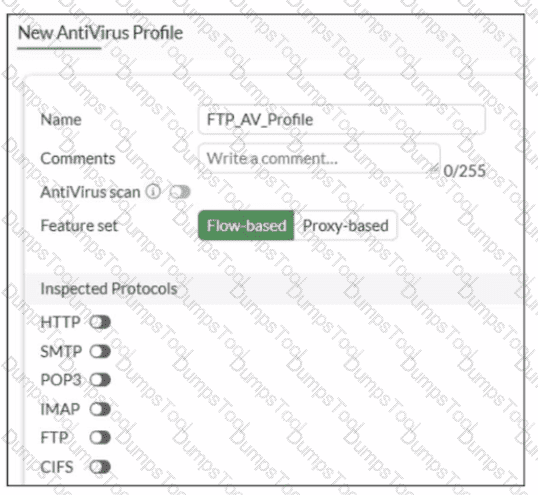
Refer to the exhibit.

Why is the Antivirus scan switch grayed out when you are creating a new antivirus profile for FTP?
Antivirus scan is disabled under System - > Feature visibility
None of the inspected protocols are active in this profile.
The Feature Set for the profile is Flow-based but it must be Proxy-based
FortiGate. with less than 2 GB RAM. does not support the Antivirus scan feature.
In FortiOS 7.6, the Antivirus scan master switch in an antivirus profile becomes available only after at least one supported protocol is enabled for inspection.
What the exhibit shows
A new antivirus profile named FTP_AV_Profile
Feature set: Flow-based
Antivirus scan switch is grayed out
All Inspected Protocols (HTTP, SMTP, POP3, IMAP, FTP, CIFS) are currently disabled
Why the Antivirus scan switch is grayed out
In FortiOS antivirus profiles:
The Antivirus scan toggle is a dependent control
It cannot be enabled unless at least one inspected protocol is selected
This prevents enabling AV scanning when there is no traffic type to scan
This behavior is documented in the FortiOS 7.6 Antivirus Profile configuration section.
Once you enable a protocol (for example, FTP), the Antivirus scan switch becomes active and configurable.
Why option B is correct
B. None of the inspected protocols are active in this profile.
All protocol toggles are OFF
Therefore, FortiGate disables (grays out) the Antivirus scan option
This is expected and correct behavior
Why the other options are incorrect
A. Antivirus scan is disabled under Feature visibilityIncorrect. Feature Visibility controls whether Antivirus appears in the GUI, not whether the scan switch is enabled inside a profile.
C. Feature set must be Proxy-basedIncorrect. Antivirus scanning is supported in both flow-based and proxy-based modes.
D. Less than 2 GB RAM does not support Antivirus scanIncorrect. Memory size affects performance and offloading, not basic AV scan availability.
You have configured the below commands on a FortiGate.

What would be the impact of this configuration on FortiGate?
FortiGate will enable strict RPF on all its interfaces and porti will be exempted from RPF checks.
FortiGate will enable strict RPF on all its interfaces and porti will be enable for asymmetric routing.
The global configuration will take precedence and FortiGate will enable strict RPF on all interfaces.
Port1 will be enabled with flexible RPF. and all other interfaces will be enabled for strict RPF
Refer to the exhibit to view the firewall policy.

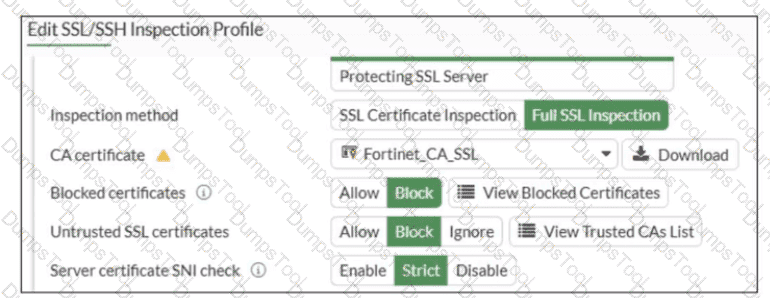
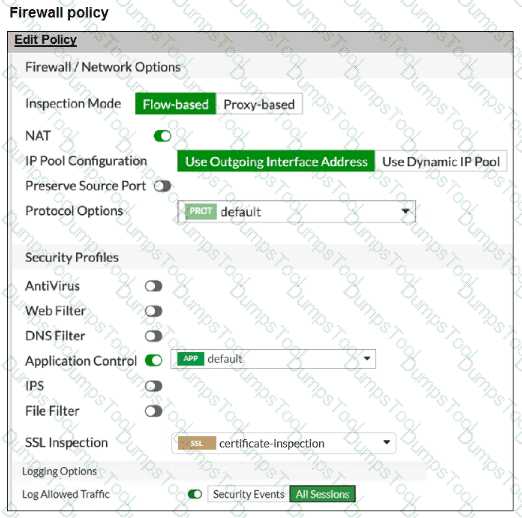
Why would the firewall policy not block a well-known virus, for example EICAR? (Choose one answer)
The action on the firewall policy is not set to DENY.
Web filter is not enabled, so the firewall policy does not complement the antivirus profile.
The firewall policy is not configured in proxy-based inspection mode.
The firewall policy does not apply deep content inspection.
“The only security features you can apply using SSL certificate inspection mode are web filtering and application control... Note that while offering some level of security, certificate inspection does not allow FortiGate to inspect the flow of encrypted data.”
“To perform SSL inspection on traffic flowing through the FortiGate device, you must allow the traffic with a firewall policy and apply an SSL inspection profile to the policy... For antivirus or IPS control, you should use a deep-inspection profile.”
“When you use deep inspection, FortiGate impersonates the recipient of the originating SSL session, and then decrypts and inspects the content to find threats and block them. It then re-encrypts the content and sends it to the real recipient.”
Technical Deep Dive:
The exhibit shows that the policy is allowing HTTPS and the SSL/SSH inspection profile is certificate-inspection , not deep-inspection . That is the key issue. With certificate inspection, FortiGate can inspect only SSL metadata such as the certificate and SNI/hostname context; it cannot decrypt the HTTPS payload itself. Because EICAR is detected by antivirus through payload inspection, FortiGate must see the file contents. Without deep SSL inspection, the antivirus engine never gets the decrypted payload, so the file can pass even though the antivirus profile is attached.
Option A is incorrect because FortiGate firewall policies often use ACCEPT + security profile enforcement ; the session can still be blocked by antivirus after policy match. Option B is incorrect because web filter is not required for antivirus detection. Option C is incorrect because the real requirement is deep SSL inspection , not specifically proxy-based mode; full SSL inspection is the deciding factor here.
In practice, to block EICAR over HTTPS, you would apply a deep-inspection SSL profile to the policy, for example:
config firewall policy
edit < policy-id >
set inspection-mode flow
set av-profile " default "
set ssl-ssh-profile " deep-inspection "
next
end
On real hardware, this also matters for performance design. Simple firewall/NAT sessions are often NP fast-pathed, but once you enable deep SSL inspection and content scanning, traffic is typically handed to CPU/WAD/content-inspection path for decryption and scanning, so throughput is lower than certificate-inspection or no-inspection.
Which two statements are correct when the FortiGate device enters conserve mode? (Choose two.)
FortiGate refuses to accept configuration changes.
FortiGate halts complete system operation and requires a reboot to regain available resources.
FortiGate continues to transmit packets without IPS inspection when the fail-open global setting in IPS is enabled.
FortiGate continues to run critical security actions, such as quarantine.
Refer to the exhibit.

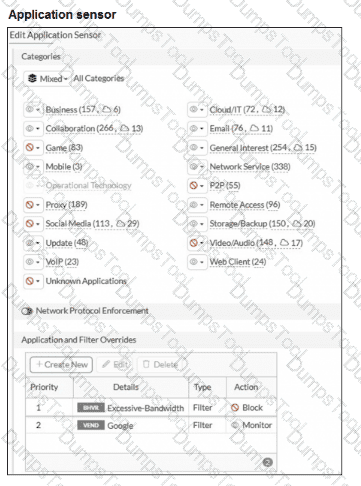
An administrator has configured an Application Overrides for the ABC.Com application signature and set the Action to Allow This application control profile is then applied to a firewall policy that is scanning all outbound traffic. Logging is enabled in the firewall policy. To test the configuration, the administrator accessed the ABC.Com web site several times.
Why are there no logs generated under security logs for ABC.Com?
The ABC Com is hitting the category Excessive-Bandwidth.
The ABC.Com Type is set as Application instead of Filter.
The ABC.Com is configured under application profile, which must be configured as a web filter profile.
The ABC Com Action is set to Allow
In FortiOS 7.6 Application Control, security logs are generated primarily for actions such as Block or Monitor, not for Allow actions.
What is happening in the exhibit
An Application Override is configured for ABC.Com
Type: Application
Action: Allow
The application control profile is applied to a firewall policy
Logging is enabled on the firewall policy
Traffic to ABC.Com is successfully allowed
However, no security logs appear for ABC.Com.
Why no logs are generated
In FortiOS 7.6:
Application Control logs are written to Security Logs when:
An application is Blocked
An application is Monitored
When an application action is set to Allow:
The traffic is permitted silently
No application control security log is generated
Even if policy logging is enabled
This is expected and documented behavior.
To generate logs for allowed applications, the action must be set to Monitor, not Allow.
Why the other options are incorrect
A. ABC.Com is hitting the category Excessive-BandwidthIncorrect. ABC.Com has a higher-priority explicit override (priority 1), so it is not evaluated against the Excessive-Bandwidth filter.
B. The ABC.Com Type is set as Application instead of FilterIncorrect. Application-type overrides are valid and commonly used; this does not suppress logging.
C. The ABC.Com must be configured as a web filter profileIncorrect. This traffic is being evaluated by Application Control, not Web Filter.
What are three key routing principles in SD-WAN? (Choose three answers)
By default, SD-WAN rules are skipped if the included SD-WAN members do not have a valid route to the destination.
SD-WAN rules have precedence over any other type of routes.
Regular policy routes have precedence over SD-WAN rules.
By default, SD-WAN rules are skipped if only one route to the destination is available.
By default, SD-WAN rules are skipped if the best route to the destination is not an SD-WAN member.
“This slide shows the SD-WAN rule lookup process. SD-WAN rules are essentially policy routes.”
“FortiGate performs a forwarding information base (FIB) lookup for the packet destination IP (dstip). If the resolved interface for the fib-best-match isn’t an SD-WAN member, then FortiGate moves on to the next rule. This behavior follows the key routing principle: SD-WAN rules are skipped if the best route to the destination isn’t an SD-WAN member .”
“If the resolved interface is an SD-WAN member, then FortiGate looks for one or more acceptable members in the oif list... An acceptable member is an alive member that has a route to the destination. This behavior follows the key routing principle: SD-WAN rules are skipped if none of the configured members in the rule have a valid route to the destination .”
“Because regular policy routes have precedence over any other routes...”
“Also note that policy routes have precedence over SD-WAN rules, and over any routes in the FIB.”
Technical Deep Dive:
The correct answers are A, C, and E .
A is correct because an SD-WAN rule is not enough by itself. A selected member must also be alive and have a valid route to the destination. If none of the members referenced by the rule can actually reach the destination, the rule is skipped.
C is correct because a regular policy route is evaluated before SD-WAN rules. This is a classic exam trap. FortiGate treats SD-WAN steering like policy-route logic, but standard policy routes still win if they match and are valid.
E is correct because FortiGate first checks the FIB best match . If that best route resolves to an interface that is not an SD-WAN member, FortiGate skips the SD-WAN rule and continues.
Why the others are wrong:
B is false because SD-WAN rules do not have precedence over everything; regular policy routes do.
D is false because the number of available routes is not the deciding rule. Even with only one route, SD-WAN can still steer traffic if the routing and member conditions are met.
Operationally, think of SD-WAN routing in this order: policy route check → SD-WAN rule lookup → standard FIB fallback . On FortiGate, the practical validation commands are:
get router info routing-table all
diagnose sys sdwan service
diagnose firewall proute list
That combination lets you confirm whether a packet is being captured by a policy route, whether an SD-WAN rule has acceptable members, and what the FIB currently resolves for the destination.
Refer to the exhibit.

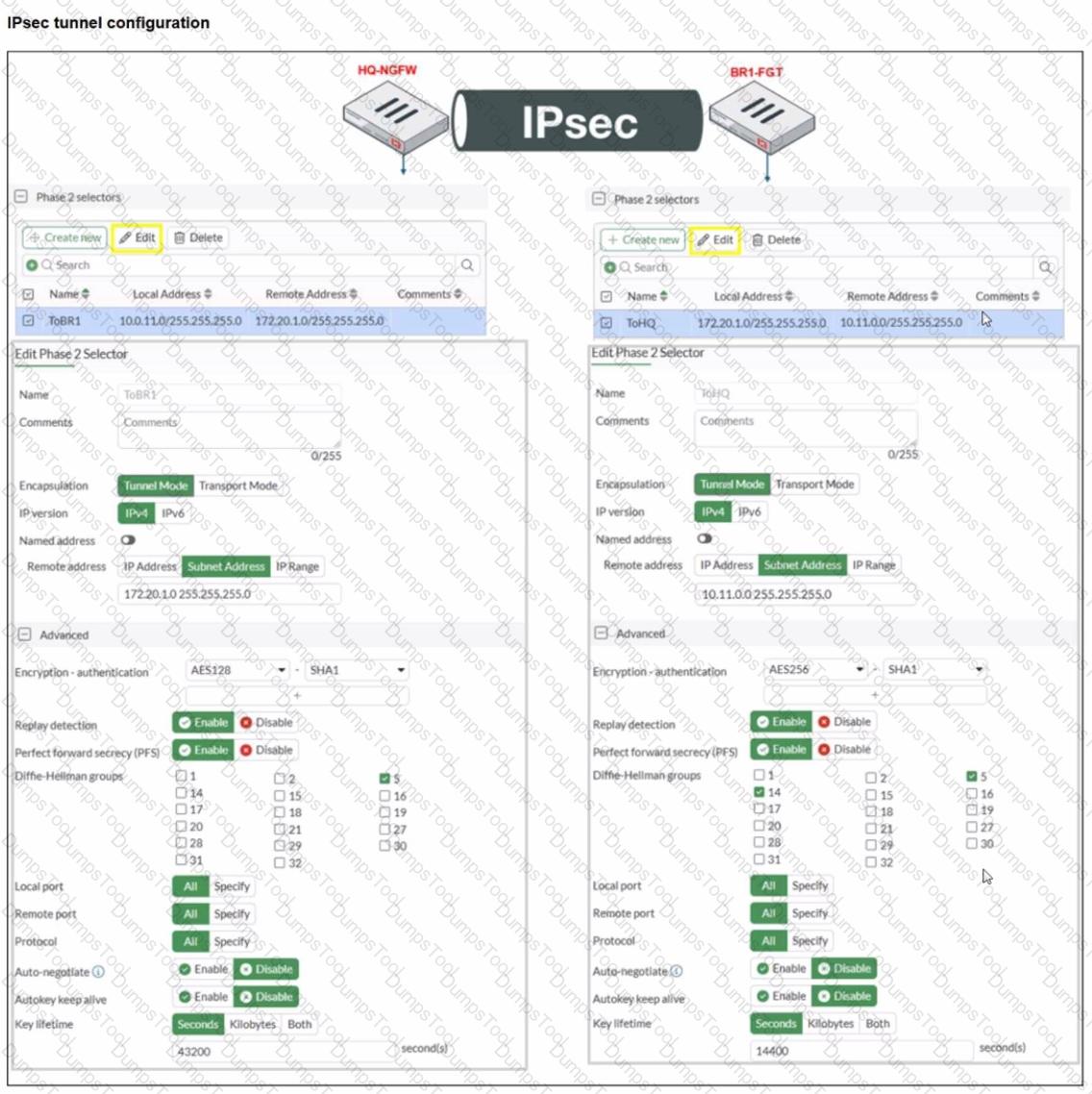
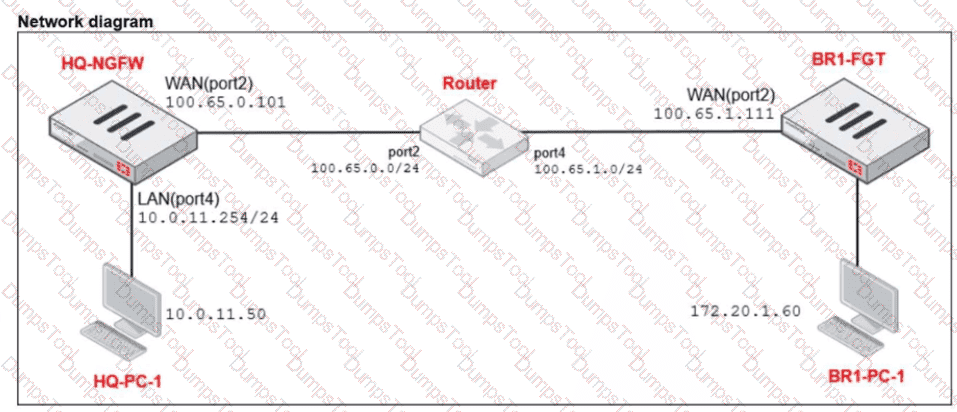
A network administrator is troubleshooting an IPsec tunnel between two FortiGate devices. The administrator has determined that phase 1 failed to come up. The administrator has also re-entered the pre-shared key on both FortiGate devices to make sure they match.
Based on the phase 1 configuration and the diagram shown in the exhibit, which two configuration changes can the administrator make to bring phase 1 up? (Choose two.)
On HQ-NGFW, disable Diffie-Hellman group 2.
On HQ-NGFW, set IKE mode to Main (ID protection).
On BR1-FGT, set port2 to Interface.
On both FortiGate devices, set Dead Peer Detection to On Demand.
Exact Extract:
“In IKEv1, there are two possible modes in which the IKE SA negotiation can take place: main, and aggressive mode. Settings on both ends must agree; otherwise, phase 1 negotiation fails and both IPsec peers are not able to establish a secure channel.”
“When both peers know each other ' s IP address or FQDN, you may want to use main mode to take advantage of its more secure negotiation. In this case, FortiGate can identify the remote peer by its IP address and, as a result, associate it with the correct IPsec tunnel.”
“FortiGate supports three DPD modes... The default DPD mode is On Demand .”
“ Diffie-Hellman (DH) ... is used during IKE SA negotiation. The use of DH in phase 1 is mandatory and can’t be disabled . You must select at least one DH group.”
Technical Deep Dive:
The correct answers are B and C .
B is correct because phase 1 fails when IKE mode settings do not match between peers. The study guide explicitly says phase 1 settings on both ends must agree. Since this is a static site-to-site tunnel and both peers know each other’s IP addresses, Main (ID protection) is the appropriate mode.
C is correct based on the exhibit: BR1-FGT appears bound to the wrong physical interface. The screenshot shows Interface = port1 , while the diagram/answer choice indicates the tunnel should be using port2 . If the phase 1 is bound to the wrong WAN interface, FortiGate sends IKE packets out the wrong path and phase 1 will not come up.
Why the others are not the fix:
A is not correct because DH is mandatory in phase 1. The issue is not “disable DH group 2” by itself; the real requirement is that the peers negotiate a compatible proposal. The option as written is not the proper corrective action from the guide.
D is not correct because DPD does not determine whether phase 1 can initially establish. It is a tunnel health/failure-detection feature after negotiation behavior, and On Demand is already the default mode.
Refer to the exhibits.


Based on the current HA status, an administrator updates the override and priority parameters on HQ-NGFW-1 and HQ-NGFW-2 as shown in the exhibits.
What would be the expected outcome in the HA cluster?
HQ-NGFW-2 will take over as the primary because it has the override enable setting and higher priority than HQ-NGFW-1.
HQ-NGFW-1 will remain the primary because HQ-NGFW-2 has lower priority
The HA cluster will become out of sync because the override setting must match on all HA members.
HQ-NGFW-1 will synchronize the override disable setting with HQ-NGFW-2.
From the current HA status, HQ-NGFW-1 is the primary and HQ-NGFW-2 is the secondary.
The administrator then changes these HA parameters:
HQ-NGFW-1: set override disable, set priority 90
HQ-NGFW-2: set override enable, set priority 110
In FGCP (A-P mode), the override (preemption) feature controls whether a higher-priority unit is allowed to take over the primary role.
When override is enabled, the cluster will prefer (and can re-elect) the unit with the highest device priority to become primary (preempting a lower-priority primary when conditions trigger re-election behavior as defined by FGCP).
Here, HQ-NGFW-2 has:
override enabled
higher priority (110) than HQ-NGFW-1 (90)
Therefore, the expected result is that HQ-NGFW-2 becomes the primary.
Why the other options are incorrect:
B is incorrect because it claims HQ-NGFW-2 has lower priority (it is higher: 110 > 90).
C is incorrect because a mismatch in the override setting is not what causes the “configuration out of sync” condition shown in get system ha status (that is about synchronized configuration databases, not a requirement that override values must match to remain in-sync).
D is incorrect because HA settings like override/priority are not synchronized in the way regular configuration objects are; they are device-level HA parameters.
There are multiple dialup IPsec VPNs configured in aggressive mode on the HQ FortiGate. The requirement is to connect dial-up users to their respective department VPN tunnels.
Which phase 1 setting you can configure to match the user to the tunnel?
Local Gateway
Dead Peer Detection
Peer ID
IKE Mode Config
In FortiOS 7.6, when multiple dialup IPsec VPNs are configured on the same FortiGate—especially in Aggressive Mode—FortiGate must identify which Phase 1 configuration a connecting client should match.
How FortiGate selects a dialup IPsec tunnel
For dialup VPNs:
The remote peer (user or device) does not have a fixed IP address
Multiple Phase 1 interfaces may exist on the HQ FortiGate
FortiGate uses identifying information sent during IKE Phase 1 to select the correct tunnel
Aggressive Mode behavior
Aggressive mode sends ID information in clear text during Phase 1
This allows FortiGate to match incoming peers to the correct Phase 1 configuration
Why Peer ID is the correct answer
C. Peer ID
Peer ID (also called IKE ID) is used to:
Identify the remote peer
Differentiate between multiple dialup tunnels
Common Peer ID formats:
FQDN
User FQDN
Key ID
FortiGate matches the received Peer ID against the Phase 1 configuration to select the correct tunnel
This is the documented and recommended method for:
Mapping users to different department tunnels
Supporting multiple dialup IPsec VPNs in aggressive mode
Why the other options are incorrect
A. Local GatewayIdentifies the local FortiGate interface/IP, not the remote user.
B. Dead Peer DetectionUsed only for tunnel health monitoring, not tunnel selection.
D. IKE Mode ConfigUsed for assigning IP addresses and pushing settings, not for selecting the Phase 1 tunnel.
Refer to the exhibit.
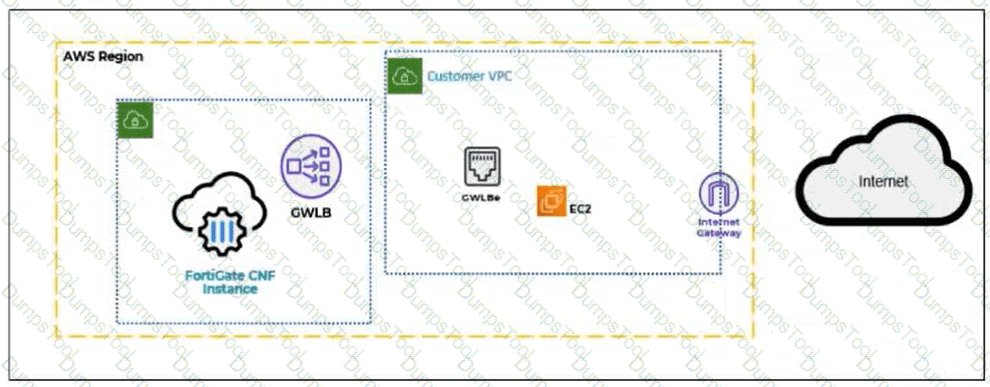
A partial cloud topology is shown.

You deployed a FortiGate Cloud-Native Firewall (CNF) in AWS.
During the deployment, which components must the FortiGate CNF create to handle traffic from the EC2 instance?
The customer VPC and GWLBe
The gateway load balancer endpoint (GWLBe) in the customer virtual private cloud (VPC)
The CNF VPC. customer VPC. and GWLB
The GWLB. GWLBe, and the internet gateway (IGW) in the customer VPC
In the FortiGate Cloud-Native Firewall (CNF) for AWS architecture, traffic from workloads (such as an EC2 instance) in the customer VPC is redirected to the security service (FortiGate CNF) using AWS Gateway Load Balancer (GWLB) technology.
The key AWS component that must exist inside the customer VPC to steer workload traffic to the GWLB is the:
Gateway Load Balancer Endpoint (GWLBe)
This endpoint is what the customer VPC routes point to (for example, default route or subnet route entries), enabling transparent insertion of the FortiGate CNF inspection path for EC2 traffic.
Why the other options are not correct:
A: CNF does not “create the customer VPC” (that is customer-owned), and “GWLBe” is the only relevant created item here, not the whole VPC.
C: Customer VPC is not created by CNF, and GWLB is typically part of the CNF service side; the question specifically asks what must be created to handle traffic from the EC2 instance (that requires GWLBe in the customer VPC).
D: CNF does not create the Internet Gateway (IGW) in the customer VPC, and IGW is not the required CNF-created component for steering traffic to FortiGate CNF.
A network administrator is configuring an IPsec VPN tunnel for a sales employee travelling abroad.
Which VPN Wizard template must the administrator apply?
Remote Access
Hub-and-Spoke
Site-to-Site
Dial-up User
Exact Extract:
“If you want the wizard to configure the VPN for you, then select the template type Site to Site, Hub-and-Spoke, or Remote Access that best matches your VPN.”
“Use remote access VPNs when remote internet users need to securely connect to the office to access corporate resources. The remote user connects to a VPN server located on the corporate premises, such as FortiGate, to establish a secure tunnel.”
“A common use of the IPsec wizard is for configuring a remote access VPN for FortiClient users.”
Technical Deep Dive:
The correct answer is A. Remote Access .
A sales employee travelling abroad is a remote user , not another branch office or headquarters firewall. That means the tunnel type is a remote access VPN , where the user connects from an internet location back to the corporate FortiGate. In this design, the remote client typically uses FortiClient , and FortiGate acts as the VPN server.
Why the other options are incorrect:
Hub-and-Spoke is for multi-site branch connectivity through a central hub.
Site-to-Site is for connecting two fixed networks, such as branch office to headquarters.
Dial-up User describes the remote-user behavior conceptually, but it is not the IPsec Wizard template choice shown in the study guide. The wizard template to select is Remote Access .
So for a travelling sales employee, the administrator must choose the Remote Access VPN Wizard template.
What are two characteristics of HA cluster heartbeat IP addresses in a FortiGate device? (Choose two.)
Heartbeat IP addresses are used to distinguish between cluster members.
The heartbeat interface of the primary device in the cluster is always assigned IP address 169.254.0.1.
A change in the heartbeat IP address happens when a FortiGate device joins or leaves the cluster.
Heartbeat interfaces have virtual IP addresses that are manually assigned.
In FortiOS 7.6, HA cluster heartbeat IP addresses are automatically managed by FortiGate and play a critical role in cluster communication and synchronization.
Correct statements
A. Heartbeat IP addresses are used to distinguish between cluster members.
Correct
FortiGate assigns unique heartbeat IP addresses (link-local addresses in the 169.254.0.0/16 range) to each HA member.
These addresses are used for:
Cluster member identification
Health checks
Synchronization traffic
This allows FortiGate units to uniquely identify and communicate with each other inside the HA cluster.
C. A change in the heartbeat IP address happens when a FortiGate device joins or leaves the cluster.
Correct
Heartbeat IPs are dynamically assigned.
When:
A new FortiGate joins the cluster, or
A member leaves or fails,
FortiGate may reassign heartbeat IP addresses to maintain unique identification among members.
This behavior is documented in the FortiOS HA operation and troubleshooting guides.
Why the other options are incorrect
B. The heartbeat interface of the primary device is always assigned IP address 169.254.0.1.
Incorrect
There is no fixed or guaranteed heartbeat IP (such as 169.254.0.1) for the primary unit.
Heartbeat IP assignment is dynamic, not role-based.
D. Heartbeat interfaces have virtual IP addresses that are manually assigned.
Incorrect
Heartbeat IP addresses are:
Automatically assigned
Link-local
Administrators do not manually configure heartbeat IP addresses.
Which three methods are used by the collector agent for AD polling? (Choose three answers)
NetAPI
WMI
WinSecLog
DNS reverse lookup
FSSO REST API
“As previously stated, collector agent-based polling mode has three methods (or options) for collecting login information. The order on the slide from left to right shows most recommend to least recommended:
• WMI ...
• WinSecLog ...
• NetAPI ...”
Technical Deep Dive:
The correct three AD polling methods are WMI, WinSecLog, and NetAPI . These are the collector-agent polling options FortiGate FSSO uses against Windows domain controllers. WMI is generally the most efficient because the DC returns requested login events directly. WinSecLog polls Windows Security Event Logs and is typically more reliable than NetAPI for not missing recorded logons. NetAPI can be faster, but it is more prone to missing events under load because it depends on temporary session information rather than persistent security logs.
Why the other options are wrong:
DNS reverse lookup is not one of the three AD polling methods. DNS is used by FSSO to resolve workstation names to IP addresses and to track IP changes, but it is not itself a polling method for collecting AD logon events. FSSO REST API is also not one of the documented collector-agent AD polling methods in the study guide.
From an operational standpoint, FSSO login collection and workstation verification are separate functions. The collector agent may still rely on DNS and workstation checks after a login is learned, but the actual AD polling methods remain only WMI, WinSecLog, and NetAPI . On a FortiGate, when troubleshooting FSSO behavior, you would typically validate the collector feed and user cache with commands such as:
diagnose debug authd fsso list
diagnose debug authd fsso server-status
Those commands help confirm whether the users gathered by the collector through one of those three polling methods are reaching FortiGate correctly.
Which two statements about equal-cost multi-path (ECMP) configuration on FortiGate are true? (Choose two answers)
If SD-WAN is enabled, you control the load balancing algorithm with the parameter load-balance-mode.
If SD-WAN is disabled, you can configure the parameter v4-ecmp-mode to volume-based.
If SD-WAN is enabled, you can configure routes with unequal distance and priority values to be part of ECMP.
If SD-WAN is disabled, you configure the load balancing algorithm in config system settings.
“If SD-WAN is disabled, you can change the ECMP load balancing algorithm on the FortiGate CLI using the commands shown on this slide.”
“When SD-WAN is enabled, FortiOS hides the v4-ecmp-mode setting and replaces it with the load-balance-mode setting under config system sdwan . That is, when you enable SD-WAN, you control the ECMP algorithm with the load-balance-mode setting.”
“There are some differences between the two settings. The main difference is that load-balance-mode supports the volume algorithm, and v4-ecmp-mode does not .”
“These routes are called equal cost multipath (ECMP) routes...”
Technical Deep Dive:
The correct answers are A and D .
A is correct because when SD-WAN is enabled, FortiOS no longer uses v4-ecmp-mode; it uses load-balance-mode under config system sdwan. That is the explicit SD-WAN control point for ECMP behavior.
D is correct because when SD-WAN is disabled, ECMP configuration is done in the regular system routing settings, not under SD-WAN. The study guide states that you change the ECMP algorithm on the FortiGate CLI when SD-WAN is disabled, which corresponds to the classic config system settings ECMP controls.
Why the others are wrong:
B is wrong because the guide explicitly says load-balance-mode supports volume , while v4-ecmp-mode does not . So you cannot set v4-ecmp-mode to volume-based.
C is wrong because ECMP requires equal-cost routes. If distance or priority differ, they are no longer ECMP candidates; FortiGate selects the preferred route instead. The concept of ECMP itself requires equal route cost attributes.
From an implementation standpoint, the common CLI patterns are:
config system settings
set v4-ecmp-mode source-ip-based
end
and, with SD-WAN enabled:
config system sdwan
set load-balance-mode source-ip-based
end
On hardware platforms, ECMP still affects session distribution at the routing decision stage before later security services are applied. NP offload can accelerate forwarding after route selection, but the ECMP decision itself is a FortiOS control-plane routing function.
FortiGate is integrated with FortiAnalyzer and FortiManager.
When creating a firewall policy, which attribute must an administrator include to enhance functionality and enable log recording on FortiAnalyzer and FortiManager?
Universally Unique Identifier
Policy ID
Sequence ID
Log ID
In FortiOS 7.6, when FortiGate is integrated with FortiAnalyzer and FortiManager, firewall policies rely on a Universally Unique Identifier (UUID) to ensure proper policy tracking, synchronization, and log correlation across devices.
Why the UUID is required
Every firewall policy in FortiOS has a UUID.
FortiManager uses the UUID to:
Track policies across managed FortiGate devices
Maintain policy consistency during installs and revisions
FortiAnalyzer uses the UUID to:
Correlate logs accurately to the correct firewall policy
Preserve log association even if policy order or policy ID changes
Without a UUID:
Policy-to-log mapping can break
FortiManager cannot reliably manage or synchronize policies
FortiAnalyzer log analysis becomes inconsistent
This is explicitly documented in Fortinet administration and logging architecture references.
Why the other options are incorrect
B. Policy IDPolicy ID can change when policies are moved and is not reliable for long-term correlation across FortiManager and FortiAnalyzer.
C. Sequence IDSequence ID reflects GUI ordering only and has no role in log correlation.
D. Log IDLog ID is generated per log event, not per firewall policy.
Which two statements about the Security Fabric rating are true? (Choose two answers)
A license is required to obtain an executive summary in the Security Rating section.
The root FortiGate provides executive summaries of all the FortiGate devices in the Security Fabric.
The Security Posture category provides PCI compliance results.
Security Rating Insights are available only in the Security Rating page.
“The Security Rating page is separated into three major scorecards: Security Posture, Fabric Coverage, and Optimization, which provide an executive summary of the three largest areas of security focus in the Security Fabric .” ( Fortinet Document Library )
“On the root FortiGate , go to Security Fabric > Security Rating.” ( Fortinet Document Library )
“The Info and Compliance tab includes the security controls used for the test and links to specific FSBP, PCI, or CIS compliance policies .” ( Fortinet Document Library )
“A new Security Rating Insights feature provides immediate access to crucial security information. Hover over any tested object to reveal a tooltip...” and “Objects, such as firewall policies, with security rating recommendations are highlighted... click Security Rating Insights to display relevant issues.” ( Fortinet Document Library )
Technical Deep Dive:
The correct answers are B and C .
B is correct because Security Rating is viewed from the root FortiGate and its scorecards provide an executive summary for the Security Fabric, not just an isolated downstream unit. The root device is the point from which the Security Fabric summary is presented. ( Fortinet Document Library )
C is correct because the Security Rating results include an Info and Compliance view with references to PCI compliance policies. That means PCI-related compliance results are part of the Security Rating reporting associated with the security categories, including Security Posture. ( Fortinet Document Library )
Why the others are incorrect:
A is incorrect because Fortinet documents state there is a base set of free checks and a separate licensed set of checks. A license is not required just to obtain the executive summary view itself. ( Fortinet Document Library )
D is incorrect because Security Rating Insights are not limited to the Security Rating page. Fortinet documents show they also appear as tooltips and buttons on other GUI objects and pages . ( Fortinet Document Library )
TESTED 21 Apr 2026
Copyright © 2014-2026 DumpsTool. All Rights Reserved