When creating a Security Posture Policy in Forcepoint DSPM, which field uses a GQL query to identify the data asset?
Department
Data Owner
Data Mapping
Asset Name
The correct answer is C. Data Mapping . In Forcepoint DSPM, Security Posture Policies are used to define and govern critical business data assets, often referred to as crown-jewel data. Each policy represents a managed data asset associated with a department, owner, and query-based definition. The Data Mapping field is where the administrator enters or edits the GQL query that identifies which files or records belong to that data asset. Forcepoint’s documentation explicitly lists Asset Name , Department , Data Owner , and Data Mapping as required Security Posture Policy details, and defines Data Mapping as “a GQL query used to identify the data asset within the DSPM database.”
This distinction matters because Asset Name is only the business label, Department assigns responsibility to a business unit, and Data Owner identifies the person or group accountable for monitoring and compliance. The actual technical selection logic is contained in Data Mapping , where GQL can match data across sources such as SMB and SharePoint using query criteria like source and path. References/topics: Policy Center, Data Register, Security Posture Policies, Data Mapping, GQL, Data Asset Inventory .
Which field is required when creating Departments in Forcepoint DSPM Compliance Hub?
Chief Reviewer
Group Name
GQL data mapping
Head of Department
The correct answer is D. Head of Department . In Forcepoint DSPM Compliance Hub, Departments represent organisational business units such as HR, Finance, or Payment Processing. They are used to mirror the company’s functional structure inside the governance workflow so that policies, data assets, ownership responsibilities, and review activities can be aligned to the correct business stakeholders. Forcepoint states that Departments are configured by defining company departments and assigning department representatives, with department heads or business-unit representatives acting as primary points of contact.
The documented workflow for adding a department is explicit: click Add new department , then enter the Department name , Head of Department , and Notify At email address, then save. This makes Head of Department the required field among the options listed. The field is important because department heads receive governance-related notifications and, when they log in, see only the Security Posture Policies and Data Asset Inventory assigned to their department.
The distractors belong to other workflows. Chief Reviewer is not the department-creation field. Group Name relates to user or group administration, not Compliance Hub department definition. GQL data mapping is used for identifying data assets within DSPM policy/data-mapping logic, not for creating a department. References/topics: Compliance Hub, Departments, Department Representatives, Policy Center, Data Asset Inventory visibility .
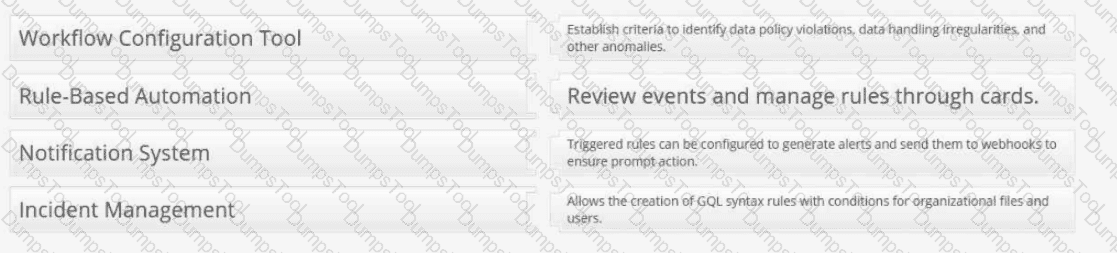
Provide the matching definitions for these Forcepoint DSPM Controls Orchestration terms:


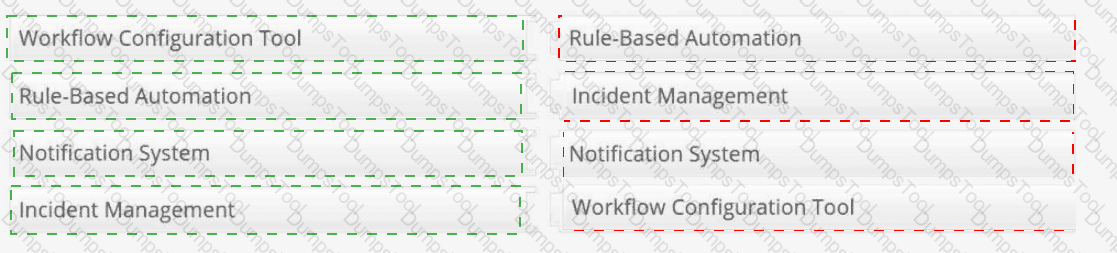
Workflow Configuration Tool → Allows the creation of GQL syntax rules with conditions for organizational files and users.
Rule-Based Automation → Establish criteria to identify data policy violations, data handling irregularities, and other anomalies.
Notification System → Triggered rules can be configured to generate alerts and send them to webhooks to ensure prompt action.
Incident Management → Review events and manage rules through cards.
Controls Orchestration in Forcepoint DSPM is the policy automation layer used to convert data-risk criteria into reviewable operational events. The Workflow Configuration Tool is represented by the rule-building interface under Policy Center > Controls Orchestration , where administrators define datasets, ownership, rule conditions, and GQL logic for organizational files, trustees, or agent activities. Forcepoint states that rules are created to identify data matching specific criteria and are applied during scans of the selected dataset.
Rule-Based Automation describes the criteria-driven detection model. Administrators establish rules that identify policy violations, data-handling irregularities, or other anomalies that require attention. Notification System maps to the ability to configure triggered rules to send external notifications, including webhook-based alerts, when matching data is detected. Incident Management maps to the Incidents workflow: Forcepoint states that each rule is automatically added as a card in the Incidents tab, and selecting the card takes the user back to the associated rule. References/topics: Policy Center, Controls Orchestration, GQL Conditions, Notifications, Webhooks, Incidents .

When creating a Detector, which field allows you to exclude specific criteria from the search?
Not contain
Not Add
Except
Exclude
The correct answer is A. Not contain . In Forcepoint DSPM, detector creation uses inclusion and exclusion logic to control what should trigger a detector match. The Contain field defines the positive match criteria: the keywords, phrases, regular expressions, extensions, or path terms that the detector should search for. The Not Contain field provides the negative condition: terms or criteria that should be ignored even when the broader detector logic would otherwise match.
Forcepoint’s DSPM documentation for Content Detectors states that if there are terms the detector should ignore, they are set in the Not Contain field. The same concept appears in Path Detectors , where administrators define the search method, populate Contain with triggering terms, and then use Not Contain to exclude terms from matching.
This matters operationally because detectors can otherwise generate excessive or misleading matches. For example, a detector looking for payroll-related content may include “salary” or “compensation” in Contain , while excluding harmless template, archive, or test terms in Not Contain . Not Add , Except , and Exclude are not the documented detector-configuration field names. References/topics: Administration > Detectors, Content Detectors, Path Detectors, Contain/Not Contain logic, AI Mesh detector contribution .
Anna created a complex GQL query that she plans on using weekly to filter the results and export the data for review. How can she store this query for repeated use?
From Analytics, select Import to upload an Excel file that contains a list of GQL filters.
From Enterprise Search, select Import to upload an Excel file that contains a list of GQL filters.
From Enterprise Search, enter the GQL filter, select the star icon to bookmark the filter.
From Administration, select Bookmarks, enter the GQL filter, then select Save.
The correct answer is C . Forcepoint DSPM allows frequently used Enterprise Search filters to be saved as bookmarks, which is the appropriate method for Anna’s weekly workflow. The documented Enterprise Search capability states that the page lets users access recently used filters, save frequently used filters as bookmarks, customize column headings, and generate meaningful reports. It also supports advanced filtering through GetVisibility Query Language , where a GQL query narrows scanned-file results to a focused, manageable subset for analysis and action.
Operationally, Anna would go to Enterprise Search , enter the complex GQL filter in the search/query field, execute or validate the filter, and then select the star icon to bookmark it. Forcepoint support documentation confirms that administrators can save complex GQL queries by using the star icon, creating a GQL bookmark, and providing an appropriate description.
The other options are incorrect because DSPM does not use an Excel import workflow to load reusable GQL filters from Analytics or Enterprise Search. Administration is also not the documented location for saving Enterprise Search GQL bookmarks. References/topics: Enterprise Search, GQL Filtering, Bookmarked Filters, Exporting Data, Reusable Search Workflows .
What is the primary function of a detector in Forcepoint DSPM?
To create user credential tags during a data scan.
To create tags based on specific keyword searches during scans.
To increase network speed by blocking files tagged with sensitive data.
To increase storage capacity by flagging files for archiving.
A detector in Forcepoint DSPM is a rule-based classification component used during scanning to identify files whose content or path matches defined detection logic. The correct answer is B because detectors are designed to locate specific patterns, words, or expressions and then contribute to classification/tagging outcomes. Forcepoint describes Detector Groups in AI Mesh as components where “detectors assess both the file path and its contents using rule-based logic, such as regular expressions and keywords,” returning a match when the content fits the defined patterns.
This is distinct from AI classifiers, which infer sensitive-data meaning from broader semantic or machine-learning signals. Detectors are the more deterministic mechanism: they look for defined indicators such as a keyword, phrase, regular expression, or path element. Forcepoint release notes also describe detector functionality as allowing content or path search when creating a detector, including an example where adding the word Archive to a detector can tag files located in an Archive folder.
The other options confuse detectors with unrelated platform functions. Detectors do not create credential tags specifically, optimize network throughput, block files for speed, or increase storage capacity. References/topics: Detectors, Pattern Matching, AI Mesh, Classification Tags, Content and Path Search .
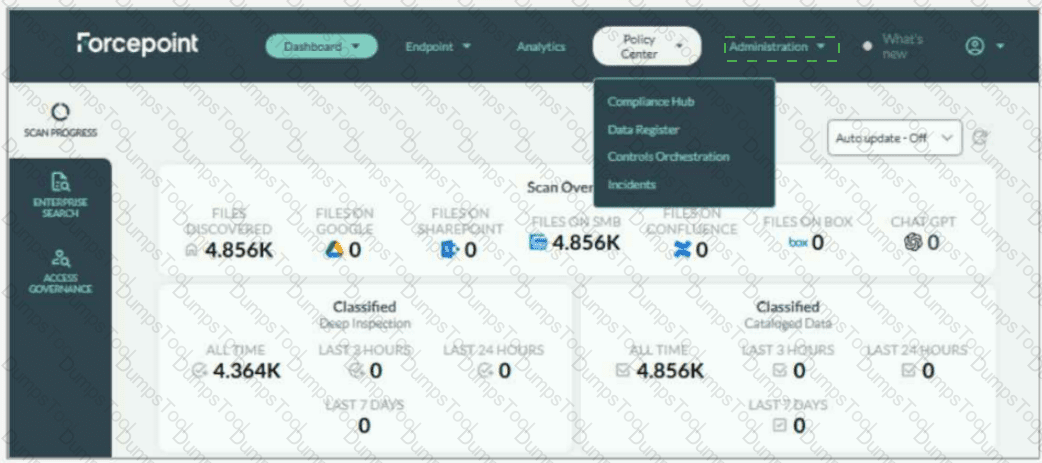
Adam needs to update the taxonomy tags in Forcepoint DSPM to match his company's policies. Where on the UI are taxonomy tags managed?


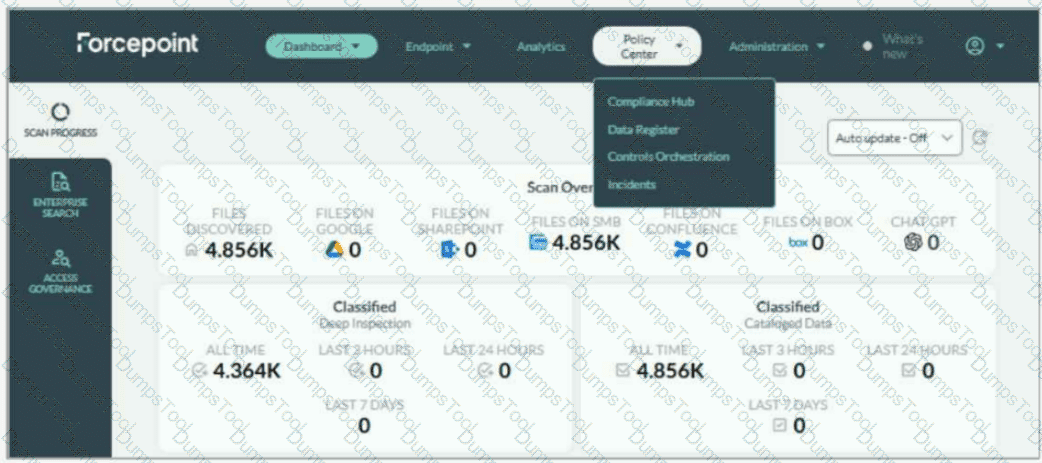
Administration > Taxonomy
Taxonomy tags are managed from the Administration menu, specifically under Administration > Taxonomy . In the screenshot, Adam should not select Policy Center ; the currently open menu shows Compliance Hub, Data Register, Controls Orchestration, and Incidents, but taxonomy management is not located there. The correct UI action is to open the Administration drop-down on the top navigation bar and select Taxonomy .
Forcepoint’s DSPM documentation states that the Taxonomy page displays predefined AI Mesh tags, which cannot be removed, and also allows administrators to add custom tags for pattern matching and detection rules. It further explains that taxonomy mapping can connect AI Mesh tags with data-source taxonomies so mapped tags can be written back as the organization’s own labels.
This location is important because taxonomy governs the classification language DSPM applies to scanned data. By updating taxonomy tags, Adam aligns DSPM classification output with the company’s internal handling policies, sensitivity labels, and compliance terminology. Forcepoint also notes that new taxonomy tags are created from the Taxonomy tab under the Administration section, and that applied tags are visible in the Data Asset Inventory. References/topics: Administration, Taxonomy, AI Mesh Tags, Classification Tags, Pattern Matching, Detection Rules .
TESTED 20 Jun 2026
Copyright © 2014-2026 DumpsTool. All Rights Reserved