dumpstool logo

How does an XSLT processor identify the specific nodes in an XML document to which a particular transformation rule should be applied?
After you transfer ownership of an Integration System to an ISU, what other component, if it exists, must you transfer ownership of to ensure the integration continues to run in an automated fashion?
Refer to the following scenario to answer the question below.
You have configured a Core Connector: Worker integration, which utilizes the following basic configuration:
• Integration field attributes are configured to output the Position Title and Business Title fields from the Position Data section.
• Integration Population Eligibility uses the field Is Manager which returns true if the worker holds a manager role.
• Transaction Log service has been configured to Subscribe to specific Transaction Types: Position Edit Event.
You launch your integration with the following date launch parameters (Date format of MM/DD/YYYY):
• As of Entry Moment: 05/25/2024 12:00:00 AM
• Effective Date: 05/25/2024
• Last Successful As of Entry Moment: 05/23/2024 12:00:00 AM
• Last Successful Effective Date: 05/23/2024
To test your integration, you made a change to a worker named Jeff Gordon who is not assigned to the manager role. You perform an Edit Position on Jeff Gordon and update their business title to a new value. Jeff Gordon ' s worker history shows the Edit Position Event as being successfully completed with an effective date of 05/24/2024 and an Entry Moment of 05/24/2024 07:58:53 AM however Jeff Gordon does not show up in your output.
What configuration element would have to be modified for the integration to include Jeff Gordon in the output?
A vendor needs an EIB that uses a custom report to output a list of new hires and their child dependent(s). You have been asked to create a calculated field that will be used to add only child dependent(s).
Which calculated field functions do you need to accomplish this?
You have configured a filename sequence generator for a connector integration. The vendor decides that a unique filename is no longer required.
How would you modify the integration to meet this requirement?
Refer to the following XML to answer the question below.
Refer to the following XML to answer the question below.
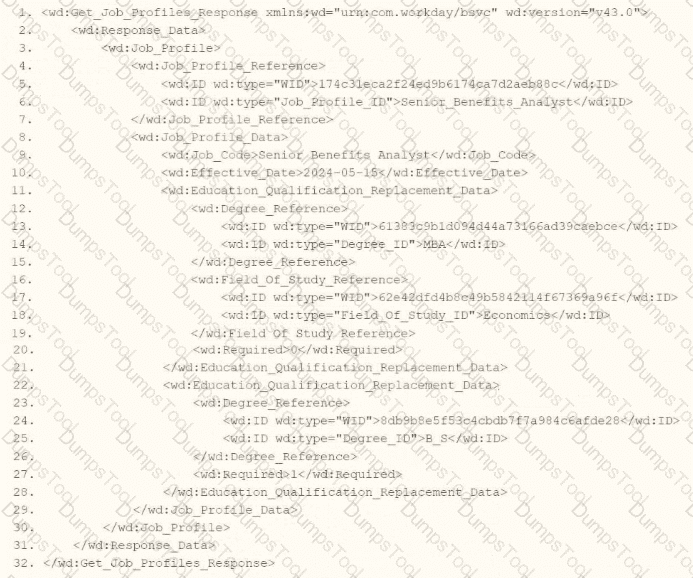
You are an integration developer and need to write XSLT to transform the output of an EIB which is making a request to the Get Job Profiles web service operation. The root template of your XSLT matches on the < wd:Get_Job_Profiles_Response > element. This root template then applies templates against < wd:Job_Profile > . XPath contains a number of delivered functions such as format-date. The format-date function uses the following syntax: format-date ($value as xs: date? $picture as xs:string). Within the template which matches on < wd:Job_Profile > , what XPath syntax would you use to output the value of the < wd:Effective_Date > element formatted with the day-month-year format of " 15-07-2024 " ?
You need to create a report that includes data from multiple business objects. For a supervisory organization specified at run time, the report must output one row per worker, their active benefit plans, and the names and ages of all related dependents. The Worker business object contains the Employee, Benefit Plans, and Dependents fields. The Dependent business object contains the employee ' s dependent ' s Name and Age fields.
How would you select the primary business object (PBO) and related business objects (RBO) for the report?
You have a population of workers who have put multiple names in their Legal Name - First Name Workday delivered field. Your third-party vendor only accepts one-word first names. For workers that have included a middle name, the first and middle names are separated by a single space. You have been asked to implement the following logic:
* Extract the value before the single space from the Legal Name - First Name Workday delivered field.
* Count the number of characters in the extracted value.
* Identify if the number of characters is greater than.
* If the count of characters is greater than 0, use the extracted value. Otherwise, use the Legal Name - First Name Workday delivered field.
What functions are needed to achieve the end goal?
Refer to the following scenario to answer the question below.
You are configuring a Core Connector: Worker integration with the Data Initialization Service (DIS) enabled. The integration must extract worker contact details and job information, including a calculated field override that determines phone allowance eligibility.
You need to review and correct the security configuration so that all overrides are secured appropriately and data is successfully extracted, resolving any security issues that arise when testing runs of the integration.
While troubleshooting issues with the connector, you are looking for a report which allows you to see how a given item is secured.
What report or task would assist you in this?
Refer to the scenario. You are configuring a Core Connector: Worker integration with the Data Initialization Service (DIS) enabled to extract worker demographic and contact information. The integration must include worker fields such as name, address, and a calculated field identifying workers eligible for a phone allowance.
The Phone Allowance Type calculated field exists and is functional in the tenant, but it is not displaying in the output.
What configuration step should you complete to include this field in the output?
You have successfully configured an ISU and an ISSG with the correct security policies and have assigned them to an EIB.
What task do you need to run before you can launch the EIB?
What XSL component is required to execute valid transformation instructions in the XSLT code?
Refer to the scenario. You are configuring a Core Connector: Worker integration with the Data Initialization Service (DIS) enabled. The integration must extract worker contact details and job information, including a calculated field override that determines phone allowance eligibility.
While testing, the output contains no records, and the Messages tab shows exception logs stating you don ' t have access to the Exempt field. You note this is the same field being used for Population Eligibility in the integration.
What must you configure to resolve this security issue?
Refer to the following XML and example transformed output to answer the question below.
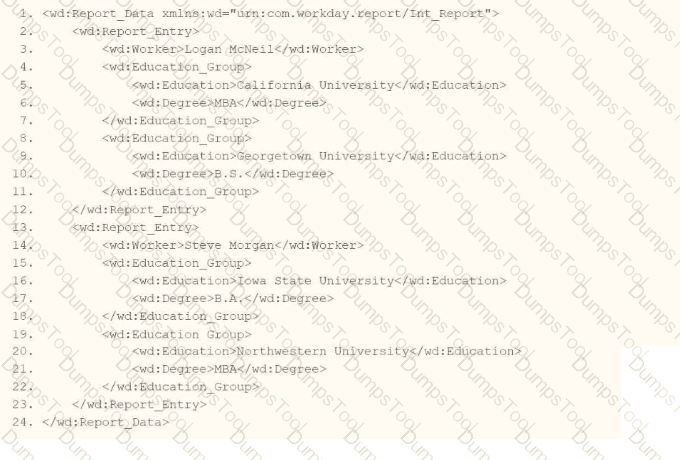
Example transformed wd:Report_Entry output;
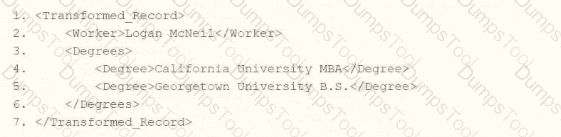
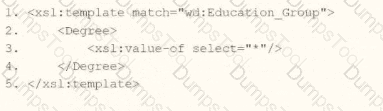
What is the XSLT syntax tor a template that matches on wd: Educationj3roup to produce the degree data in the above Transformed_Record example?

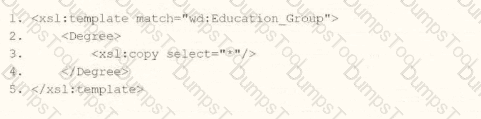
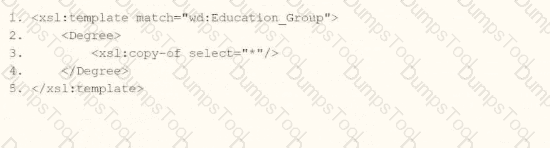
You are configuring an EIB that uses a custom report as its data source. When attempting to transfer ownership of the report to the Integration System User (ISU), the ISU does not appear as an option for new report owners. You confirm that the ISU already has the necessary access to the report data source and related fields.
Within the Custom Report Creation domain, which security configuration should you update to allow the ISU to appear as a valid report owner?
What option for an outbound EIB uses a Workday-delivered transformation to output a format other than Workday XML?
Refer to the following scenario to answer the question below.
You are configuring a Core Connector: Worker integration to send data to a new external compliance and certification tracking vendor. You have begun to configure the connector with the Data Initialization Service (DIS) enabled. Your goal is to extract worker qualification data, but the vendor has three specific requirements:
The file must only include Active workers who are in the “Clinical Staff” Job Family.
The vendor has specified that for each worker’s Education data, they only want to receive the Institution Name, Institution Type and Degree.
The vendor requires a custom “License ID” that must combine the Certification Name and Issuing State, for example, “RN-CA”. A Calculated Field that provides this custom “License ID” already exists in the tenant.
The License ID calculated field is not displaying in the output however you have confirmed the calculated field exists and is functional in the tenant.
What configuration step should you complete to include this field in the output?
How do you initially upload the XSLT file to a Document Transformation integration system?
Refer to the following scenario to answer the question below.
You need to configure a Core Connector: Candidate Outbound integration for your vendor. The connector requires the data initialization service (DIS).
The vendor needs the file to only include candidates that undergo a candidate assessment event in Workday.
How do you accomplish this?
You are configuring integration security for a Core Connector integration system. How do you find the web service operation used by the connector template?
A vendor needs to create a Date Difference calculated field. However, the two dates needed for that calculation are on two separate business objects.
What additional calculated field do you need to create that Date Difference calculated field?
You are creating a connector based integration where all fields are provided by the template. However, the vendor would also like the following configurations as well:
• A file name output to have the current date and integration run number
• Have internal values for a particular field transferred to their external values
What workflow would you follow to create this integration?
The following XML code was generated using Core Connector: Location.
You need to format the locc:Entry_Date element for both US (month/day/year) and EU (day.month.year) date styles while also ensuring that the locc:Entry_Date field contains a value when producing a CSV file.
Which combination of attributes and values should you use to create these classes?
Refer to the scenario. You are configuring a Core Connector: Worker integration with the Data Initialization Service (DIS) enabled that runs once daily. The integration must extract only active worker records with changes to compensation, home address, or business title since the last run 24 hours ago, using Workday’s change detection to avoid full extracts.
During testing, an employee’s home address is updated, but the integration does not detect the change in the output. The employee is eligible, the connector uses the correct integration field attributes, and the launch parameters are properly configured for a Full-Diff extract.
What configuration task must you modify from the integration system to ensure the expected change is included in the output?
You are configuring a monthly schedule for an EIB integration that runs on the last day of each month.
What is the maximum end date you can use in this configuration?
Refer to the scenario. You are implementing a Core Connector: Worker integration to send employee data to a third-party active employee directory. The external vendor requires the following:
The Employee ' s Active Directory User Principal Name.
A mapping from Worker Type values to external worker type codes.
A specific filename format that includes a timestamp and sequence number.
You also need to ensure the document transformation occurs before the file is delivered to the endpoint. You must include an Employee’s Active Directory User Principal Name (generated by a Calculated Field).
How do you ensure this field is pulled into the output?

TESTED 16 Oct 2026