dumpstool logo

A Data Analyst has the following chart that shows the number of song downloads per year since the release of the song.
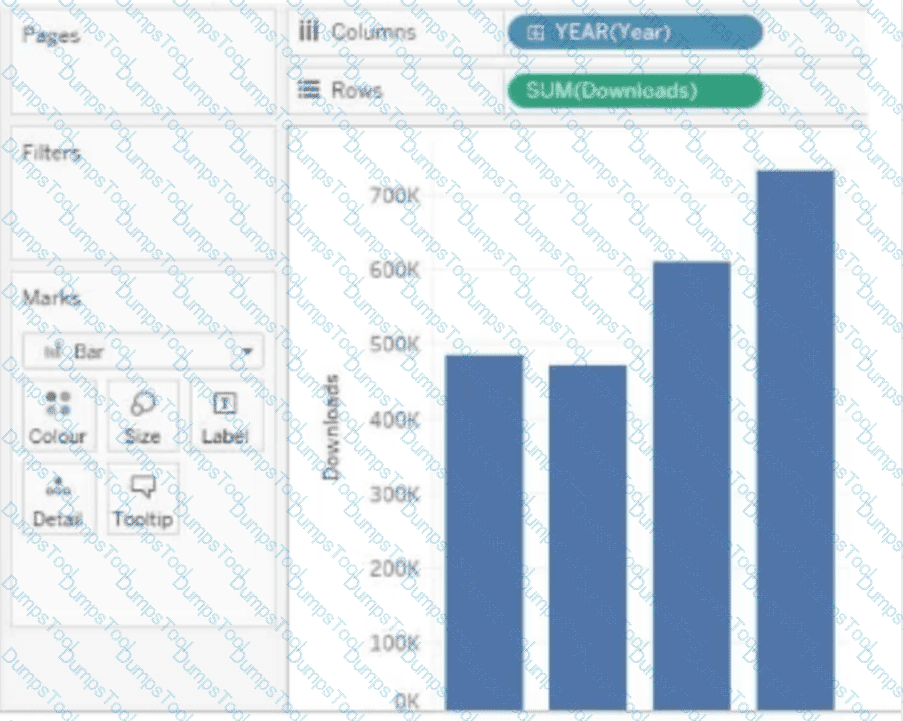
The required result is a cumulative progression of downloads across the years.
Which quick table calculation should the analyst use?
A Data Analyst needs to calculate the first Tuesday of each month in the data.
Which set of functions should the analyst use to perform this calculation?
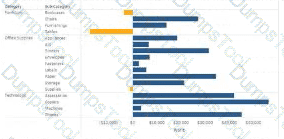
A Data Analyst has the following visualization.
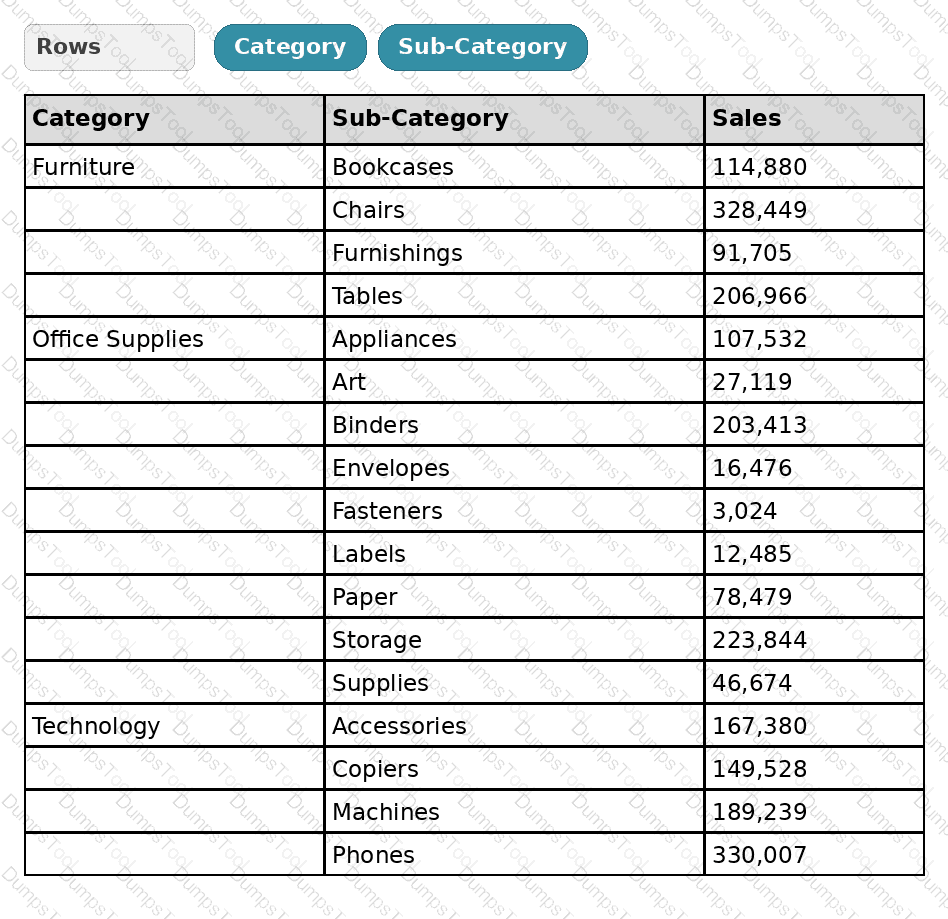
The analyst needs to add totals to the table as shown in the following visualization.
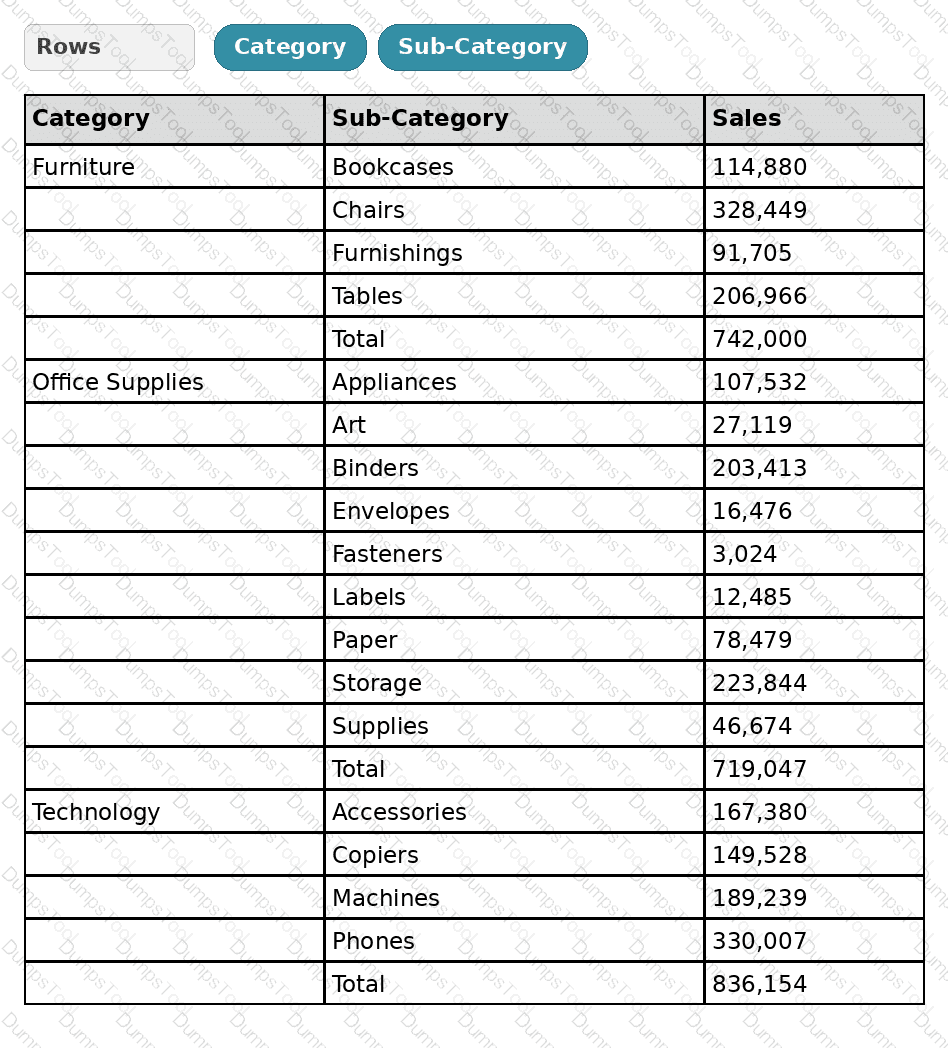
What should the analyst use from Totals on the Analysis menu?
You have a Tableau workbook.
You want to make the workbook available in Tableau Online.
What should you do?
A Data Analyst has a data source that has two tables named Table1 and Table2. Table1 is the primary table and Table2 is the secondary table.
The analyst wants to combine the tables by using Tableau Prep. The combined table must include only values from Table1 that do not match any values in Table2. The field values from Table2 must appear as null values.
Which type of join should the analyst use?
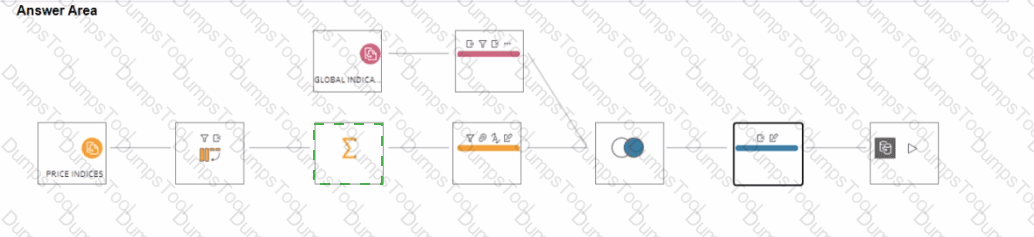
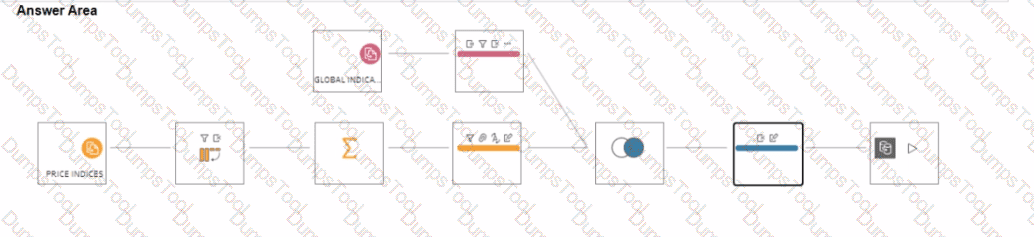
You have a Tableau Prep flow that joins a dataset named Global Indicators to a dataset named Price Indices.
In which step can you transform rows of monthly data into rows of yearly data ' '
A Data Analyst has a dataset that contains people and the awards they have won.
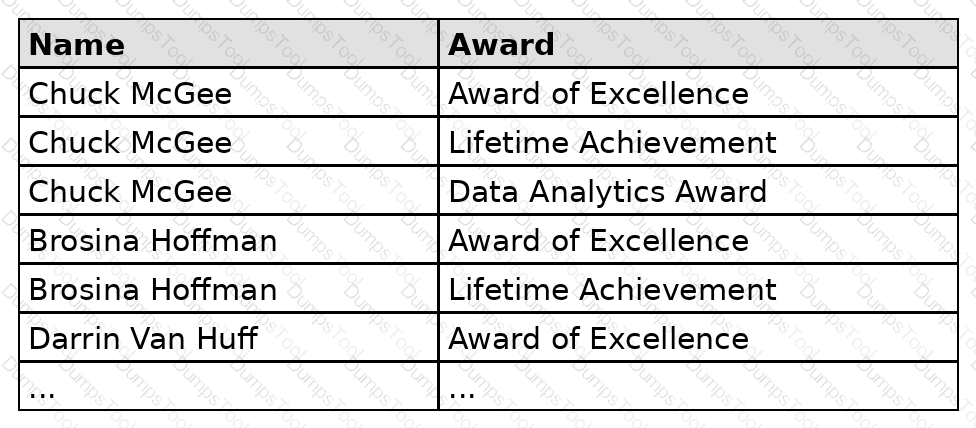
Which formula should the analyst use to get the number of people who won an award?
You have a Tableau workbook that contain three worksheets named Sheet1 Sheet2 and Sheet3.
You create several filters.
From the Data Source page you plan to add data source fillers
When type of filter will appear in the Edit Data Source Filters dialog box?
A Data Analyst is using containers on a dashboard.
How should the analyst make sure multiple objects within a container are always taking up the same width or height, even if the container is resized?
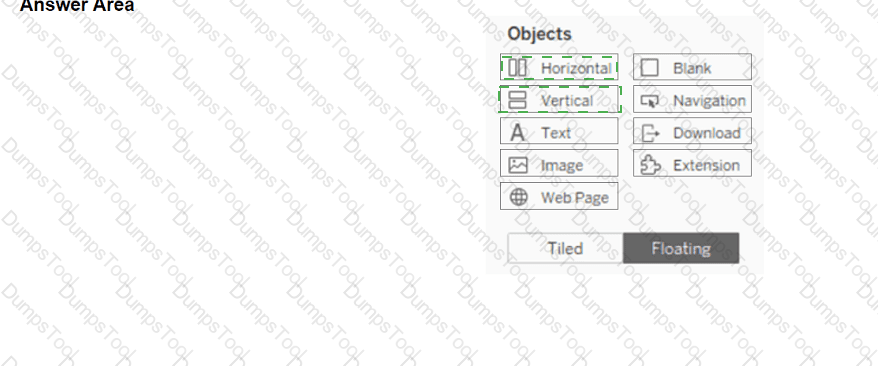
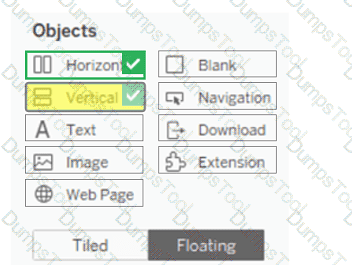
A Data Analyst looks into the item hierarchy in a dashboard.
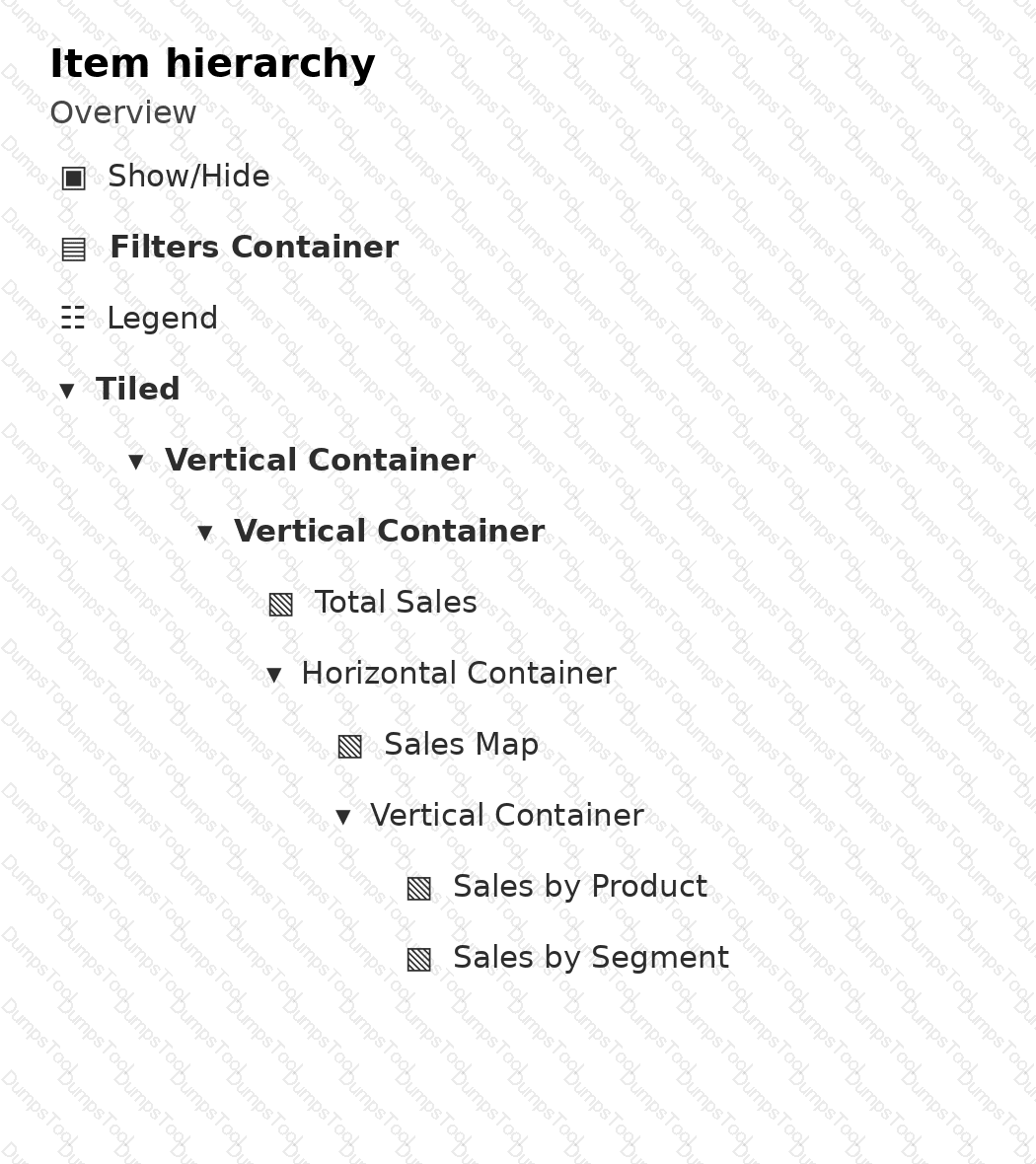
Which three elements are floating? Choose three.
You have two tables named Employeelnfo and DepartmentInfo. Employeelnfo contains four fields named Full Name, Department ID, Start Date, and Salary.
DepartmentInfo contains four fields named Department Name, Size, Department ID, and VP.
You want to combine the tables to meet the following requirements:
. Each record in Employeelnfo must be retained in the combined table.
. The records must contain the Department Name, Size, and VP fields.
· Every record must have a full name.
Which type of join should you use?
A Data Analyst has the following dataset:
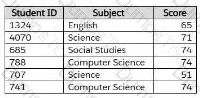
The analyst wants to create a new calculated dimension field named Category that meets the following conditions:
When Subject is Computer Science or Science, the Category must be Sciences.
When Subject is English or Social Studies, the Category must be Humanities.
Which two logical functions achieve this goal? (Choose two.)
When using the INCLUDE Level of Detail (LOD) calculation, where should the dimension referenced by the INCLUDE function be located on the sheet?
A Data Analyst is given the following table and asked to create a flow that adds a date field to the data. This field should automatically update as new dates (months) are added to the original table.
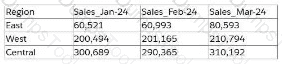
Which technique should the analyst use as the first step to achieve this in Tableau Prep?
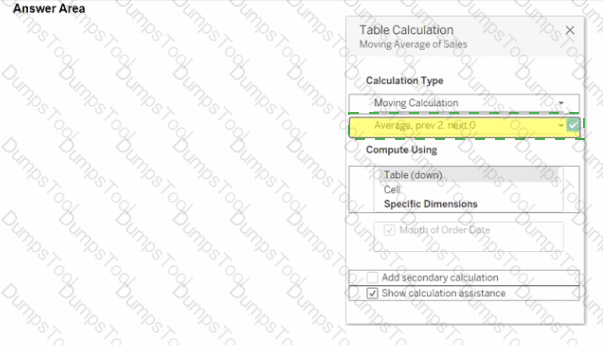
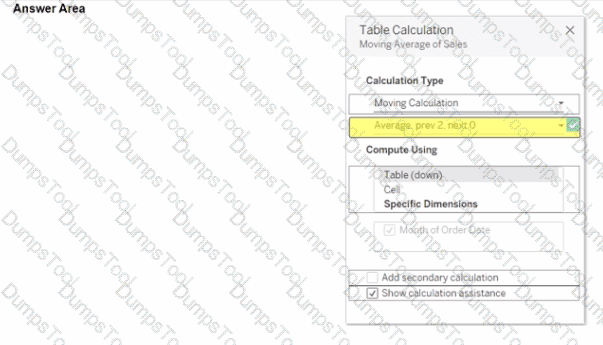
You use a quick table calculation lo calculate the moving average of a measure named Sales.
You need to calculate the moving averages of the last three years.
Which setting should you change in the Table Calculation dialog box? {Click the appropriate Option in the Answer Area)
When a Data Analyst needs to format workbook settings, which options are available in the Format Workbook panel?
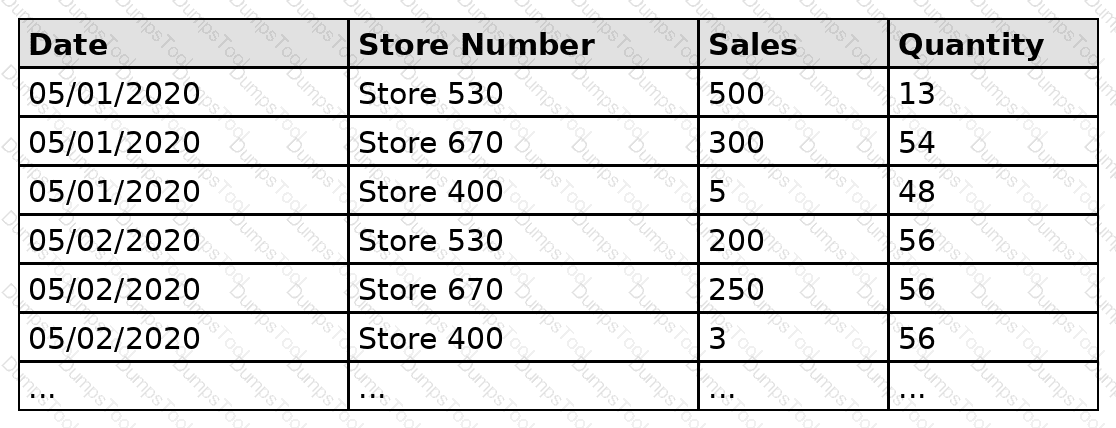
A Data Analyst has the following dataset that contains sales for the month of May.
The analyst plans to create a data extract from the dataset. The analyst wants to extract data only from stores that have $500 or more in total sales.
What should the analyst do?
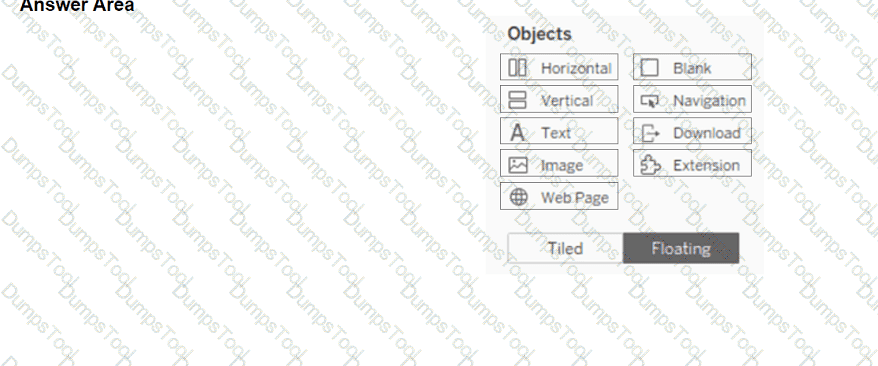
You have a blank dashboard.
You want to add two sheets to the dashboard. The sheets must support the Show/Hide button.
To which two objects can you add the sheets? (Click the two appropriate Options in the Answer Area.)
You have the following bar chart.
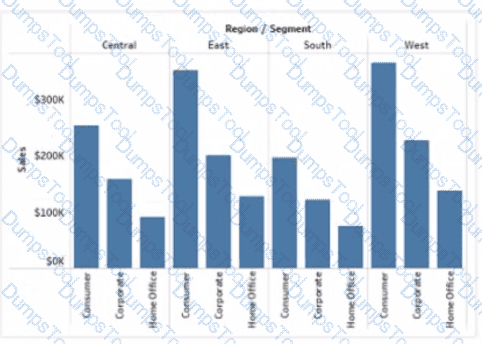
You want the chart to appear as shown in the Mowing exhibit.
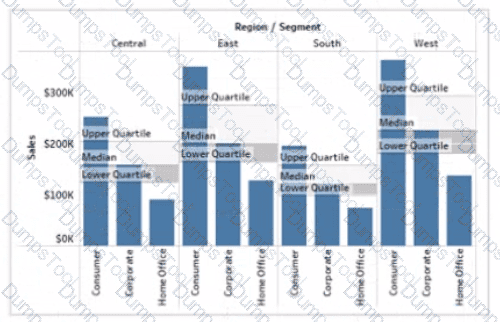
What should you add?
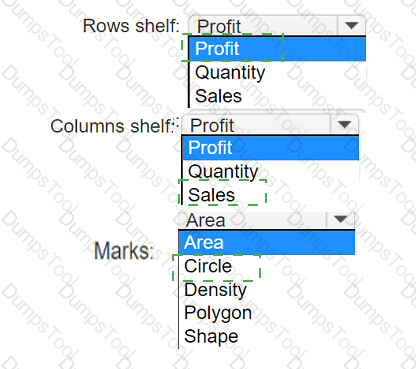
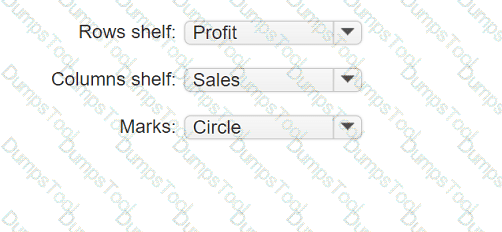
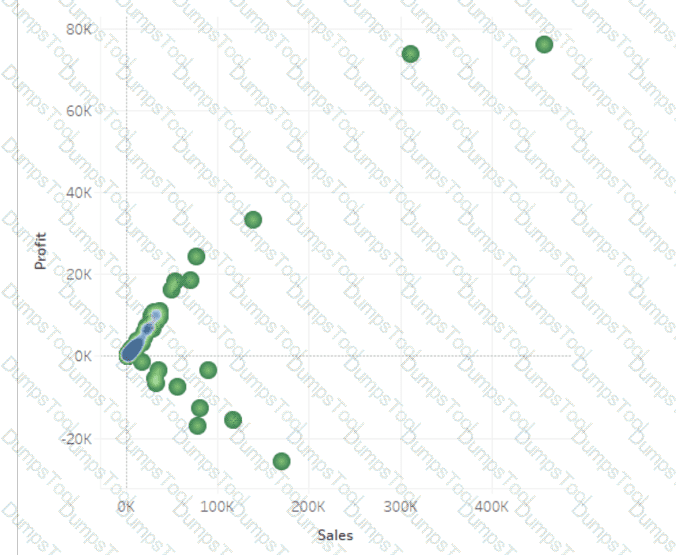
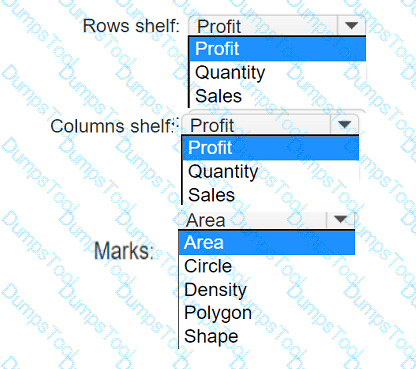
You have a data set that contains three columns named Sales, Profit, and Quantity.
You need to build the following scatter plot.
A Data Analyst has the following primary data source that contairis a dimension named Dorm_Code.
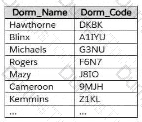
The analyst receives the following secondary data source that contains updated dorm codes.
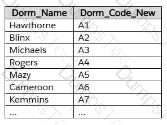
The analyst needs to bring the updated dorm codes into Tableau and use the codes in existing visualizations. The new dorm codes must use the existing field name of Dorm_Code.
What should the analyst do?
You are subscribed to several views.
You need to unsubscribe from the views.
What should you use?
You have the following dataset.
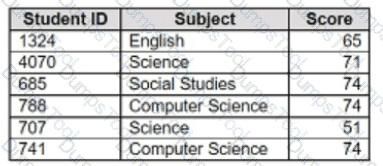
You want to create a new calculated dimension field named Category that meets the following conditions:
. When Subject is Computer Science or Science, Category must be Sciences.
. When Subject is English or Social Studies, Category must be Humanities.
Which two logical functions achieve the goal? Choose two.
A Data Analyst needs to analyze the financial performance of the sales team. In order to make the dashboards easier to understand, the analyst needs to format the financial values to show the dollar symbol ($) in front of the value.
How should the analyst enable this formatting across the workbook?
A Data Analyst has the following dashboard.
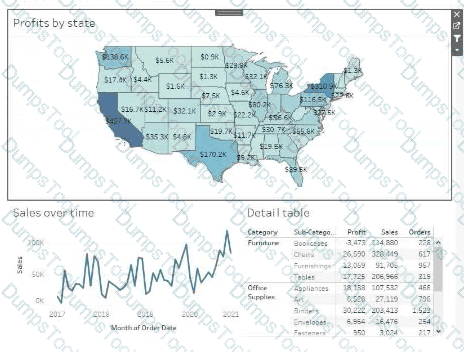
Currently, the map is used as a filter that affects the data on the other sheets of the dashboard.
The analyst needs to configure the dashboard to ensure that selecting a data point on the map only filters the Detail table.
What should the analyst do?
You plan to create a visualization that has a dual axis chart. The dual axis chart will contain a shape chart and a line chart will use the same measure named Population on the axis.
You need to configure be shapes to be much larger than the line.
What should you do?
You are creating a new dashboard.
You need to add a button to the dashboard that allows users to export the dashboard as an image.
Which type of object should you use?
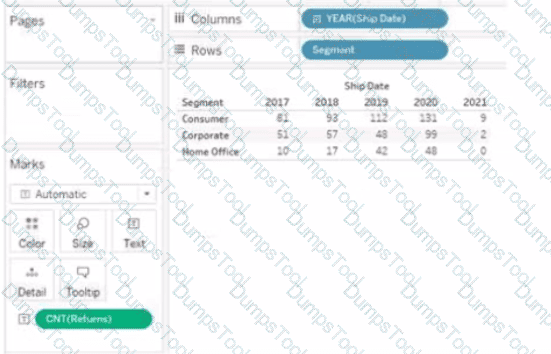
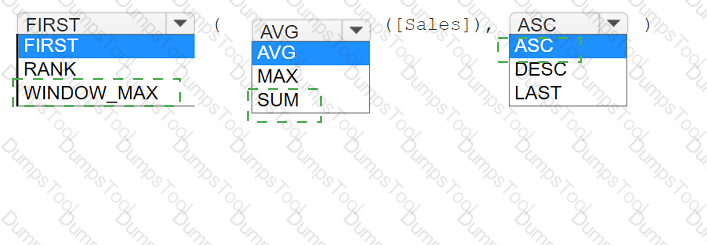
You have the following visualization.
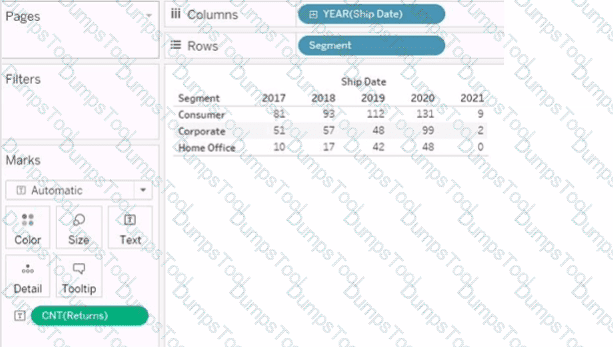
You want the count of Returns displayed only for the first year in the table.
How should you complete the formula in the calculated field? (Use the dropdowns in the Answer Area to select the correct options to complete the formula.)

You create the following worksheet
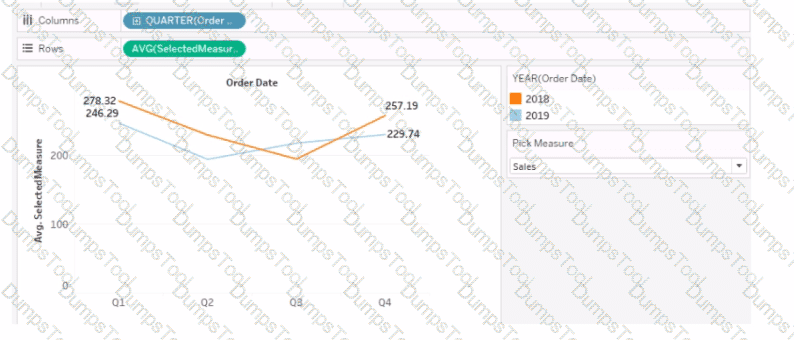
The Pick Measure parameter contains the following list of values
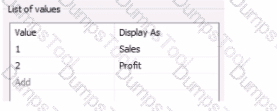
Users can select a value from Pick Measure to change the visualization to show either the Sales measure or the Profit measure.
Which formula is used in the Selected Measure calculated field lo switch between measures?
You have the following:
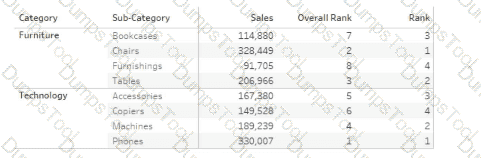
Overall Rank and Rank are calculated fields that use the RANK function.
You filter out the sub-category where [Ovorall Rank] - 1.
For which three the sub-categories will the value of Rank change? Choose three.
A Data Analyst has the following worksheet, with Profit data for Categary and Sub-Categury.
The analyst executed the following calculated field at the Total level:
COUNTD( IF ( INCLUDE [Sub-Category]: SUM([Profit] ) < 0 THEN [Category] END )
What is the result?
You have the following dataset.
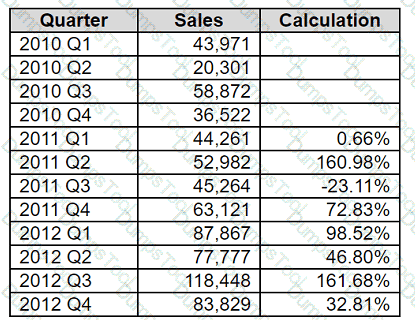
Which formula calculates the percent difference in sales relative to the same quarter the previous year as shown in the Calculation field?
From Tableau Desktop, a Data Analyst signs in to a site within Tableau Server.
What appears in the list of available data sources when the analyst searches for a published data source?
You have the following dataset.
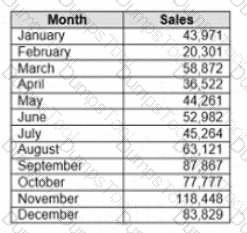
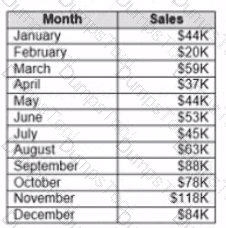
When you use the dataset in a worksheet, you want Sales to appear automatically as shown in the following table.
What should you do?
You create a parameter named Choose Region fiat contains values from a field named Region.
You want users to be able to use the Choose Region parameter to interact with a chart by logging between different regions
What should you do next?
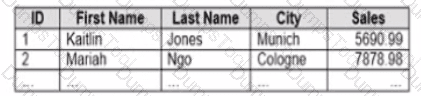
You company has two divisions located in the United States and Germany Bach division has a separate database. The following is a sample of the sales data for the division in the United States.
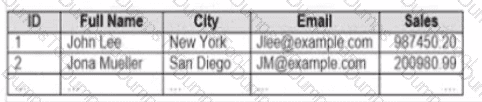
The following is a sample of the sales data for me division in Germany.
You have population data in a file named Populatio.csv. the following is a sample of the data.
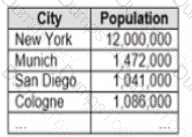
You plan to create a visualization that ml show tie sales per capita for each salesperson Each salesperson must be identified by identified by their full name.
You need to prepare the data to support the planned visualization. The data source must support being published .
Which four actions should you perform in order?
(Place the four correct options n order Use the arrows to move Options to Answer Area arrows to re-order the options.
Use Answer Area arrows to re-order the options)

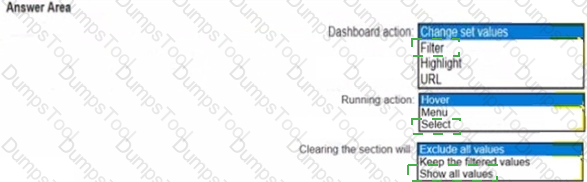
You have the following dashboard.
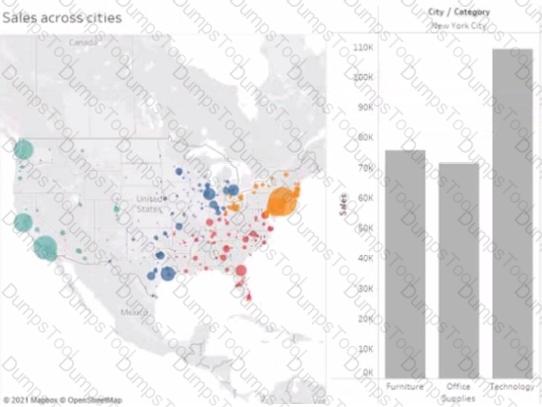
When a user selects a only on the map the data on the bar chart must show only the data for the selected city. The data in the bar chart must change only when the user selects a different city How should you configure the dashboard action? (Use the dropdowns in the Answers Area to select the correct options.)

A Data Analyst has a large data source that contains more than 10 million rows. Users can filter the rows by a field named Animal.
The following is a sample of the data.
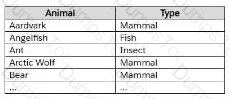
The analyst wants to ensure that every calculation is affected by including only animals of a particular type.
Which type of filter should the analyst create on the worksheet?
A Data Analyst is creating a map that includes multiple data layers at country, state, and city levels. Users want to customize their map by turning layers on and off as needed.
How should the analyst provide this functionality?
You have the following dashboard that contains two sheets.
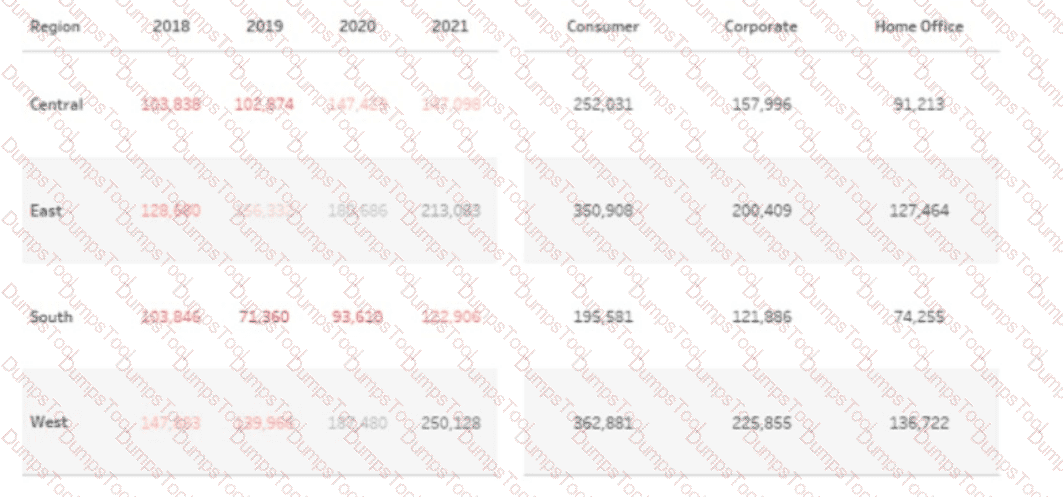
You want to minimize the whitespace between the sheets.
What should you configure?
A Data Analyst has received a request to provide a dashboard related to employee time logs. The employees are entering their time using mobile devices throughout the day and data is stored in a cloud-based database. The end users would like to receive data on their dashboard in as close to real-time as possible.
How should the analyst best create a data source to meet these requirements?
A Data Analyst has the following chart that shows the cumulative volume of sales from various dates.
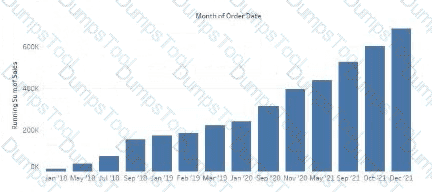
The analyst wants the months to appear as shown in the following chart.
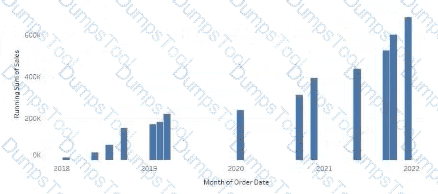
What should the analyst do?
You have the following tiled dashboard that has one sheet.
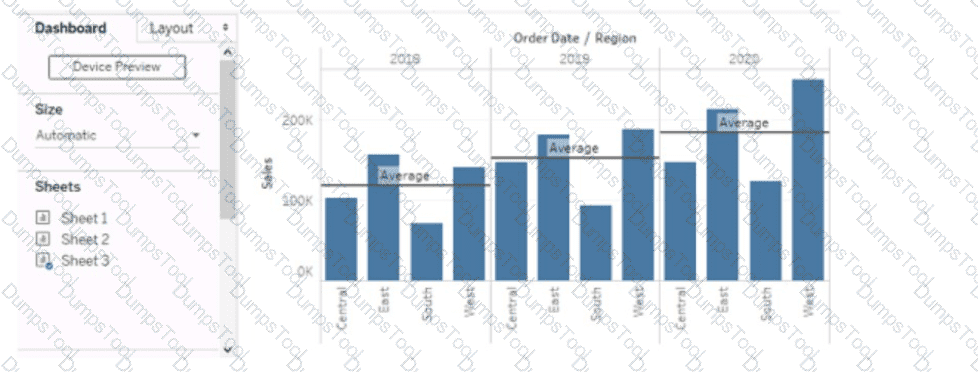
You want to replace the sheet with Sheet2.
What should you do?
You have a data source that has two tables named Table1 and Table2. Table1 is the primary table and Table2 is the secondary table.
You want to combine the tables by using Tableau Prep. The combined table must include only values from Table1 that do NOT match any values in Table2. The field values from Table2 must appear as null values.
Which type of join should you use?
You have a data source that contains 20 tables.
You want the tables to be organized within the Data pane based on the type of data contained within the tables.
What should you use?
A Data Analyst has a dataset that contains people and the awards they have won.
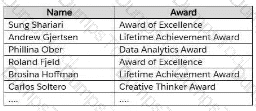
Which formula should the analyst use to get the number of different types of awards that have been won?
You have the following dashboard.
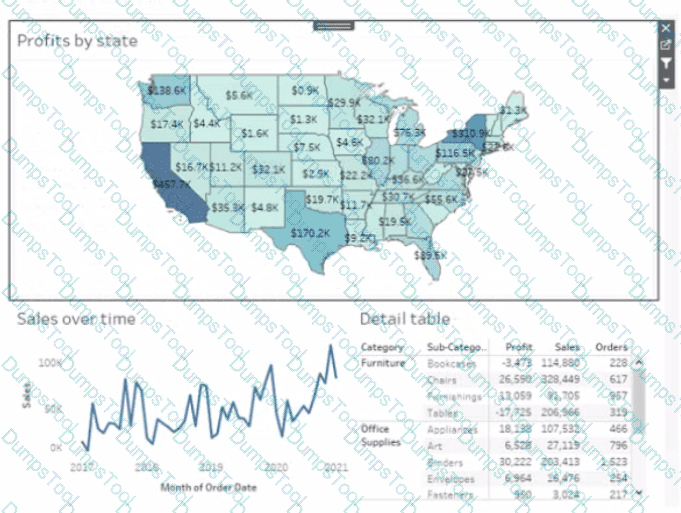
Currently the map is used as a filter that affects the data on the otter sheets of the dashboard
You need to configure the dashboard to ensure that selecting a data point on the map only tillers the Detail table
What should you do?
You want to connect a Tableau workbook to a dataset in a Microsoft Excel spreadsheet.
What should you do from Tableau Desktop?
From Tableau Desktop you sign in lo a Tableau Server site.
What appears in the list of available data sources when you search for a published data source?
You have the following visualization.
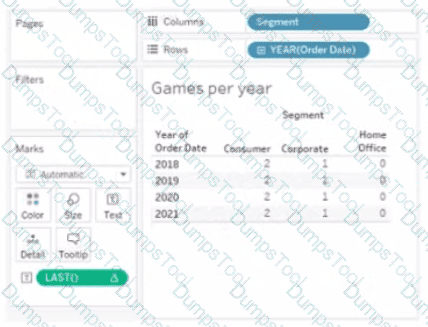
The Last() calculation is set to compute using Table (across)
Which value will appear in the crosstab for the Consumer segment of the year 2018 if you change compute to use Oder Dale?
You subscribe to a view that delivers a daily email to your inbox.
You want to make the subscription available to other stakeholders.
What should you do?
You have a data source that contains the following columns.
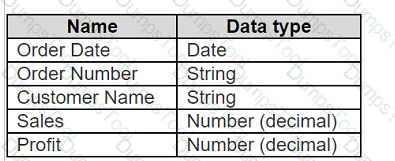
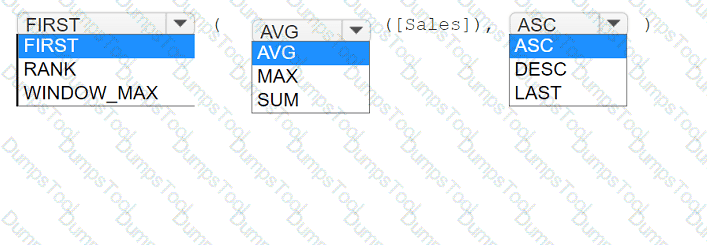
You want to sort customers based on the most expensive orders.
How should you complete the formula? (Use the dropdowns in the Answer Area to select the correct options to complete the formula.)
You have the following dataset in Microsoft Excel.
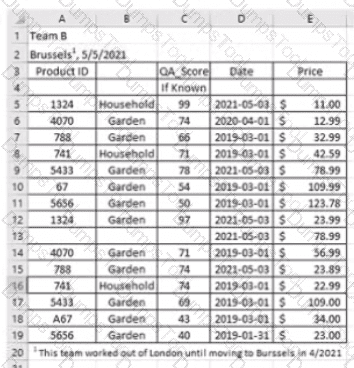
You are using Data interpreter to cleans the dataset. Data interpreter provides the following results.
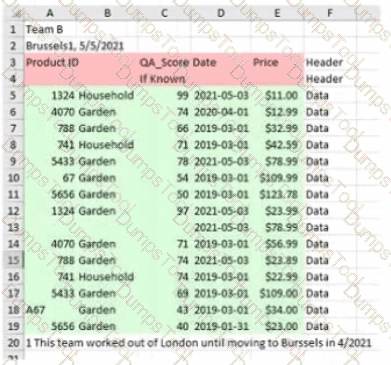
How many rows of data will be ingested into Tableau as values?
A Data Analyst needs to create a dashboard to show sales rep revenue tracking against goals. The revenue data source has already been published to the corporate Tableau site. The goals data is stored in a Microsoft Excel file and must be updated on a regular basis by the sales managers.
How should the analyst set up the data sources to meet these requirements?
You have the following line chart that shows the average sales by month.
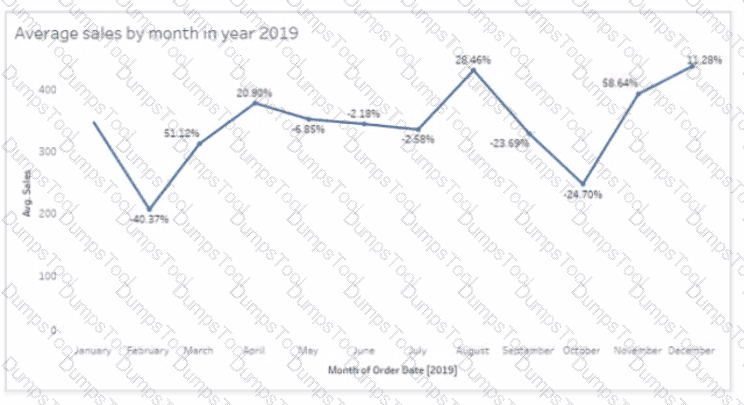
Which month had the biggest increase in swage sales compared to me previous month in 2019?
You have the Mowing two tables that contains data about the books in a library.

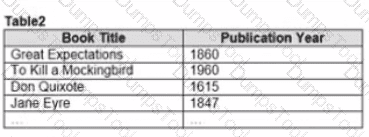
Both tables are incomplete so there are books missing from the tables.
You need to combine the tables. The solution must ensure that all the data is retained
Which type of join should you use?

TESTED 22 Sep 2026