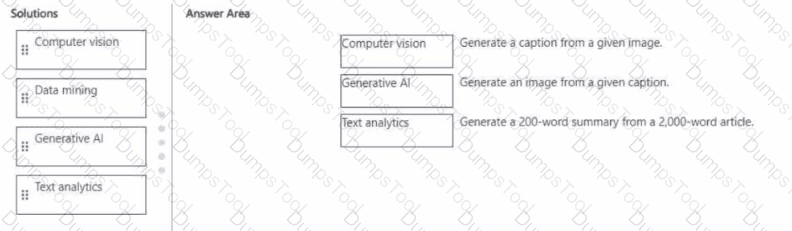
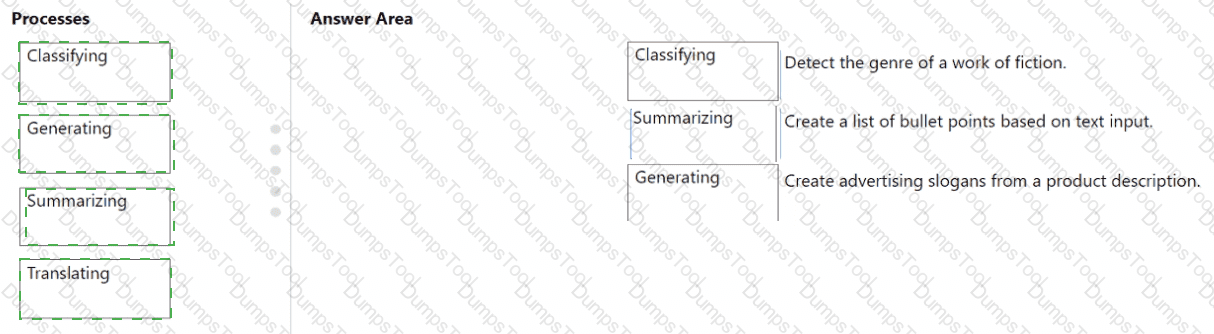
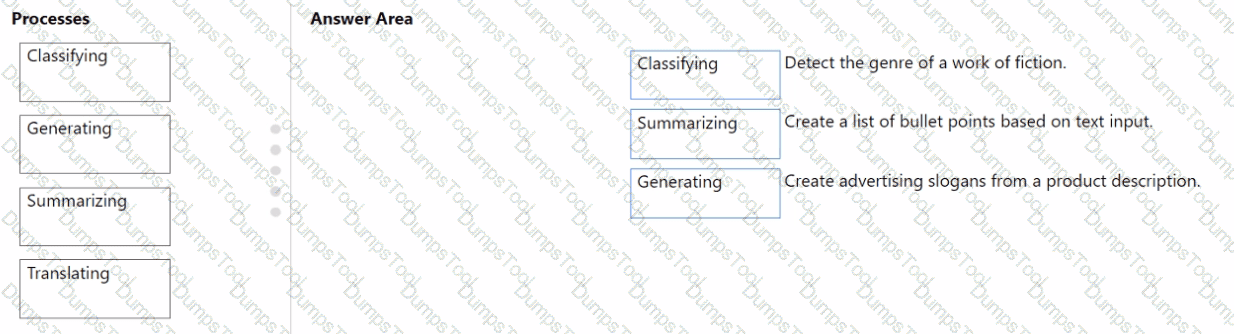
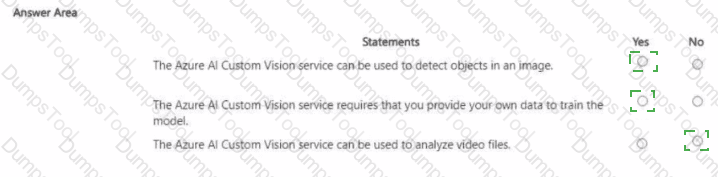
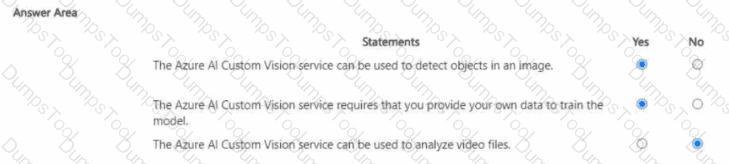
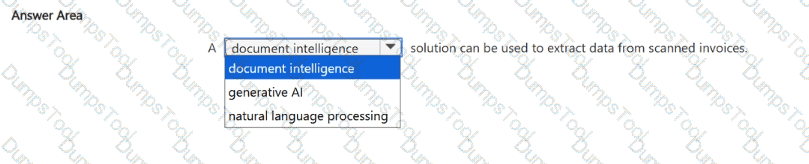
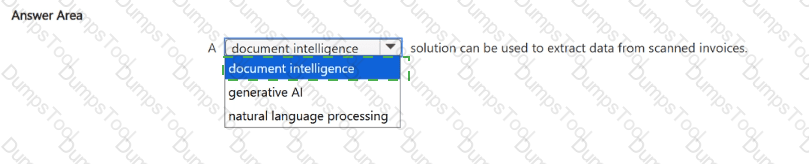
What can be used to analyze scanned invoices and extract data, such as billing addresses and the total amount due?
Azure Al Search
Azure Al Document intelligence
Azure Al Custom Vision
Azure OpenAI
The correct answer is B. Azure AI Document Intelligence (formerly Form Recognizer).
This Azure service uses AI and OCR technologies to analyze and extract structured data from documents such as invoices, receipts, and purchase orders. It identifies key fields like billing address, invoice number, total amount due, and line items. The service supports prebuilt models for common document types and custom models for specialized layouts.
Option review:
A. Azure AI Search: Used for knowledge mining and semantic search, not document data extraction.
B. Azure AI Document Intelligence — ✅ Correct. Designed for form and invoice extraction.
C. Azure AI Custom Vision: Used for image classification and object detection, not text extraction.
D. Azure OpenAI: Generates or processes language but not structured document data.
Therefore, Azure AI Document Intelligence is the right service to extract data from scanned invoices.
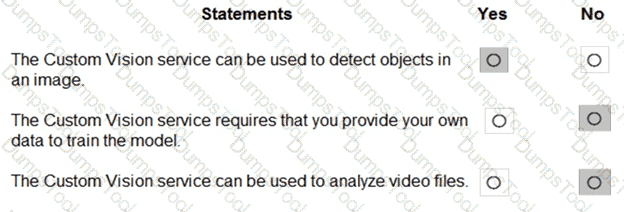
For each of the following statements, select Yes if the statement is true. Otherwise, select No.
NOTE: Each correct selection is worth one point.


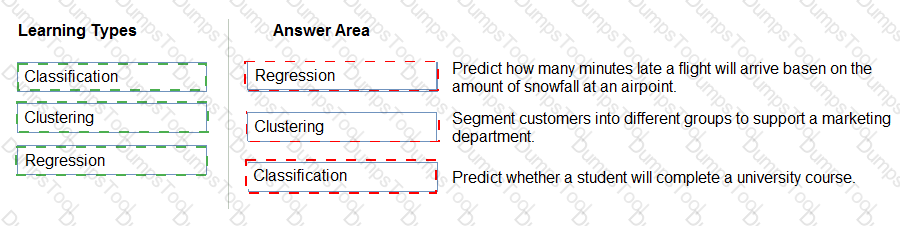
According to the Microsoft Azure AI Fundamentals (AI-900) official study guide and the Microsoft Learn module “Identify features of common machine learning types”, there are three main types of machine learning: supervised learning, unsupervised learning, and reinforcement learning. Within supervised learning, two common approaches are regression and classification, while clustering is a primary example of unsupervised learning.
“You train a regression model by using unlabeled data.” – No.Regression models are trained with labeled data, meaning the input data includes both features (independent variables) and target labels (dependent variables) representing continuous numerical values. Examples include predicting house prices or sales forecasts. Unlabeled data (data without target output values) cannot be used to train regression models; such data is used in unsupervised learning tasks like clustering.
“The classification technique is used to predict sequential numerical data over time.” – No.Classification is used for categorical predictions, where outputs belong to discrete classes, such as spam/not spam or disease present/absent. Predicting sequential numerical data over time refers to time series forecasting, which is typically a regression or forecasting problem, not classification. The AI-900 syllabus clearly separates classification (categorical prediction) from regression (continuous value prediction) and time series (temporal pattern analysis).
“Grouping items by their common characteristics is an example of clustering.” – Yes.This statement is correct. Clustering is an unsupervised learning technique used to group similar data points based on their features. The AI-900 study materials describe clustering as the process of “discovering natural groupings in data without predefined labels.” Common examples include customer segmentation or document grouping.
Therefore, based on Microsoft’s AI-900 training objectives and definitions:
Regression → supervised learning using labeled continuous data (No)
Classification → categorical prediction, not sequential numeric forecasting (No)
Clustering → grouping by similarity (Yes)
To complete the sentence, select the appropriate option in the answer area.


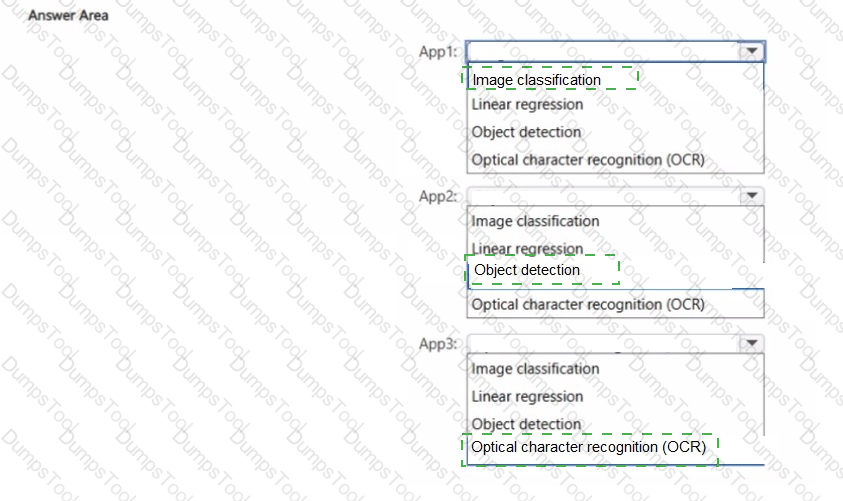
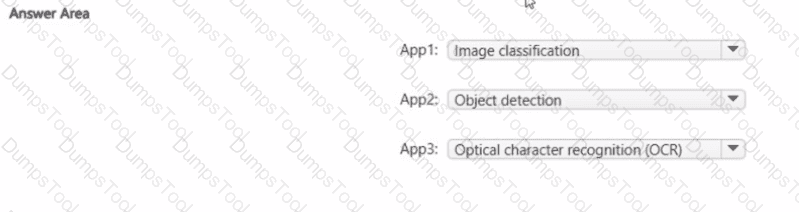
According to the Microsoft Azure AI Fundamentals (AI-900) official study materials, object detection is a type of computer vision workload that not only identifies objects within an image but also determines their location by drawing bounding boxes around them. This functionality is clearly described in the Microsoft Learn module “Identify features of computer vision workloads.”
In this scenario, the AI system analyzes an image to find a vehicle and then returns a bounding box showing where that vehicle is located within the image frame. That ability — to detect, classify, and localize multiple objects — perfectly defines object detection.
Microsoft’s study content contrasts object detection with other computer vision workloads as follows:
Image classification: Determines what object or scene is present in an image as a whole but does not locate it (e.g., “this is a car”).
Object detection: Identifies what objects are present and where they are, usually returning coordinates for bounding boxes (e.g., “car detected at position X, Y”).
Optical Character Recognition (OCR): Extracts text content from images or scanned documents.
Facial detection: Specifically locates human faces within an image or video feed, often as part of face recognition systems.
In Azure, object detection capabilities are available through services such as Azure Computer Vision, Custom Vision, and Azure Cognitive Services for Vision, which can be trained to detect vehicles, products, or other objects in various image datasets.
Therefore, based on the AI-900 study guide and Microsoft Learn materials, the verified and correct answer is Object detection, as it accurately describes the process of returning a bounding box indicating an object’s position in an image.
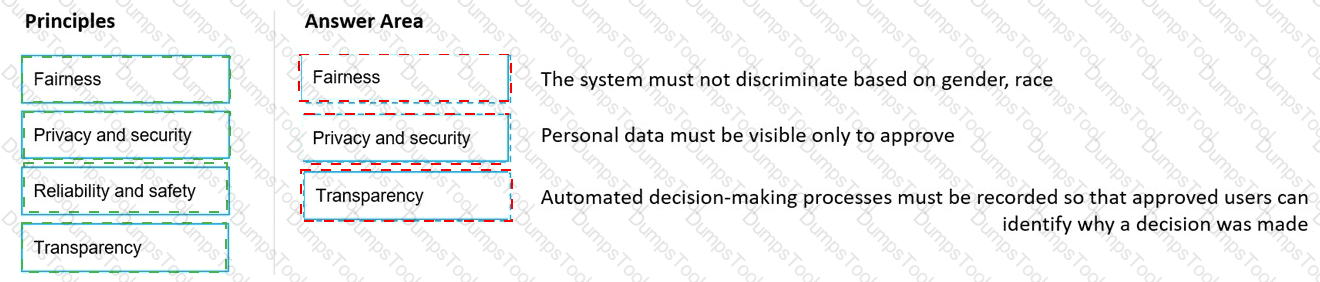
You are designing a system that will generate insurance quotes automatically.
Match the Microsoft responsible Al principles to the appropriate requirements.
To answer, drag the appropriate principle from the column on the left to its requirement on the right Each principle may be used once, more than once, or not at all.
NOTE: Each correct match is worth one point.


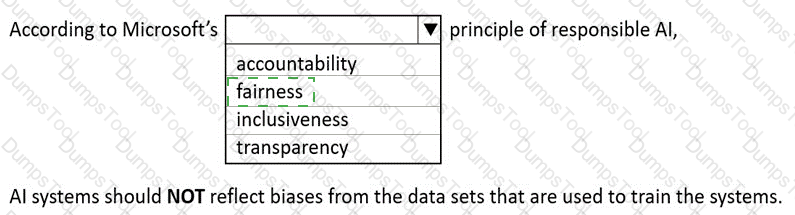
Microsoft’s Responsible AI principles are the foundation for developing and deploying ethical and trustworthy AI systems. The six key principles are Fairness, Reliability and Safety, Privacy and Security, Inclusiveness, Transparency, and Accountability. Each principle guides specific practices for ensuring AI systems operate responsibly in real-world applications like automated insurance quoting systems.
Transparency – This principle ensures that the AI’s decisions can be understood and explained. Recording the decision-making process and enabling staff to trace how a quote was generated aligns with transparency. It allows stakeholders to interpret the reasoning behind model outputs, ensuring that the AI behaves predictably and ethically.
Privacy and Security – This principle focuses on protecting personal data and ensuring that sensitive information is handled responsibly. Limiting access to customer data only to authorized personnel maintains compliance with privacy laws (like GDPR) and safeguards against misuse. Microsoft emphasizes that AI systems should maintain strict control over data visibility and integrity.
Inclusiveness – This principle ensures that AI systems are accessible to all users, including people with disabilities. By supporting screen readers and assistive technologies, the system ensures equal access to information and services for every customer. Inclusiveness prevents discrimination and promotes accessibility, both of which are central to Microsoft’s Responsible AI strategy.
Thus, the correct mapping of principles is:
Decision process → Transparency
Personal information visibility → Privacy and Security
Accessibility via screen readers → Inclusiveness.
You have an Azure Machine Learning model that uses clinical data to predict whether a patient has a disease.
You clean and transform the clinical data.
You need to ensure that the accuracy of the model can be proven.
What should you do next?
Train the model by using the clinical data.
Split the clinical data into Two datasets.
Train the model by using automated machine learning (automated ML).
Validate the model by using the clinical data.
According to the Microsoft Azure AI Fundamentals (AI-900) official study guide and Microsoft Learn modules on machine learning concepts, ensuring that the accuracy of a predictive model can be proven requires data partitioning—specifically splitting the available data into training and testing datasets. This is a foundational concept in supervised machine learning.
When you split the data, typically about 70–80% of the dataset is used for training the model, while the remaining 20–30% is used for testing (or validation). The reason behind this approach is to ensure that the model’s performance metrics—such as accuracy, precision, recall, and F1-score—are evaluated on data the model has never seen before. This prevents overfitting and allows you to demonstrate that the model generalizes well to new, unseen data.
In the AI-900 Microsoft Learn content under “Describe the machine learning process”, it is explained that after cleaning and transforming the data, the next essential step is data splitting to “evaluate model performance objectively.” By keeping training and testing data separate, you can prove the reliability and accuracy of the model’s predictions, which is particularly crucial in sensitive domains like clinical or healthcare analytics, where decision transparency and validation are vital.
Option A (Train the model by using the clinical data) is incorrect because you should not train and evaluate on the same data—it would lead to biased results.
Option C (Train the model using automated ML) is incorrect because automated ML is a method for training and tuning, but it doesn’t inherently prove accuracy.
Option D (Validate the model by using the clinical data) is also incorrect if you use the same dataset for validation and training—it would not prove true accuracy.
Therefore, per Microsoft’s official AI-900 study content, the verified correct answer is B. Split the clinical data into two datasets.
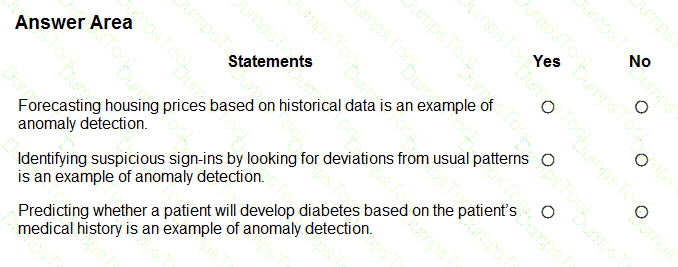
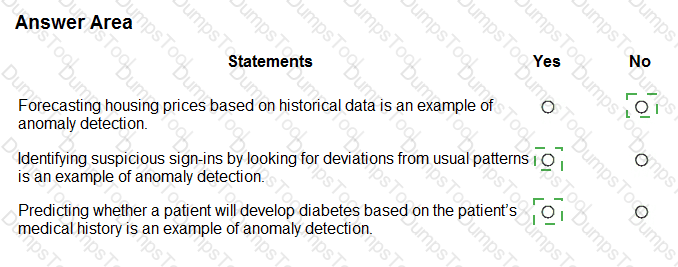
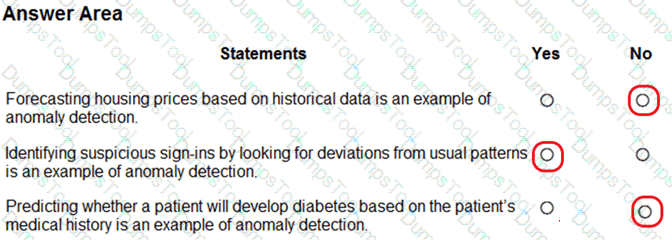
For each of the following statements, select Yes if the statement is true. Otherwise, select No.
NOTE: Each correct selection is worth one point.


Box 1: No
Box 2: Yes
Box 3: Yes
Anomaly detection encompasses many important tasks in machine learning:
Identifying transactions that are potentially fraudulent.
Learning patterns that indicate that a network intrusion has occurred.
Finding abnormal clusters of patients.
Checking values entered into a system.
Which two resources can you use to analyze code and generate explanations of code function and code comments? Each correct answer presents a complete solution.
NOTE: Each correct answer is worth one point.
the Azure OpenAI DALL-E model
the Azure OpenAI Whisper model
the Azure OpenAI GPT-4 model
the GitHub Copilot service
The correct answers are C. the Azure OpenAI GPT-4 model and D. the GitHub Copilot service.
According to the Microsoft Azure AI Fundamentals (AI-900) curriculum and Microsoft Learn documentation on Azure OpenAI and GitHub Copilot, both GPT-4 and GitHub Copilot can be used to analyze and generate explanations for code functionality, as well as produce or refine code comments.
Azure OpenAI GPT-4 model (C):The GPT-4 model is a large language model (LLM) developed by OpenAI and available through the Azure OpenAI Service. It is trained on vast amounts of text, including programming languages, documentation, and natural language instructions. This enables it to interpret source code, explain what it does, suggest optimizations, and automatically generate detailed code comments. When prompted with code snippets, GPT-4 can provide structured natural language explanations describing the logic and intent of the code. In enterprise scenarios, developers use Azure OpenAI GPT models for code understanding, review automation, and documentation generation.
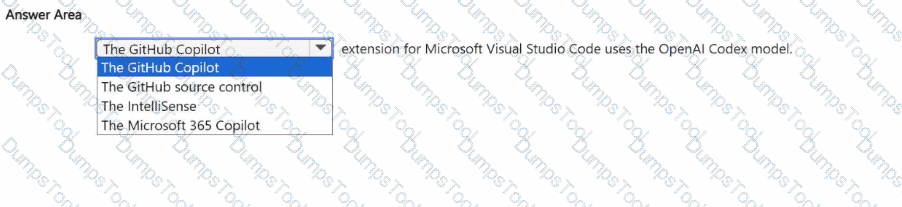
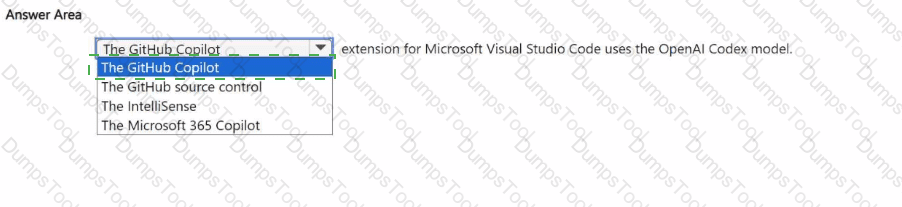
GitHub Copilot service (D):GitHub Copilot, powered by OpenAI Codex, is an AI coding assistant integrated into IDEs such as Visual Studio Code. It can analyze code context and generate inline comments and explanations in real time. GitHub Copilot understands the syntax and intent of numerous programming languages and provides intelligent suggestions or explanations directly in the developer’s environment.
The other options are not suitable:
A. DALL-E is a generative image model for creating visual content, not text or code analysis.
B. Whisper is an automatic speech recognition (ASR) model used for converting speech to text, unrelated to code interpretation.
Therefore, based on the official Azure AI and GitHub documentation, the correct and verified answers are C. Azure OpenAI GPT-4 model and D. GitHub Copilot service.
Select the answer that correctly completes the sentence.


Privacy and security.
According to Microsoft’s Responsible AI Principles, implementing filters to block harmful or inappropriate content in a Generative AI chat solution demonstrates a commitment to the Privacy and Security principle. This principle ensures that AI systems are designed and operated in a way that protects users, their data, and society from harm.
When a chat system uses Generative AI models (like Azure OpenAI’s GPT-based services), there is a risk that the model might produce unsafe, offensive, or sensitive content. Microsoft addresses this through content filters and safety systems, which automatically detect and block violent, hate-based, or sexually explicit outputs. This is part of responsible deployment practices to ensure that user interactions remain safe, private, and compliant with ethical standards.
Implementing these filters aligns with the Privacy and Security principle because it:
Protects users from exposure to harmful or abusive content.
Ensures that conversations are safeguarded against malicious or unsafe use.
Upholds user trust by maintaining a safe digital environment for all participants.
Let’s briefly clarify why the other options are incorrect:
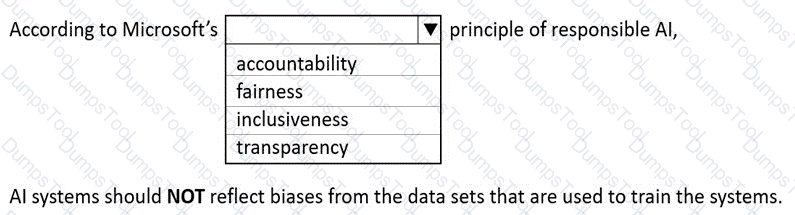
Fairness deals with ensuring unbiased treatment and equitable outcomes in AI decisions.
Transparency focuses on explaining how AI systems make decisions.
Accountability refers to human oversight and responsibility for AI actions.
Thus, content filtering mechanisms are explicitly an example of Privacy and Security, as they protect users and data from harm or misuse while maintaining ethical AI behavior.
Therefore, the verified correct answer is Privacy and security.
Which Azure Al Document Intelligence prebuilt model should you use to extract parties and jurisdictions from a legal document?
contract
layout
general document
read
Within Azure AI Document Intelligence (formerly Form Recognizer), the Contract prebuilt model is designed to extract key information from legal and business contracts, including parties, jurisdictions, dates, and terms. According to Microsoft Learn, this prebuilt model identifies structured entities such as contracting parties, effective dates, governing jurisdictions, and termination clauses.
Layout (B) extracts text, tables, and structure but does not identify semantic information such as parties or jurisdictions.
General document (C) extracts key-value pairs and entities but lacks domain-specific contract analysis.
Read (D) performs OCR (optical character recognition) to extract raw text but not contextual metadata.
Thus, when the requirement is to extract parties and jurisdictions from a legal document, the Contract model is the correct Azure AI Document Intelligence choice.
You need to build an app that will identify celebrities in images.
Which service should you use?
Azure OpenAI Service
Azure Machine Learning
conversational language understanding (CLU)
Azure Al Vision
According to the Microsoft Azure AI Fundamentals (AI-900) official learning path, the appropriate service for recognizing celebrities in images is Azure AI Vision (formerly Computer Vision). This service is part of Azure’s Cognitive Services suite and specializes in analyzing visual content using pretrained deep learning models. One of its built-in capabilities, as documented in Microsoft Learn: “Analyze images with Azure AI Vision”, includes object detection, face detection, and celebrity recognition.
The Azure AI Vision Analyze API can detect and identify thousands of objects, brands, and celebrities. When an image is submitted to the service, the model compares detected faces to a known database of public figures and returns metadata including celebrity names, confidence scores, and bounding box coordinates. This makes it ideal for applications that need to recognize well-known individuals automatically—such as media cataloging, content tagging, or entertainment apps.
The other options are incorrect:
A. Azure OpenAI Service provides generative AI and language models (like GPT-4), but it cannot analyze image content directly in the context of AI-900 fundamentals.
B. Azure Machine Learning is for custom model training and deployment, not a prebuilt vision recognition service.
C. Conversational Language Understanding (CLU) processes natural language input, not images.
Therefore, the correct service for identifying celebrities in images is D. Azure AI Vision.
Select the answer that correctly completes the sentence


According to the Microsoft Azure AI Fundamentals (AI-900) official study guide and Microsoft Learn module “Identify features of Computer Vision workloads on Azure”, Object Detection is a specific computer vision capability used to identify and locate multiple types of objects within a single image. Unlike image classification, which assigns one label to an entire image, object detection identifies individual objects, their categories, and their positions using bounding boxes or polygons.
In practical terms, Object Detection combines two key outputs:
Classification – recognizing what the object is (for example, “car”, “person”, “dog”).
Localization – determining where the object appears in the image by drawing bounding boxes around it.
This technology is commonly used in scenarios such as traffic monitoring (detecting vehicles and pedestrians), retail shelf analysis (detecting products and inventory levels), and manufacturing quality control (identifying defective parts).
Microsoft’s Azure Cognitive Services – Custom Vision includes a dedicated Object Detection domain, which allows developers to train custom models to recognize multiple object types within a single image. The service uses deep learning techniques, particularly convolutional neural networks (CNNs), to process pixel patterns and spatial relationships for accurate detection.
For contrast:
Image Classification identifies only the overall category of an image (e.g., “This is a cat”).
Image Description generates captions summarizing the visual content (e.g., “A cat sitting on a couch”).
Optical Character Recognition (OCR) detects and extracts text from images, not physical objects.
Therefore, per the official AI-900 learning content and Azure documentation, when the goal is to identify multiple types of items within a single image, the correct AI workload is Object Detection.
You need to convert handwritten notes into digital text.
Which type of computer vision should you use?
optical character recognition (OCR)
object detection
image classification
facial detection
According to the Microsoft Azure AI Fundamentals (AI-900) study guide and Microsoft Learn documentation on Azure AI Vision, OCR is a computer vision technology that detects and extracts printed or handwritten text from images, scanned documents, or photographs. The OCR feature in Azure AI Vision can analyze images containing handwritten notes, recognize the characters, and convert them into machine-readable digital text.
This process is ideal for digitizing handwritten meeting notes, forms, or classroom materials. OCR works by identifying text regions in an image, segmenting characters or words, and then applying language models to interpret them correctly. Azure’s OCR capabilities support multiple languages and can handle varied handwriting styles.
Other options are incorrect because:
B. Object detection identifies and locates objects (like cars, animals, or furniture) within an image, not text.
C. Image classification assigns an image to a predefined category (e.g., “dog” or “cat”) rather than extracting text.
D. Facial detection detects or recognizes human faces, not written text.
Therefore, to convert handwritten notes into digital text, the correct computer vision technique is Optical Character Recognition (OCR).
To complete the sentence, select the appropriate option in the answer area.


In the Microsoft Azure AI Fundamentals (AI-900) and Azure Machine Learning (AML) learning paths, deploying a real-time inference pipeline refers to making a trained machine learning model available as a web service that can process incoming data and return predictions instantly. To achieve this, the model must be deployed to an infrastructure capable of handling continuous, low-latency requests with high reliability and scalability.
Microsoft’s official guidance from Azure Machine Learning documentation specifies that:
For testing or development, you can deploy to Azure Container Instances (ACI) because it provides a lightweight, temporary environment suitable for small-scale or non-production workloads.
For production-grade, real-time inference, the deployment should be made to Azure Kubernetes Service (AKS).
AKS provides enterprise-level scalability, load balancing, and high availability, which are critical for serving real-time predictions to multiple consumers simultaneously. It manages containerized applications using Kubernetes orchestration, allowing the model to scale automatically based on traffic demands.
Azure Machine Learning Compute is mainly used for model training and batch inference pipelines, not real-time endpoints. A local web service is typically used only for debugging or offline testing on a developer machine and cannot be shared for external consumption.
Therefore, when deploying a real-time inference pipeline as a service for others to consume, the correct and Microsoft-verified option is Azure Kubernetes Service (AKS). This environment ensures production readiness, secure endpoint management, and scalability for live AI applications, fully aligning with best practices outlined in the Azure Machine Learning designer documentation and AI-900 exam objectives.
https://docs.microsoft.com/en-us/azure/machine-learning/concept-designer#deploy
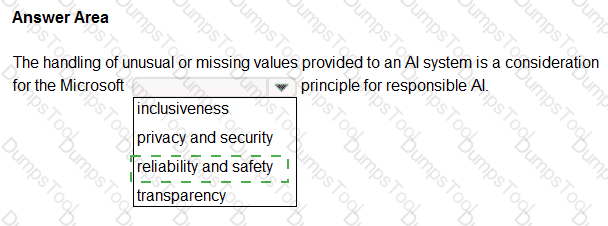
Select the answer that correctly completes the sentence


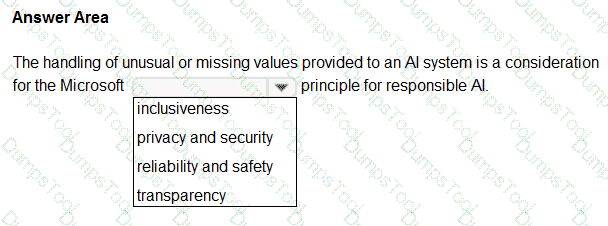
According to the Microsoft Azure AI Fundamentals (AI-900) official study guide and Microsoft’s Responsible AI Framework, the Reliability and Safety principle ensures that AI systems operate consistently, accurately, and as intended, even when confronted with unexpected data or edge cases. It emphasizes that AI systems must be tested, validated, and monitored to ensure stable performance and to prevent harm caused by inaccurate or unreliable outputs.
In the given scenario, the AI system is designed not to provide predictions when key fields contain unusual or missing values. This approach demonstrates that the system is built to avoid unreliable or unsafe outputs that could result from incomplete or corrupted data. Microsoft explicitly outlines that reliable AI systems must handle data anomalies and input validation properly to prevent incorrect predictions.
Here’s how the other options differ:
Inclusiveness ensures accessibility for all users, including those with disabilities or from different backgrounds. It’s unrelated to prediction control or data reliability.
Privacy and Security protects sensitive data and ensures proper handling of personal information, not system prediction logic.
Transparency ensures that users understand how an AI system makes its decisions but doesn’t address prediction reliability.
Thus, stopping a prediction when data is incomplete or abnormal directly supports the Reliability and Safety principle — it ensures that the AI model functions correctly under valid conditions and avoids unintended or harmful outcomes.
This principle aligns with Microsoft’s Responsible AI guidance, which highlights that AI solutions must “operate reliably and safely, even under unexpected conditions, to protect users and maintain trust.”
You need to provide content for a business chatbot that will help answer simple user queries.
What are three ways to create question and answer text by using Azure Al Language Service ' s question answering? Each correct answer presents a complete solution.
NOTE: Each correct and ask questions by selection is worth one point.
Connect the bot to the Cortana channel using Cortana.
Import chit-chat content from a predefined data source.
Manually enter the questions and answers.
Use Azure Machine Learning Automated ML to train a model based on a file that contains question and answer pairs.
Generate the questions and answers from an existing webpage.
The correct answers are B. Import chit-chat content from a predefined data source, C. Manually enter the questions and answers, and E. Generate the questions and answers from an existing webpage.
According to Microsoft Learn and the Azure AI Fundamentals (AI-900) study guide, the Question Answering feature of the Azure AI Language Service (formerly part of QnA Maker) allows developers to create a knowledge base (KB) that enables a chatbot to answer common questions automatically. This knowledge base can be built in three main ways:
Import chit-chat content (B):Azure provides predefined chit-chat datasets that can be imported to make a bot more conversational and natural. This includes small talk such as greetings, acknowledgments, and polite responses (for example, “How are you?” → “I’m doing great, thanks!”). Importing this content enriches the bot’s personality and improves user engagement.
Manually enter questions and answers (C):Developers can manually add pairs of questions and answers directly into the question answering knowledge base. This approach is suitable for custom FAQs or domain-specific content. It gives complete control over how each question is phrased and what answer is returned, ensuring high precision and clarity.
Generate questions and answers from an existing webpage (E):Azure AI Language can automatically extract Q & A pairs from a website’s FAQ or support page. This is done by providing the webpage URL to the service, which scans the page and builds a knowledge base from the detected questions and corresponding answers.
The other options are incorrect:
A (Cortana channel) relates to bot deployment, not knowledge creation.
D (Automated ML) is used for predictive modeling, not for building Q & A datasets.
Thus, the verified correct answers are B, C, and E.
For a machine learning progress, how should you split data for training and evaluation?
Use features for training and labels for evaluation.
Randomly split the data into rows for training and rows for evaluation.
Use labels for training and features for evaluation.
Randomly split the data into columns for training and columns for evaluation.
https://docs.microsoft.com/en-us/azure/machine-learning/algorithm-module-reference/split-data
The correct answer is B. Randomly split the data into rows for training and rows for evaluation.
According to the Microsoft Azure AI Fundamentals (AI-900) official study guide and the Microsoft Learn module “Describe fundamental principles of machine learning on Azure”, the process of developing a machine learning model involves dividing the available dataset into two or more parts—commonly training data and evaluation (or testing) data. The goal is to ensure that the model can learn patterns from one subset of the data (training set) and then be objectively tested on unseen data (evaluation set) to measure how well it generalizes to new situations.
The training dataset contains both features (the measurable inputs) and labels (the target outputs). The model learns from the patterns and relationships between these features and labels. The evaluation dataset also contains features and labels, but it is kept separate during the training phase. Once the model has been trained, it is tested on this unseen evaluation data to calculate metrics like accuracy, precision, recall, or F1 score.
Microsoft emphasizes that the data split should be random and based on rows, not columns. Each row represents a complete observation (for example, one customer record, one transaction, or one image). Randomly splitting ensures that both subsets represent the same distribution of data, avoiding bias. Splitting by columns would separate features themselves, which would make the model training invalid.
The AI-900 materials often illustrate this using Azure Machine Learning’s data preparation workflow, where data is randomly divided (commonly 70% for training and 30% for testing). This ensures the model learns from diverse examples and is fairly evaluated.
Therefore, the verified and correct approach, as per Microsoft’s official guidance, is B. Randomly split the data into rows for training and rows for evaluation.
When training a model, why should you randomly split the rows into separate subsets?
to train the model twice to attain better accuracy
to train multiple models simultaneously to attain better performance
to test the model by using data that was not used to train the model
When training a machine learning model, it is standard practice to randomly split the dataset into training and testing subsets. The purpose of this is to evaluate how well the model generalizes to unseen data. According to the AI-900 study guide and Microsoft Learn module “Split data for training and evaluation”, this ensures that the model is trained on one portion of the data (training set) and evaluated on another (test or validation set).
The correct answer is C. to test the model by using data that was not used to train the model.
Random splitting prevents data leakage and overfitting, which occur when a model memorizes patterns from the training data instead of learning generalizable relationships. By testing on unseen data, developers can assess true performance, ensuring that predictions will be accurate on future, real-world data.
Options A and B are incorrect because:
A. Train the model twice does not improve accuracy; model accuracy depends on data quality, feature engineering, and algorithm choice.
B. Train multiple models simultaneously refers to model comparison, not the purpose of splitting data.
Thus, the correct reasoning is that random splitting provides a reliable estimate of the model’s predictive power on new data.
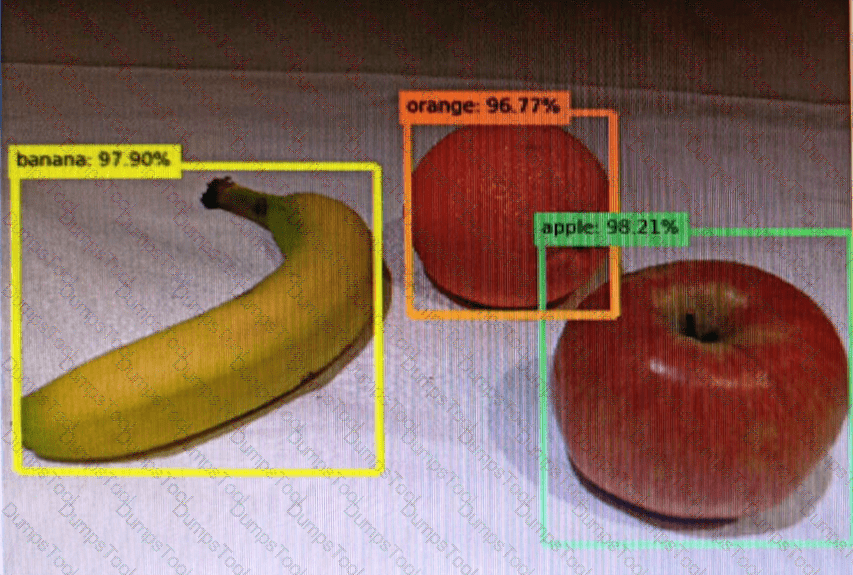
You send an image to a Computer Vision API and receive back the annotated image shown in the exhibit.

Which type of computer vision was used?
object detection
semantic segmentation
optical character recognition (OCR)
image classification
Object detection is similar to tagging, but the API returns the bounding box coordinates (in pixels) for each object found. For example, if an image contains a dog, cat and person, the Detect operation will list those objects together with their coordinates in the image. You can use this functionality to process the relationships between the objects in an image. It also lets you determine whether there are multiple instances of the same tag in an image.
The Detect API applies tags based on the objects or living things identified in the image. There is currently no formal relationship between the tagging taxonomy and the object detection taxonomy. At a conceptual level, the Detect API only finds objects and living things, while the Tag API can also include contextual terms like " indoor " , which can ' t be localized with bounding boxes.
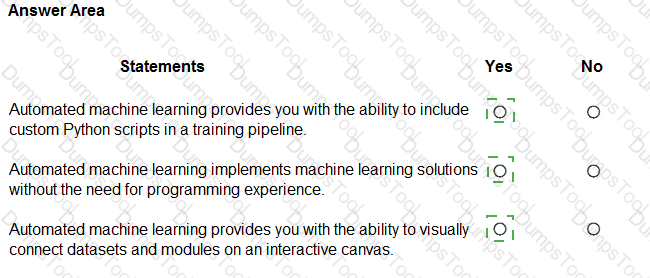
For each of the following statements, select Yes if the statement is true. Otherwise, select No.
NOTE: Each correct selection is worth one point.


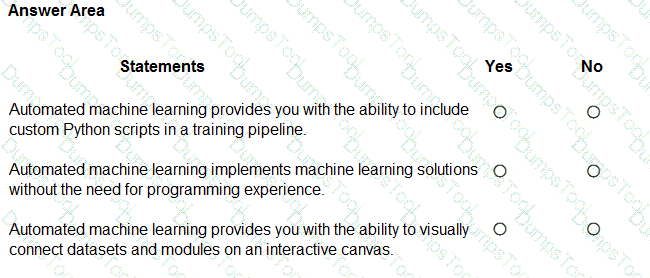
According to the Microsoft Azure AI Fundamentals (AI-900) study guide and Azure Machine Learning documentation, Automated Machine Learning (AutoML) is a feature designed to help users build, train, and tune machine learning models automatically without requiring deep knowledge of programming or data science.
First Statement: “Automated machine learning provides you with the ability to include custom Python scripts in a training pipeline.”This is False (No). AutoML automates the model selection and tuning process but does not allow the inclusion of custom Python scripts within its workflow. Custom Python integration is supported in Azure Machine Learning designer pipelines or SDK-based training, not in AutoML.
Second Statement: “Automated machine learning implements machine learning solutions without the need for programming experience.”This is True (Yes). One of AutoML’s core benefits is that it enables non-programmers to train and evaluate models by simply selecting data, choosing a target column, and letting Azure automatically test algorithms and hyperparameters. This aligns with Microsoft’s AI-900 objective to democratize AI development.
Third Statement: “Automated machine learning provides you with the ability to visually connect datasets and modules on an interactive canvas.”This is False (No). That feature belongs to Azure Machine Learning Designer, not AutoML. The designer offers a drag-and-drop visual interface for connecting datasets and modules, whereas AutoML provides a wizard-driven approach focused on automation.
For each of the following statements, select Yes If the statement is true. Otherwise, select No.
NOTE: Each correct selection is worth one point.


Location of a damaged product → Yes
Multiple instances of the same product → Yes
Multiple types of damaged products → Yes
All three statements are Yes, because they correctly describe the capabilities of object detection, one of the major workloads in computer vision, as defined in the Microsoft Azure AI Fundamentals (AI-900) study guide and Microsoft Learn module: “Describe features of computer vision workloads on Azure.”
Object detection is an advanced computer vision technique that allows AI systems not only to classify objects within an image but also to locate them by drawing bounding boxes around each detected object. This differentiates it from simple image classification, which only identifies what objects exist in an image without specifying their locations.
Identifying the location of a damaged product – YesAccording to Microsoft Learn, object detection can return the coordinates or bounding boxes for recognized objects. Therefore, if the model is trained to detect damaged products, it can pinpoint exactly where those defects appear within an image.
Identifying multiple instances of a damaged product – YesObject detection models can detect multiple objects of the same class in one image. For instance, if an image contains several damaged products, each will be identified and marked individually. This feature supports tasks such as automated quality inspection in manufacturing, where several defective units may appear simultaneously.
Identifying multiple types of damaged products – YesObject detection can also distinguish different classes of objects. When trained on multiple labels (e.g., cracked, scratched, or broken items), the model can detect and classify each type of damage in one image.
In Microsoft’s AI-900 framework, object detection is presented as a critical part of computer vision workloads capable of locating and classifying multiple objects and categories within visual content.
What is a form of unsupervised machine learning?
multiclass classification
clustering
binary classification
regression
As outlined in the AI-900 study guide and Microsoft Learn’s “Explore fundamental principles of machine learning” module, clustering is a core example of unsupervised machine learning.
In unsupervised learning, the model is trained on data without labeled outcomes. The goal is to discover patterns or groupings naturally present in the data. Clustering algorithms, such as K-means, DBSCAN, or Hierarchical clustering, analyze similarities among data points and group them into clusters. For example, clustering can group customers by purchasing behavior or segment products by shared characteristics — all without predefined labels.
Supervised learning, by contrast, uses labeled data (input-output pairs) to train a model that predicts outcomes. This includes:
A. Multiclass classification – Predicts more than two categories (e.g., classifying images as dog, cat, or bird).
C. Binary classification – Predicts two categories (e.g., spam vs. not spam).
D. Regression – Predicts continuous numeric values (e.g., price prediction).
Therefore, the only option representing unsupervised learning is clustering, which enables data discovery without predefined labels.
Which Azure Cognitive Services service can be used to identify documents that contain sensitive information?
Custom Vision
Conversational Language Understanding
Form Recognizer
According to the Microsoft Azure AI Fundamentals (AI-900) official study materials and Microsoft Learn module “Identify features of common AI workloads,” the Azure Form Recognizer service is part of Azure Cognitive Services for Document Intelligence. It enables organizations to extract, analyze, and identify information from structured and unstructured documents, including sensitive or confidential data such as names, addresses, financial figures, and identification numbers.
Form Recognizer uses optical character recognition (OCR) combined with machine learning to automatically extract key-value pairs, tables, and text fields from documents like invoices, receipts, contracts, and forms. It can be customized to identify and classify documents that contain specific sensitive data, allowing businesses to automate compliance and data governance tasks.
By contrast:
A. Custom Vision is used for image classification and object detection — it analyzes visual data, not document content.
B. Conversational Language Understanding (formerly LUIS) identifies intent and entities in text conversations, not document structure or sensitive data.
Form Recognizer is explicitly mentioned in the AI-900 course as the tool for document analysis and extraction. It can even integrate with Azure Cognitive Search or Azure Purview for further data management and compliance workflows.
Therefore, the verified and correct answer, aligned with Microsoft’s official training content, is C. Form Recognizer, as it is the Azure Cognitive Service capable of identifying and processing documents containing sensitive information.
For each of the following statements, select Yes if the statement is true. Otherwise, select No.
NOTE: Each correct selection is worth one point.


This question evaluates understanding of fundamental machine learning concepts as covered in the Microsoft Azure AI Fundamentals (AI-900) official study guide and Microsoft Learn module “Explore the machine learning process.” These statements relate to data labeling, model evaluation practices, and performance metrics—three essential parts of building and assessing a machine learning model.
Labelling is the process of tagging training data with known values → YesAccording to Microsoft Learn, “Labeling is the process of tagging data with the correct output value so the model can learn relationships between inputs and outputs.” This is essential for supervised learning, where models require historical data with known outcomes. For example, if training a model to recognize fruit images, each image is labeled as “apple,” “banana,” or “orange.” Hence, this statement is true.
You should evaluate a model by using the same data used to train the model → NoThe AI-900 guide stresses that using the same data for both training and evaluation can cause overfitting, where the model performs well on training data but poorly on unseen data. Instead, the dataset is split into training and testing (or validation) subsets. Evaluation must use test data that the model has never seen before to ensure an unbiased measure of performance. Therefore, this statement is false.
Accuracy is always the primary metric used to measure a model’s performance → NoMicrosoft Learn emphasizes that accuracy is only one metric and not always the best choice. Depending on the problem type, other metrics such as precision, recall, F1-score, or AUC (Area Under the Curve) may be more appropriate—especially in cases with imbalanced datasets. For example, in fraud detection, recall may be more important than accuracy. Thus, this statement is false.
Which action can be performed by using the Azure Al Vision service?
identifying breeds of animals in live video streams
extracting key phrases from documents
extracting data from handwritten letters
creating thumbnails for training videos
The Azure AI Vision service (formerly Computer Vision) is designed to analyze visual content in images and videos. According to Microsoft Learn’s “Describe features of computer vision workloads,” Azure AI Vision can identify objects, people, text, and scenes, and even classify images or detect objects in real time.
Identifying breeds of animals in live video streams is an example of image classification or object detection—core capabilities of Azure AI Vision. The Vision service can analyze each frame in a video, recognize animals, and classify them according to known categories, making this the correct answer.
The other options are incorrect:
B. Extracting key phrases from documents → Done by Azure AI Language (Text Analytics).
C. Extracting data from handwritten letters → Done by Azure AI Document Intelligence (Form Recognizer) using OCR.
D. Creating thumbnails for training videos → While possible in Azure Media Services, it’s not a primary Azure AI Vision function.
Thus, the best answer is A. Identifying breeds of animals in live video streams.
Match the tool to the Azure Machine Learning task.
To answer, drag the appropriate tool from the column on the left to its tasks on the right. Each tool may be used once, more than once, or not at all
NOTE: Each correct match is worth one point.


The correct matching aligns directly with the Microsoft Azure AI Fundamentals (AI-900) official study guide and Microsoft Learn modules under “Identify features of Azure Machine Learning”. Azure Machine Learning provides a suite of tools that serve different functions within the model development lifecycle — from creating workspaces, to training models, to automating experimentation.
The Azure portal → Create a Machine Learning workspace.The Azure portal is a web-based graphical interface for managing all Azure resources. According to Microsoft Learn, you use the portal to create and configure the Azure Machine Learning workspace, which acts as the central environment where datasets, experiments, models, and compute resources are organized. Creating a workspace through the portal involves specifying a subscription, resource group, and region — tasks that are part of the setup stage rather than model development.
Machine Learning designer → Use a drag-and-drop interface used to train and deploy models.The Machine Learning designer (formerly “Azure ML Studio (classic)”) provides a visual, no-code/low-code interface for building, training, and deploying machine learning pipelines. The designer uses a drag-and-drop workflow where users connect modules representing data transformations, model training, and evaluation. This tool is ideal for beginners and those who want to quickly experiment with machine learning concepts without writing code.
Automated machine learning (Automated ML) → Use a wizard to select configurations for a machine learning run.Automated ML simplifies model creation by automatically selecting algorithms, hyperparameters, and data preprocessing options. Users interact through a guided wizard (within the Azure Machine Learning studio) that walks them through configuration steps such as selecting datasets, target columns, and performance metrics. The system then iteratively trains and evaluates multiple models to recommend the best-performing one.
Together, these tools streamline the machine learning workflow:
Azure portal for setup and resource management,
Machine Learning designer for visual model creation, and
Automated ML for guided, automated model selection and tuning.
Select the answer that correctly completes the sentence.


The correct answer is Azure AI Language, which includes the Question Answering capability (previously known as QnA Maker). According to the Microsoft Azure AI Fundamentals (AI-900) study guide and Microsoft Learn documentation, the Azure AI Language service can be used to create a knowledge base from frequently asked questions (FAQ) and other structured or semi-structured text sources.
This service allows developers to build intelligent applications that can understand and respond to user questions in natural language by referencing prebuilt or custom knowledge bases. The Question Answering feature extracts pairs of questions and answers from documents, websites, or manually entered data and uses them to construct a searchable knowledge base. This knowledge base can then be integrated with Azure Bot Service or other conversational platforms to create interactive, self-service chatbots.
Here’s how it works:
Developers upload FAQ documents, URLs, or structured content.
Azure AI Language processes the content and identifies logical question-answer pairs.
The model stores these pairs in a knowledge base that can be queried by user input.
When users ask questions, the model finds the best matching answer using natural language understanding techniques.
In contrast:
Azure AI Document Intelligence (Form Recognizer) is used to extract structured data from forms and documents, not to create FAQ knowledge bases.
Azure AI Bot Service is for managing and deploying conversational bots but does not generate knowledge bases.
Microsoft Bot Framework SDK provides tools for building conversational logic but still requires a knowledge source like Question Answering from Azure AI Language.
Therefore, the service that can create a knowledge base from FAQ content is Azure AI Language.
For each of the following statements, select Yes if the statement is true. Otherwise, select No.
NOTE: Each correct selection is worth one point.


Yes, Yes, and No.
According to the Microsoft Azure AI Fundamentals (AI-900) official study materials and the Microsoft Learn module “Identify features of natural language processing (NLP) workloads on Azure”, the Azure Translator service is a cloud-based AI service within Azure Cognitive Services that provides real-time text translation across multiple languages.
“You can use the Translator service to translate text between languages.” – Yes.This is the core function of the Translator service. It takes text as input in one language and returns it in another using advanced neural machine translation models. This aligns with the AI-900 learning objective: “Describe the capabilities of Azure Cognitive Services for language”, which specifically names Azure Translator as the service used to perform automatic text translation. The service supports over 100 languages and dialects, offering both single-sentence and document-level translations.
“You can use the Translator service to detect the language of a given text.” – Yes.This statement is also true. The Translator service automatically detects the source language if it is not specified in the request. This feature is documented in the Azure Translator API, where the system identifies the input language before performing translation. The AI-900 exam content emphasizes this as one of the Translator service’s built-in capabilities—language detection for untagged text.
“You can use the Translator service to transcribe audible speech into text.” – No.This is not a function of Translator. Transcription (converting speech to text) is a speech AI workload, handled by the Azure Speech Service, not Translator. The Speech-to-Text capability in Azure Cognitive Services processes spoken audio input and returns the text transcription. The Translator service only works with text input, not direct audio.
Therefore, based on official AI-900 guidance, the verified configuration is:
✅ Yes – for text translation
✅ Yes – for language detection
❌ No – for speech transcription.
This aligns precisely with the AI-900 learning outcomes describing Text Translation and Language Detection as Translator capabilities, and Speech Transcription as part of the separate Speech service.
You are processing photos of runners in a race.
You need to read the numbers on the runners ' shirts to identify the runners in the photos. Which type of computer vision should you use?
image classification
optical character recognition (OCR)
object detection
facial recognition
The correct answer is B. Optical Character Recognition (OCR).
Optical Character Recognition (OCR) is a feature of Azure AI Vision that converts printed or handwritten text within images into machine-readable text. In this scenario, the goal is to read runner numbers on shirts from race photos. OCR can identify and extract these numbers, allowing them to be associated with specific participants.
Option analysis:
A. Image classification: Categorizes entire images (e.g., “runner,” “crowd”), not text.
B. Optical Character Recognition (OCR) — ✅ Correct. Extracts alphanumeric text from images.
C. Object detection: Identifies and locates objects (e.g., shoes, cars) but doesn’t read text.
D. Facial recognition: Identifies individuals by matching facial features to known identities, not by reading numbers.
Therefore, to read and extract runner numbers from photos, the correct computer vision technique is Optical Character Recognition (OCR).
You need to provide customers with the ability to query the status of orders by using phones, social media, or digital assistants.
What should you use?
Azure Al Bot Service
the Azure Al Translator service
an Azure Al Document Intelligence model
an Azure Machine Learning model
According to the Microsoft Azure AI Fundamentals (AI-900) official study guide and Microsoft Learn module “Identify Azure services for conversational AI,” the Azure AI Bot Service is specifically designed to create intelligent conversational agents (chatbots) that can interact with users across multiple communication channels, such as web chat, social media, phone calls, Microsoft Teams, and digital assistants.
In this scenario, customers need the ability to query the status of their orders through various interfaces — including voice and text platforms. Azure AI Bot Service enables this by integrating with Azure AI Language (for understanding natural language), Azure Speech (for speech-to-text and text-to-speech capabilities), and Azure Communication Services (for telephony or chat integration).
The bot can interpret user input like “Where is my order?” or “Check my delivery status,” call backend systems (such as an order database or API), and then respond appropriately to the user through the same communication channel.
Let’s analyze the incorrect options:
B. Azure AI Translator Service: Used for real-time text translation between languages; it doesn’t handle conversation logic or database queries.
C. Azure AI Document Intelligence model: Extracts data from structured and semi-structured documents (e.g., invoices, receipts), not user queries.
D. Azure Machine Learning model: Builds and deploys predictive models, but doesn’t provide conversational or multi-channel interaction capabilities.
Thus, for enabling multi-channel conversational experiences where customers can inquire about order statuses using voice, chat, or digital assistants, the most appropriate solution is Azure AI Bot Service, as outlined in Azure’s AI conversational workload documentation.
What are three stages in a transformer model? Each correct answer presents a complete solution.
NOTE: Each correct answer is worth one point.
object detection
embedding calculation
tokenization
next token prediction
anonymization
A transformer model is the foundational architecture behind many modern natural language processing systems such as GPT and BERT. It processes text data through multiple key stages. According to the Microsoft Azure AI Fundamentals (AI-900) curriculum and Microsoft Learn materials, the major stages of a transformer-based large language model are tokenization, embedding calculation, and next token prediction.
Tokenization (C) – The first step converts raw text into smaller units called tokens (words, subwords, or characters). This process allows the model to handle text in a structured numerical form rather than as raw language.
Embedding Calculation (B) – After tokenization, the tokens are mapped into high-dimensional numeric vectors, known as embeddings. These embeddings capture semantic relationships between words and phrases so that the model can understand context and meaning.
Next Token Prediction (D) – This stage is the heart of transformer operation, where the model predicts the next likely token in a sequence based on prior tokens. Repeated next-token predictions enable text generation, summarization, or translation.
Options A (object detection) and E (anonymization) are incorrect because they relate to vision and privacy workflows, not language modeling.
Select the answer that correctly completes the sentence.


The correct answer is Document Intelligence.
According to the Microsoft Azure AI Fundamentals (AI-900) study materials and Microsoft Learn documentation, the Azure AI Document Intelligence service (formerly known as Form Recognizer) is specifically designed to extract structured data from documents, including scanned invoices, receipts, forms, and business cards.
This service combines optical character recognition (OCR) with machine learning to analyze both the layout and semantic meaning of document content. When processing scanned invoices, Document Intelligence identifies and extracts fields such as invoice numbers, dates, totals, taxes, vendor names, and line-item details. The extracted information can then be automatically imported into business systems like accounting software or databases, eliminating manual data entry and improving operational efficiency.
Here’s why the other options are incorrect:
Generative AI: Focuses on creating new content such as text, images, or code (for example, using GPT-4 or DALL·E). It is not used for structured data extraction.
Natural Language Processing (NLP): Deals with understanding and generating human language from text-based input, not document scanning or layout interpretation.
The Document Intelligence workload excels at handling semi-structured documents where the location and format of data vary between samples. Microsoft’s prebuilt models—like Invoice, Receipt, Identity Document, and Contract—simplify extraction without requiring custom training.
In summary, if the task involves extracting data from scanned invoices, the appropriate Azure AI service is Azure AI Document Intelligence, which uses AI-powered document understanding to convert unstructured document images into structured, usable data.
For each of the following statements, select Yes if the statement is true. Otherwise, select No.
NOTE: Each correct selection is worth one point.


In Microsoft Azure AI Language Service, both Named Entity Recognition (NER) and Key Phrase Extraction are core features for text analytics. They serve distinct purposes in analyzing and structuring unstructured text data.
Named Entity Recognition (NER):NER is used to identify and categorize specific entities within text, such as people, organizations, locations, dates, times, and quantities. According to Microsoft Learn’s “Analyze text with Azure AI Language” module, NER scans text to extract these entities along with their types. Therefore, the statement “Named entity recognition can be used to retrieve dates and times in a text string” is True (Yes).
Key Phrase Extraction:This feature identifies the most important phrases or main topics in a block of text. It is useful for summarization or highlighting central ideas without classifying them into specific categories. Therefore, the statement “Key phrase extraction can be used to retrieve important phrases in a text string” is also True (Yes).
City Name Retrieval:While key phrase extraction highlights major phrases, it does not extract specific entities like cities or dates. Extracting such details requires Named Entity Recognition, which is designed to find named entities such as city names, people, or organizations. Hence, the statement “Key phrase extraction can be used to retrieve all the city names in a text string” is False (No).
For each of the following statements, select Yes if the statement is true. Otherwise, select No.
NOTE: Each correct selection is worth one point.


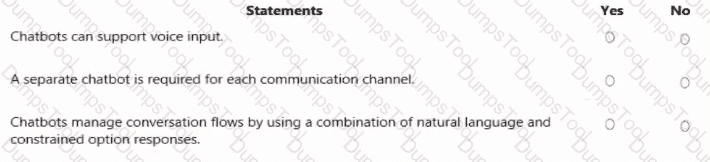
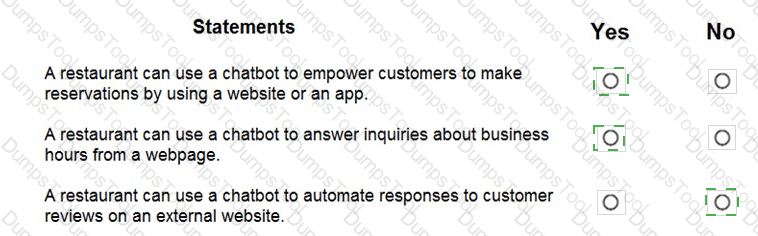
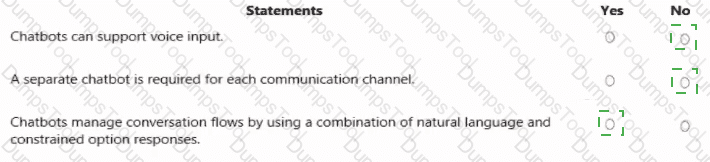
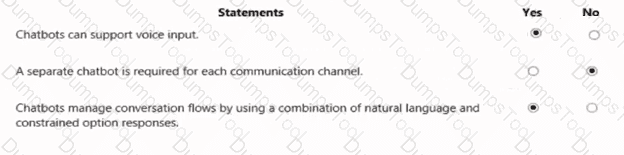
This question is derived from the Microsoft Azure AI Fundamentals (AI-900) learning module, particularly under “Describe features of conversational AI workloads on Azure.” It tests understanding of chatbot capabilities and design principles within the context of Azure Bot Service and Conversational AI.
Chatbots can support voice input – YesAccording to the AI-900 official materials, conversational AI systems such as chatbots can interact with users through text or voice. Using speech recognition services like Azure Cognitive Services Speech-to-Text, bots can interpret spoken input, and with Text-to-Speech, they can respond verbally. This enables voice-based chatbots used in virtual assistants, call centers, and customer support. Hence, voice input is fully supported by conversational AI solutions in Azure.
A separate chatbot is required for each communication channel – NoThe Azure Bot Service is designed to provide multi-channel communication from a single bot instance. A single chatbot can communicate across several channels such as Microsoft Teams, Web Chat, Slack, Facebook Messenger, and email without needing separate bots for each platform. This centralized design allows developers to create, deploy, and manage one bot while configuring multiple channel connections through the Azure portal. Therefore, the statement is false.
Chatbots manage conversation flows by using a combination of natural language and constrained option responses – YesIn Microsoft’s AI-900 training, chatbots are described as using Natural Language Processing (NLP) to understand free-form user input while also guiding interactions with predefined options such as buttons or quick replies. This hybrid approach ensures both flexibility and control, improving user experience and accuracy. Bots can interpret natural language via services like Language Understanding (LUIS) and also present structured options to guide conversations efficiently.
You have the Predicted vs. True chart shown in the following exhibit.

Which type of model is the chart used to evaluate?
classification
regression
clustering
What is a Predicted vs. True chart?
Predicted vs. True shows the relationship between a predicted value and its correlating true value for a regression problem. This graph can be used to measure performance of a model as the closer to the y=x line the predicted values are, the better the accuracy of a predictive model.
Which two actions can you perform by using the Azure OpenAI DALL-E model? Each correct answer presents a complete solution.
NOTE: Each correct answer is worth one point.
Create images.
Use optical character recognition (OCR).
Detect objects in images.
Modify images.
Generate captions for images.
The correct answers are A. Create images and D. Modify images.
The Azure OpenAI DALL-E model is a text-to-image generative AI model that can create original images and modify existing ones based on text prompts. According to Microsoft Learn and Azure OpenAI documentation, DALL-E interprets natural language descriptions to produce unique and creative visual content, making it useful for design, illustration, marketing, and educational applications.
Create images (A) – DALL-E can generate new images entirely from textual input. For example, the prompt “a futuristic city skyline at sunrise” would result in a custom-generated artwork that visually represents that description.
Modify images (D) – DALL-E also supports inpainting and outpainting, allowing users to edit or expand existing images. You can replace parts of an image (for example, changing a background or object) or add new elements consistent with the visual style of the original.
The remaining options are incorrect:
B. OCR is performed by Azure AI Vision, not DALL-E.
C. Detect objects in images is also an Azure AI Vision (Image Analysis) feature.
E. Generate captions for images is handled by Azure AI Vision, not DALL-E, since DALL-E generates—not interprets—visuals.
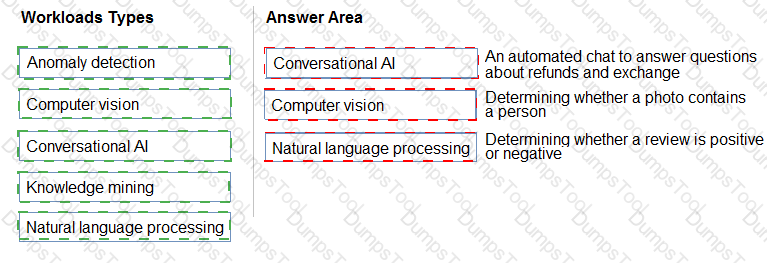
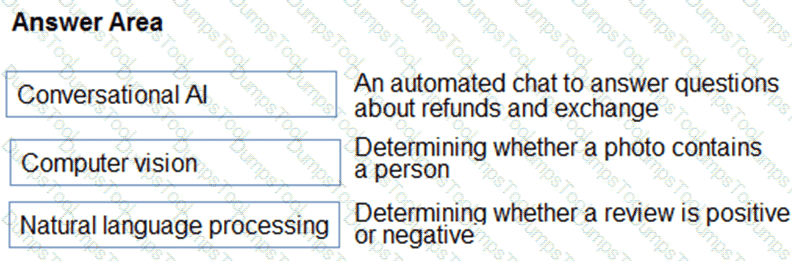
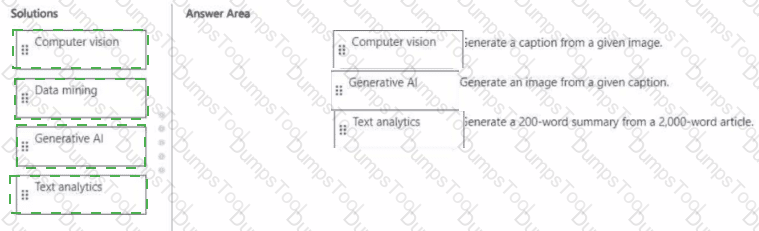
Match the types of AI workloads to the appropriate scenarios.
To answer, drag the appropriate workload type from the column on the left to its scenario on the right. Each workload type may be used once, more than once, or not at all.
NOTE: Each correct selection is worth one point.


Box 3: Natural language processing
Natural language processing (NLP) is used for tasks such as sentiment analysis, topic detection, language detection, key phrase extraction, and document categorization.
For each of The following statements, select Yes if the statement is true. Otherwise, select No.
NOTE: Each correct selection is worth one point.


The Azure AI Language service (part of Azure Cognitive Services) provides a set of natural language processing (NLP) capabilities designed to analyze and interpret text data. Its core features include language detection, key phrase extraction, sentiment analysis, and named entity recognition (NER).
Language Identification – YESAccording to the Microsoft Learn module “Analyze text with Azure AI Language,” one of the service’s built-in capabilities is language detection, which determines the language of a given text string (e.g., English, Spanish, or French). This allows applications to automatically adapt to multilingual input.
Handwritten Signature Detection – NOThe Azure AI Language service only processes text-based data; it does not analyze images or handwriting. Detecting handwritten signatures requires computer vision capabilities, specifically Azure AI Vision or Azure AI Document Intelligence, which can extract and interpret visual content from scanned documents or images.
Identifying Companies and Organizations – YESThe Named Entity Recognition (NER) feature within Azure AI Language can identify entities such as people, locations, dates, organizations, and companies mentioned in text. It tags these entities with categories, enabling structured analysis of unstructured data.
✅ Summary:
Language detection → Yes (supported by AI Language).
Handwritten signatures → No (requires Computer Vision).
Entity recognition for companies/organizations → Yes (supported by AI Language NER).
A smart device that responds to the question. " What is the stock price of Contoso, Ltd.? " is an example of which Al workload?
computer vision
anomaly detection
knowledge mining
natural language processing
The question describes a smart device that can understand and respond to a spoken or written question such as, “What is the stock price of Contoso, Ltd.?” This scenario directly maps to the Natural Language Processing (NLP) workload in Microsoft Azure AI.
According to the Microsoft AI Fundamentals (AI-900) study guide and the Microsoft Learn module “Describe features of common AI workloads,” NLP enables systems to understand, interpret, and generate human language. Azure AI Language and Azure Speech services are examples of NLP-based solutions.
In this case, the smart device performs several NLP tasks:
Speech recognition – converts spoken input into text.
Language understanding – interprets the user’s intent, i.e., retrieving the stock price of a specific company.
Response generation – formulates a meaningful answer that can be presented back as text or speech.
This process shows a full pipeline of natural language understanding (NLU) and conversational AI. It does not involve visual data (computer vision), data pattern analysis (anomaly detection), or document search (knowledge mining).
Hence, the correct AI workload is D. Natural Language Processing.
You plan to deploy an Azure Machine Learning model by using the Machine Learning designer
Which four actions should you perform in sequence? To answer, move the appropriate actions from the list of actions to the answer area and arrange them in the correct order.


According to the Microsoft Azure AI Fundamentals (AI-900) official study guide and the Microsoft Learn module “Identify features of common machine learning types”, the standard workflow for creating and deploying a machine learning model — especially within Azure Machine Learning Designer — follows a structured sequence of steps to ensure that the model is trained effectively and evaluated correctly.
Here’s the detailed breakdown of the correct order:
Import and prepare a dataset:This is always the first step in the machine learning lifecycle. The dataset is imported into Azure Machine Learning and cleaned or preprocessed. Preparation might include handling missing values, normalizing data, removing outliers, and encoding categorical variables. This ensures the dataset is ready for modeling.
Split the data randomly into training data and validation data:The dataset is then divided into two parts — the training set and the validation (or testing) set. Typically, around 70–80% of the data is used for training and 20–30% for validation. This step ensures that the model can be evaluated on unseen data later, preventing overfitting.
Train the model:During this stage, the machine learning algorithm learns patterns from the training data. Azure Machine Learning Designer provides multiple algorithms (classification, regression, clustering, etc.) that can be applied using “Train Model” components.
Evaluate the model against the validation dataset:Finally, the trained model’s performance is tested using the validation dataset. Evaluation metrics such as accuracy, precision, recall, or RMSE (depending on the model type) are calculated to assess how well the model generalizes to new data.
The incorrect option — “Evaluate the model against the original dataset” — is not used in proper ML workflows, because evaluating on the same data used for training would give misleadingly high accuracy due to overfitting.
You need to build an app that will read recipe instructions aloud to support users who have reduced vision.
Which version service should you use?
Text Analytics
Translator Text
Speech
Language Understanding (LUIS)
According to the Microsoft Azure AI Fundamentals (AI-900) official study guide and the Microsoft Learn module “Identify features of speech capabilities in Azure Cognitive Services”, the Azure Speech service provides functionality for converting text to spoken words (speech synthesis) and speech to text (speech recognition).
In this scenario, the app must read recipe instructions aloud to assist users with visual impairments. This task is achieved through speech synthesis, also known as text-to-speech (TTS). The Azure Speech service uses advanced neural network models to generate natural-sounding voices in many languages and accents, making it ideal for accessibility scenarios such as screen readers, virtual assistants, and educational tools.
Microsoft Learn defines Speech service as a unified offering that includes:
Speech-to-text (speech recognition): Converts spoken words into text.
Text-to-speech (speech synthesis): Converts written text into natural-sounding audio output.
Speech translation: Translates spoken language into another language in real time.
Speaker recognition: Identifies or verifies a person based on their voice.
The other options do not fit the requirements:
A. Text Analytics – Performs text-based natural language analysis such as sentiment, key phrase extraction, and entity recognition, but it cannot produce audio output.
B. Translator Text – Translates text between languages but does not generate speech output.
D. Language Understanding (LUIS) – Interprets user intent from text or speech for conversational bots but does not read text aloud.
Therefore, based on the AI-900 curriculum and Microsoft Learn documentation, the correct service for converting recipe text to spoken audio is the Azure Speech service.
✅ Final Answer: C. Speech
Which Azure Al Language feature can be used to retrieve data, such as dates and people ' s names, from social media posts?
language detection
speech recognition
key phrase extraction
entity recognition
The Azure AI Language service provides several NLP features, including language detection, key phrase extraction, sentiment analysis, and named entity recognition (NER).
When you need to extract specific data points such as dates, names, organizations, or locations from unstructured text (for example, social media posts), the correct feature is Entity Recognition.
Entity Recognition identifies and classifies information in text into predefined categories like:
Person names (e.g., “John Smith”)
Organizations (e.g., “Contoso Ltd.”)
Dates and times (e.g., “October 22, 2025”)
Locations, events, and quantities
This capability helps transform unstructured textual data into structured data that can be analyzed or stored.
Option analysis:
A (Language detection): Determines the language of a text (e.g., English, French).
B (Speech recognition): Converts spoken audio to text; not applicable here.
C (Key phrase extraction): Identifies important phrases or topics but not specific entities like names or dates.
D (Entity recognition): Correctly extracts names, dates, and other specific data from text.
Hence, the accurate feature for this scenario is D. Entity Recognition.
You have a website that includes customer reviews.
You need to store the reviews in English and present the reviews to users in their respective language by recognizing each user’s geographical location.
Which type of natural language processing workload should you use?
translation
language modeling
key phrase extraction
speech recognition
According to the Microsoft Azure AI Fundamentals (AI-900) syllabus and Microsoft Learn module “Describe features of natural language processing (NLP) workloads on Azure,” translation is a core NLP workload that converts text from one language into another while maintaining meaning and context.
In this scenario, the website stores reviews in English and must present them in the user’s native language based on geographical location. This directly requires a translation workload, which uses Azure Cognitive Services — specifically, the Translator service — to automatically translate content dynamically for each user.
Other options explained:
B. Language modeling involves predicting the next word in a sentence or understanding linguistic patterns; it’s used in model training, not translation.
C. Key phrase extraction identifies main ideas in text, not language conversion.
D. Speech recognition converts spoken words into written text but does not perform translation or handle geographic adaptation.
Microsoft’s Translator service supports real-time text translation, multi-language detection, and context preservation, making it ideal for global websites. The AI-900 study guide emphasizes translation as one of the most common NLP workloads, enabling applications to break language barriers and enhance accessibility for diverse audiences.
Therefore, based on official Microsoft Learn material, the correct answer is:
✅ A. translation.
For each of the following statements, select Yes if the statement is true. Otherwise, select No.
NOTE; Each correct selection is worth one point.


According to the Microsoft Azure AI Fundamentals (AI-900) official study guide and Microsoft Learn modules on machine learning concepts, ensuring that the accuracy of a predictive model can be proven requires data partitioning—specifically splitting the available data into training and testing datasets. This is a foundational concept in supervised machine learning.
When you split the data, typically about 70–80% of the dataset is used for training the model, while the remaining 20–30% is used for testing (or validation). The reason behind this approach is to ensure that the model’s performance metrics—such as accuracy, precision, recall, and F1-score—are evaluated on data the model has never seen before. This prevents overfitting and allows you to demonstrate that the model generalizes well to new, unseen data.
In the AI-900 Microsoft Learn content under “Describe the machine learning process”, it is explained that after cleaning and transforming the data, the next essential step is data splitting to “evaluate model performance objectively.” By keeping training and testing data separate, you can prove the reliability and accuracy of the model’s predictions, which is particularly crucial in sensitive domains like clinical or healthcare analytics, where decision transparency and validation are vital.
Option A (Train the model by using the clinical data) is incorrect because you should not train and evaluate on the same data—it would lead to biased results.
Option C (Train the model using automated ML) is incorrect because automated ML is a method for training and tuning, but it doesn’t inherently prove accuracy.
Option D (Validate the model by using the clinical data) is also incorrect if you use the same dataset for validation and training—it would not prove true accuracy.
Therefore, per Microsoft’s official AI-900 study content, the verified correct answer is B. Split the clinical data into two datasets.
You need to make the press releases of your company available in a range of languages.
Which service should you use?
Translator Text
Text Analytics
Speech
Language Understanding (LUIS)
The Translator Text service (part of Azure Cognitive Services) provides real-time text translation across multiple languages. According to Microsoft Learn’s AI-900 module on “Identify features of Natural Language Processing (NLP) workloads”, translation is one of the four main NLP tasks, alongside key phrase extraction, sentiment analysis, and language understanding.
In this scenario, the company wants to make press releases available in a range of languages, which requires converting text from one language to another while preserving meaning and tone. The Translator Text API supports more than 100 languages and can be integrated into web apps, chatbots, or content management systems for automatic multilingual publishing.
The other options perform different functions:
Text Analytics (B) extracts insights such as key phrases or sentiment but does not translate.
Speech (C) focuses on converting between speech and text, not text translation.
Language Understanding (LUIS) (D) identifies user intent but does not perform translation.
Therefore, to provide multilingual press releases, the appropriate service is A. Translator Text, which ensures accurate, fast, and scalable translation across global audiences.
Which AI service can you use to interpret the meaning of a user input such as “Call me back later?”
Translator Text
Text Analytics
Speech
Language Understanding (LUIS)
According to the Microsoft Azure AI Fundamentals (AI-900) learning content, Language Understanding Intelligent Service (LUIS) is part of Azure Cognitive Services used to interpret the meaning or intent behind a user’s input in natural language. When a user says, “Call me back later,” the system must recognize that the user intends for a call to be scheduled or delayed—this is not just about translating or analyzing text but understanding intent and relevant entities.
LUIS allows developers to train models to identify intents (such as ScheduleCall, CancelMeeting, etc.) and extract key entities (like names, times, or actions) from text inputs. It is typically integrated with conversational agents such as Azure Bot Service, enabling more natural, human-like interactions.
Other options do not fit the scenario:
Translator Text (A) translates text between languages but does not interpret meaning.
Text Analytics (B) performs sentiment analysis, key phrase extraction, and named entity recognition, but it doesn’t identify intent.
Speech (C) converts spoken language to text or text to speech but doesn’t interpret what the words mean.
Therefore, for understanding user intent such as “Call me back later,” the correct AI service is D. Language Understanding (LUIS).
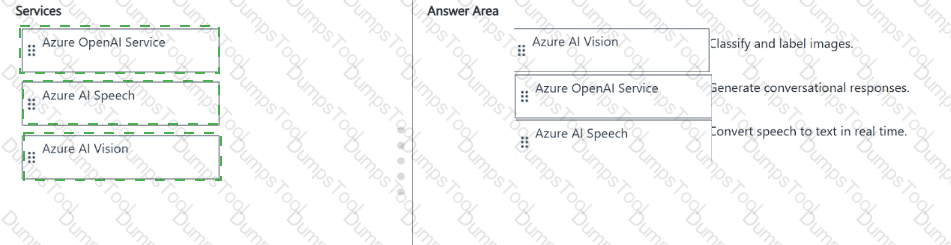
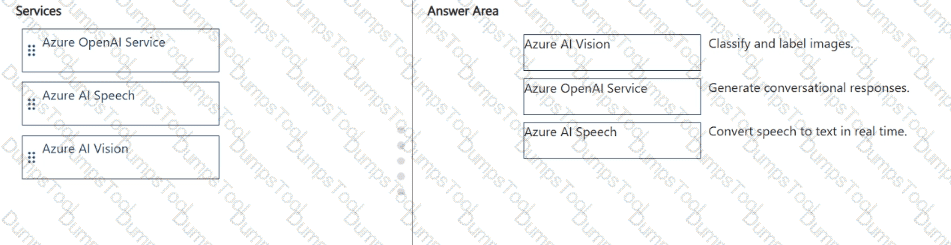
Match the computer vision service to the appropriate Al workload.
To answer, drag the appropriate service from the column on the left to its workload on the right. Each service may be used once, more than once, or not at all.
NOTE: Each correct match is worth one point.



This question evaluates understanding of the different Azure AI Computer Vision services and their distinct functionalities, as covered in the Microsoft AI-900 study guide and Microsoft Learn modules under “Describe features of common AI workloads” and “Identify Azure services for computer vision.”
Azure AI Document Intelligence (formerly known as Form Recognizer):This service is designed to extract structured information from documents, such as forms, receipts, and invoices. It uses optical character recognition (OCR) combined with AI models to detect key-value pairs, tables, and handwritten text. This makes it ideal for automating data entry and digitizing scanned documents. Hence, it matches “Extract information from scanned forms and invoices.”
Azure AI Vision (formerly Computer Vision):This service provides image and video analysis capabilities. It can detect objects, people, text, and scenes; generate image captions; and extract descriptive tags. It also supports OCR for printed and handwritten text within images. Therefore, it matches “Analyze images and video, and extract descriptions, tags, objects, and text.”
Azure AI Custom Vision:Custom Vision allows you to train your own image classification and object detection models using your own labeled images. Unlike the general Vision service, Custom Vision lets you build domain-specific models—for example, detecting your company’s products or identifying manufacturing defects. Hence, it matches “Train custom image classification and object detection models by using your own images.”
These three services complement each other within Azure’s computer vision ecosystem, collectively supporting both general-purpose and specialized AI solutions for visual data analysis.
You need to identify harmful content in a generative Al solution that uses Azure OpenAI Service.
What should you use?
Face
Video Analysis
Language
Content Safety
According to the Microsoft Azure AI Fundamentals (AI-900) curriculum and Azure OpenAI documentation, the appropriate service for detecting and managing harmful, unsafe, or inappropriate content in text, images, or other generative AI outputs is Azure AI Content Safety.
Azure AI Content Safety is designed to automatically detect potentially harmful material such as hate speech, violence, self-harm, sexual content, or profanity. It ensures that generative AI applications like chatbots, image generators, and content creation tools comply with Microsoft’s Responsible AI principles — specifically Reliability & Safety and Accountability.
This service integrates directly with the Azure OpenAI Service, meaning that when developers build AI solutions using models like GPT-4 or DALL·E, they can use Content Safety to filter and moderate both input prompts and model outputs. This protects users from unsafe or offensive content generation.
Let’s analyze why the other options are incorrect:
A. Face – The Face service detects and analyzes human faces in images or videos. It is unrelated to moderating harmful textual or generative content.
B. Video Analysis – This service analyzes video streams to detect objects, actions, or events but not inappropriate or harmful text or imagery from AI models.
C. Language – The Azure AI Language service focuses on text understanding tasks like sentiment analysis, entity recognition, and translation, not content safety filtering.
Therefore, per Microsoft Learn’s official AI-900 guidance, when identifying or filtering harmful content in a generative AI solution built with Azure OpenAI, the correct and verified service to use is Azure AI Content Safety.
Select the answer that correctly completes the sentence.


According to the Microsoft Azure AI Fundamentals (AI-900) official study guide and Microsoft Learn module “Identify features of common machine learning types”, regression is a supervised machine learning technique used to predict continuous numerical values based on one or more input features. In this scenario, the task is to predict a vehicle’s miles per gallon (MPG)—a continuous numeric value—based on several measurable factors such as weight, engine power, and other specifications.
Regression models learn the mathematical relationship between input variables (independent features) and a numeric target variable (dependent outcome). Common regression algorithms include linear regression, decision tree regression, and support vector regression. In the example, the model would analyze historical data of vehicles and learn patterns that map characteristics (like engine size, horsepower, and weight) to fuel efficiency. Once trained, it can predict the MPG for a new vehicle configuration.
The other options describe different problem types:
Classification predicts discrete categories (for example, whether a car is “fuel efficient” or “not fuel efficient”), not continuous values.
Clustering is an unsupervised learning method that groups data points based on similarities without predefined labels, not predictive modeling.
Anomaly detection identifies data points that significantly deviate from normal patterns, such as detecting engine sensor failures or fraudulent transactions.
Since predicting MPG involves estimating a numeric value within a continuous range, regression is the most appropriate model type.
In summary, per AI-900 training content, regression models are used when the output variable is numeric, classification for categorical outputs, and clustering for pattern discovery. Therefore, predicting miles per gallon based on vehicle features is a textbook example of a regression problem in Azure Machine Learning.
You have a dataset that contains the columns shown in the following table.

You have a machine learning model that predicts the value of ColumnE based on the other numeric columns.
Which type of model is this?
regression
analysis
clustering
The dataset described contains numeric columns (ColumnA through ColumnE). The model’s task is to predict the value of ColumnE based on the other numeric columns (A–D). This is a classic regression problem.
According to the Microsoft Azure AI Fundamentals (AI-900) study guide and Microsoft Learn module “Identify common types of machine learning,” a regression model is used when the target variable (the value to predict) is continuous and numeric, such as price, temperature, or—in this case—a numerical value in ColumnE.
Regression models analyze relationships between independent variables (inputs: Columns A–D) and a dependent variable (output: ColumnE) to predict a continuous outcome. Common regression algorithms include linear regression, decision tree regression, and neural network regression.
Option analysis:
A. Regression: ✅ Correct. Used for predicting numerical, continuous values.
B. Analysis: ❌ Incorrect. “Analysis” is a general term, not a machine learning model type.
C. Clustering: ❌ Incorrect. Clustering is unsupervised learning, grouping similar data points, not predicting values.
Therefore, the type of machine learning model used to predict ColumnE (a numeric value) from other numeric columns is Regression, which fits perfectly within Azure’s supervised learning models.
For each of the following statements, select Yes if the statement is true. Otherwise, select No.
NOTE: Each correct selection is worth one point.
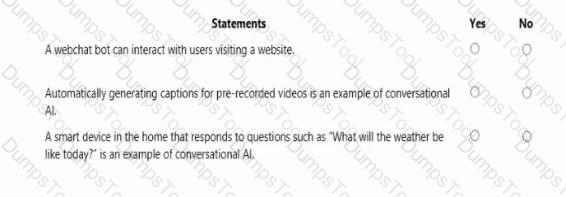


This question tests understanding of Microsoft’s six guiding principles for Responsible AI, which are: fairness, reliability and safety, privacy and security, inclusiveness, transparency, and accountability. These principles, as described in the Microsoft Azure AI Fundamentals (AI-900) study guide and Microsoft Learn Responsible AI module, help ensure that AI systems are developed and used ethically and responsibly.
Transparency – Yes:Transparency means users should understand how and why an AI system makes certain decisions. Providing an explanation of the outcome of a credit loan application clearly supports transparency because it helps customers know the reasoning behind approval or rejection. According to Microsoft Learn, transparency ensures that “AI systems are understandable by users and stakeholders,” especially in sensitive applications such as finance and credit scoring. Thus, the first statement is Yes.
Reliability and Safety – Yes:The reliability and safety principle ensures AI systems perform consistently, safely, and as intended, even in complex or high-risk environments. A triage bot that prioritizes insurance claims based on injury type aligns with this principle—it must be accurate, dependable, and safe to ensure claims are processed correctly and not influenced by errors or faulty algorithms. Microsoft teaches that AI should be “reliable under expected and unexpected conditions” to prevent harm or misjudgment. Therefore, this statement is Yes.
Inclusiveness – No:Inclusiveness focuses on ensuring AI systems empower and benefit all users, especially those with different abilities or backgrounds. Offering an AI solution at different prices across sales territories is a business decision, not an ethical or inclusiveness principle issue. It does not relate to accessibility or equal participation of diverse users. Therefore, this final statement is No.
Which term is used to describe uploading your own data to customize an Azure OpenAI model?
completion
grounding
fine -tuning
prompt engineering
In Azure OpenAI Service, fine-tuning refers to the process of uploading your own labeled dataset to customize or adapt a pretrained model (such as GPT-3.5 or Curie) for a specific use case. According to the Microsoft Learn documentation and AI-900 official study guide, fine-tuning allows organizations to improve a model’s performance on domain-specific tasks or to align responses with brand tone and context.
Fine-tuning differs from simple prompting because it requires providing structured training data (usually in JSONL format) that contains pairs of input prompts and ideal completions. The model uses this data to adjust its internal weights, thereby “learning” your organization’s language patterns, terminology, or industry context.
Option review:
A. Completion: Refers to the text generated by a model in response to a prompt. It’s the output, not the customization process.
B. Grounding: Integrates external, up-to-date data sources (like search results or databases) during inference but doesn’t alter the model’s parameters.
C. Fine-tuning: ✅ Correct — this is the process of uploading and training with your own data.
D. Prompt engineering: Involves designing effective prompts but does not change the underlying model.
Thus, fine-tuning is the term used for customizing an Azure OpenAI model using your own uploaded data.
You have the following dataset.

You plan to use the dataset to train a model that will predict the house price categories of houses.
What are Household Income and House Price Category? To answer, select the appropriate option in the answer area.
NOTE: Each correct selection is worth one point.


In machine learning, especially within the Microsoft Azure AI Fundamentals (AI-900) framework, datasets used for supervised learning are composed of features (inputs) and labels (outputs). According to the Microsoft Learn module “Explore the machine learning process”, a feature is any measurable property or attribute used by the model to make predictions, whereas a label is the actual value or category the model is trying to predict.
Household Income → FeatureA feature (also known as an independent variable) represents the input data that the machine learning algorithm uses to detect patterns or correlations. In this dataset, Household Income is a numeric value that influences the prediction of house price categories. During training, the model learns how variations in household income correlate with changes in the house price category. Microsoft Learn defines features as “the attributes or measurable inputs that are used to train the model.” Thus, Household Income serves as a predictive input or feature.
House Price Category → LabelThe label (or dependent variable) represents the output the model aims to predict. It is the known result during training that helps the algorithm learn correct mappings between features and outcomes. In this scenario, House Price Category—which can take values such as “Low,” “Middle,” or “High”—is the classification outcome that the model will predict based on household income (and possibly other variables). According to Microsoft Learn, “the label is the variable that contains the known values that the model is trained to predict.”
In summary, the dataset defines a supervised learning classification problem, where Household Income is the feature (input) and House Price Category is the label (output) that the model will learn to predict.
You need to predict the animal population of an area.
Which Azure Machine Learning type should you use?
clustering
classification
regression
According to the AI-900 official study materials, regression is a type of supervised machine learning used to predict continuous numeric values. Predicting the animal population of an area involves estimating a numeric quantity, which makes regression the appropriate model type.
Microsoft Learn defines regression workloads as predicting real-valued outputs, such as:
Forecasting sales or demand.
Predicting housing prices.
Estimating resource usage or population sizes.
In contrast:
Classification predicts discrete categories (e.g., “cat” or “dog”).
Clustering groups data into similar clusters but doesn’t produce numeric predictions.
Therefore, because the task requires predicting a numerical population size, the verified answer is C. Regression, as per Microsoft’s AI-900 official guidelines.
Your company is exploring the use of voice recognition technologies in its smart home devices. The company wants to identify any barriers that might unintentionally leave out specific user groups.
This an example of which Microsoft guiding principle for responsible AI?
accountability
fairness
inclusiveness
privacy and security
According to the Microsoft Azure AI Fundamentals (AI-900) Official Study Guide and the Microsoft Responsible AI Framework, Inclusiveness is one of the six guiding principles for responsible AI. The principle of inclusiveness ensures that AI systems are designed to empower everyone and engage people of all abilities. Microsoft emphasizes that inclusive AI systems must be developed with awareness of potential barriers that could unintentionally exclude certain user groups. This directly aligns with the scenario described—where the company is examining voice recognition technologies in smart home devices to identify barriers that might leave out users, such as those with speech impairments, accents, or language differences.
The official Microsoft Learn module “Identify guiding principles for responsible AI” explains that inclusiveness focuses on creating systems that can understand and serve users with diverse needs. For example, voice recognition models should account for variations in dialect, tone, accent, and speech patterns to ensure equitable access for all. A lack of inclusiveness could cause bias or misrecognition for underrepresented groups, leading to unintentional exclusion.
Microsoft’s guidance further stresses that designing for inclusiveness involves involving diverse users in the data collection and testing phases, conducting accessibility assessments, and continuously improving model performance across different demographic groups. In this way, inclusiveness promotes fairness, accessibility, and usability across cultural and physical differences.
In contrast:
A. Accountability is about ensuring humans are responsible for AI outcomes.
B. Fairness focuses on preventing bias and discrimination in data or algorithms.
D. Privacy and security ensure protection of personal data and secure handling of information.
Thus, evaluating potential barriers that could exclude specific user groups exemplifies Inclusiveness, as it demonstrates a proactive approach to making AI accessible and beneficial for all users.
You have an Azure Machine Learning model that predicts product quality. The model has a training dataset that contains 50,000 records. A sample of the data is shown in the following table.

For each of the following Statements, select Yes if the statement is true. Otherwise, select No.
NOTE: Each correct selection is worth one point.


This question tests the understanding of features and labels in machine learning, a core concept covered in the Microsoft Azure AI Fundamentals (AI-900) syllabus under “Describe fundamental principles of machine learning on Azure.”
In supervised machine learning, data is divided into features (inputs) and labels (outputs).
Features are the independent variables — measurable properties or characteristics used by the model to make predictions.
Labels are the dependent variables — the target outcome the model is trained to predict.
From the provided dataset, the goal of the Azure Machine Learning model is to predict product quality (Pass or Fail). Therefore:
Mass (kg) is a feature – Yes“Mass (kg)” represents an input variable used by the model to learn patterns that influence product quality. It helps the algorithm understand how variations in mass might correlate with passing or failing the quality test. Thus, it is correctly classified as a feature.
Quality Test is a label – YesThe “Quality Test” column indicates the outcome of the manufacturing process, marked as either Pass or Fail. This is the target the model tries to predict during training. In Azure ML terminology, this column is the label, as it represents the dependent variable.
Temperature (C) is a label – No“Temperature (C)” is an input that helps the model determine quality outcomes, not the outcome itself. It influences the quality result but is not the value being predicted. Therefore, temperature is another feature, not a label.
In conclusion, per Microsoft Learn and AI-900 study materials, features are measurable inputs (like mass and temperature), while the label is the target output (like the quality test result).
Match the Azure OpenAI large language model (LLM) process to the appropriate task.
To answer, drag the appropriate process from the column on the left to its task on the right. Each process may be used once, more than once, or not at all.
NOTE: Each correct match is worth one point.


According to the Microsoft Azure AI Fundamentals (AI-900) study material and Azure OpenAI Service documentation, large language models (LLMs) such as GPT are capable of performing multiple natural language processing (NLP) tasks depending on the intent of the prompt. These tasks generally fall into categories like classification, generation, summarization, and translation, each with a distinct purpose and output type.
Classifying – This process involves analyzing text and assigning it to a predefined category or label based on its content. The scenario “Detect the genre of a work of fiction” clearly fits this category. The model must evaluate the text and determine whether it belongs to genres like mystery, romance, or science fiction. This is a classic text classification problem, as the output is a discrete category derived from textual features.
Summarizing – This process means condensing lengthy text into a shorter version that preserves the key information. In the scenario “Create a list of bullet points based on text input,” the model extracts essential information and reformats it as concise bullet points, which is an abstraction form of summarization. Summarization models help users quickly understand the main ideas from long documents, meeting efficiency and readability goals.
Generating – This refers to the LLM’s ability to produce new, creative content based on input instructions. The task “Create advertising slogans from a product description” represents generation because it requires the model to construct original text that didn’t previously exist. Generation tasks showcase the creativity and contextual fluency of models like GPT in marketing and content creation.
Thus, these mappings align directly with the Azure OpenAI LLM capabilities taught in AI-900, linking each NLP process with its most suitable real-world task.
For each of the following statements, select Yes if the statement is true. Otherwise, select No.
NOTE: Each correct selection is worth one point.


Yes, No, Yes.
According to the Microsoft Azure AI Fundamentals (AI-900) official study guide and the Microsoft Learn module “Identify capabilities of Azure Cognitive Services for Language”, the Azure Translator service is a cloud-based machine translation service used to translate text or entire documents between languages in real time. It uses REST APIs or client libraries to translate text input, detect languages, and support multiple target languages in a single request.
“The following service call will accept English text as an input and output Italian and French text: /translate?from=en & to=it,fr – Yes.This URL format is correct because the Translator service API allows multiple target languages to be specified in a single to parameter separated by commas. In this case, from=en defines the source language (English), and to=it,fr requests translations into Italian (it) and French (fr). The API would return results in both target languages simultaneously. This syntax is officially documented in Microsoft Learn as the valid format for multi-language translation.
“The following service call will accept English text as an input and output Italian and French text: /translate?from=en & to=fr & to=it – No.This format is incorrect, as the Translator API does not support repeating the to parameter multiple times. Only one to parameter is valid, and multiple target languages must be provided as a comma-separated list within the same to parameter.
“The Translator service can be used to translate documents from English to French.” – Yes.This statement is true. The Translator service supports both text translation and document translation. The document translation capability allows the translation of whole files such as Word, PowerPoint, or PDF documents while preserving formatting and structure. This feature is included in the official Translator API under “Document Translation.”
In summary, the AI-900 study content clarifies that:
✅ /translate?from=en & to=it,fr → Valid syntax
❌ /translate?from=en & to=fr & to=it → Invalid syntax
✅ Translator can translate full documents between languages
You plan to develop a bot that will enable users to query a knowledge base by using natural language processing.
Which two services should you include in the solution? Each correct answer presents part of the solution.
NOTE: Each correct selection is worth one point.
Language Service
Azure Bot Service
Form Recognizer
Anomaly Detector
According to the Microsoft Azure AI Fundamentals (AI-900) Official Study Guide and the Microsoft Learn module “Explore conversational AI in Microsoft Azure,” conversational bots are AI applications that can understand and respond to natural language inputs through text or speech. Building such a bot typically involves two key Azure services:
Azure Bot Service (Option B):This service provides the framework and infrastructure needed to create, test, and deploy intelligent chatbots that interact with users across multiple channels (webchat, Teams, email, etc.). It handles conversation flow, integration, and user message management.
Azure Language Service (Option A):This service powers the natural language understanding (NLU) capability of the bot. It enables the bot to interpret user input, extract intent, and query a knowledge base using Question Answering (formerly QnA Maker). This allows the bot to respond intelligently to user questions by finding the most relevant answers.
The other options are incorrect:
C. Form Recognizer is used for extracting structured data from documents like invoices or forms.
D. Anomaly Detector is used for identifying unusual patterns in time-series data.
Hence, to build a bot that understands and answers user questions in natural language, the solution must combine Azure Bot Service for conversation management and Azure Language Service for knowledge-based question answering and natural language understanding.
What are two metrics that you can use to evaluate a regression model? Each correct answer presents a complete solution.
NOTE: Each correct selection is worth one point.
coefficient of determination (R2)
F1 score
root mean squared error (RMSE)
area under curve (AUC)
balanced accuracy
A: R-squared (R2), or Coefficient of determination represents the predictive power of the model as a value between -inf and 1.00. 1.00 means there is a perfect fit, and the fit can be arbitrarily poor so the scores can be negative.
C: RMS-loss or Root Mean Squared Error (RMSE) (also called Root Mean Square Deviation, RMSD), measures the difference between values predicted by a model and the values observed from the environment that is being modeled.
Select the answer that correctly completes the sentence.


Clustering.
According to the Microsoft Azure AI Fundamentals (AI-900) official study guide and Microsoft Learn module “Identify features of common machine learning types”, clustering is an unsupervised machine learning technique used to group data points into distinct segments or clusters based on shared characteristics. Unlike supervised learning (classification or regression), clustering works with unlabeled data, discovering natural groupings without predefined outcomes.
In this question, Recency, Frequency, and Monetary (RFM) values are common marketing metrics used to evaluate customer behavior:
Recency – how recently a customer made a purchase.
Frequency – how often they make purchases.
Monetary – how much money they spend.
Using RFM analysis, a company can segment its customers into groups such as “loyal,” “occasional,” or “at-risk” buyers. This segmentation process does not rely on predefined labels but rather discovers patterns within the data — which is the defining characteristic of clustering.
In the AI-900 context, clustering is described as a method that “groups items with similar features so that items in the same group are more similar to each other than to those in other groups.” Common algorithms used include K-Means, Hierarchical Clustering, and DBSCAN, all available within Azure Machine Learning Designer and other Azure ML environments.
To clarify the incorrect options:
Classification is supervised learning used to predict discrete categories (e.g., yes/no, spam/not spam).
Regression predicts continuous numeric values (e.g., house prices).
Regularization is a model optimization technique, not a type of machine learning.
Therefore, when businesses use RFM values to identify customer segments without labeled outcomes, this is an application of unsupervised learning through clustering.
You are designing an AI system that empowers everyone, including people who have hearing, visual, and other impairments.
This is an example of which Microsoft guiding principle for responsible AI?
fairness
inclusiveness
reliability and safety
accountability
Inclusiveness: At Microsoft, we firmly believe everyone should benefit from intelligent technology, meaning it must incorporate and address a broad range of human needs and experiences. For the 1 billion people with disabilities around the world, AI technologies can be a game-changer.
You use drones to identify where weeds grow between rows of crops to send an Instruction for the removal of the weeds. This is an example of which type of computer vision?
scene segmentation
optical character recognition (OCR)
object detection
Object detection is similar to tagging, but the API returns the bounding box coordinates for each tag applied. For example, if an image contains a dog, cat and person, the Detect operation will list those objects together with their coordinates in the image.
You have an app that identifies birds in images. The app performs the following tasks:
* Identifies the location of the birds in the image
* Identifies the species of the birds in the image
Which type of computer vision does each task use? To answer, select the appropriate options in the answer area.
NOTE: Each correct selection is worth one point.
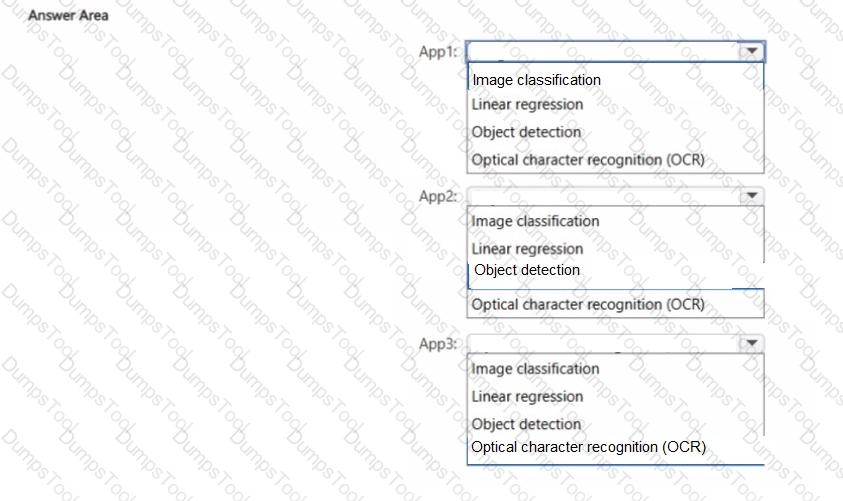


According to the Microsoft Azure AI Fundamentals (AI-900) Official Study Guide and the Microsoft Learn module “Explore computer vision in Microsoft Azure,” there are multiple types of computer vision tasks, each designed for different goals such as recognizing, categorizing, or locating objects within an image.
In this question, the application performs two distinct tasks: locating birds within an image and identifying their species. Each of these corresponds to a different type of computer vision capability.
Locate the birds → Object detection
Object detection is used when an AI system needs to identify and locate multiple objects within a single image.
It not only recognizes what the object is but also provides bounding boxes that indicate the exact position of each object.
In this scenario, locating the birds (drawing rectangles around each bird) is achieved through object detection models, such as those available in the Azure Custom Vision Object Detection domain.
Identify the species of the birds → Image classification
Image classification focuses on identifying what is in the image rather than where it is.
It assigns a single label (or multiple labels in multilabel classification) to an entire image based on its contents.
In this case, determining the species of a bird (e.g., robin, eagle, parrot) is achieved through image classification, where the model compares visual features against learned patterns from training data.
Incorrect options:
Automated captioning generates descriptive sentences about an image, not object locations or classifications.
Optical character recognition (OCR) extracts text from images, irrelevant in this case.
Select the answer that correctly completes the sentence.


Azure Kubernetes Service (AKS).
According to the Microsoft Azure AI Fundamentals (AI-900) official study guide and Microsoft Learn documentation on Azure Machine Learning, the Azure Kubernetes Service is commonly used to host and deploy machine learning models, including Automated ML models, into production environments. Once a model is trained using Azure Machine Learning (Azure ML), it must be deployed as a web service endpoint so it can receive data and return predictions.
Azure ML offers two primary options for hosting and deploying models:
Azure Kubernetes Service (AKS) – for high-scale, production-grade deployments that require fast response times, high availability, and scalability.
Azure Container Instances (ACI) – for testing or low-scale workloads where cost and simplicity are more important than performance.
AKS provides a managed Kubernetes cluster that allows for automated container orchestration, load balancing, scaling, and monitoring of deployed machine learning models. When you use Automated ML in Azure ML Studio, the generated model can be containerized and deployed directly to AKS, making it accessible as a REST API endpoint. This enables applications, systems, or users to send data and receive predictions in real time.
The other options serve different purposes:
Azure Data Factory is used for data integration and pipeline orchestration, not model hosting.
Azure Automation focuses on automating administrative tasks and runbooks, not ML deployment.
Azure Logic Apps is used to automate workflows and integrate services, not to serve ML models.
Therefore, the correct service to host automated machine learning (AutoML) models in production is Azure Kubernetes Service (AKS), as it provides a reliable, scalable, and secure environment for real-time inference and enterprise AI workloads.
Which Azure OpenAI model should you use to summarize the text from a document?
Whisper
DALL-E
Codex
GPT
According to the Microsoft Learn documentation and the Azure AI Fundamentals (AI-900) study guide, the GPT (Generative Pre-trained Transformer) family of models within Azure OpenAI Service is used for text-based natural language tasks, including summarization, content generation, and text completion.
When you need to summarize text from a document, GPT models (such as GPT-3.5 or GPT-4) can process large sections of text, extract the most relevant details, and generate concise summaries that retain the key meaning. The summarization task uses the model’s natural language understanding capabilities to identify core concepts and generate human-like, coherent text.
Other options are incorrect:
A. Whisper → Used for speech-to-text transcription, not text summarization.
B. DALL-E → Generates images from text prompts, not text summaries.
C. Codex → Specializes in code generation and completion, not document summarization.
For each of the following statements, select Yes if the statement is true. Otherwise, select No.
NOTE: Each correct selection is worth one point.
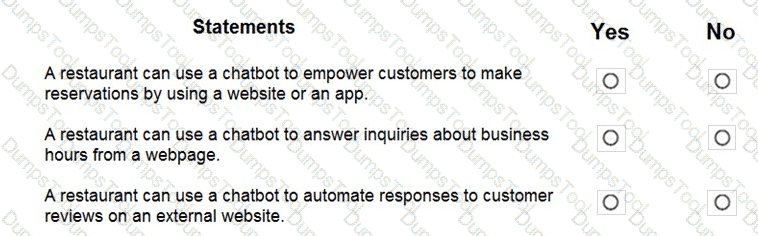


“The Azure OpenAI GPT-3.5 Turbo model can transcribe speech to text.” — NOThis statement is false. The GPT-3.5 Turbo model is a text-based large language model (LLM) designed for natural language understanding and generation, such as answering questions, summarizing text, or writing content. It does not process or transcribe audio input. Speech-to-text capabilities belong to Azure AI Speech Services, specifically the Speech-to-Text API, not Azure OpenAI.
“The Azure OpenAI DALL-E model generates images based on text prompts.” — YESThis statement is true. The DALL-E model, available within Azure OpenAI Service, is a generative AI model that creates original images from natural language descriptions (text prompts). For example, given a prompt like “a futuristic city at sunset,” DALL-E generates a unique, high-quality image representing that concept. This aligns with generative AI workloads in the AI-900 study guide, where DALL-E is specifically mentioned as an image-generation model.
“The Azure OpenAI embeddings model can convert text into numerical vectors based on text similarities.” — YESThis statement is also true. The embeddings model in Azure OpenAI converts text into multi-dimensional numeric vectors that represent semantic meaning. These embeddings enable tasks such as semantic search, recommendations, and text clustering by comparing similarity scores between vectors. Words or phrases with similar meanings have vectors close together in the embedding space.
In summary:
GPT-3.5 Turbo → Text generation (not speech-to-text)
DALL-E → Image generation from text prompts
Embeddings → Convert text into numerical semantic representations
Correct selections: No, Yes, Yes.
Match the types of computer vision to the appropriate scenarios.
To answer, drag the appropriate workload type from the column on the left to its scenario on the right. Each workload type may be used once, more than once, or not at all.
NOTE: Each correct selection is worth one point.
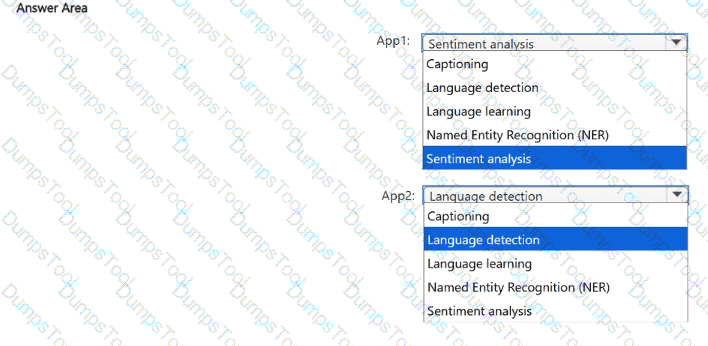

The correct mappings are based on the Microsoft Azure AI Fundamentals (AI-900) curriculum topic: “Describe features of computer vision workloads.” Microsoft divides computer vision tasks into key workload types — image classification, object detection, facial recognition, and optical character recognition (OCR) — each designed for specific visual analysis objectives.
Identify celebrities in images → Facial recognitionFacial recognition goes beyond simple face detection; it can identify or verify specific individuals by comparing facial features with known profiles. According to Microsoft Learn, the Face service in Azure Cognitive Services can detect, recognize, and identify people in photos or videos. Recognizing celebrities or known individuals is a prime example of facial recognition.
Extract movie title names from movie poster images → Optical Character Recognition (OCR)OCR is used to detect and extract text content from images, such as printed or handwritten words. Azure’s Computer Vision API uses OCR technology to read text in various languages from photos, scanned documents, or posters. Therefore, extracting movie titles or actor names from a poster image is a perfect use case for OCR.
Locate vehicles in images → Object detectionObject detection identifies and locates specific objects within an image, returning bounding boxes that indicate their positions. In Azure, the Custom Vision service or Computer Vision object detection models are used to detect multiple objects like vehicles, pedestrians, or animals in a single image.
Summary:
Facial recognition → Identifies specific people (celebrities)
OCR → Extracts text (movie titles)
Object detection → Finds and locates physical items (vehicles)
Thus, the verified and official answer is:
What is a use case for classification?
predicting how many cups of coffee a person will drink based on how many hours the person slept the previous night.
analyzing the contents of images and grouping images that have similar colors
predicting whether someone uses a bicycle to travel to work based on the distance from home to work
predicting how many minutes it will take someone to run a race based on past race times
According to the Microsoft Azure AI Fundamentals (AI-900) official study guide and Microsoft Learn module “Identify features of classification machine learning”, classification is a type of supervised machine learning used when the goal is to predict a categorical outcome. That means the output variable represents discrete labels such as Yes/No, True/False, or Category A/B/C.
In this example, the model is predicting whether a person uses a bicycle (Yes or No) — a binary categorical outcome. The input (distance from home to work) is numeric, but the prediction is a class or category, which makes it a classification problem.
To compare:
A and D (predicting how many cups of coffee or race minutes) involve numeric predictions, which are regression tasks.
B (grouping images by similar colors) involves clustering, an unsupervised learning method used to find natural groupings in data.
Thus, the use case that fits classification is predicting whether someone uses a bicycle, since the answer is categorical.
Select the .


The correct completion of the sentence is:
“You can use the Custom Vision service to train an object detection model by using your own images.”
According to the Microsoft Azure AI Fundamentals (AI-900) official study guide and Microsoft Learn module “Identify features of computer vision workloads,” the Azure Custom Vision service is a specialized component of Azure Cognitive Services for Vision that enables developers to train custom image classification or object detection models using their own labeled image datasets.
The Custom Vision service differs from the Computer Vision service in that it allows full customization — meaning you can upload your own images, tag them manually, and train the model to recognize objects specific to your use case (for example, detecting your company’s products, tools, or vehicles). Once trained, the model can identify and localize these objects in new images by returning bounding boxes and confidence scores, which is precisely what defines an object detection workload.
Microsoft’s AI-900 materials describe object detection as the process of identifying objects in an image and determining their position, typically represented by bounding boxes. Custom Vision supports two main project types:
Image Classification: Determines what is present in the image (e.g., “dog,” “cat,” “car”).
Object Detection: Identifies what is present and where it is located in the image.
In contrast:
Computer Vision provides prebuilt models for general image analysis but doesn’t allow custom model training.
Form Recognizer is used for extracting text and data from structured or semi-structured documents.
Azure Video Analyzer for Media focuses on video content analysis, not custom object detection.
Therefore, based on the official Microsoft AI-900 study guide and Microsoft Learn content, the verified and correct answer is Custom Vision, as it specifically allows training of a custom object detection model using your own images.
Select the answer that correctly completes the sentence.


In Azure Machine Learning Designer, the Dataset output visualization feature is specifically used to explore and understand the distribution of values in potential feature columns before model training begins. This capability is critical for data exploration and preprocessing, two essential stages of the machine learning pipeline described in the Microsoft Azure AI Fundamentals (AI-900) and Azure Machine Learning learning paths.
When a dataset is imported into Azure Machine Learning Designer, users can right-click on the dataset output port and select “Visualize”. This launches the dataset visualization pane, which provides detailed statistical summaries for each column, including:
Data type (numeric, categorical, string, Boolean)
Minimum, maximum, mean, and standard deviation values for numeric columns
Frequency counts and distinct values for categorical columns
Missing value counts
This visual inspection helps determine which columns should be used as features, which might need normalization or encoding, and which contain missing or irrelevant data. It is a vital step in ensuring the dataset is clean and ready for model training.
Let’s examine why other options are incorrect:
Normalize Data module is used to scale numeric data, not to visualize distributions.
Select Columns in Dataset module is used to include or exclude columns, not to analyze them.
Evaluation results visualization feature is used after model training to interpret performance metrics like accuracy or recall, not data distributions.
Therefore, based on official Microsoft documentation and AI-900 study materials, to explore the distribution of values in potential feature columns, you use the Dataset output visualization feature in Azure Machine Learning Designer.
Match the types of machine learning to the appropriate scenarios.
To answer, drag the appropriate machine learning type from the column on the left to its scenario on the right. Each machine learning type may be used once, more than once, or not at all.
NOTE: Each correct selection is worth one point.
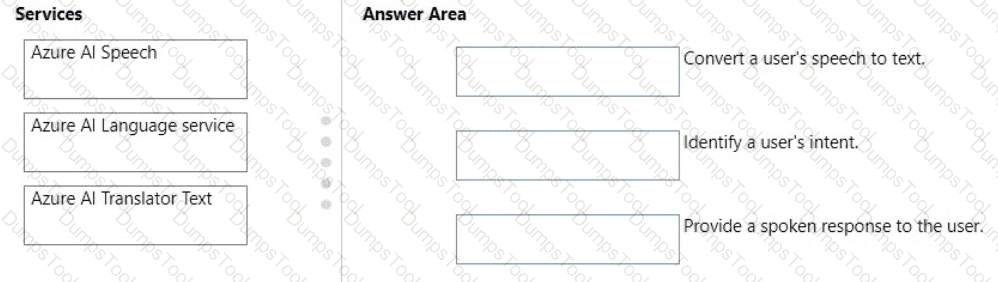


According to the Microsoft Azure AI Fundamentals (AI-900) official study guide and the Microsoft Learn module “Identify features of computer vision workloads on Azure”, computer vision models can perform different types of image analysis depending on the goal of the task. The main types include image classification, object detection, and semantic segmentation. Each method analyzes images at a different level of granularity.
Image Classification → Separate images of polar bears and brown bearsImage classification assigns an entire image to a specific category or label. The model analyzes the image as a whole and determines which predefined class it belongs to. For example, in this case, the model would look at the features of each image and decide whether it shows a polar bear or a brown bear. The Microsoft Learn materials define classification as “assigning an image to a specific category.”
Object Detection → Determine the location of a bear in a photoObject detection identifies where objects appear within an image by drawing bounding boxes around them. This type of model not only classifies what object is present but also provides its location. Microsoft Learn explains that object detection “detects and locates individual objects within an image.” For instance, the model can detect a bear in a forest scene and highlight its position.
Semantic Segmentation → Determine which pixels in an image are part of a bearSemantic segmentation is the most detailed form of image analysis. It classifies each pixel in an image according to the object it belongs to. In this scenario, the model identifies every pixel corresponding to the bear’s body. The AI-900 content defines this as “classifying every pixel in an image into a category.”
To summarize:
Image classification → Categorizes entire images.
Object detection → Locates and labels objects within images.
Semantic segmentation → Labels each pixel for precise object boundaries.
https://nanonets.com/blog/how-to-do-semantic-segmentation-using-deep-learning/
Match the Azure Cognitive Services service to the appropriate actions.
To answer, drag the appropriate service from the column on the left to its action on the right. Each service may he used once, more than once, or not at all.
NOTE: Each correct match is worth one point.


These matches are based on the Microsoft Azure AI Fundamentals (AI-900) Official Study Guide and the Microsoft Learn module “Explore Azure Cognitive Services.”
Microsoft Azure provides Cognitive Services that enable developers to integrate artificial intelligence capabilities—such as vision, speech, language understanding, and decision-making—into applications without requiring in-depth AI expertise.
Convert a user’s speech to text → Speech ServiceThe Azure Speech Service supports speech-to-text (STT) conversion, which transcribes spoken language into written text. This feature is commonly used in voice assistants, transcription systems, and voice-enabled apps. The service uses advanced speech recognition models to handle different accents, languages, and background noises.
Identify a user’s intent → Language ServiceThe Azure AI Language Service (which includes capabilities from LUIS – Language Understanding) is used to interpret what a user means or wants to achieve based on their words. It identifies intents (the goal or action behind the input) and entities (key pieces of information) from natural language text. This is a key component in conversational AI applications, allowing chatbots and virtual assistants to respond intelligently.
Provide a spoken response to the user → Speech ServiceThe Speech Service also supports text-to-speech (TTS) functionality, which converts textual responses into natural-sounding speech. This enables applications to communicate audibly with users, completing the conversational loop.
Translator Text is not used here because it’s primarily designed for language translation between different languages, not for speech recognition or intent understanding.
You need to scan the news for articles about your customers and alert employees when there is a negative article. Positive articles must be added to a press book.
Which natural language processing tasks should you use to complete the process? To answer, drag the appropriate tasks to the correct locations. Each task may be used once, more than once, or not at all. You may need to drag the split bar between panes or scroll to view content.
NOTE: Each correct selection is worth one point.
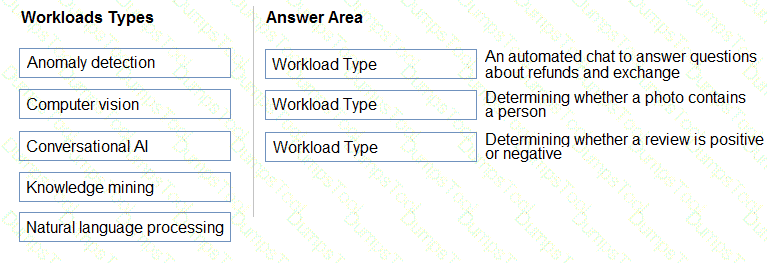


Box 1: Entity recognition
the Named Entity Recognition module in Machine Learning Studio (classic), to identify the names of things, such as people, companies, or locations in a column of text.
Named entity recognition is an important area of research in machine learning and natural language processing (NLP), because it can be used to answer many real-world questions, such as:
Which companies were mentioned in a news article?
Does a tweet contain the name of a person? Does the tweet also provide his current location?
Were specified products mentioned in complaints or reviews?
Box 2: Sentiment Analysis
The Text Analytics API ' s Sentiment Analysis feature provides two ways for detecting positive and negative sentiment. If you send a Sentiment Analysis request, the API will return sentiment labels (such as " negative " , " neutral " and " positive " ) and confidence scores at the sentence and document-level.
You are building a knowledge base by using QnA Maker. Which file format can you use to populate the knowledge base?
PPTX
XML
ZIP
QnA Maker supports automatic extraction of question-and-answer pairs from structured files such as PDF, Microsoft Word, or Excel documents, as well as from public webpages. This makes PDF the correct file format for populating a knowledge base.
Other options are invalid:
B. PPTX – Not supported.
C. XML – Not a recognized input for QnA Maker.
D. ZIP – Used for packaging, not Q & A content.
In which two scenarios can you use the Form Recognizer service? Each correct answer presents a complete solution.
NOTE: Each correct selection is worth one point.
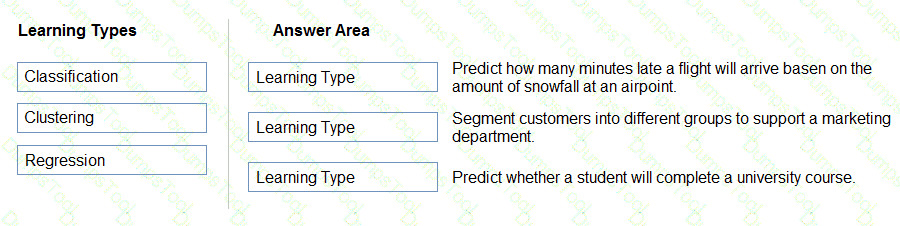
Extract the invoice number from an invoice.
Translate a form from French to English.
Find image of product in a catalog.
Identity the retailer from a receipt.
The correct answers are A and D because both scenarios involve extracting structured information from documents, which is exactly what Azure Form Recognizer is designed to do.
According to the Microsoft Azure AI Fundamentals (AI-900) official study guide and Microsoft Learn module “Explore computer vision”, Form Recognizer is an Azure Cognitive Service that uses advanced Optical Character Recognition (OCR) and machine learning to extract key-value pairs, tables, and text from structured and semi-structured documents such as receipts, invoices, business cards, and forms. It allows organizations to automate data entry and digitize document processing.
A. Extract the invoice number from an invoice → CorrectForm Recognizer can identify fields such as invoice number, total amount, date, vendor name, and billing address directly from invoices. It uses prebuilt models for invoices and receipts that automatically detect and extract relevant information without requiring extensive manual labeling. As stated in Microsoft Learn, “Form Recognizer extracts information from documents like receipts and invoices and returns structured data including key-value pairs.”
D. Identify the retailer from a receipt → CorrectThe prebuilt receipt model in Form Recognizer can read printed or scanned receipts and extract data points such as retailer name, transaction date, total amount, and tax information. This makes it ideal for expense reporting, auditing, or financial reconciliation.
The following options are incorrect:
B. Translate a form from French to English → This task involves language translation, which is performed by Azure Translator, not Form Recognizer.
C. Find an image of a product in a catalog → This requires object detection or image classification, which are part of Computer Vision, not Form Recognizer.
Therefore, based on Microsoft’s AI-900 learning objectives and documentation, the two correct scenarios are:
✅ A. Extract the invoice number from an invoice
✅ D. Identify the retailer from a receipt
Select the answer that correctly completes the sentence.


The correct completion of the sentence is:
“The interactive answering of questions entered by a user as part of an application is an example of natural language processing.”
According to the Microsoft Azure AI Fundamentals (AI-900) official study materials, Natural Language Processing (NLP) is a branch of Artificial Intelligence that focuses on enabling computers to understand, interpret, and respond to human language in a way that is both meaningful and useful. It is one of the key AI workloads described in the “Describe features of common AI workloads” module on Microsoft Learn.
When a user types a question into an application and the system responds interactively — such as in a chatbot, Q & A system, or virtual assistant — this process requires language understanding. NLP allows the system to process the input text, determine user intent, extract relevant entities, and generate an appropriate response. This is the foundational capability behind services such as Azure Cognitive Service for Language, Language Understanding (LUIS), and QnA Maker (now integrated as Question Answering in the Language service).
Microsoft’s study guide explains that NLP workloads include the following key scenarios:
Language understanding: Determining intent and context from text or speech.
Text analytics: Extracting meaning, key phrases, sentiment, or named entities.
Conversational AI: Powering bots and virtual agents to interact using natural language.These systems rely on NLP models to analyze user inputs and respond accordingly.
In contrast:
Anomaly detection identifies data irregularities.
Computer vision analyzes images or video.
Forecasting predicts future values based on historical data.
Therefore, based on the AI-900 official materials, the interactive answering of user questions through an application clearly falls under Natural Language Processing (NLP).
You need to generate images based on user prompts. Which Azure OpenAI model should you use?
GPT-4
DALL-E
GPT-3
Whisper
According to the Microsoft Azure OpenAI Service documentation and AI-900 official study materials, the DALL-E model is specifically designed to generate and edit images from natural language prompts. When a user provides a descriptive text input such as “a futuristic city skyline at sunset”, DALL-E interprets the textual prompt and produces an image that visually represents the content described. This functionality is known as text-to-image generation and is one of the creative AI capabilities supported by Azure OpenAI.
DALL-E belongs to the family of generative models that can create new visual content, expand existing images, or apply transformations to images based on textual instructions. Within Azure OpenAI, the DALL-E API enables developers to integrate image creation directly into applications—useful for design assistance, marketing content generation, or visualization tools. The model learns from vast datasets of text–image pairs and is optimized to ensure alignment, diversity, and accuracy in the produced visuals.
By contrast, the other options serve different purposes:
A. GPT-4 is a large language model for text-based generation, reasoning, and conversation, not for creating images.
C. GPT-3 is an earlier text generation model, primarily used for language tasks like summarization, classification, and question answering.
D. Whisper is an automatic speech recognition (ASR) model used to convert spoken language into written text; it has no image-generation capability.
Therefore, when the requirement is to generate images based on user prompts, the only Azure OpenAI model that fulfills this purpose is DALL-E. This aligns directly with the AI-900 learning objective covering Azure OpenAI generative capabilities for text, code, and image creation.
For each of the following statements, select Yes if the statement is true. Otherwise, select No.
NOTE; Each correct selection is worth one point.


The Azure OpenAI DALL-E model is a generative image model designed to create original images from textual descriptions (prompts). According to the Microsoft Learn documentation and the AI-900 study guide, DALL-E’s primary function is text-to-image generation—it converts creative or descriptive text input into visually relevant imagery.
“Generate captions for uploaded images” → NoDALL-E cannot create image captions. Captioning an image (describing what’s in an uploaded image) is a vision analysis task, not an image generation task. That functionality belongs to Azure AI Vision, which can analyze and describe images, detect objects, and generate captions automatically.
“Reliably generate technically accurate diagrams” → NoWhile DALL-E can create visually appealing artwork or conceptual sketches, it is not designed for producing precise or technically correct diagrams, such as engineering schematics or architectural blueprints. The model’s generative process emphasizes creativity and visual diversity rather than factual or geometric accuracy. Thus, it cannot be relied upon for professional technical outputs.
“Generate decorative images to enhance learning materials” → YesThis is one of DALL-E’s strongest use cases. It can generate decorative, conceptual, or illustrative images to enhance presentations, educational materials, and marketing content. It enables educators and designers to quickly produce unique visuals aligned with specific themes or topics, enhancing engagement and creativity.
Match the principles of responsible AI to the appropriate descriptions.
To answer, drag the appropriate principle from the column on the left to its description on the right. Each principle may be used once, more than once, or not at all.
NOTE: Each correct match is worth one point.
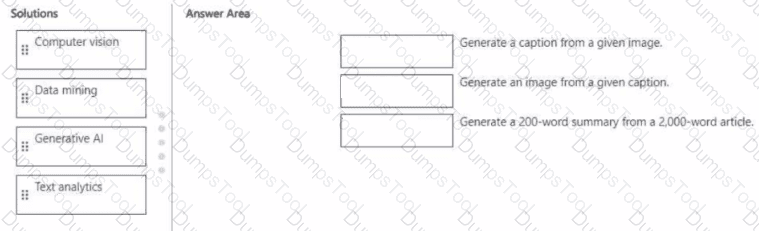


The correct answers are derived from the Microsoft Azure AI Fundamentals (AI-900) Official Study Guide and the Microsoft Learn module “Identify guiding principles for responsible AI.”
Microsoft defines six core principles of Responsible AI:
Fairness
Reliability and safety
Privacy and security
Inclusiveness
Transparency
Accountability
Each principle addresses a key ethical and operational requirement for developing and deploying trustworthy AI systems.
Reliability and safety – “AI systems must consistently operate as intended, even under unexpected conditions.”This principle ensures that AI models are dependable, robust, and perform accurately under diverse circumstances. Microsoft emphasizes that systems should be thoroughly tested and monitored to guarantee predictable behavior, prevent harm, and maintain safety. A reliable AI solution should continue to function properly when faced with unusual or noisy inputs, and fail safely when issues arise. This principle focuses on stability, testing, and dependable performance.
Privacy and security – “AI systems must protect and secure personal and business information.”This principle ensures that AI systems comply with data privacy laws and ethical standards. It protects users’ sensitive data against unauthorized access and misuse. Microsoft highlights that organizations must implement strong encryption, data anonymization, and access control mechanisms to maintain confidentiality. Protecting user data is essential to building trust and compliance with global standards like GDPR.
Other principles such as fairness and inclusiveness apply to ensuring equitable and accessible AI, but they do not directly relate to system operation or information protection.
✅ Final Answers:
“Operate as intended” → Reliability and safety
“Protect and secure information” → Privacy and security
Match the machine learning tasks to the appropriate scenarios.
To answer, drag the appropriate task from the column on the left to its scenario on the right. Each task may be used once, more than once, or not at all.
NOTE: Each correct selection is worth one point.
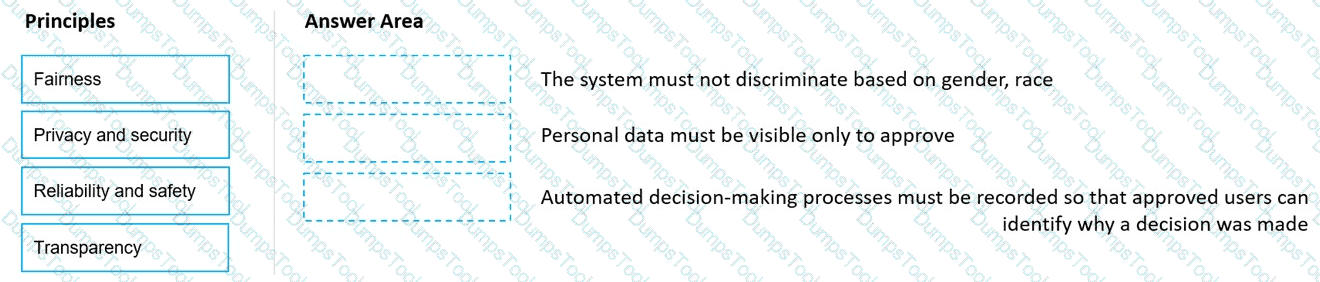


This question tests your understanding of machine learning workflow tasks as described in the Microsoft Azure AI Fundamentals (AI-900) study guide and the Microsoft Learn module “Explore the machine learning process.” The AI-900 curriculum divides the machine learning lifecycle into key phases: data preparation, feature engineering and selection, model training, model evaluation, and model deployment. Each phase has specific tasks designed to prepare, build, and assess predictive models before deployment.
Examining the values of a confusion matrix → Model evaluationIn Azure Machine Learning, evaluating a model involves checking its performance using metrics such as accuracy, precision, recall, and F1-score. The confusion matrix is one of the most common tools for this purpose. According to Microsoft Learn, “model evaluation is the process of assessing a trained model’s performance against test data to ensure reliability before deployment.” Analyzing the confusion matrix helps determine whether predictions align with actual outcomes, making this task part of model evaluation.
Splitting a date into month, day, and year fields → Feature engineeringFeature engineering refers to transforming raw data into features that better represent the underlying patterns to improve model performance. The study guide describes it as “the process of creating new input features from existing data.” Splitting a date field into separate numeric fields (month, day, year) is a classic example of feature engineering because it enables the model to learn from temporal patterns that might otherwise remain hidden.
Picking temperature and pressure to train a weather model → Feature selectionFeature selection involves identifying the most relevant variables that have predictive power for the model. As defined in Microsoft Learn, “feature selection is the process of choosing the most useful subset of input features for training.” In this scenario, selecting temperature and pressure variables as inputs for a weather prediction model fits perfectly within the feature selection stage.
Therefore, the correct matches are:
✅ Examining confusion matrix → Model evaluation
✅ Splitting date field → Feature engineering
✅ Picking temperature & pressure → Feature selection
Match the Azure Cognitive Services to the appropriate Al workloads.
To answer, drag the appropriate service from the column on the left to its workload on the right. Each service may be used once, more than once, or not at all.
NOTE: Each correct match is worth one point.


The correct matches are Custom Vision, Form Recognizer, and Face — each corresponding to a distinct capability under Azure Cognitive Services as described in the Microsoft Azure AI Fundamentals (AI-900) official study guide and Microsoft Learn modules on Computer Vision workloads.
Custom Vision → Identify objects in an imageThe Custom Vision service is part of the Azure Cognitive Services suite that enables developers to train custom image classification and object detection models. Unlike the prebuilt Computer Vision API, Custom Vision allows users to upload their own labeled images and teach the model to recognize specific objects relevant to their business context. The AI-900 syllabus explains that Custom Vision is ideal for tasks such as identifying products on a shelf, categorizing images, or detecting defects in manufacturing.
Form Recognizer → Automatically import data from an invoice to a databaseForm Recognizer is a document processing AI service that extracts structured data from forms, receipts, and invoices. It uses optical character recognition (OCR) combined with layout and key-value pair detection to automatically capture information such as invoice numbers, amounts, and vendor names. The AI-900 study materials highlight this service under the Document Intelligence category, emphasizing its ability to streamline data entry and business automation workflows by importing extracted data directly into databases or applications.
Face → Identify people in an imageThe Face service provides advanced facial detection and recognition capabilities. It can locate faces in images, compare similarities between faces, identify known individuals, and even detect facial attributes such as age or emotion. The AI-900 course classifies this under Computer Vision services for person identification and security-related use cases such as access control or identity verification.
Thus, each mapping aligns precisely with the AI-900 official learning outcomes on Cognitive Services capabilities:
Custom Vision → Object recognition
Form Recognizer → Data extraction from forms
Face → People identification
✅ Final verified configuration:
Custom Vision → Identify objects in an image
Form Recognizer → Automatically import data from an invoice to a database
Face → Identify people in an image
For each of the following statements, select Yes if the statement is true. Otherwise, select No.
NOTE: Each correct selection is worth one point.


< A webchat bot can interact with users visiting a website → Yes
Automatically generating captions for pre-recorded videos is an example of conversational AI → No
A smart device in the home that responds to questions such as “What will the weather be like today?” is an example of conversational AI → Yes
\ These answers are based on the Microsoft Azure AI Fundamentals (AI-900) Official Study Guide and the Microsoft Learn module “Explore conversational AI in Microsoft Azure.”
1. A webchat bot can interact with users visiting a website → Yes
This statement is true. A webchat bot is a key example of conversational AI, which allows users to communicate with an intelligent system through natural language. The Azure Bot Service supports a webchat channel, enabling website visitors to ask questions or get assistance directly through a chat interface embedded on a webpage. This allows businesses to provide 24/7 automated support and interactive engagement without human intervention.
2. Automatically generating captions for pre-recorded videos is an example of conversational AI → No
This is incorrect because automatically generating captions involves speech-to-text transcription, which falls under speech recognition and not conversational AI. While it uses AI to convert audio into text, it does not involve interactive communication or natural language dialogue. This task would be handled by Azure AI’s Speech service, not the conversational AI framework.
3. A smart device in the home that responds to questions such as “What will the weather be like today?” is an example of conversational AI → Yes
This is true. Smart assistants like those found in home devices (e.g., voice-activated systems) use conversational AI technologies to process spoken language (using natural language processing and speech recognition) and generate appropriate responses. This interaction represents a classic example of conversational AI, as it allows human-like dialogue between a user and an AI system.
✅ Final Answers:
Webchat bot interacting with users → Yes
Auto-captioning videos → No
Smart home device answering questions → Yes
You have a natural language processing (NIP) model that was created by using data obtained without permission.
Which Microsoft principle for responsible Al does this breach?
privacy and security
inclusiveness
transparency
reliability and safety
According to the Microsoft Azure AI Fundamentals (AI-900) official study materials and Microsoft’s Responsible AI Principles, one of the core principles is “Privacy and Security.” This principle ensures that AI systems protect personal and sensitive information, maintaining compliance with privacy laws, data protection regulations, and ethical data-handling practices.
If a Natural Language Processing (NLP) model is created using data obtained without permission, it directly violates this principle. Data collected without proper consent breaches user privacy and potentially violates regulations such as GDPR (General Data Protection Regulation) or other global privacy frameworks.
The Privacy and Security principle emphasizes the following:
AI systems must ensure data collection and usage transparency.
Data must be lawfully acquired and used with consent.
Systems should protect data against unauthorized access or misuse.
In contrast:
Inclusiveness promotes accessibility and fairness for all users.
Transparency focuses on explaining how AI systems make decisions.
Reliability and safety ensure systems function as intended and minimize harm.
Therefore, using unapproved data clearly breaches Privacy and Security, as it involves unethical data sourcing and endangers user trust.
Match the Al workload to the appropriate task.
To answer, drag the appropriate Ai workload from the column on the left to its task on the right. Each workload may be used once, more than once, or not at all.
NOTE: Each correct match is worth one point.


This question tests your understanding of AI workloads as described in the Microsoft Azure AI Fundamentals (AI-900) study guide. Each Azure AI workload is designed to handle specific types of data and tasks: text, images, documents, or content generation.
Extract data from medical admission forms for import into a patient tracking database → Azure AI Document IntelligenceFormerly known as Form Recognizer, this service belongs to the Azure AI Document Intelligence workload. It extracts key-value pairs, tables, and textual information from structured and semi-structured documents such as forms, invoices, and admission sheets. For medical forms, Document Intelligence can identify fields like patient name, admission date, and diagnosis and export them into structured formats for database import.
Automatically create drafts for a monthly newsletter → Generative AIThis task involves creating original written content, which is a capability of Generative AI. Microsoft’s Azure OpenAI Service uses large language models (like GPT-4) to generate human-like text, summaries, or articles. Generative AI workloads are ideal for automating creative writing, drafting newsletters, producing blogs, or summarizing reports.
Analyze aerial photos to identify flooded areas → Computer VisionComputer Vision workloads involve analyzing and interpreting visual data from images or videos. This includes detecting objects, classifying scenes, and identifying patterns such as flooded regions in aerial imagery. Azure’s Computer Vision or Custom Vision services can be trained to detect water coverage or terrain changes using image recognition techniques.
Thus, the correct matches are:
Azure AI Document Intelligence → Extract medical form data
Generative AI → Create newsletter drafts
Computer Vision → Identify flooded areas from aerial photos
For each of the following statements, select Yes if the statement is true. Otherwise, select No.
NOTE: Each correct selection is worth one point.


Statements
Yes
No
A bot that responds to queries by internal users is an example of a conversational AI workload.
✅ Yes
An application that displays images relating to an entered search term is an example of a conversational AI workload.
✅ No
A web form used to submit a request to reset a password is an example of a conversational AI workload.
✅ No
According to the Microsoft Azure AI Fundamentals (AI-900) official study materials, conversational AI workloads are those that enable interaction between humans and AI systems through natural language conversation, either by text or speech. These workloads are typically implemented using Azure Bot Service, Azure Cognitive Services for Language, and Azure OpenAI Service. The key characteristic of a conversational AI workload is the presence of dialogue—the AI interprets user intent and provides a meaningful, contextual response in a conversation-like manner.
“A bot that responds to queries by internal users is an example of a conversational AI workload.” → YESThis fits the definition perfectly. A chatbot that helps employees (internal users) by answering questions about policies, IT issues, or HR procedures is a typical example of conversational AI. It uses natural language understanding to interpret questions and provide automated responses. Microsoft Learn explicitly identifies chatbots as conversational AI solutions designed for both internal and external interactions.
“An application that displays images relating to an entered search term is an example of a conversational AI workload.” → NOThis is not conversational AI because there is no dialogue or language understanding involved. It is an example of information retrieval or computer vision if it uses image recognition, but not conversation.
“A web form used to submit a request to reset a password is an example of a conversational AI workload.” → NOA password reset form is a simple UI-driven process that doesn’t require AI or conversational logic. It performs a fixed function based on user input but does not understand or respond to natural language.
Therefore, based on the AI-900 study guide, only the first statement is an example of a conversational AI workload, while the second and third statements are not.
For each of the following statements, select Yes if the statement is true. Otherwise, select No.
NOTE: Each correct selection is worth one point.


These answers align with the Microsoft Azure AI Fundamentals (AI-900) Official Study Guide and the Microsoft Learn module “Explore conversational AI in Microsoft Azure.”
1. A webchat bot can interact with users visiting a website → Yes
This statement is true. The Azure Bot Service allows developers to create intelligent chatbots that can be integrated into a webchat interface. This enables visitors to interact with the bot directly from a website, asking questions and receiving automated responses. This is a typical use case of conversational AI, where natural language processing (NLP) is used to interpret and respond to user input conversationally.
2. Automatically generating captions for pre-recorded videos is an example of conversational AI → No
This statement is false. Automatically generating captions from video content is an example of speech-to-text (speech recognition) technology, not conversational AI. While it uses AI to convert spoken words into text, it lacks the two-way interactive communication characteristic of conversational AI. This task is typically handled by the Azure AI Speech service, which transcribes spoken content.
3. A smart device in the home that responds to questions such as “What will the weather be like today?” is an example of conversational AI → Yes
This statement is true. Smart home assistants that engage in dialogue with users are powered by conversational AI. These devices use speech recognition to understand spoken input, natural language understanding (NLU) to determine intent, and speech synthesis (text-to-speech) to respond audibly. This represents the full conversational AI loop, where machines communicate naturally with humans.
For each of The following statements, select Yes If the statement is true. Otherwise, select No.
NOTE: Each correct selection is worth one point
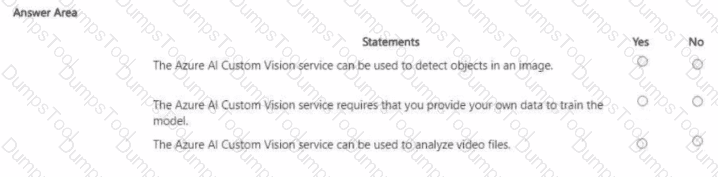

Statements
Yes
No
A webchat bot can interact with users visiting a website.
Yes
Automatically generating captions for pre-recorded videos is an example of natural language processing.
No
A smart device in the home that responds to questions such as “What will the weather be like today?” is an example of natural language processing.
Yes
According to the Microsoft Azure AI Fundamentals (AI-900) official study materials and Microsoft Learn modules on AI workloads, each of these statements maps to a distinct area of artificial intelligence — namely Conversational AI, Speech AI, and Natural Language Processing (NLP).
“A webchat bot can interact with users visiting a website.” – YesThis is true. A webchat bot represents an example of Conversational AI. It leverages natural language understanding (NLU) to interpret user input and generate appropriate responses. These bots can be created using Azure services such as Azure AI Bot Service and Language Understanding (LUIS). They enable automated interactions with users through text-based communication on websites, applications, or messaging platforms.
“Automatically generating captions for pre-recorded videos is an example of natural language processing.” – NoThis is false. Generating captions from audio involves speech recognition, not NLP. Specifically, it uses speech-to-text technology to transcribe spoken words into written text. This function is typically performed by Azure’s Speech service, which is part of the Speech AI workload, not the language-processing workload.
“A smart device in the home that responds to questions such as ‘What will the weather be like today?’ is an example of natural language processing.” – YesThis is true. Smart assistants like Alexa or Cortana use NLP to interpret spoken queries, extract meaning, and generate appropriate responses. NLP allows these devices to understand human language, retrieve relevant information, and respond conversationally.
Select the answer that correctly completes the sentence.


In Microsoft’s Responsible AI framework, the Reliability and Safety principle ensures that AI systems perform consistently, safely, and as intended across diverse conditions — even when faced with incomplete, unusual, or unexpected data. Correctly handling unusual or missing values in a dataset directly demonstrates this principle, as it helps prevent faulty predictions, biased results, or unsafe system behaviors.
According to the Microsoft Learn Responsible AI module (from the AI-900 and AI-102 study paths), a reliable AI model should maintain its performance when encountering data anomalies. This includes validating inputs, managing missing or extreme values, and testing models to ensure they behave as expected in real-world scenarios. Such practices make AI systems robust and trustworthy, which aligns exactly with the Reliability and Safety principle.
The other Responsible AI principles address different concerns:
Inclusiveness: Ensures AI empowers and serves all users equitably.
Privacy and Security: Focuses on safeguarding personal data and preventing unauthorized access.
Transparency: Ensures that AI decisions are understandable and explainable to users.
While all principles are essential, managing data integrity and system stability—including how a model responds to missing or anomalous values—is primarily a matter of reliability and safety. It ensures the AI behaves predictably and minimizes risks of errors or unintended harm.
Therefore, the correct completion of the sentence is:
“Correctly handling unusual or missing values is an example of the application of the Reliability and Safety principle for Responsible AI.”
You have an Azure Machine Learning pipeline that contains a Split Data module. The Split Data module outputs to a Train Model module and a Score Model module. What is the function of the Split Data module?
selecting columns that must be included in the model
creating training and validation datasets
diverting records that have missing data
scaling numeric variables so that they are within a consistent numeric range
According to the Microsoft Azure AI Fundamentals (AI-900) official study guide and Microsoft Learn module “Identify features of Azure Machine Learning”, the Split Data module in an Azure Machine Learning pipeline is used to divide a dataset into two or more subsets—typically a training dataset and a testing (or validation) dataset. This is a fundamental step in the supervised machine learning workflow because it allows for accurate evaluation of the model’s performance on data it has not seen during training.
In a typical workflow, the data flows as follows:
The dataset is first preprocessed (cleaned, normalized, or transformed).
The Split Data module divides this dataset into two parts — one for training the model and another for testing or scoring the model’s accuracy.
The Train Model module uses the training data output from the Split Data module to learn patterns and build a predictive model.
The Score Model module then takes the trained model and applies it to the test data output to measure how well the model performs on unseen data.
The Split Data module typically uses a defined ratio (such as 0.7:0.3 or 70% for training and 30% for testing). This ensures that the trained model can generalize well to new, real-world data rather than simply memorizing the training examples.
Now, addressing the incorrect options:
A. Selecting columns that must be included in the model is done by the Select Columns in Dataset module.
C. Diverting records that have missing data is handled by the Clean Missing Data module.
D. Scaling numeric variables is done using the Normalize Data or Edit Metadata modules.
Therefore, based on the official AI-900 learning objectives, the verified and most accurate answer is B. creating training and validation datasets.
Select the answer that correctly completes the sentence.


According to the Microsoft Azure AI Fundamentals (AI-900) official study guide and the Microsoft Learn module “Identify features of common machine learning types”, the classification technique is a type of supervised machine learning used to predict which category or class a new observation belongs to, based on patterns learned from labeled training data.
In this scenario, a banking system that predicts whether a loan will be repaid is dealing with a binary outcome—either the loan will be repaid or will not be repaid. These two possible results represent distinct classes, making this problem a classic example of binary classification. During training, the model learns from historical data containing features such as customer income, credit score, loan amount, and repayment history, along with labeled outcomes (repaid or defaulted). After training, it can classify new applications into one of these two categories.
The AI-900 curriculum distinguishes between three key supervised and unsupervised learning approaches:
Classification: Predicts discrete categories (e.g., spam/not spam, fraud/not fraud, will repay/won’t repay).
Regression: Predicts continuous numerical values (e.g., house prices, sales forecast, temperature).
Clustering: Groups data based on similarity without predefined labels (e.g., customer segmentation).
Since the banking problem focuses on predicting a categorical outcome rather than a continuous numeric value, it fits squarely into the classification domain. In Azure Machine Learning, such tasks can be performed using algorithms like Logistic Regression, Decision Trees, or Support Vector Machines (SVMs), all configured for categorical prediction.
Therefore, per Microsoft’s official AI-900 learning objectives, a banking system predicting whether a loan will be repaid represents a classification type of machine learning problem.
You have a dataset that contains experimental data for fuel samples.
You need to predict the amount of energy that can be obtained from a sample based on its density.
Which type of Al workload should you use?
Classification
Clustering
Knowledge mining
Regression
As described in the AI-900 study guide under “Identify features of machine learning,” regression is a supervised learning technique used to predict continuous numerical values. In this scenario, the goal is to predict energy output (a continuous variable) based on density (a numeric input).
Regression models find relationships between variables by fitting a line or curve that best represents the trend of the data. In Azure Machine Learning, regression algorithms such as linear regression, decision tree regression, and boosted decision trees are commonly used for such predictions.
Classification (A) predicts discrete labels (e.g., “High” or “Low”), not numeric values.
Clustering (B) groups similar data points but does not perform prediction.
Knowledge mining (C) extracts insights from unstructured data using tools like Azure AI Search and Cognitive Skills.
Hence, based on AI-900 fundamentals, predicting energy based on density requires a regression workload.
Which Azure service can use the prebuilt receipt model in Azure Al Document Intelligence?
Azure Al Computer Vision
Azure Machine Learning
Azure Al Services
Azure Al Custom Vision
The prebuilt receipt model is part of Azure AI Document Intelligence (formerly Form Recognizer), which belongs to the broader Azure AI Services family. The prebuilt receipt model is designed to automatically extract key information such as merchant names, dates, totals, and tax amounts from receipts without requiring custom training.
Among the given options, C. Azure AI Services is correct because it encompasses all cognitive AI capabilities—vision, language, speech, and document processing. Specifically, Azure AI Document Intelligence is included within Azure AI Services and provides both prebuilt and custom models for processing invoices, receipts, business cards, and identity documents.
Options A (Computer Vision) and D (Custom Vision) are image-based services, not form-processing tools. Option B (Azure Machine Learning) focuses on building custom predictive models, not using prebuilt document models.
Therefore, the correct answer is C. Azure AI Services, which includes the prebuilt receipt model in Document Intelligence.
TESTED 18 Apr 2026
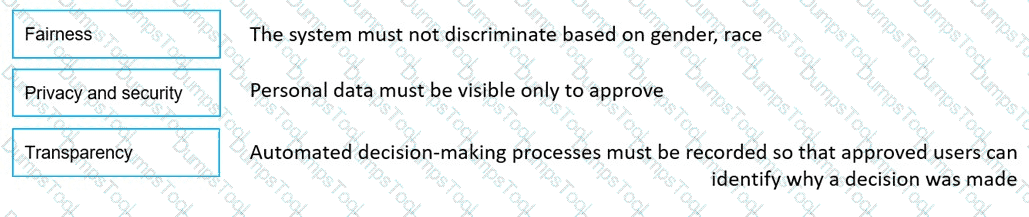
Copyright © 2014-2026 DumpsTool. All Rights Reserved