dumpstool logo

Enable audit logs in the cluster, To Do so, enable the log backend, and ensure that
1. logs are stored at /var/log/kubernetes-logs.txt.
2. Log files are retained for 12 days.
3. at maximum, a number of 8 old audit logs files are retained.
4. set the maximum size before getting rotated to 200MB
Edit and extend the basic policy to log:
1. namespaces changes at RequestResponse
2. Log the request body of secrets changes in the namespace kube-system.
3. Log all other resources in core and extensions at the Request level.
4. Log "pods/portforward", "services/proxy" at Metadata level.
5. Omit the Stage RequestReceived
All other requests at the Metadata level
Context
You must resolve issues that a CIS Benchmark tool found for the kubeadm provisioned cluster.
Task
Fix all issues via configuration and restart the affected components to ensure the new settings take effect.
Fix all of the following violations that were found against the kubelet:
The cluster uses the Docker Engine os its container runtime, If needed, use the
docker command to troubleshaot running containers.
Ensure that the anonymous-auth argument is set to false FAIL
Ensure that the -authorization-mode argument is not set to FAIL
AlwaysAllow
Use Webhook authentication /authorization where possible.
Fix all of the following violations that were found against ettd :
Ensure that the -client cert auth argument is set to true FAIL
On the Cluster worker node, enforce the prepared AppArmor profile
#include
profile nginx-deny flags=(attach_disconnected) {
#include <abstractions/base>
file,
# Deny all file writes.
deny /** w,
}
EOF'
Edit the prepared manifest file to include the AppArmor profile.
apiVersion: v1
kind: Pod
metadata:
name: apparmor-pod
spec:
containers:
- name: apparmor-pod
image: nginx
Finally, apply the manifests files and create the Pod specified on it.
Verify: Try to make a file inside the directory which is restricted.
Context:
Cluster: gvisor
Master node: master1
Worker node: worker1
You can switch the cluster/configuration context using the following command:
[desk@cli] $ kubectl config use-context gvisor
Context: This cluster has been prepared to support runtime handler, runsc as well as traditional one.
Task:
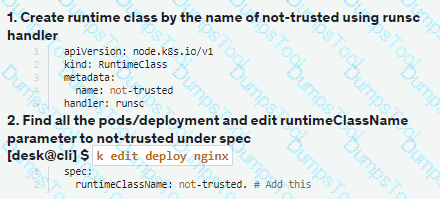
Create a RuntimeClass named not-trusted using the prepared runtime handler names runsc.
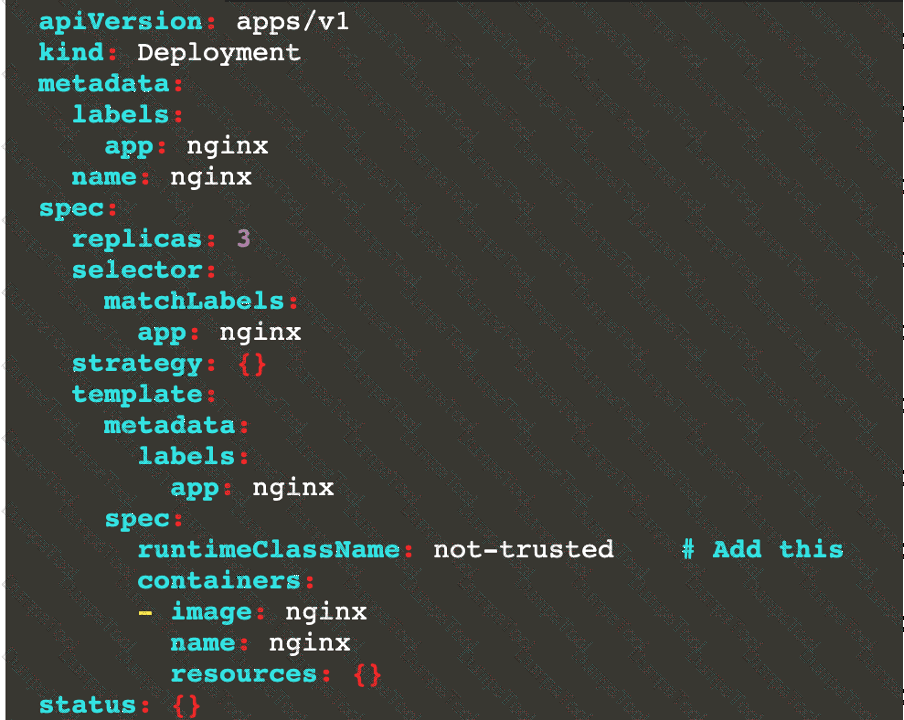
Update all Pods in the namespace server to run on newruntime.
Context
A Role bound to a Pod's ServiceAccount grants overly permissive permissions. Complete the following tasks to reduce the set of permissions.
Task
Given an existing Pod named web-pod running in the namespace security.
Edit the existing Role bound to the Pod's ServiceAccount sa-dev-1 to only allow performing watch operations, only on resources of type services.
Create a new Role named role-2 in the namespace security, which only allows performing update
operations, only on resources of type namespaces.
Create a new RoleBinding named role-2-binding binding the newly created Role to the Pod's ServiceAccount.
You can switch the cluster/configuration context using the following command:
[desk@cli] $ kubectl config use-context stage
Context:
A PodSecurityPolicy shall prevent the creation of privileged Pods in a specific namespace.
Task:
1. Create a new PodSecurityPolcy named deny-policy, which prevents the creation of privileged Pods.
2. Create a new ClusterRole name deny-access-role, which uses the newly created PodSecurityPolicy deny-policy.
3. Create a new ServiceAccount named psd-denial-sa in the existing namespace development.
Finally, create a new ClusterRoleBindind named restrict-access-bind, which binds the newly created ClusterRole deny-access-role to the newly created ServiceAccount psp-denial-sa
Create a Pod name Nginx-pod inside the namespace testing, Create a service for the Nginx-pod named nginx-svc, using the ingress of your choice, run the ingress on tls, secure port.
Context:
Cluster: prod
Master node: master1
Worker node: worker1
You can switch the cluster/configuration context using the following command:
[desk@cli] $ kubectl config use-context prod
Task:
Analyse and edit the given Dockerfile (based on the ubuntu:18:04 image)
/home/cert_masters/Dockerfile fixing two instructions present in the file being prominent security/best-practice issues.
Analyse and edit the given manifest file
/home/cert_masters/mydeployment.yaml fixing two fields present in the file being prominent security/best-practice issues.
Note: Don't add or remove configuration settings; only modify the existing configuration settings, so that two configuration settings each are no longer security/best-practice concerns.
Should you need an unprivileged user for any of the tasks, use user nobody with user id 65535
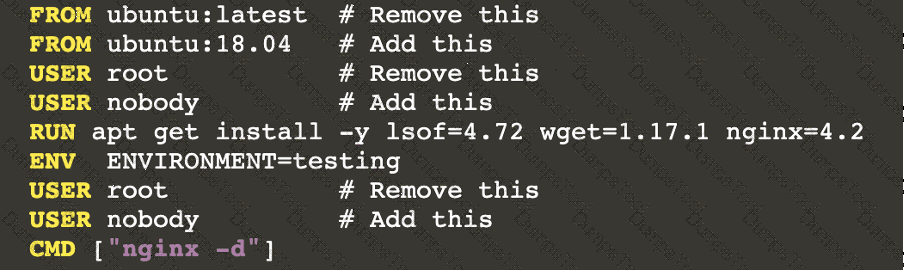
Analyze and edit the given Dockerfile
FROM ubuntu:latest
RUN apt-get update -y
RUN apt-install nginx -y
COPY entrypoint.sh /
ENTRYPOINT ["/entrypoint.sh"]
USER ROOT
Fixing two instructions present in the file being prominent security best practice issues
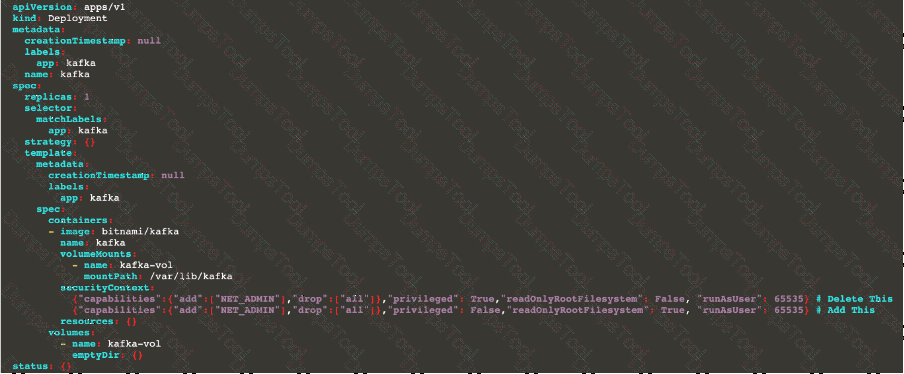
Analyze and edit the deployment manifest file
apiVersion: v1
kind: Pod
metadata:
name: security-context-demo-2
spec:
securityContext:
runAsUser: 1000
containers:
- name: sec-ctx-demo-2
image: gcr.io/google-samples/node-hello:1.0
securityContext:
runAsUser: 0
privileged: True
allowPrivilegeEscalation: false
Fixing two fields present in the file being prominent security best practice issues
Don't add or remove configuration settings; only modify the existing configuration settings
Whenever you need an unprivileged user for any of the tasks, use user test-user with the user id 5487
Documentation Deployment, Pod, Namespace
You must connect to the correct host . Failure to do so may result in a zero score.
[candidate@base] $ ssh cks000028
Context
You must update an existing Pod to ensure the immutability of its containers.
Task
Modify the existing Deployment named lamp-deployment, running in namespace lamp, so that its containers:
. run with user ID 20000
. use a read-only root filesystem
. forbid privilege escalation
The Deployment's manifest file con be found at /home/candidate/finer-sunbeam/lamp-deployment.yaml.
Documentation
Deployment, Pod Security Admission, Pod Security Standards
You must connect to the correct host . Failure to do so may result in a zero score.
[candidate@base] $ ssh cks000036
Context
For compliance, all user namespaces enforce the restricted Pod Security Standard .
Task
The confidential namespace contains a Deployment that is not compliant with the restricted Pod Security Standard . Thus, its Pods can not be scheduled.
Modify the Deployment to be compliant and verify that the Pods are running.
The Deployment's manifest file can be found at /home/candidate/nginx-unprivileged.yaml.
You must connect to the correct host . Failure to do so may
result in a zero score.
[candidato@base] $ ssh cks000023
Task
Analyze and edit the Dockerfile located at /home/candidate/subtle-bee/build/Dockerfile, fixing one instruction present in the file that is a prominent security/best-practice issue.
Do not add or remove instructions; only modify the one existing instruction with a security/best-practice concern.
Do not build the Dockerfile, Failure to do so may result in running out of storage and a zero score.
Analyze and edit the given manifest file /home/candidate/subtle-bee/deployment.yaml, fixing one fields present in the file that are a prominent security/best-practice issue.
Do not add or remove fields; only modify the one existing field with a security/best-practice concern.
Should you need an unprivileged user for any of the tasks, use user nobody with user ID 65535.
Context
A CIS Benchmark tool was run against the kubeadm-created cluster and found multiple issues that must be addressed immediately.
Task
Fix all issues via configuration and restart the affected components to ensure the new settings take effect.
Fix all of the following violations that were found against the API server:
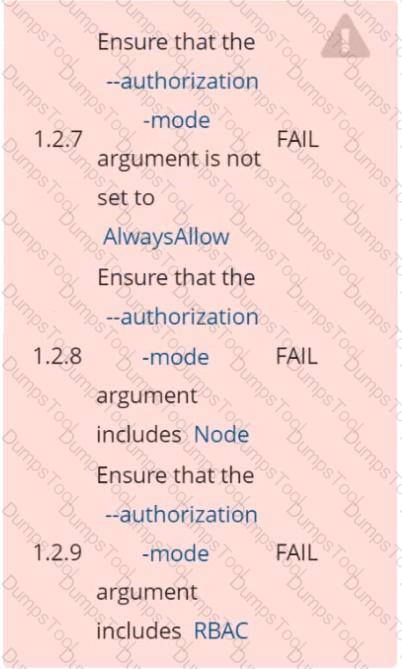
Fix all of the following violations that were found against the Kubelet:
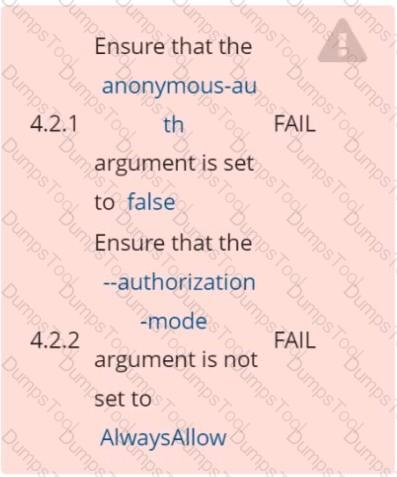
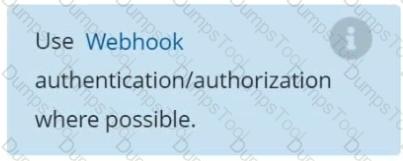
Fix all of the following violations that were found against etcd:
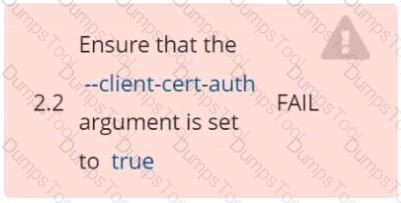
You must complete this task on the following cluster/nodes: Cluster: immutable-cluster
Master node: master1
Worker node: worker1
You can switch the cluster/configuration context using the following command:
[desk@cli] $ kubectl config use-context immutable-cluster
Context: It is best practice to design containers to be stateless and immutable.
Task:
Inspect Pods running in namespace prod and delete any Pod that is either not stateless or not immutable.
Use the following strict interpretation of stateless and immutable:
1. Pods being able to store data inside containers must be treated as not stateless.
Note: You don't have to worry whether data is actually stored inside containers or not already.
2. Pods being configured to be privileged in any way must be treated as potentially not stateless or not immutable.

TESTED 18 Sep 2026