dumpstool logo

An administrator has deployed several enterprise applications in WebSphere Application Server ND. How can the administrator configure the applications to start in a particular order?
WebSphere does not support ordered starting of applications.
Configure the Launch application before server completes startup parameter.
The applications are started in the order that they are defined.
Configure the Startup order parameter.
Applications deployed to an application server are started during server startup, and the product provides a setting to control the order. On the application's configuration page in the console, and as an attribute in wsadmin, there is a Startup order parameter, which accepts an integer. Applications with lower values start before those with higher values, so an administrator can start a shared service application before the applications that depend on it. Option D is correct.
Option A is wrong because the ordering is supported. Option C is wrong because the applications are not started in the order in which they were defined or installed; without ordering values, the sequence is not something that can be relied on. Option B concerns a different parameter, "Launch application before server completes startup", which determines whether the server waits for the application to start before it declares itself started and accepts requests. That is related to startup behaviour but does not set the order among applications.
Administrators typically combine the two settings: the startup order sets the sequence, and the launch-before-completion option makes sure a critical application is fully up before the server opens for traffic. The values should be checked after changes, since the product starts applications in parallel by default when ordering is not specified, and the server log records the start messages for confirmation.
Which two functions does Transformation Advisor provide?
Choose two
It generates reports that compare benefits of usage for each supported provider
It determines the complexity of applications.
It suggests changes to make applications faster when moved to the cloud.
It suggests partitions and generates microservices for an easier move to the cloud.
It identifies application changes required for modernization
Transformation Advisor is an IBM tool that analyses existing applications and the environments on which they run, in order to help plan a move to a modern platform such as containers or a cloud service. Its collector examines the application and server configuration and produces an assessment. Two functions from the list belong to it, options B and E. First, it determines the complexity of applications: the report assigns each application a rating, such as simple, moderate, or complex, together with an estimated development effort for migration. Second, it identifies the application changes that are required for modernisation, listing issues in the code or configuration, grouped by severity, that must be addressed for the target runtime.
The other statements go beyond what the tool provides. Option A, a comparison of benefits for each supported provider, is not a report function, because the output evaluates applications and not the commercial features of providers. Option C, suggesting changes that would make applications faster in the cloud, confuses migration readiness with performance tuning, which the tool does not perform. Option D, partitioning an application and generating microservices, is refactoring work that the tool does not undertake; it can recommend a target but does not decompose code.
The recommendations are typically used to prioritise which applications to move first and to estimate the effort involved.
When updating an application, if changes are made to classes that add, remove, or modify class hierarchies in the application and affect annotated classes, what action must be performed to ensure the updates are reflected?
Reinstall the application.
Restart the application.
Modify the annotations manually.
Modify applications.xml on the server config directory.
The product can reflect many changes to a deployed application without a full redeployment, either through dynamic reloading, which applies to changes in classes and related files, or through fine-grained update operations in which individual files are added, replaced, or removed. Annotated classes are a special case. During application installation, the product scans the application's classes for annotations and uses the results to build metadata, so, for instance, servlets or web services declared by annotation are discovered at that time. When a change affects the class hierarchy of annotated classes, by adding, removing, or modifying superclasses or interfaces, the scan results can no longer be assumed accurate, and the metadata derived at installation must be regenerated.
The only action that regenerates it is a fresh installation of the application, which makes option A the correct answer. A simple restart, option B, reloads the code but reuses the stored metadata. Editing annotations manually, option C, does not apply because annotations live in the source code compiled into the archive. Modifying applications.xml, option D, would risk corrupting the deployment configuration and does not trigger a scan.
After such a change, administrators should uninstall or reinstall the updated archive, and confirm afterwards that the expected components and endpoints appear, reviewing the application's start-up messages for scan-related warnings.
Which two authorization technologies are supported by WebSphere Application Server ND?
Choose two
OAuth
Java Message Service (JMS)
Open ID Connect
Java Authorization Contract for Containers (JACC)
Security Assertion Markup Language (SAML)
Authorisation determines what an authenticated identity is permitted to do, and WebSphere Application Server supports several technologies that decide this. The product's security documentation identifies them as the Java Message Service security model, which applies authorisation to messaging resources such as destinations, and the Java Authorization Contract for Containers, JACC. JACC defines how the application server hands authorisation decisions to a provider, so an external authorisation system such as Tivoli Access Manager can control access to Java EE resources. Options B and D are the two that fit.
The other items relate to authentication and identity federation, not authorisation. OAuth is a protocol for delegated authorisation to third-party clients, and OpenID Connect builds an identity layer on top of OAuth 2.0, so both appear in the product as token-based mechanisms that provide trust and identity rather than as the authorisation technologies in the product's list. The Security Assertion Markup Language, SAML, is an assertion format used for single sign-on and federated authentication.
The distinction matters in practice. Authentication, whether through LTPA, SPNEGO, OpenID Connect, or SAML, establishes who the caller is, while authorisation, through the Java EE role model and JACC or the JMS controls, establishes the resources that caller may reach. Administrators should configure and test each layer separately.
Which extra feature does the Intelligent Management Java ODR offering provide when compared with Intelligent Management ODRLib?
Automatic routing
High Availability deployment manager support
Dynamic cluster support
Application edition roll out support
Intelligent Management offers the on demand router in two forms. The Java ODR is a full server process in the cell, running as an application server-based proxy that participates in the cell's management and uses the product's high availability and dynamic workload management infrastructure. ODRLib is a library variant that is embedded in IBM HTTP Server through its plug-in, allowing the web server to use the routing logic and the service policies without a separate Java process. It provides routing but has a narrower set of functions than the Java ODR.
Among the features listed, support for the high availability deployment manager belongs to the Java ODR, which is option B. In a cell with a high availability deployment manager, the ODR nodes take part in the management structure, as the role-related question on the same topic suggests, whereas ODRLib has no such involvement.
The other capabilities are not exclusive to the Java ODR. Automatic routing, option A, is the basic function that both forms perform. Dynamic cluster support, option C, concerns the dynamic clusters controlled by the application placement controller, which operate irrespective of the router type. Application edition rollout, option D, is a function of the edition management facilities of Intelligent Management, and is not attributed specifically to the choice of router.
The administrator should pick ODRLib where a lightweight route is sufficient, and the Java ODR where the full set of autonomic features is required.
Which WebSphere application server directory should not be used to store non-default XML or XML backup files?
profile_root/temp
profile_root/config
profile_root/wstemp
profile_root/bin
A profile's directory contains areas with different purposes, and the product treats some of them as private, because their contents are overwritten or removed by the product's own processes. The config directory is the master configuration repository for the profile, or for the node's local copy, and the product manages its structure carefully. Administrators are warned not to place non-default XML files or XML backups there. Stray XML documents can be mistaken by the repository and synchronisation mechanisms for configuration documents, which results in errors during synchronisation or when the configuration is loaded, and a backup copy of a real document may even be read in place of the intended one. Option B is the right answer.
The other directories are less sensitive. The temp and wstemp directories, options A and C, are used for temporary files and for working copies of configuration during administrative sessions, so, although they are not designed for permanent storage, they do not take part in the repository itself. The bin directory, option D, holds the profile's scripts and commands, and files placed there do not affect the repository.
If administrators need to keep copies of configuration files, a location outside the profile's config directory is appropriate, or the backupConfig command can be used, which produces a complete archive and avoids hand-made copies altogether.
Which administrative-object command can an administrator use to restart the Node agent?
AdminConfig.setServerStatus(‘false’,…)
AdminControl.invoke($Nodeagent, ‘restart’,…)
AdminTask.restartServer(–serverName ‘Node agent’)
AdminApp.updateInteractive(‘restartApp’, ‘Node agent’…)
The node agent is represented in the cell by managed beans, and the AdminControl object of wsadmin operates on those running MBeans. A node agent MBean exposes operations including stopNode and restart, so the administrator first obtains the MBean identifier, for instance with AdminControl.queryNames for type NodeAgent and the node name, and then calls AdminControl.invoke(nodeAgentMBean, 'restart'). The node agent then restarts itself, and the deployment manager's view of the node returns to normal when the process is up. Option B describes that call.
AdminConfig, option A, works with configuration documents in the repository, and it has no method that sets server status. AdminTask offers administrative commands such as startServer and stopServer, but the command shown in option C, restartServer with the serverName parameter, is not a node agent restart operation; the node agent has its own stop and start procedures. AdminApp, option D, deals with installation and updates of applications, so updateInteractive has no relationship to server restarts, and 'restartApp' is not a valid argument.
An important practical point is that a node agent that is stopped cannot be restarted through the deployment manager, because the process that carries the MBean is not running. In that situation the node's startNode command has to be run locally on the node.
What information does the Technology Evaluation Summary section of an application migration report provide?
List of all the required features for the application in the Liberty server.xml configuration file.
High-level view of the content and structure of the application.
Detailed migration analysis with file names and line numbers where rule infractions were detected.
Which IBM platforms are a good fit with the technologies used by the application.
An application migration report is organised into sections, each with a different level of detail and a different audience. The Technology Evaluation Summary section sits at the top, and it answers a strategic question: given the technologies the application uses, which IBM runtime platforms suit it best. The analysis examines the application's use of specifications and APIs, and then indicates the fit with the platforms the report evaluates, such as traditional WebSphere Application Server, Liberty, and options for containers, so that a decision-maker can see where the application could run with the least rework. Option D is correct.
The other descriptions belong to different parts of the report. A list of the features needed in the Liberty server.xml file, option A, is the kind of information given in the Liberty-related recommendations, where features are mapped to the technologies used. A high-level view of the content and structure of the application, option B, is given by the application inventory or summary of its modules. A detailed analysis with file names and line numbers for infractions, option C, is the content of the detailed results, which identify the individual rule violations that a developer must fix.
Reading the report in order from summary to detail is the efficient approach: use the technology evaluation to choose a target, then the detailed section to estimate and plan the changes.
An administrator has assumed administration of an older Version 8.0 cell. They want to move the cell to a supported WebSphere Application Server ND 9.0.5 configuration, but not every application can immediately move to the newer version. They are considering upgrading the cell to a mixed-cell configuration, with some nodes at Version 9.0.5 and others at Version 8.0.
Which statement is true about a mixed-cell configuration?
The deployment manager must be at the highest version.
The deployment manager must be at the lowest version.
The cell migration tools work for all legacy WebSphere versions.
Heterogenous cell configuration is not supported.
A mixed-cell configuration allows nodes at different release levels to coexist in a single cell during a phased migration. The product places a firm rule on the deployment manager: it must be at a release level at least as high as the nodes it manages. A deployment manager at version 9.0.5 can administer nodes at version 9.0.5 and at earlier supported versions, but a deployment manager at 8.0 cannot manage a node at 9.0.5, because it would not understand the newer configuration documents. Therefore, the deployment manager is migrated first and must be at the highest version, as option A states.
Option B is the reverse of the rule. Option D, that heterogeneous cell configuration is not supported, is false because the mixed-cell arrangement is supported for the combinations that the product documents, although it is intended as a temporary state during migration. Option C overstates the migration tools: the migration utilities support migration only from a limited range of earlier versions, and a version 8.0 source may need a stepwise path or another approach.
For an administrator in this situation, the typical sequence is to migrate the deployment manager to 9.0.5, then migrate nodes as applications are ready, and to validate that the earlier-version nodes are within the supported range for the 9.0.5 deployment manager. Once all applications are compatible, the remaining nodes are migrated and the mixed state ends.
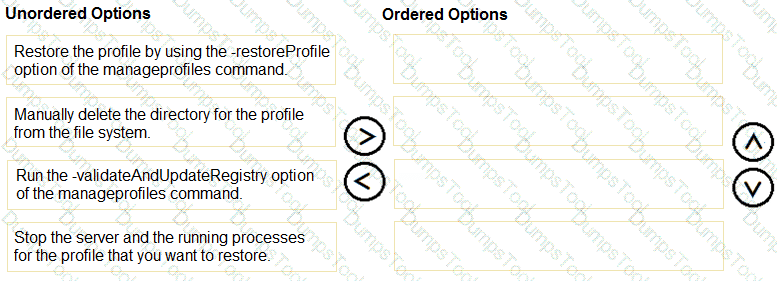
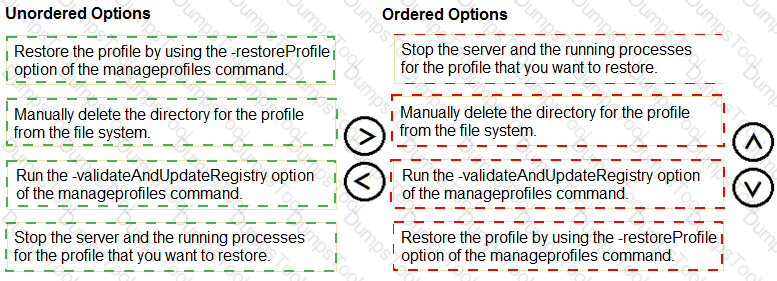
What is the correct order of steps for restoring a WebSphere Application Server profile?
1. Stop the server and the running processes for the profile that you want to restore.
2. Manually delete the directory for the profile from the file system.
3. Run the -validateAndUpdateRegistry option of the manageprofiles command.
4. Restore the profile by using the -restoreProfile option of the manageprofiles command.
Restoring a profile that was removed or damaged requires the registry and the file system to agree, because manageprofiles tracks every profile in a registry file and refuses to restore into a name it still believes exists. The correct sequence is as follows. First, stop the server and any running processes for the profile that is to be restored, since files in use cannot be replaced safely. Second, manually delete the profile's directory from the file system, so that no remnants of the old profile conflict with the restored one. Third, run the manageprofiles command with the -validateAndUpdateRegistry option, which compares the registry with what exists on disk and removes the entry for the profile whose directory is gone. Fourth, restore the profile with the -restoreProfile option of manageprofiles, supplying the backup archive created earlier with -backupProfile.
The order is significant. Running the registry validation before the directory is deleted would leave the entry in place, and the restore would fail because the profile name is still registered. Restoring before validation would produce the same conflict. Stopping the processes first prevents partial or locked file deletions.
Administrators should keep in mind that a profile backup restores configuration at the time the archive was taken, and that the restore must be performed on the same installation level and under the same path as the original.
An administrator installed the metrics.ear application in one of the WebSphere Application Server ND instances. When trying to query metrics through the endpoint, a lengthy response time was observed. Which property can be tuned in the Prometheus configuration file to better accommodate long-running metrics data collections?
scrape_timeout
response_timeout
metrics_timeout
request_timeout
The metrics.ear application publishes PMI statistics from WebSphere Application Server in the Prometheus exposition format, and Prometheus collects them by polling the endpoint at an interval, a process called scraping. Each scrape has a time limit, and when the server takes longer than the limit to produce its response, Prometheus abandons the request and records the target as failing. The property in the Prometheus configuration that sets the limit is scrape_timeout, which is why option A is the one to tune. Raising it gives a long-running collection time to finish. The value must not exceed the scrape_interval for the same job, since a scrape that is allowed to last longer than the interval would overlap the next one, and Prometheus rejects such a configuration.
The other names are not properties of the Prometheus scrape configuration. response_timeout, metrics_timeout, and request_timeout are plausible words, but none is accepted in the configuration file, so using them would cause a validation error or be ignored.
A long scrape time often indicates that too many PMI counters are enabled. Besides raising the timeout, the administrator should reduce the statistic set, or limit the modules reported, so that the endpoint returns promptly. The community guidance on integrating PMI with Prometheus and Grafana recommends starting with the basic statistic set.
Which wsadmin command can an administrator use to find a migration report for an application?
AdminTask.getMigrationReport ('-generate')
AdminTask.getMigrationReport ('-generate -interactive')
AdminTask.getMigrationReport ('-interactive')
AdminTask.getMigrationReport ('applicationName -interactive')
Migration reports are produced and read through the AdminTask object in wsadmin. The getMigrationReport command displays a report that already exists for an installed application. Because many administrators do not know the exact parameters, the product supports an interactive mode, which prompts the user for the necessary values, such as the application name, and then retrieves the report. Invoking AdminTask.getMigrationReport with the -interactive option is the way to find a report in that mode, and option C does so.
The other forms combine the command with flags that do not belong to it. The -generate flag, in options A and B, is associated with creating a report, which is the function of createMigrationReport, so using it with the get command is inappropriate. Option D places the application name before the flag as a bare token, which does not follow the syntax of the command, since parameter values must be introduced by the appropriate parameter name when not in interactive mode.
An administrator who already knows the application name can use the non-interactive form, passing the application name through its parameter. The report is stored with the application, and it is removed automatically if the application is uninstalled or redeployed, so a report that cannot be found may mean that it has not yet been generated or has been removed since the last deployment.
Which two of the following are valid options for the syncNode command?
Choose two
forceStop
stopservers
restart
silentMode
verbose
The syncNode command is run on a node to synchronise its configuration with the deployment manager's master repository without needing the node agent, which is useful when the node agent cannot start because its local configuration is out of date. The command takes the deployment manager's host name and SOAP port, optionally followed by options that adjust its behaviour. Two of them are in the list. The -stopservers option stops all of the node's servers before synchronising, so that files are not replaced under running processes, and the -restart option restarts the node agent after synchronisation completes. Options B and C are correct.
The other names are not options for the command. forceStop in option A is not recognised. silentMode, option D, is not an option for syncNode. verbose, option E, is not a syncNode option either, although other commands accept similar flags; for diagnostic output the command writes to a log file, which can be named with the -logfile option, and the -trace option increases the detail.
A typical recovery proceeds as follows: stop the node's servers, run syncNode with the deployment manager's host and port, and start the node agent. If the command is used with security enabled, the credentials for the deployment manager must be supplied with -user and -password. The resulting synchronisation log is the first place to check when the run fails.
Following an upgrade to WebSphere Application Server ND 9.0.5, a JMS application that uses an indirect JNDI lookup cannot connect to the MQ Queue Manager and receives an MQRC_NOT_AUTHORIZED exception.
Which Queue Connection Factory property can be set to fix the error?
Component-managed authentication alias
Container-managed authentication alias
XA recovery alias
username and password
An indirect JNDI lookup in a JMS application resolves the queue connection factory through a JNDI reference, typically declared as a resource reference in the application's deployment descriptor. In that configuration, the resource reference's authentication type determines which credentials are used at the time of connection. When the reference specifies container authentication, the application server supplies the credentials, taken from the container-managed authentication alias on the connection factory. If no valid alias is set, the connection to the queue manager is attempted without suitable credentials, and a current IBM MQ queue manager responds with MQRC_NOT_AUTHORIZED. Setting the container-managed authentication alias, option B, therefore resolves the error.
The component-managed authentication alias, option A, applies when the application itself requests the credentials, for example by passing an alias in code, so it would not be used for a container-authenticated reference. The XA recovery alias, option C, is used by the transaction service when it reconnects to resources during recovery and does not govern normal application connections. Option D, specifying a plain user name and password, is not the recommended route, and a defined alias keeps credentials encrypted and administered centrally.
The need for explicit credentials following the upgrade is consistent with the stricter security defaults of recent IBM MQ releases, which require authenticated access, and the queue manager's authority records must also grant the alias's user the right to connect.
Which enterprise module may be installed in WebSphere Application Server ND?
SAR
CAR
BAR
JAR
An enterprise application is packaged as an enterprise archive, or EAR, which contains modules of several types. The module types the product recognises are web modules, packaged as WAR files, enterprise bean modules, packaged as JAR files, application client modules, also JAR files, and resource adapter modules, packaged as RAR files. Of the four extensions offered, only JAR corresponds to a module type that can be installed, since it is used for EJB modules and client modules. Option D is correct.
The other extensions do not correspond to enterprise modules. SAR, option A, is a name used by some other application servers for service archives, and it is not an enterprise module type in this product. CAR, option C, is not an enterprise module type either; the term client archive does appear in some other contexts, but the product's application client module uses the JAR extension. BAR, option B, is likewise not a module type in this product.
When an application is installed, the console or wsadmin reads the modules from the EAR and presents each one for mapping to servers and for binding of references. A standalone WAR or JAR may also be installed, in which case the product wraps it in an enterprise application, so the same module types apply. Understanding the module types helps in planning the mapping of modules to targets.
In WebSphere Application Server ND, how can an administrator safeguard security audit data against tampering?
Sign and encrypt using an SMF emitter.
Encrypt and sign using a 3rd party key.
Encrypt using an SMF emitter and sign using a 3rd party key.
Sign and encrypt using the binary log audit service provider.
Security auditing produces records that must be trustworthy if they are to serve as evidence, so the product lets administrators protect the audit data from modification and disclosure. The binary log audit service provider writes audit records to binary log files and offers two protections: signing and encryption. Signing uses a key to produce signatures that allow later verification that a record has not been altered. Encryption protects the confidentiality of the content. Using the binary log provider with both signing and encryption enabled safeguards the data against tampering, which is the position stated in option D.
The other choices describe mechanisms that either do not exist or do not combine as claimed. The SMF emitter, mentioned in options A and C, belongs to the System Management Facilities on z/OS and writes audit records to SMF, relying on that platform's own facilities; it is not the product's means for signing and encrypting the data in a distributed environment. Option B refers to a third-party key, but the signing and encryption keys used by the provider are taken from the product's own configured key stores, so no external key is the safeguard.
To use these features, the administrator should configure the audit service provider in the administrative console with keystores holding the signing and encryption certificates, and the auditor should be given the role to view the records.
Which statement is accurate about installing and updating IBM SDK Java Technology Edition on distributed operating systems for WebSphere Application Server ND?
Both 32-bit and 64-bit IBM Java SDKs are supported.
IBM SDK is embedded with the product offerings.
Java SDKs used with WAS 8.5.5.x are supported.
The Java SDK version can be updated independently
WebSphere Application Server 9.0.5 on distributed platforms uses the IBM SDK, Java Technology Edition, and the product is designed so that the Java SDK is serviced separately from the application server's own code. The SDK can be installed and updated as a package in its own right through Installation Manager, and the managesdk command lets administrators choose which installed SDK a profile uses. That separation means a new SDK service release can be applied without waiting for an application server fix pack, which supports option D, that the Java SDK version can be updated independently.
The other statements are less accurate for this release. Option A claims that both 32-bit and 64-bit SDKs are supported, but the product now runs on 64-bit platforms only, so a 32-bit SDK is not supported. Option B says the SDK is embedded with the product, whereas it is delivered as a separate package that Installation Manager installs alongside the server. Option C suggests that SDKs used with version 8.5.5 are supported, but each release supports the SDK levels that IBM certifies for it, and the earlier release's Java 6 and 7 levels are not.
After updating an SDK, administrators should use managesdk to verify and, where required, change the default or per-profile SDK, restart the servers, and check the Java level from the startup messages.
A WebSphere Application Server JVM crashed with an OutOfMemoryError. Analysis of the generated heap dumps and javacores determined that the configured maximum heap was insufficient for the load generated by the application.
Which parameter must be tuned to resolve the OutOfMemoryError?
–Xss
–Xms
–Xmn
–Xmx
The heap of the IBM JVM has a lower and an upper size set by the -Xms and -Xmx options. The -Xmx option sets the maximum heap size, which is the limit to which the heap can grow. When analysis of heap dumps and javacores shows that the heap was exhausted because the maximum was too small for the workload, the parameter that has to be adjusted is -Xmx, which makes option D correct. Raising the limit gives the application more room, provided the machine has the physical memory to support it, since an oversized heap that causes paging will degrade performance.
The other parameters address different aspects. -Xms sets the initial heap size, and changing it affects how often the heap must grow, but it does not raise the ceiling. -Xmn applies to the nursery, the area for newly allocated objects under the generational policy, so it governs the balance between young and old regions. -Xss sets the stack size of each thread, which concerns StackOverflowError rather than exhaustion of the heap.
Increasing the maximum treats the symptom if the cause is a leak, so the administrator should review the verbose GC data to confirm that the heap use stabilises at the new level. Where the heap occupancy keeps rising, the dumps need further analysis to find the retaining references.
What is the primary function of the Performance Advisors in WebSphere Application Server?
Design the website layout based on user experience.
Provides a starting point for the server configuration optimization.
Analyze the application code and error codes on runtime application server logs.
Manage the server resources and dynamic runtime configurations.
Performance advisors in WebSphere Application Server examine runtime data from the Performance Monitoring Infrastructure and compare it against rules that represent good practice for configuring resources. When a counter shows that a setting is likely to be inappropriate, for instance a pool that is too small or a cache that is evicting heavily, the advisor issues a recommendation that the administrator can review. The advice is a starting point for optimising the configuration of the server, and it relies on the data of the load that the server is actually under, so it reflects real behaviour. Option B is correct. The Performance Advisor works within the Tivoli Performance Viewer, and the Runtime Performance Advisor runs within the server and writes messages to the log.
The other statements are mistaken. The advisors do not design site layouts for user experience, option A, and they do not analyse application code or interpret error codes in server logs, option C. They also do not manage resources or change the configuration dynamically, option D; they recommend, and the administrator decides whether to apply the change.
Because the advice is based on observed data, it is only as good as the load and the sampling period behind it. It should be gathered under representative peak load and applied one change at a time, with the result measured before the next adjustment.
Which command forcibly stops a frozen WebSphere Application Server process?
stopServer.sh server1 –forceStop
stopServer.sh server1 –nowait
stopServerNoWait.sh server1
stopServer.sh server1 –immediate
The stopServer command asks a server to shut down in an orderly way: it connects to the server, requests termination, and waits for the shutdown to complete before returning. The command supports a small set of documented options, including -nowait, -quiet, -logfile, -replacelog, -trace, -timeout, and the credential options -username and -password. A frozen process poses a particular problem, because the orderly request depends on the server being responsive enough to process it.
Of the four choices offered, option A is the only one that expresses forced termination. Option B, -nowait, changes only whether the command waits for completion: it asks for a normal stop and returns immediately, so a hung server remains running. Option C names a script that is not shipped with the product. Option D uses -immediate, a term that does not appear among the standard stopServer options for the traditional server and that suggests a faster stop without implying termination of the process.
In operational practice, when a process does not respond to a normal stop and the timeout expires, the reliable fallback is to terminate the operating-system process, after first gathering diagnostic data such as thread dumps so that the cause of the hang can be analysed. The administrator then restarts the server and reviews the SystemOut and FFDC logs for the underlying fault.
Which statement characterizes the Service Integration Bus?
A WebSphere Application Server component dedicated for internal communication between administrative services.
A mediation service that can be deployed onto the embedded IBM MQ JMS provider.
A WebSphere Application Server component used by the default messaging provider for transport.
An IBM product that can be used instead of the embedded JMS provider.
A service integration bus is the messaging infrastructure of WebSphere Application Server's service integration technology. It supplies the transport, destinations, and persistence behind the default messaging provider: applications look up JMS connection factories and destinations that resolve to a bus, and the messaging engines running on bus members move the messages. Option C captures that relationship, a component used by the default messaging provider for transport.
Each alternative misplaces the bus. Option A is wrong because internal communication between administrative services is handled by the administrative connectors and the high availability manager, not by a bus. Option B is wrong because mediations are services that can be attached to bus destinations to process messages in flight; they are not deployed onto an embedded IBM MQ JMS provider, and the embedded provider concept does not apply to the bus in that way. Option D is wrong because the bus is not a separate product. IBM MQ is the separate product, and it can be connected to a bus through an MQ link or used directly through the IBM MQ messaging provider, but the bus itself is part of the application server.
When planning a bus, administrators add application servers or clusters as bus members, and each member hosts or can host messaging engines, which determines availability and scalability.
An administrator has added a cluster with four cluster members to a service integration bus. How many messaging engines must they use to achieve a highly available messaging infrastructure?
A single messaging engine that runs on a server in a cluster is sufficient.
Two buses are required for a highly available messaging infrastructure.
One messaging engine per cluster member is required, so four total.
Two messaging engines that run on servers in a cluster are required.
A service integration bus is made highly available by arranging for a messaging engine to be able to fail over. When a cluster is added as a bus member, the product creates a messaging engine for the cluster, and by default only one cluster member runs that engine at a time, while the other members stand ready to take over if the host server fails. The high availability manager monitors the active member, and on failure it activates the engine on another member of the cluster, restoring messaging service with the engine's persistent state held in the shared message store. Because one engine, with the ability to fail over among the four members, achieves that availability, option A is correct.
More engines are not required. Option C, one engine per member, describes a scalability configuration, in which a workload is partitioned across engines, and it adds complexity because of partitioned destinations; it is not a requirement for availability. Option D, two engines, is arbitrary and does not correspond to a rule in the product. Option B, two buses, would multiply management effort without providing failover in the way a clustered engine does.
An administrator choosing between availability and scalability should recognise that the default policy favours availability. If throughput is also a concern, additional engines can be introduced with workload sharing, along with the necessary configuration of the message stores.
Which role is able to create multiple security domains in the WebSphere Application Server ND administrative console?
monitor
administrator
security
configurator
Security domains allow different applications, or different scopes in the cell, to use their own security configuration, for instance separate user registries or authentication settings, instead of the single global configuration. Creating them is a privileged operation, because they change how authentication and authorisation behave. In the administrative console, the administrative role that is required to create multiple security domains is the administrator role. Option B is correct. The administrator role has the broadest administrative authority, including operations for managing security configuration, while the adminsecuritymanager role specifically governs the administration of administrative roles and, as such, relates to granting authority.
The other roles are insufficient. The monitor role is read-only, so it can view configuration but cannot alter it. The configurator role can change configuration but lacks the authority to carry out these security-related changes. Option C, security, does not correspond to a defined administrative role and is not available for assignment.
Once domains exist, they are assigned to resources by scope, such as servers, clusters, or applications, and the global security settings continue to act as the default for anything not otherwise assigned. Before relying on a domain, administrators should test the login flow for each affected application, since a misconfigured domain can prevent users from authenticating.
Which Intelligent Management autonomic manager delivers the service that balances requests among available nodes and dynamically updates application status in response to other application changes in the infrastructure?
Health Management
Application Placement Controller (APC)
Dynamic Workload Manager (DWLM)
Autonomic Request Flow Manager (ARFM)
Intelligent Management adds several autonomic managers to a Network Deployment cell, and each has a distinct responsibility. The Application Placement Controller (APC) decides where application instances should run and starts or stops them to satisfy demand and service policies. The Autonomic Request Flow Manager (ARFM) governs request flow at the on demand router, applying prioritisation and queuing so that work is admitted according to service-policy goals. The Health Management component monitors defined health conditions and carries out corrective actions such as restarting a server. Dynamic Workload Management (DWLM) is the manager that balances requests among the available nodes.
DWLM adjusts routing weights dynamically, using runtime information about response times and load, so that traffic is spread to regulate performance. It also keeps the routing layer informed of the current application state: when APC changes the running infrastructure, for instance by starting an additional instance, DWLM updates application status so the on demand router can use or avoid the affected servers. Option C matches both parts of the description.
Option B places and sizes application instances but does not itself distribute individual requests. Option D manages flow and priority, not node-level balancing, and Option A reacts to health policy violations. The question's emphasis on balancing requests and dynamically updating status points to DWLM.
Which supported client type supplies the support required by full-function Java SE client applications for object resolution, security, reliability, availability, and serviceability (RAS), but does not support a client container that offers easy access to these services?
ActiveX to Enterprise JavaBeans Bridge
Applet client
Java thin client
Java EE client
The Java thin client is a standalone Java SE application that uses the WebSphere thin client runtime libraries to reach services in the application server. That runtime provides the support a full-function Java SE client needs: resolving objects, including JNDI lookups and remote references; security operations such as authentication to the server; and the facilities for reliability, availability, and serviceability, abbreviated RAS, which cover logging and diagnostic behaviour. What it does not provide is an application client container. Without the container, the client has to handle initialisation and service access in its own code rather than relying on declarative references and container-managed startup. That matches the wording of the question, so the correct answer is C.
The Java EE client differs on exactly this point, because it runs in the application client container, which gives easy access to those services. The applet client runs within a browser's Java plug-in and has its own limitations on what the browser permits. The ActiveX to EnterpriseJavaBeans Bridge serves non-Java ActiveX clients rather than full-function Java SE applications.
Selecting among client types is largely a question of how much container support the application needs. For a lightweight Java SE tool that only needs to call enterprise beans, the thin client is adequate; for more involved clients, the Java EE client is preferred.
Which two statements are correct about the clone migration feature?
Choose two
Clone migrations follow the standard migration procedures, except the -clone parameter is specified when WASPostUpgrade is run.
Cloned configurations must use the same port numbers as the original profiles.
If a deployment manager is cloned, its federated nodes must also be cloned.
Clone migrations follow the standard migration procedures, except the -clone parameter is specified when WASPreUparade is run.
The cloning request must be made via a properties file parameter to WASPreUpgrade.
Clone migration is a feature that lets an administrator migrate a configuration to a new installation while the original environment continues to run, so the source remains available as a fallback. The procedure follows the standard migration sequence of running the pre-upgrade tool against the source and the post-upgrade tool on the target, with one distinction: the -clone parameter is specified when WASPostUpgrade is run. Option A is correct, while option D wrongly attributes the parameter to the pre-upgrade step, and option E likewise places a cloning request in a properties file for WASPreUpgrade.
A further rule concerns topology. When a deployment manager is cloned, its federated nodes must be cloned as well, so that the cell remains consistent, which makes option C correct. A cloned deployment manager that continues to manage the original nodes would conflict with the existing cell.
Option B is incorrect. Because the cloned and original environments may coexist, they cannot use the same port numbers when they run on the same system; the migration assigns new, non-conflicting ports, so ports are not required to match.
Administrators typically choose clone migration where a rollback path, parallel validation, or a short cut-over window is required, as running both environments reduces risk compared with an in-place upgrade.
When modifying descriptors in Java EE 6 applications that use annotations, what is one method to ensure the changes take effect?
Update the files through the administrative console.
Restart the application.
Reinstall the application.
Update server.xml for the application server.
A Java EE 6 application can describe its components through annotations in the code, through deployment descriptors, or through both. At installation time the product scans the application's classes, reads the annotations, and merges that information with whatever the deployment descriptors state, producing the metadata it uses at run time. That metadata is stored with the installed application, so a change to a descriptor, or to any element that changes how annotations are interpreted, is not picked up simply by changing a file in place or by restarting the application, because the stored result of the earlier scan remains in effect. To make the product repeat the scan and rebuild the metadata, the administrator reinstalls the application, which is option C.
Option A, updating files through the administrative console, is a way of delivering changed files, but it does not by itself guarantee a rescan of annotated classes. Option B, restarting, reloads the code but reuses the existing metadata. Option D, editing server.xml, targets the server configuration, and the file does not hold the application's deployment descriptor or its annotation metadata.
After reinstalling, administrators should confirm the intended components were discovered, for example by checking the module and servlet listings in the console, and should preserve bindings and mappings by supplying them again or using a saved binding file. In clustered environments the new version is synchronised to every node before the application starts.
When installing a new enterprise application, which option does not offer resource binding during deployment?
wsadmin scripts
Monitored directory
Rapid deployment tools
Administrative console installation wizard
Resource bindings connect the resource references declared in an application, such as data sources, EJB references, and message destinations, to actual resources defined in the server's JNDI namespace. During installation the application must receive those bindings, and the different installation paths vary in how much control they give over them. The administrative console installation wizard presents binding panels for each module and reference. The wsadmin scripting interface, using AdminApp.install, accepts binding options and binding files, so bindings can be supplied programmatically. Rapid deployment tools, through their annotation-driven approach, can generate bindings as part of the deployment package, which supports resource binding in those packages.
The monitored directory is the exception. When an application archive is copied into the monitored directory, the server installs it automatically, applying default bindings and without presenting any opportunity to adjust them. Because the deployment happens unattended, the administrator cannot specify the resource bindings at that time, and any adjustment has to be made afterward through the console or wsadmin. Option B is therefore the one that does not offer resource binding.
This limitation makes the monitored directory best suited to development and test environments, in which defaults are acceptable. For production releases, an installation method that permits explicit bindings is preferable because it avoids a corrective step after deployment and reduces the risk of an application starting against a wrong resource.

TESTED 21 Nov 2026
Copyright © 2014-2026 DumpsTool. All Rights Reserved