dumpstool logo

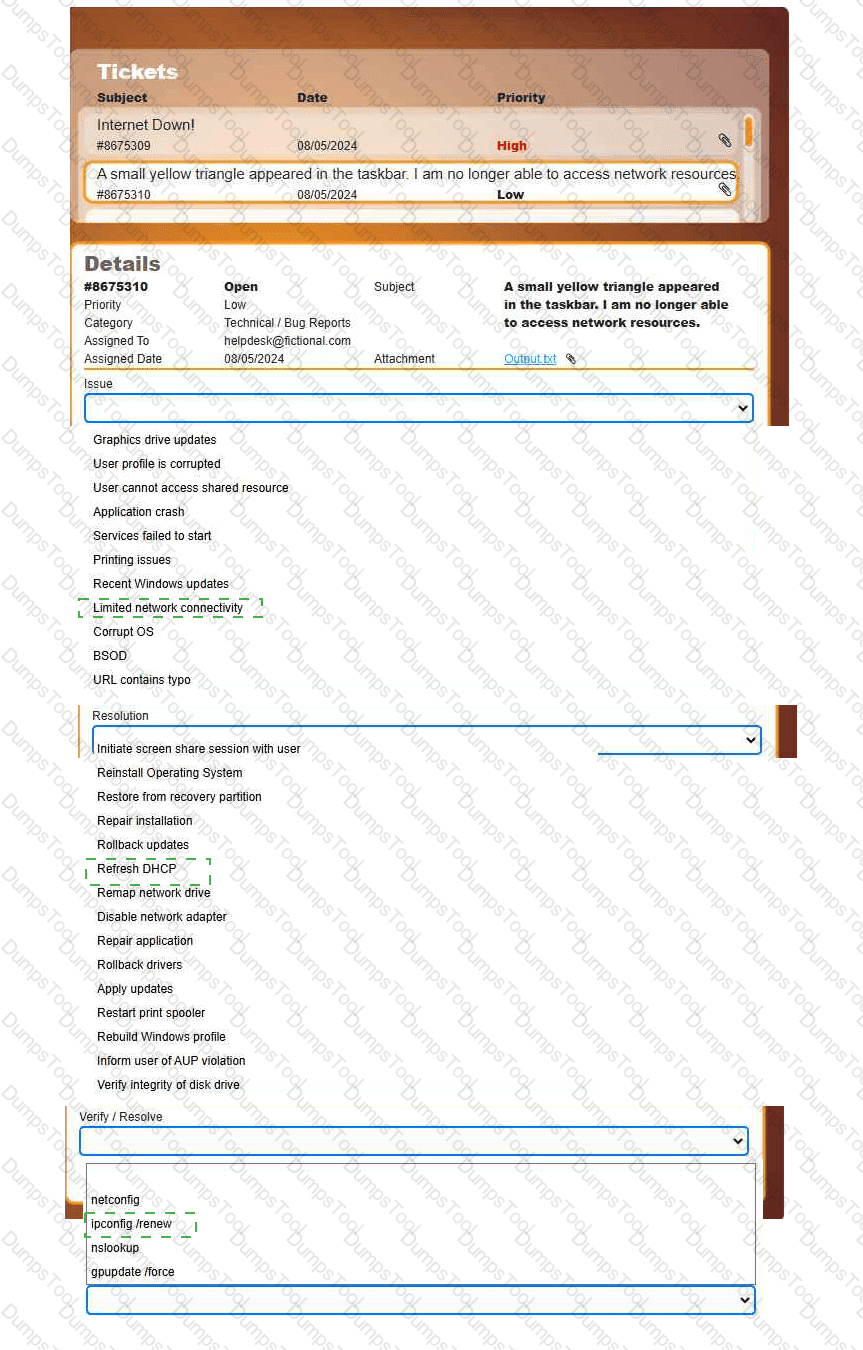
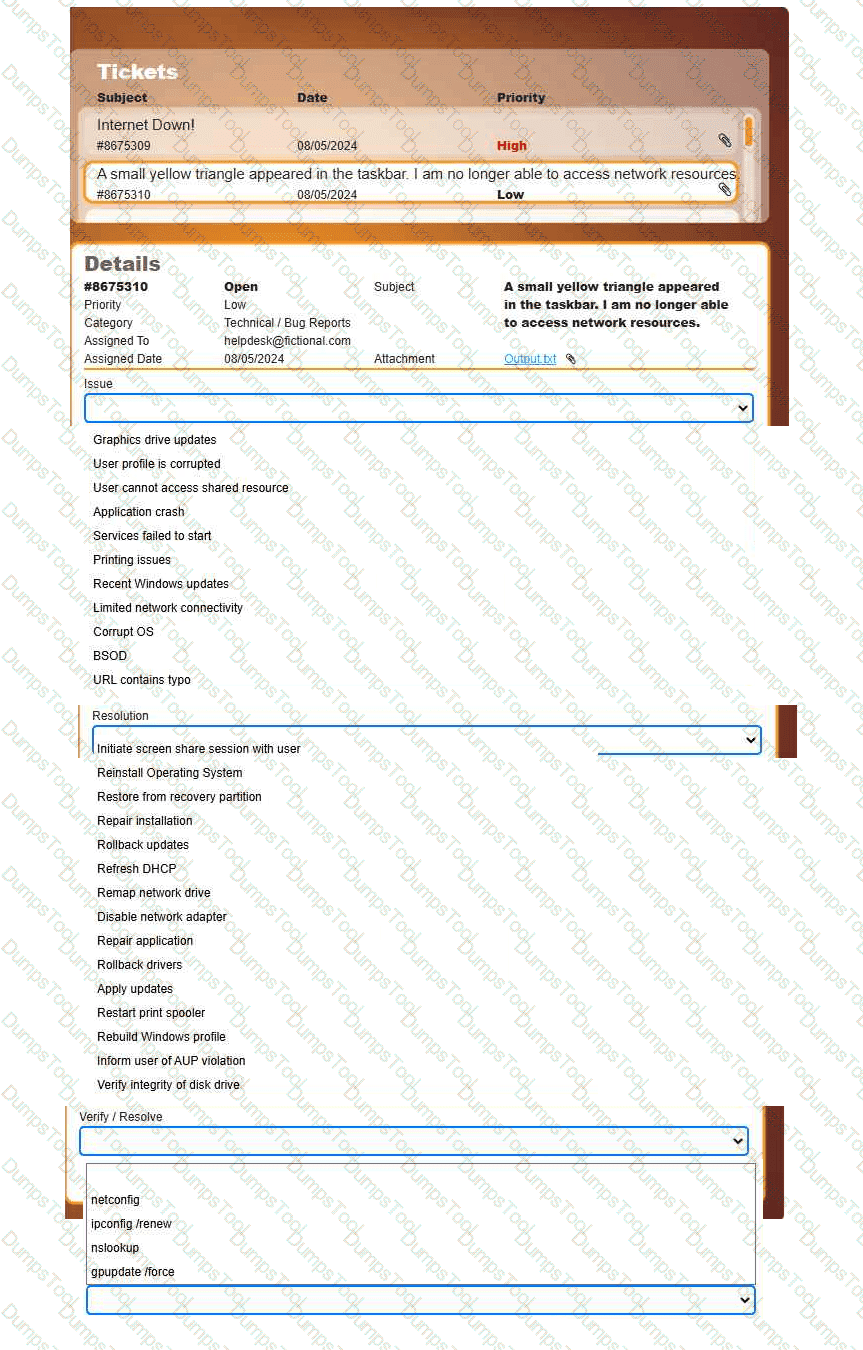
Welcome to your first day as a Fictional Company, LLC helpdesk employee. Please work the tickets in your helpdesk ticket queue.
INSTRUCTIONS
Click on individual tickets to see the ticket details, and view applicable attachments to
determine the problem.
Select the appropriate issue from the ' Issue ' drop-down menu. Then, select the most
efficient resolution from the ' Resolution ' drop-down menu. Finally, select the proper
command or verification to remediate or confirm your fix of the issue from the
' Verify/Resolve ' drop-down menu.
A user receives an unexpected text message containing a link to reset an expired password. Which of the following social engineering attacks is taking place?
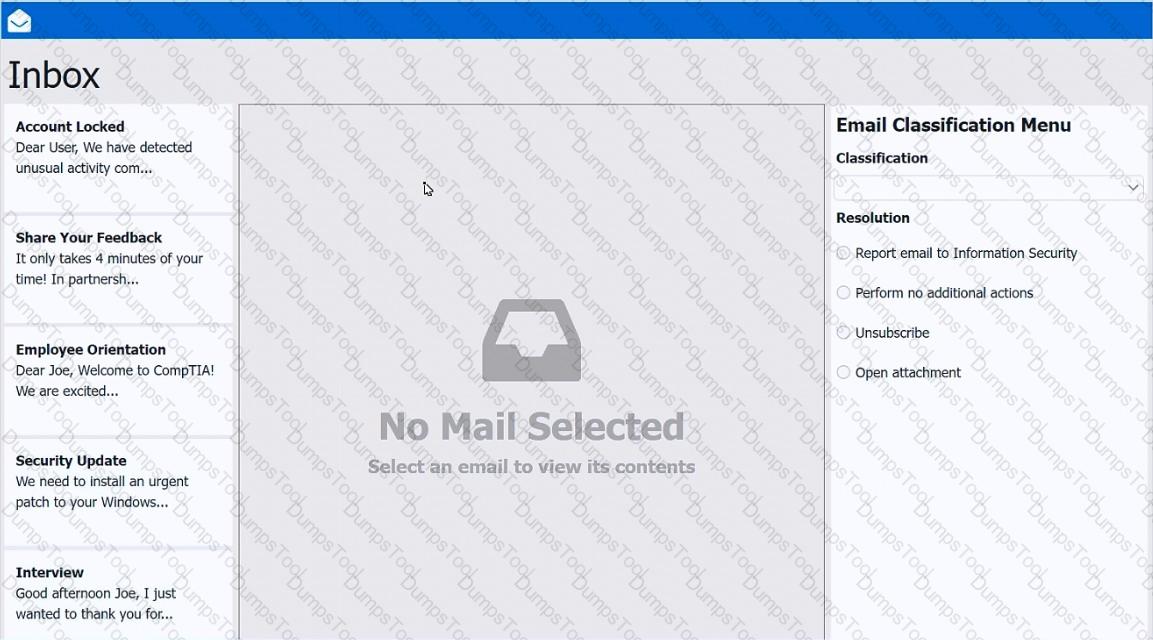
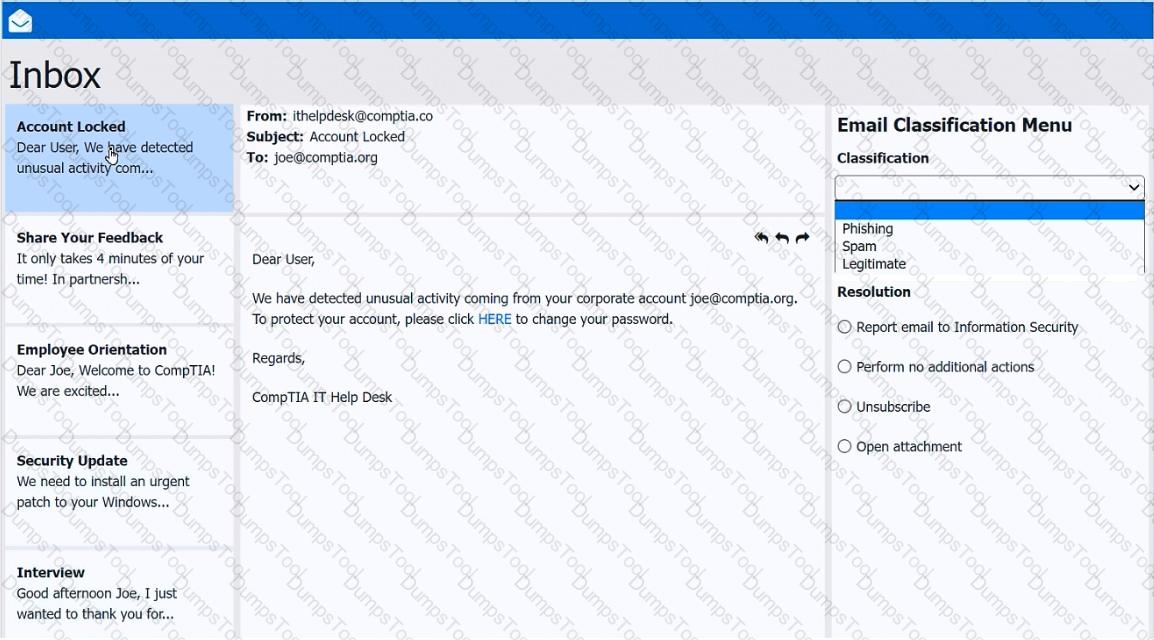
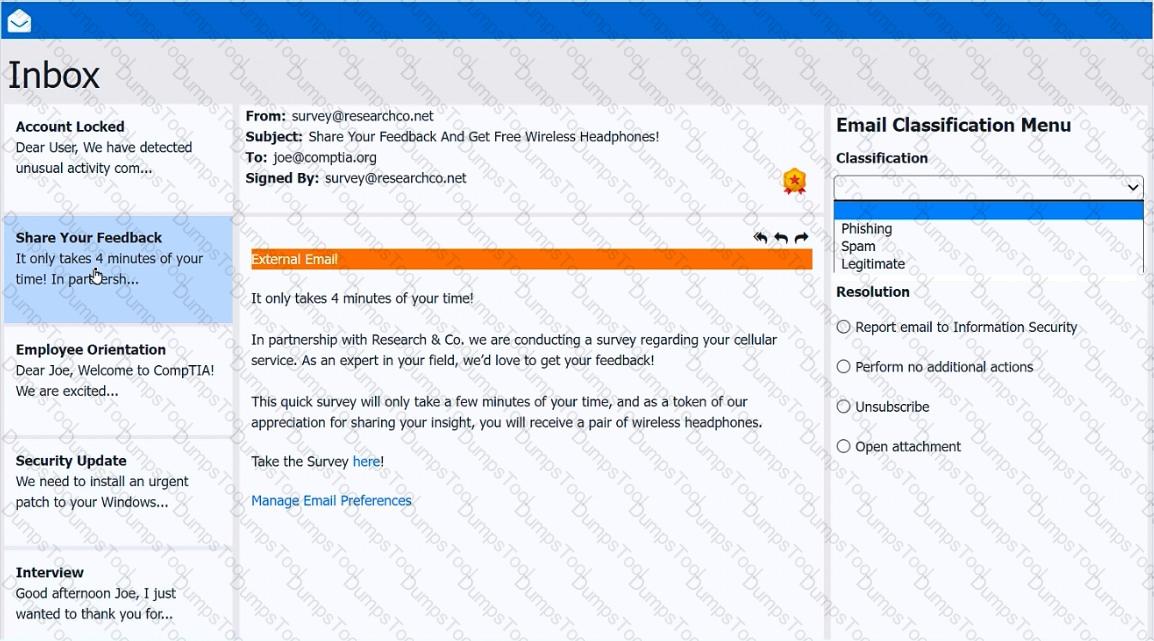
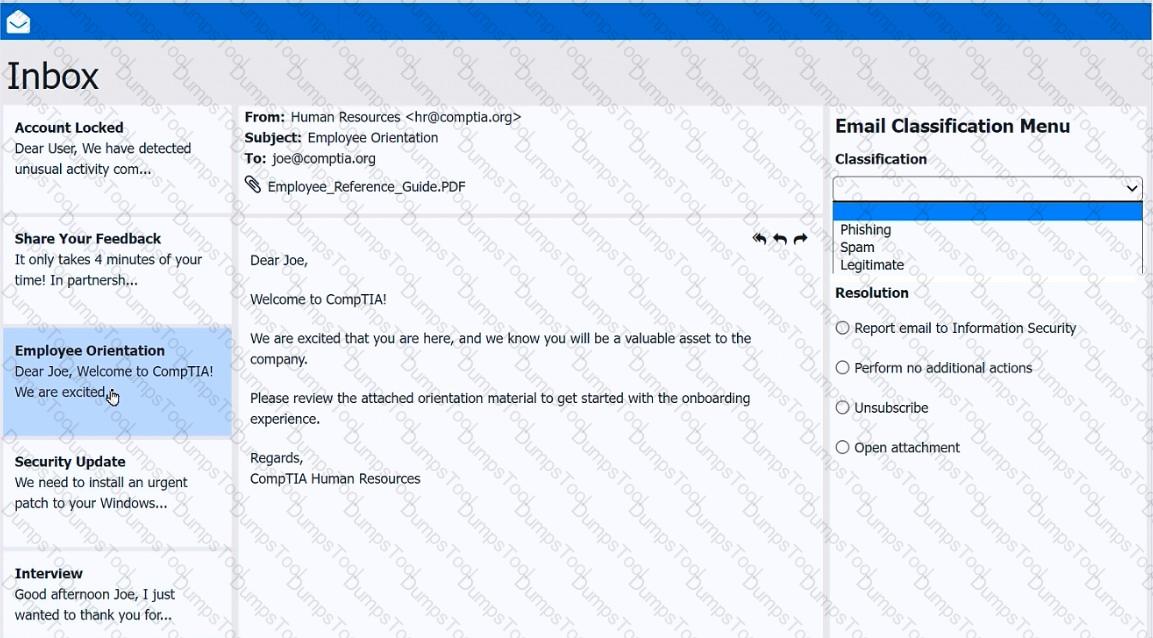
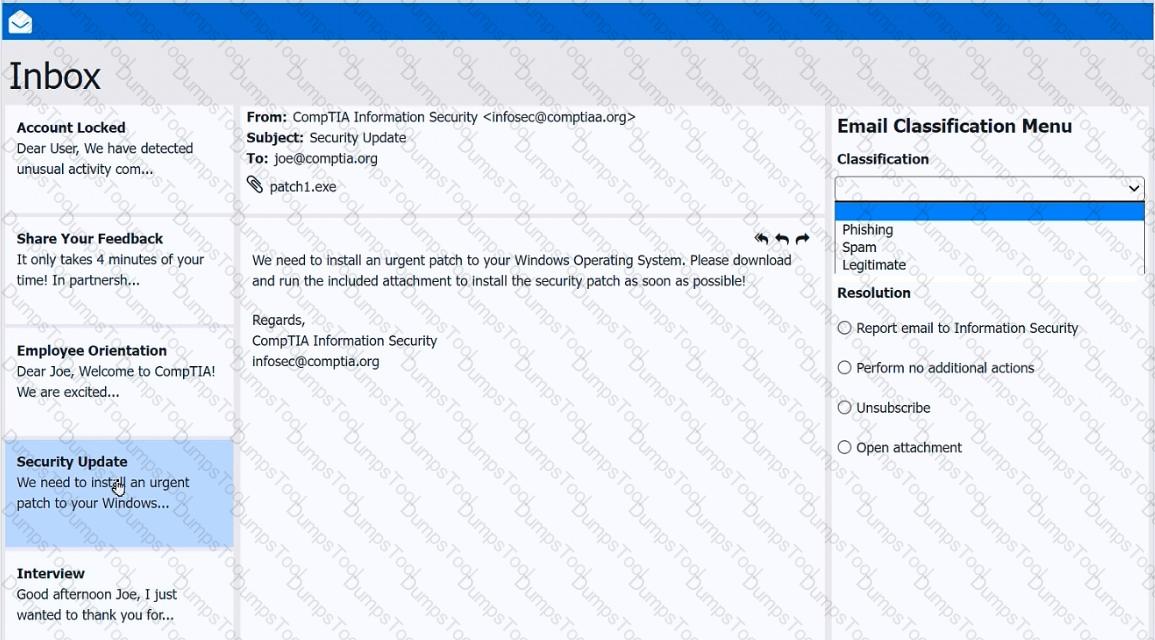
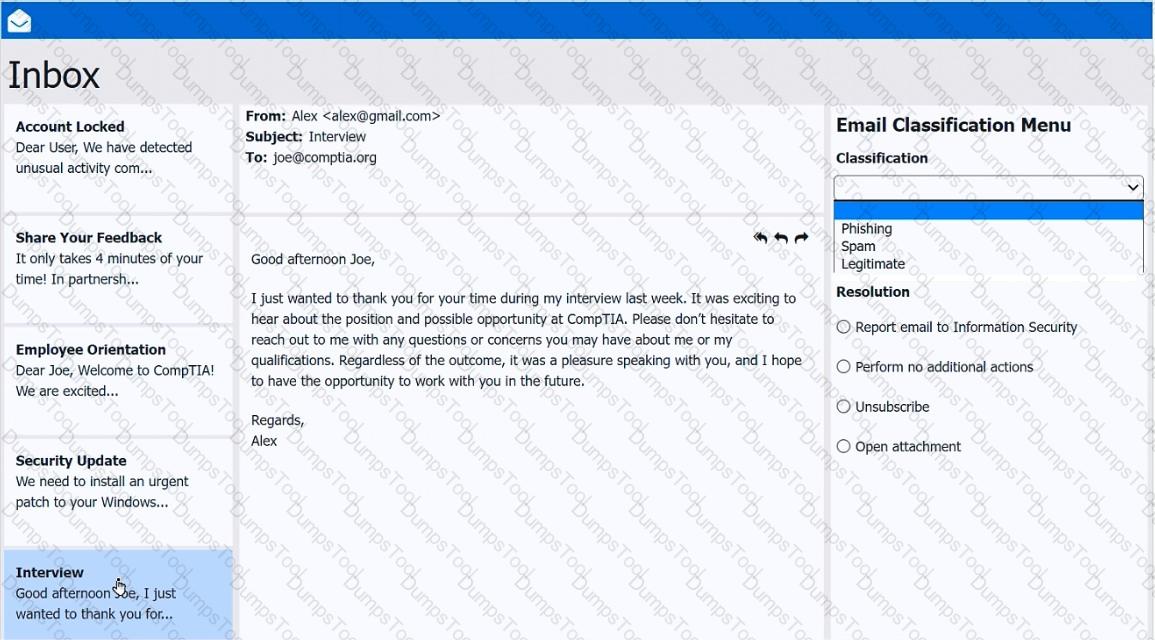
As a corporate technician, you are asked to evaluate several suspect email messages on a client ' s computer. Corporate policy requires the following:
> All phishing attempts must be reported.
> Future spam emails to users must be prevented.
INSTRUCTIONS
Review each email and perform the following within the email:
> Classify the emails
> Identify suspicious items, if applicable, in each email
> Select the appropriate resolution
If at any time you would like to bring back the initial state of the simulation, please click the Reset All button.
A user reports a critical application issue. The user tells the technician that a former IT employee previously resolved this same issue. Which of the following steps should the technician take first?
An end user sees frequent onscreen messages from a retail site they visited a week ago. A technician investigates and determines that the pop-up blocker is turned on. Which of the following should the technician do next?
A user ' s machine is infected with malware that the user ' s existing security software did not detect. Which of the following best explains the reason the infection was undetected?
Which of the following methods involves requesting a user’s approval via a push notification to verify the user’s identity?
A high percentage of users at an office store documents on their local computers. The office needs to migrate to the next version of Windows. Which of the following methods should a technician use?
A support technician must install software that allows a user to deliver a project status presentation to external stakeholders. Which of the following software types should the technician install?
A user wants to use several used computers to set up a low-cost lab at home to study and test scripts for managing servers. Which of the following would be the best operating system choice?
An international traveler is concerned about others accessing the contents of their smartphone if it is lost or stolen. The traveler has enabled biometrics. Which of the following additional security measures further reduces the risk of unauthorized data access?
A technician is 3-D printing high-strength, carbon fiber-based filament parts for a customer order. Which of the following is the most important for the technician to use?
A security administrator teaches all of an organization ' s staff members to use BitLocker To Go. Which of the following best describes the reason for this training?
An endpoint ' s screensaver no longer activates automatically. The global security policy states that the screensaver should activate after the endpoint has been idle for an hour. Which of the following commands should the technician run on the endpoint to investigate this issue?
A remote user reports that their screen displays the message, “All of your files have been encrypted. If you want your files back, you will need to pay us in Bitcoin.” Which of the following should a technician do first?
A technician thinks that an application a user downloaded from the internet may not be the legitimate one, even though the name is the same. The technician needs to confirm whether the application is legitimate. Which of the following should the technician do?
What is found in an MSDS (Material Safety Data Sheet) for a battery backup?
A user reports that the time on their computer does not match the time on their VoIP phone. What should a technician do?
A technician is assisting a customer who is experiencing frequent network issues. The customer asks whether other clients have experienced similar issues and how those situations were handled. Which of the following is the best way for the technician to respond?
Which of the following concepts should a technician consider when discussing confidential work projects with individuals outside the company?
After a user installs a mobile application from an advertisement, the phone ' s battery dies a few hours later and becomes hot to touch, even when not in use. Which of the following should a technician do first?
A support specialist must apply a new application update to an entire organization. Which of the following is the first step in this process?
What is the next step a technician should take after completing malware cleanup?
A small office reported a phishing attack that resulted in a malware infection. A technician is investigating the incident and has verified the following:
● All endpoints are updated and have the newest EDR signatures.
● Logs confirm that the malware was quarantined by EDR on one system.
● The potentially infected machine was reimaged.
Which of the following actions should the technician take next?
A secretary receives an email from the CEO requesting immediate vendor payment. Later, the CEO says they never sent it. Which social engineering tactic is this?
A company wants to prevent unauthorized physical access to its mobile devices. Which of the following should the company do? (Select two).
Which of the following is the best reason for a network engineering team to provide a help desk technician with IP addressing information to use on workstations being deployed in a secure network segment?
After completing malware removal steps, what is the next step the technician should take?
A company requires technicians to verify that files downloaded from the internet have not been modified. Which of the following should the technicians use for validation?
A project team needs special access on a shared repository to add new content, edit existing content, and prevent content deletion. Which of the following should an administrator do to configure this setup with the least amount of effort?
A user installed a free application from an unofficial application store. Now, their smartphone displays random pop-ups and shows increased data usage. Additionally, the user cannot perform certain actions such as opening banking applications or updating their OS. Which of the following should the user do first to address the security issues on their smartphone?
A technician is preparing to replace the batteries in a rack-mounted UPS system. After ensuring the power is turned off and the batteries are fully discharged, the technician needs to remove the battery modules from the bottom of the rack. Which of the following steps should the technician take?
A user takes an iOS-based smartphone that is performing slowly to a repair shop. A shop technician finds the following information:
Battery charge: 25%
Battery health: 90%
Hot-spot: On
Mobile reception: |||
Roaming: Off
Used space: 63.76GB/64GB
Which of the following is the cause of the issue?
A user needs to test several software replacement possibilities. Part of the process involves installing the different software options on a corporate-imaged sandboxed PC. Which of the following is the best option to allow the user to install the required software?
An administrator must write a script that will output the host name to a file. Which of the following commands is the best way to accomplish this task?
A company executive is currently attending a major music festival with a large number of attendees and is having trouble accessing a work email account. The email application is not downloading emails and also appears to become stuck during connection attempts. Which of the following is most likely causing the disruption?
A technician is unable to join a computer to the Windows domain. However, the computer can ping the domain controller by IP address. Which of the following is the most likely reason?
A technician is assisting a user who is growing increasingly frustrated because an application continuously crashes. The technician must coordinate with another department to resolve the issue. Which of the following actions should the technician take to effectively and professionally communicate with the user?
Users are reporting that an unsecured network is broadcasting with the same name as the normal wireless network. They are able to access the internet but cannot connect to the file share servers. Which of the following best describes this issue?
A technician installs VPN client software that has a software bug from the vendor. After the vendor releases an update to the software, the technician attempts to reinstall the software but keeps getting an error message that the network adapter for the VPN already exists. Which of the following should the technician do next to mitigate this issue?
A Microsoft OS laptop user requests an alternative log-in authentication method because they have forgotten their password multiple times. Which of the following should a technician enable to satisfy this request?
An organization sees unauthorized apps installed and licensing prompts. What should the security team do?
Which of the following authentication methods is the best way to prevent users from frequently entering their credentials?
After installing new webcam software, a PC experiences BSOD during videoconference calls. What should the technician do next?
Which of the following describes an attack in which an attacker sets up a rogue AP that tricks users into connecting to the rogue AP instead of the legitimate network?
A technician notices that the weekly backup is taking too long to complete. The daily backups are incremental. Which of the following would most likely resolve the issue?
An administrator received an email stating that the OS they are currently supporting will no longer receive security updates and patches. Which of the following is the most likely reason?

TESTED 12 Oct 2026