Halloween Sale - Special 75% Discount Offer - Ends in 0d 00h 00m 00s - Coupon code: 75onlydt

Network-Security-Essentials Questions and Answers

Question # 6

You have five public IP addresses available from your ISP. When you create a Static NAT action, you want to specify one of the public IP addresses for inbound traffic but do not see it in the IP address drop-down list. How can you change the Firebox configuration to see additional public IP addresses in the Static NAT action? (Select one.)

A.

Add secondary IP addresses to the external interface

B.

Configure 1-to-1 NAT for your entire subnet

C.

Add the public IP addresses to the From field of the policy that uses the Static NAT action

D.

Enable the Set Source IP option in the policy

E.

Add the IP addresses to the Dynamic NAT configuration

Full Access
Question # 7

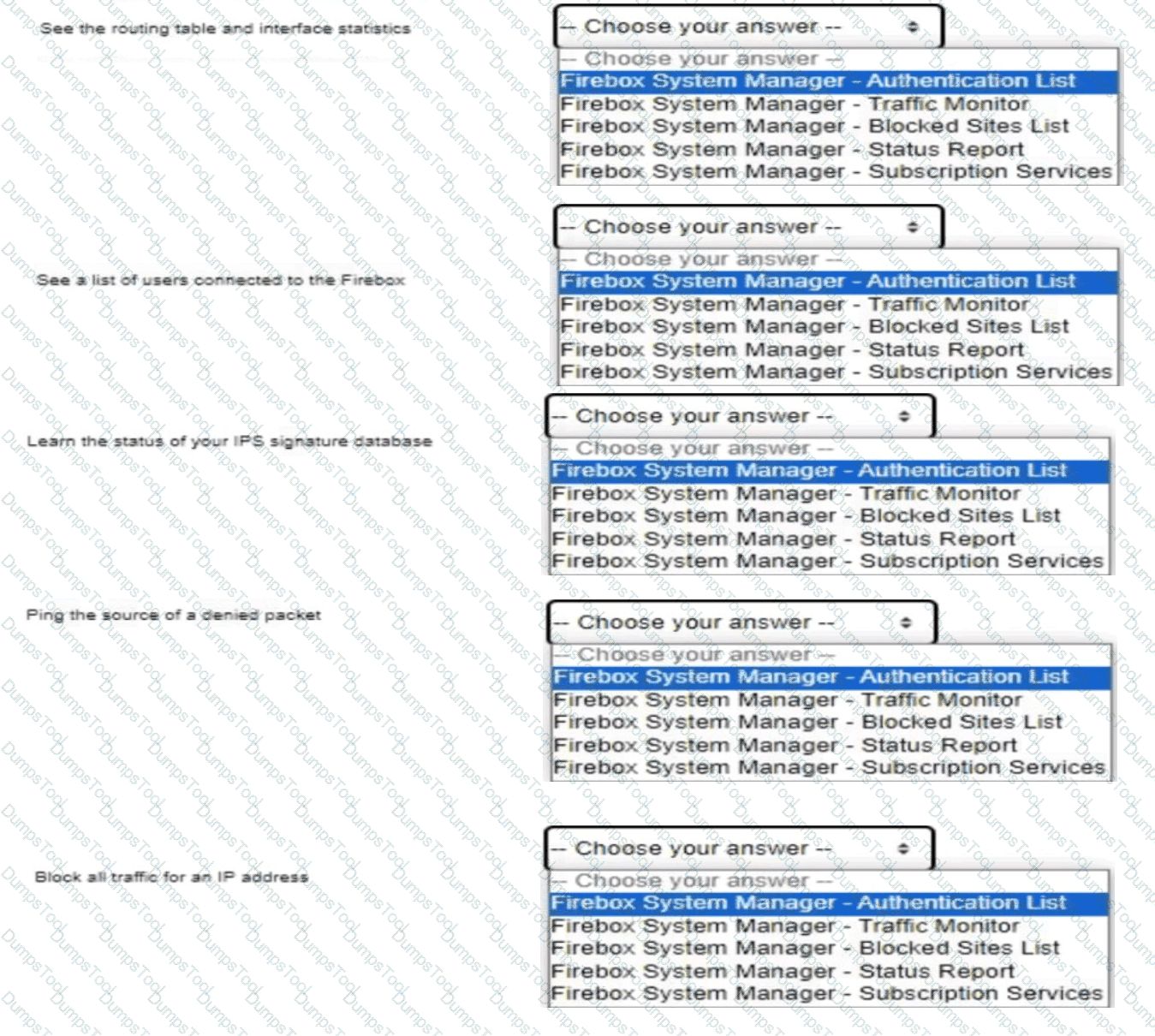
In Firebox System Manager, where can you perform each of these tasks?

Question # 7

Full Access
Question # 8

You lost access to a Firebox because no one knows the administrator passphrase. How can you regain access to the Firebox? (Select one.)

A.

Reset the Firebox to its factory defaults

B.

Plug in a USB flash drive with the WatchGuard Password Reset utility loaded

C.

Call WatchGuard Support for a passphrase reset

D.

Restore a backup image of the Firebox

E.

Connect with a console cable to reset the passphrase

Full Access
Question # 9

What does a Firebox configured with default firewall policies do with outbound traffic that does not have a configured route? (Select one.)

A.

Sends the traffic to the loopback interface

B.

Drops the traffic

C.

Denies the traffic

D.

Sends the traffic to the default gateway

Full Access
Question # 10

If policies are automatically ordered, which of these policies has the highest precedence? (Select one.)

A.

HTTPS policy - From: Any-Trusted, Any-Optional To: Any-External

B.

HTTPS policy - From: Trusted To: Any-External

C.

Outgoing policy - From: Any-Trusted, Any-Optional To: Any-External

D.

HTTPS policy - From: User1@Firebox-DB To: Any-External

Full Access
Question # 11

A Firebox has an external IP address of 203.0.113.100. A public web server with the IP address 10.0.1.80 is connected to a Firebox internal network. What is the effect of the policy shown in this image? (Select one.)
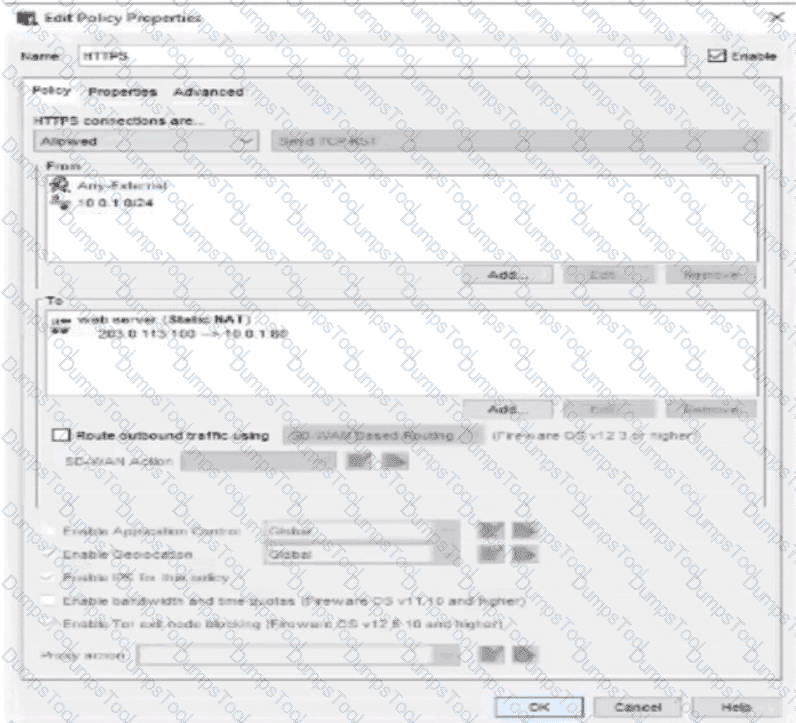
Question # 11

A.

Allows users on the Internet to connect to the 10.0.1.80 IP address of the web server

B.

Applies dynamic NAT to the 10.0.1.80 IP address of the web server to allow inbound connections

C.

Allows users on the Internet and the 10.0.1.0/24 network to use the internal IP address of the Firebox to connect to the web server

D.

Allows users on the Internet and the 10.0.1.0/24 network to use the external IP address of the Firebox to connect to the web server

Full Access
Question # 12

If you have only one public IP address, can you use Static NAT to enable inbound connections to both an email server and a web server on the private network? (Select one.)

A.

Yes, if both servers are on different private subnets

B.

No, you must use Dynamic NAT to route inbound connections to more than one server

C.

No, you must assign a public IP address to each server

D.

Yes, if both servers use different ports

Full Access
Question # 13

You have an existing network infrastructure built out that uses tagged and untagged VLAN networks. Based on the diagram below, which VLANs must you add to the Firebox interface? (Select one.)
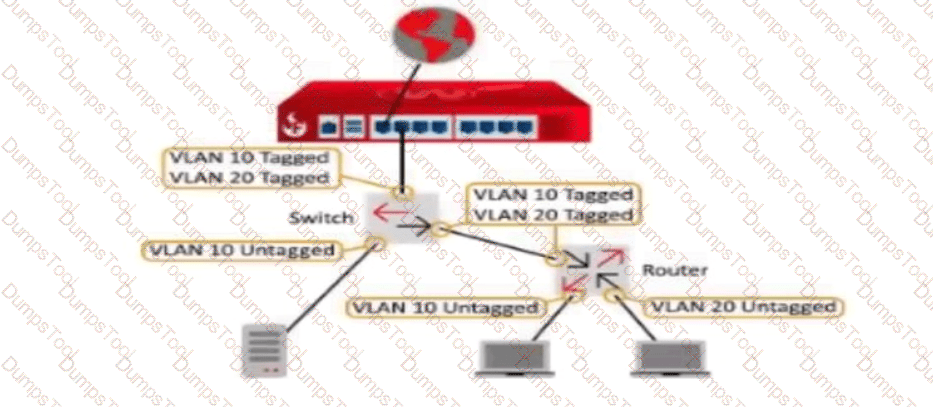
Question # 13

A.

VLAN 10 Untagged and VLAN 20 Untagged

B.

VLAN 10 Tagged and VLAN 20 Tagged

C.

VLAN 10 Untagged and VLAN 20 Tagged

D.

VLAN 10 Tagged and VLAN 20 Untagged

E.

VLAN 10 Untagged, VLAN 10 Tagged, and VLAN 20 Tagged

Full Access
Question # 14

Your network was the target of an attack last week. You want to learn more about the source of the attack. What monitoring tools can you use to get started? (Select one.)

A.

Traffic Monitor in Firebox System Manager

B.

FireWatch in Fireware Web UI

C.

Discovery in Fireware Web UI

D.

WatchGuard Log Catalog

E.

Log Search and reports in WatchGuard Cloud or Dimension

Full Access
Question # 15

Clients on the 10.0.10.0/24 network must connect to the server at 10.0.20.100. Based on this image, what static route must you add to the Firebox for traffic to reach the server? (Select one.)
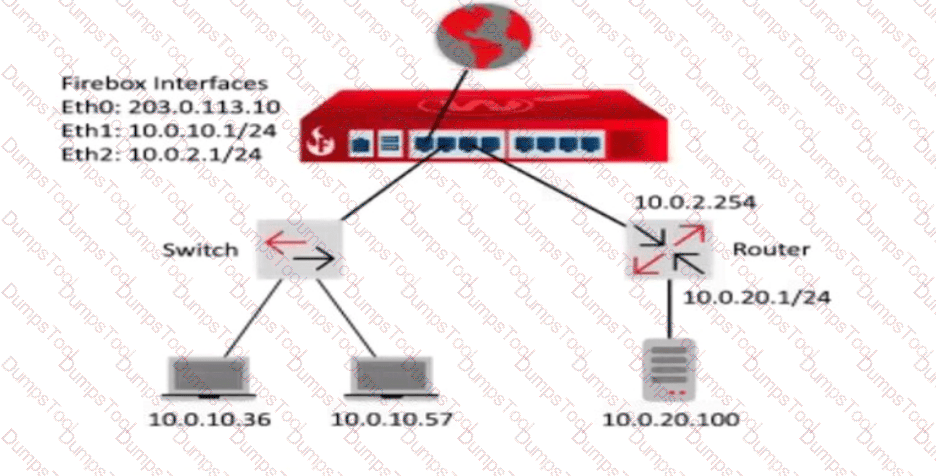
Question # 15

A.

Route to 10.0.10.0/24, Gateway 10.0.0.1

B.

Route to 10.0.20.0/24, Gateway 10.0.2.254

C.

Route to 10.0.20.0/24, Gateway 10.0.2.1

D.

Route to 10.0.2.0/24, Gateway 10.0.2.1

E.

Route to 10.0.20.0/24, Gateway 10.0.2.254

Full Access
Question # 16

Your users have no network connectivity on their computers in the 10.0.40.0/24 network. You investigate and discover the DHCP address pool for this network is exhausted, but there are no available IP addresses in the network to assign. Which of these options can you use to expand the IP address space of this network? (Select two.)

A.

Change the IP address of the 10.0.40.1/24 network to 10.0.40.123/24

B.

Enable a wireless SSID for the 10.0.40.1/24 network

C.

Add 10.0.50.1/24 to the 10.0.40.1/24 network as a secondary network

D.

Create a Dynamic NAT rule for traffic from the 10.0.40.1/24 network going to the 10.0.50.1/24 network

E.

Bridge the 10.0.40.1/24 network across additional interfaces

Full Access
Question # 17

Some management tasks require you to use a specific management interface. Match the task below with the management interface that supports it.
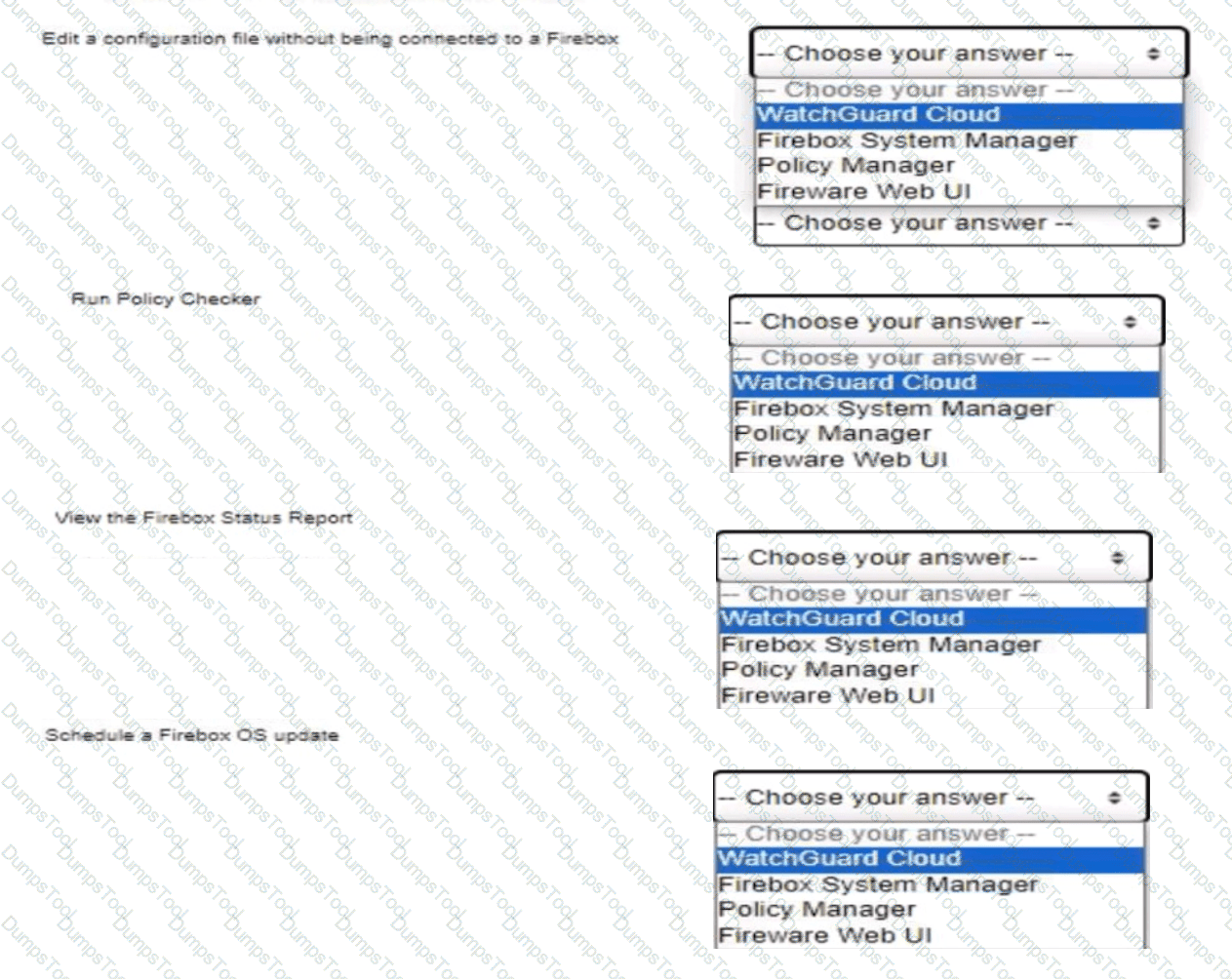

Question # 17

Full Access
Question # 18

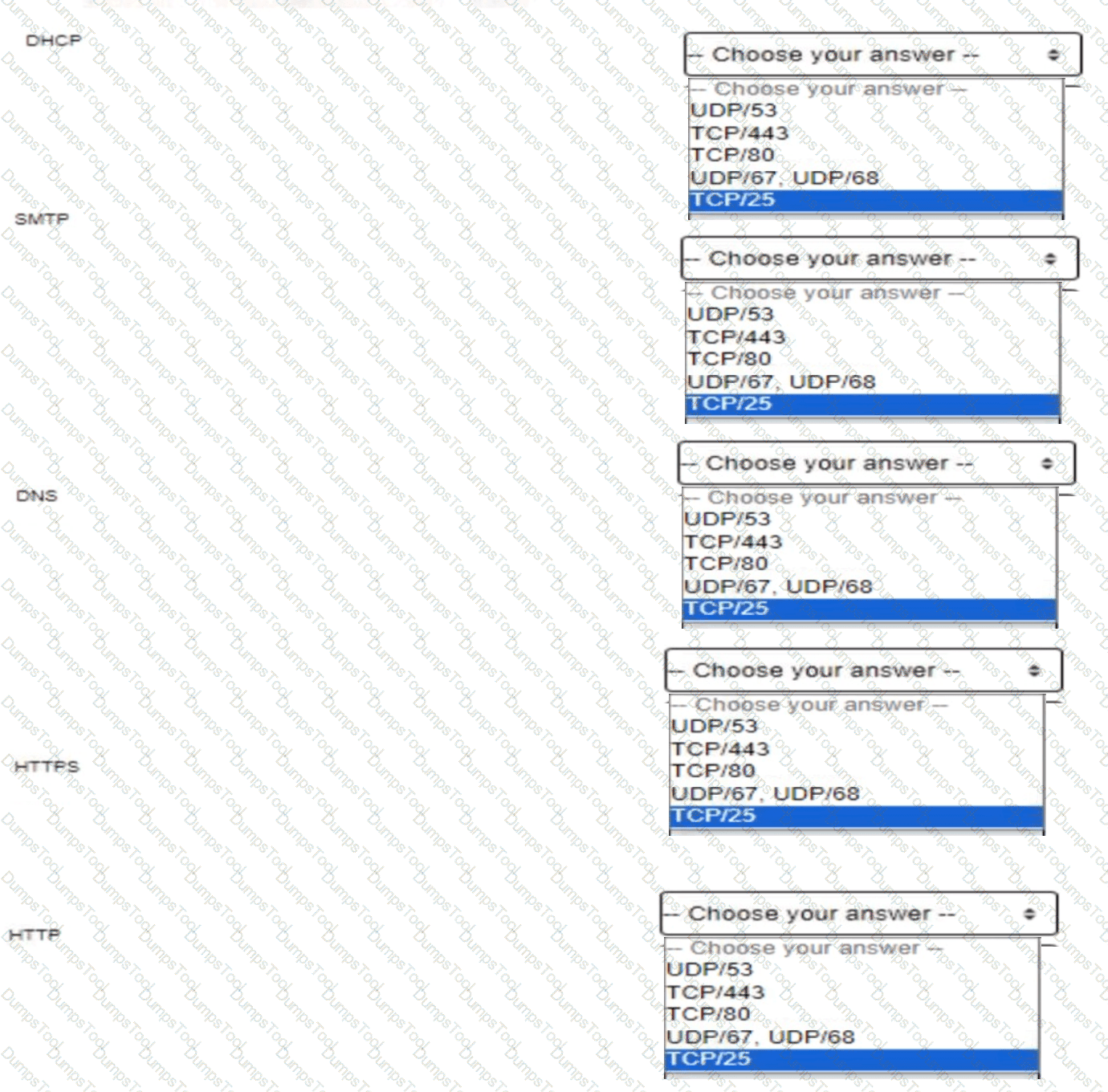
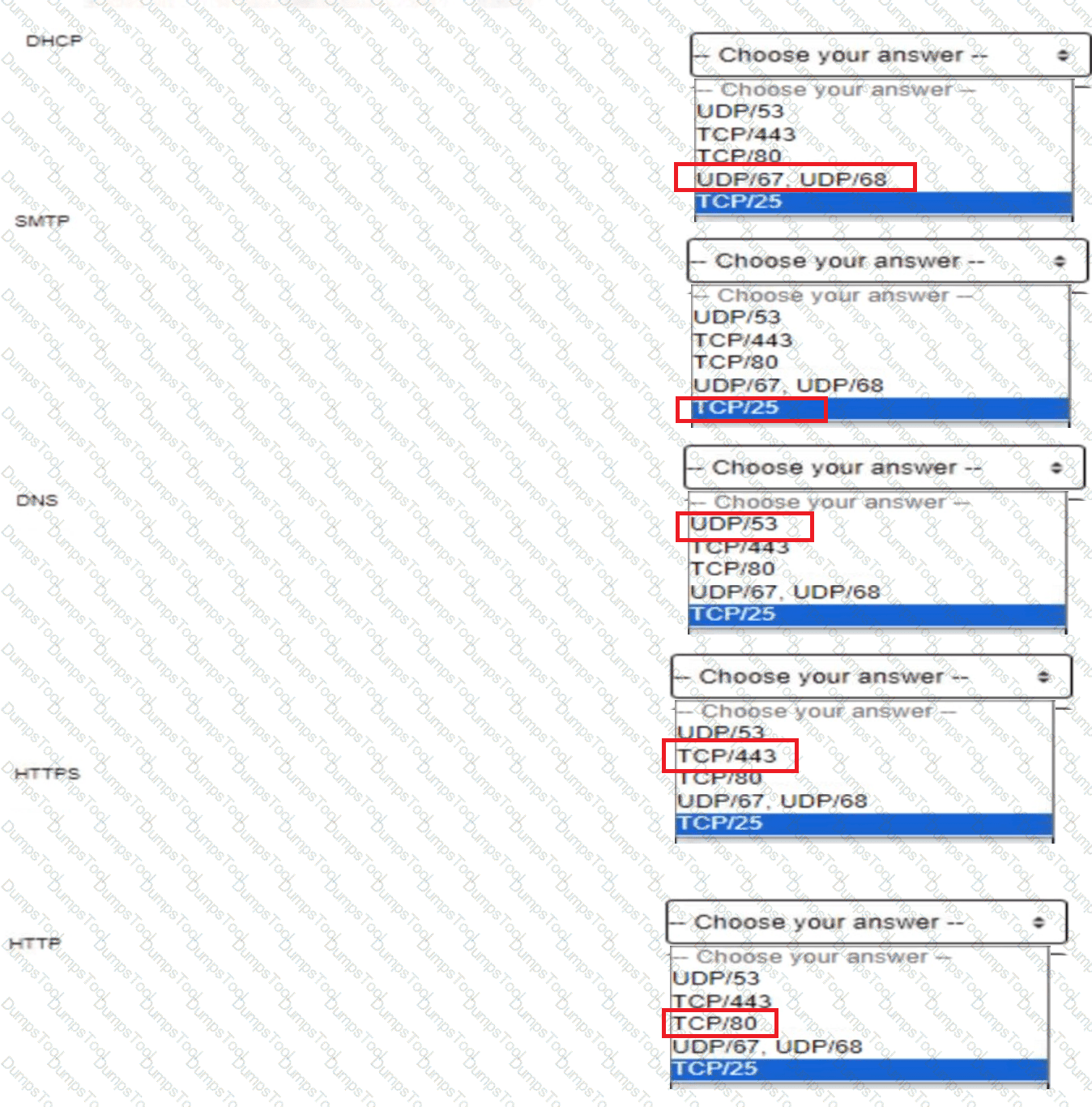
Match the network server to the protocol and port it uses:

Question # 18

Full Access