
Which pattern can a web API use to notify its client of state changes as soon as they occur?
ETL data load
Schedule Event Publisher
HTTP Webhook
Shared database trigger
An HTTP webhook provides event-driven notification from an API or service to a client-controlled HTTP endpoint. Instead of requiring the client to repeatedly poll the API for changes, the client registers or supplies a callback URL. When the relevant state transition occurs, the service immediately issues an HTTP request—commonly POST—to that endpoint.
This architecture closely matches the requirement to notify the client as soon as the state change occurs. MuleSoft-supported connectors expose the same webhook model. For example, MuleSoft's connector documentation describes webhook endpoints as URLs that receive notifications about configured events, demonstrating the callback-based semantics of the pattern.
An ETL load is primarily designed for batch-oriented movement and transformation of data and would introduce unnecessary latency. A scheduled event publisher is still time based, meaning notification occurs according to a schedule rather than directly in response to the state transition. A shared database trigger tightly couples applications through the persistence tier and does not constitute an API notification mechanism.
A webhook therefore creates a clean event-driven API contract: the producing service detects the event and actively notifies the registered consumer endpoint.
Reference topics: HTTP webhooks; event-driven API integration; callback endpoints; asynchronous notifications; API consumer decoupling.
Official documentation: https://docs.mulesoft.com/stripe-connector/latest/stripe-connector-reference
===============================================================
An API has been developed and deployed to CloudHub. Among the policies applied to this API is an allowlist of IP addresses. A developer wants to run a test in Anypoint Studio and does not want any policies applied because their workstation is not included in the allowlist.
What must the developer do in order to run this test locally without the policies applied?
Pass in the runtime parameter "-Danypoint.platform.gatekeeper=disabled"
Deactivate the API in API Manager so the Autodiscovery element will not find the application when it runs in Studio
Run the test as-is, with no changes, because the Studio runtime will not attempt to connect to API Manager
Create a properties file specifically for local development and set the API instance ID to a value that is not used in API Manager
API Autodiscovery is what pairs a Mule application with a particular API Manager instance. The apiId in the Autodiscovery configuration identifies the managed API from which the runtime obtains API configuration and policies. Therefore, using an environment-specific configuration for local development prevents the locally running application from binding to the production API instance and consequently prevents those production policies from governing local test traffic.
This is different from setting anypoint.platform.gatekeeper=disabled. Gatekeeper controls whether a managed API is blocked while policy information is unavailable or being synchronized; disabling Gatekeeper is not equivalent to disabling API Manager policies. Policies can still be downloaded and applied when the application remains paired through Autodiscovery.
Running the application unchanged is also incorrect because a locally executed Mule runtime can connect to API Manager when Autodiscovery and platform credentials are configured. MuleSoft explicitly documents local Autodiscovery for policy testing. Deactivating the shared API is likewise inappropriate because it modifies centrally managed configuration rather than isolating the developer's local environment.
Reference topics: API Autodiscovery; API Instance ID; Environment-specific Configuration; Mule Gateway Gatekeeper.
Official documentation: https://docs.mulesoft.com/mule-gateway/mule-gateway-autodiscovery-overview
===============================================================
Two APIs are deployed to a two-node on-prem cluster. Due to a requirements change, the two APIs must communicate to exchange data asynchronously.
How can this be solved?
Instead of using the VM Connector use directly
It is not possible to use the VM Connector since the APIs are running in a cluster mode and each node has its own set of VM Queues
If the two APIs use the same domain, VM Connector can be leveraged
The VM Connector is used for inter-application communication, so it is not possible to use the VM Connector
VM Connector supports both intra-application and inter-application asynchronous communication. MuleSoft specifically documents that two different Mule applications can publish to and consume from the same VM queue when both applications are part of the same Mule domain and reference the shared VM configuration.
The fact that the applications are deployed to a two-node Mule cluster does not prevent use of VM Connector. In cluster mode, VM queues are cluster-wide resources. Mule's cluster synchronizes access, and messages placed on a VM queue can be processed by another node in the cluster. MuleSoft identifies this as a supported mechanism for distributing asynchronous work across clustered runtime instances.
Therefore, option B is incorrect: each node does not operate an entirely isolated VM queue namespace for a shared clustered configuration. Option D also contradicts VM Connector's documented inter-application use case.
The required architectural condition is that both applications use the same domain/shared VM configuration so they can reference the same queue. The publisher can then send asynchronously while the second API consumes from the shared VM queue.
Reference topics: VM Connector; Mule domains; inter-application communication; persistent/transient queues; Mule HA clustering.
Official documentation: https://docs.mulesoft.com/vm-connector/latest/vm-publish-across-apps
Official documentation: https://docs.mulesoft.com/vm-connector/latest/vm-reference
===============================================================
A Mule application uses API autodiscovery to access and enforce policies for a RESTful implementation.
What needs to be configured for the flowRef attribute of the autodiscovery global element?
The name of the flow that has APIkit Console to receive all incoming RESTful operation requests
Nothing because flowRef is an optional attribute which can be passed during runtime
The name of the flow that has HTTP Listener to receive all incoming RESTful operation requests
Any of the APIkit generated implementation flows
API Autodiscovery pairs a Mule API implementation with an API instance managed in API Manager. The global autodiscovery element requires the API instance identifier and a flowRef that identifies the flow where API Gateway policy enforcement begins.
MuleSoft explicitly states that flowRef must reference a flow containing an HTTP Listener. The referenced flow represents the inbound API entry point receiving the requests against which API Manager policies are enforced. Connectors that merely use HTTP internally are not sufficient for this requirement.
In an APIkit-generated application, the appropriate flow is typically the main API flow that contains the HTTP Listener and APIkit Router. Individual generated resource/operation flows execute later after routing; they are not the primary inbound policy-enforcement point. Similarly, the APIkit Console flow is intended for interactive API documentation/testing and should not be used as the flowRef for production policy enforcement.
The attribute is not simply supplied dynamically at runtime. It is part of the Mule application's Autodiscovery configuration and identifies the exact listener-based flow paired to API Manager.
Therefore, flowRef must identify the flow containing the HTTP Listener that receives the REST API's incoming requests.
Reference topics: API Autodiscovery; api-gateway:autodiscovery; flowRef; HTTP Listener; API Manager policy enforcement.
Official documentation: https://docs.mulesoft.com/mule-gateway/mule-gateway-config-autodiscovery-mule4
===============================================================
A Mule application needs to invoke an API hosted by an external system to initiate a process. The external API takes anywhere between one minute and 24 hours to complete its process.
Which implementation should be used to get response data from the external API after it completes processing?
Expose an HTTP callback API in Mule and register it with the external system
Use a Scheduler to check for a response every minute
Use an HTTP Connector inside Async scope to invoke the API and wait for a response
Use an HTTP Connector to invoke the API and wait for a response
A process that can require up to 24 hours is inherently asynchronous. The initiating Mule application should not keep an HTTP connection open until the remote system completes. Instead, Mule should initiate the process, return or continue independently, and expose an HTTP callback endpoint that the external system invokes when processing finishes.
The callback URL is registered with the external system so that completion data can be pushed back to Mule. This separates request initiation from completion notification and avoids tying up network connections or execution resources for an unpredictable duration. Callback-based processing is a standard asynchronous integration mechanism; MuleSoft documentation uses callback endpoints extensively where a remote system must later contact a Mule application.
Polling every minute is inefficient over a possible 24-hour interval and can generate large volumes of unnecessary requests. An Async scope does not transform a fundamentally synchronous HTTP request into a 24-hour callback model; the downstream HTTP connection would still be governed by response and connection timeout behavior. Waiting synchronously is even less appropriate.
Therefore, exposing a Mule HTTP callback API and registering it with the external system provides the most scalable and reliable architecture.
Reference topics: asynchronous integration; callback APIs; HTTP Listener; long-running processes; event-driven completion notification.
Official documentation: https://docs.mulesoft.com/http-connector/latest/http-authentication
===============================================================
Which statement is true when using XML SDK for creating custom message processors?
Operations can be reused in recursive calls
An XML SDK provides both inbound and outbound operations
Properties are fields defined by an end user of the XML SDK component and serve as a global configuration for the entire Mule project in which they are used
All operations are public
Option C is directly supported by the MuleSoft XML SDK documentation. MuleSoft defines an XML SDK property as a field supplied by an end user of the component that operates at the module configuration level. Unlike an operation parameter, which applies to one operation invocation, properties configure the XML SDK component across the Mule project in which that configuration is used.
The other choices conflict with documented XML SDK behavior. XML SDK operations do not support recursive calls, so A is false. XML SDK provides outbound operations but does not provide inbound message sources such as schedulers, making B false.
Option D also requires correction. Current XML SDK versions support a visibility setting with values including PUBLIC and PRIVATE; the default is public, but operations are not universally required to remain public. MuleSoft's current XML SDK reference explicitly documents private operation visibility.
Therefore, C is the technically correct and directly documented statement. This is one question where the option selected in the supplied source should not be accepted without verification.
Reference topics: XML SDK Properties; Operations; module configuration; operation visibility; XML SDK limitations.
Official documentation: https://docs.mulesoft.com/mule-sdk/latest/xml-sdk
Official documentation: https://docs.mulesoft.com/mule-sdk/latest/
===============================================================
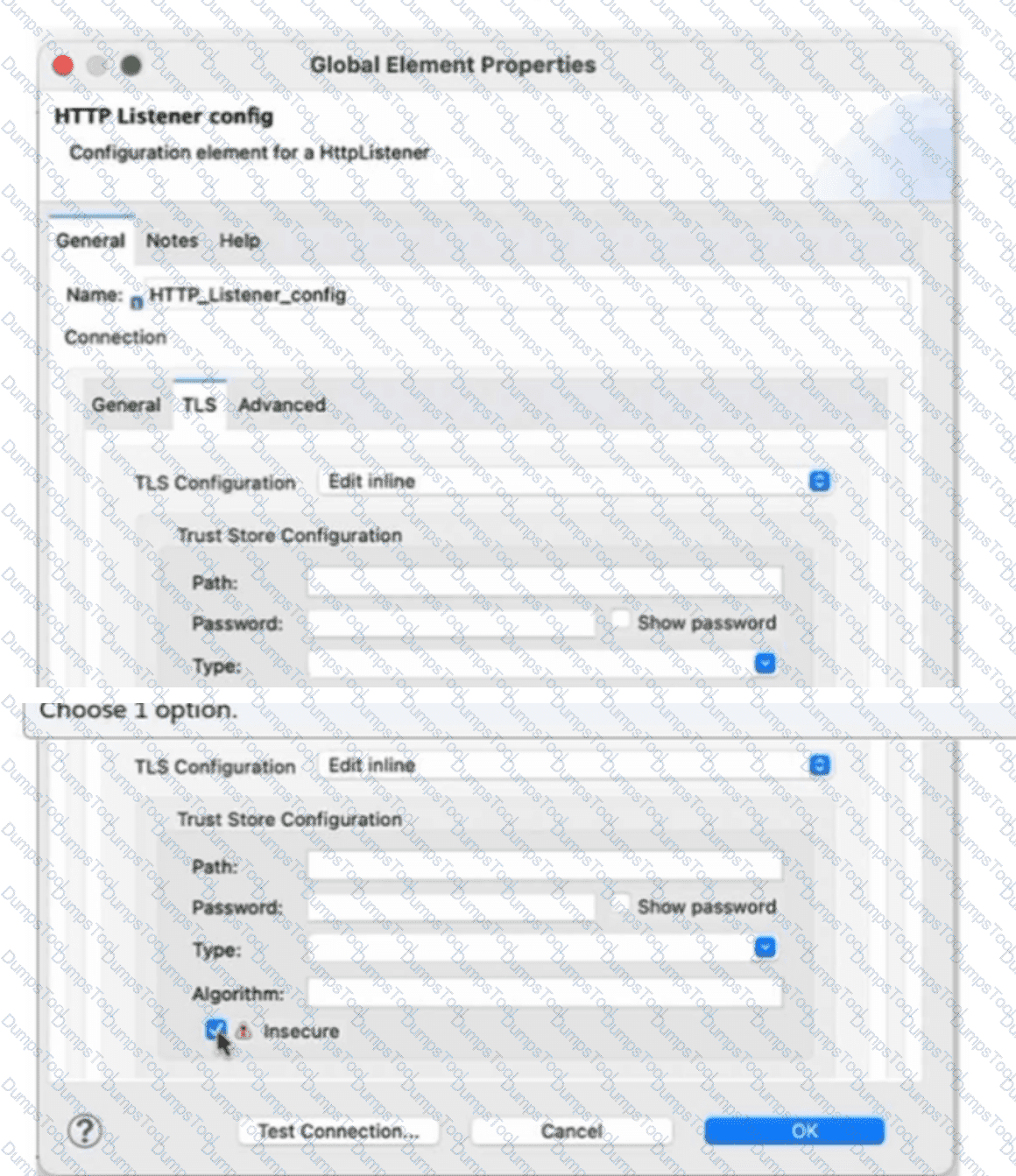
Refer to the exhibit.
What is the result if "Insecure" is selected as part of the HTTP Listener configuration?
Exhibit:
The HTTP Listener will trust any certificate presented by the HTTP client
The HTTP Listener will only accept HTTP requests
Mutual TLS authentication will be enabled between this HTTP Listener and an HTTP client
The HTTP Listener will accept any unauthenticated request
The Insecure setting belongs to Mule's TLS truststore configuration. MuleSoft defines the insecure property as a Boolean that determines whether truststore validation is performed. When insecure="true", Mule stops performing certificate validation.
For an HTTP Listener operating as the TLS server, the truststore is used when validating certificates supplied by connecting clients. Therefore, disabling truststore validation means the listener does not enforce normal trust verification against the configured certificate authorities; effectively, certificates presented by HTTP clients are trusted without the standard certificate-chain validation represented by the truststore. This corresponds to option A.
Selecting Insecure does not convert HTTPS into plain HTTP, so option B is incorrect. It also does not itself enable mutual TLS. Full mutual TLS requires appropriate server key material and client-certificate authentication/trust configuration. Likewise, "Insecure" specifically concerns certificate validation; it should not be interpreted as a generic instruction to bypass every possible authentication mechanism applied to the API.
MuleSoft explicitly warns that this option creates a security vulnerability and is appropriate only for development or prototyping, not production.
Reference topics: TLS Context; Truststore; insecure; client-certificate validation; mutual TLS.
Official documentation: https://docs.mulesoft.com/mule-runtime/4.11/tls-configuration
===============================================================
A Mule application defines an SSL/TLS keystore property "tls.keystore.keyPassword" as secure.
How can this property be referenced to access its value within the application?
${secure::tls.keystore.keyPassword}
p(secure::tls.keystore.keyPassword)
$(secure::tls.keystore.keyPassword)
#[secure::tls.keystore.keyPassword]
Mule Secure Configuration Properties uses the secure:: prefix when an application references a property stored in a secure configuration properties file. Therefore, a property named tls.keystore.keyPassword is referenced using:
${secure::tls.keystore.keyPassword}
MuleSoft's Secure Configuration Properties documentation specifically states that the secure:: prefix is required when loading values from a secure properties file. The same syntax is used whether the property is consumed by a TLS configuration, connector configuration, global element, or another Mule component.
The ${...} syntax represents Mule configuration-property resolution. By contrast, DataWeave runtime expressions use the #[...] form; simply placing a secure-property identifier inside that syntax does not constitute the documented secure configuration-property reference. Likewise, the other alternatives do not use the required Mule configuration-property syntax.
This distinction is particularly important for TLS credentials. A keystore key password should be maintained externally from Mule XML, encrypted in the secure properties source, and resolved through the Secure Configuration Properties module at runtime.
Therefore, the correct reference is ${secure::tls.keystore.keyPassword}.
Reference topics: Secure Configuration Properties; secure:: prefix; encrypted application properties; TLS keystore credentials.
Official documentation: https://docs.mulesoft.com/mule-runtime/4.9/secure-configuration-properties
===============================================================
A Mule API receives a JSON payload and updates the target system with the payload. The developer uses JSON schemas to ensure the data is valid.
How can the data be validated before posting to the target system?
Add the JSON module dependency and add the validate schema operation in the flow, configured to reference the schema
Using the DataWeave If Else condition, test the values of the payload against the examples included in the schema
Apply the JSON Schema policy in API Manager and reference the correct schema in the policy configuration
Use a DataWeave 2.0 transform operation, and at the top of the DataWeave script, add: %dw 2.0 / import json-module
MuleSoft provides the JSON Module specifically for operations such as JSON validation. The application should include the JSON Module as a Mule dependency and place its Validate schema operation before the connector or operation that posts the data to the target system.
The Validate schema operation receives the JSON document and evaluates it against the configured JSON Schema. When validation succeeds, processing continues to the next processor. If the payload does not conform, Mule raises JSON:SCHEMA_NOT_HONOURED, allowing the flow's error-handling strategy to reject or transform the invalid request before the target system is modified.
MuleSoft also documents that modules/connectors added manually to an application are declared in pom.xml as dependencies with the mule-plugin classifier; the JSON Module follows this standard pattern.
DataWeave conditional validation would unnecessarily reimplement schema semantics and would not automatically interpret a JSON Schema. API Manager does not provide the application-level JSON Module operation described by this requirement, and import json-module is not a valid mechanism for invoking the Mule JSON Module from DataWeave.
Reference topics: JSON Module; Validate Schema; JSON Schema; JSON:SCHEMA_NOT_HONOURED; Maven module dependency.
Official documentation: https://docs.mulesoft.com/json-module/latest/json-schema-validation
Official documentation: https://docs.mulesoft.com/json-module/latest/json-xml-maven
===============================================================
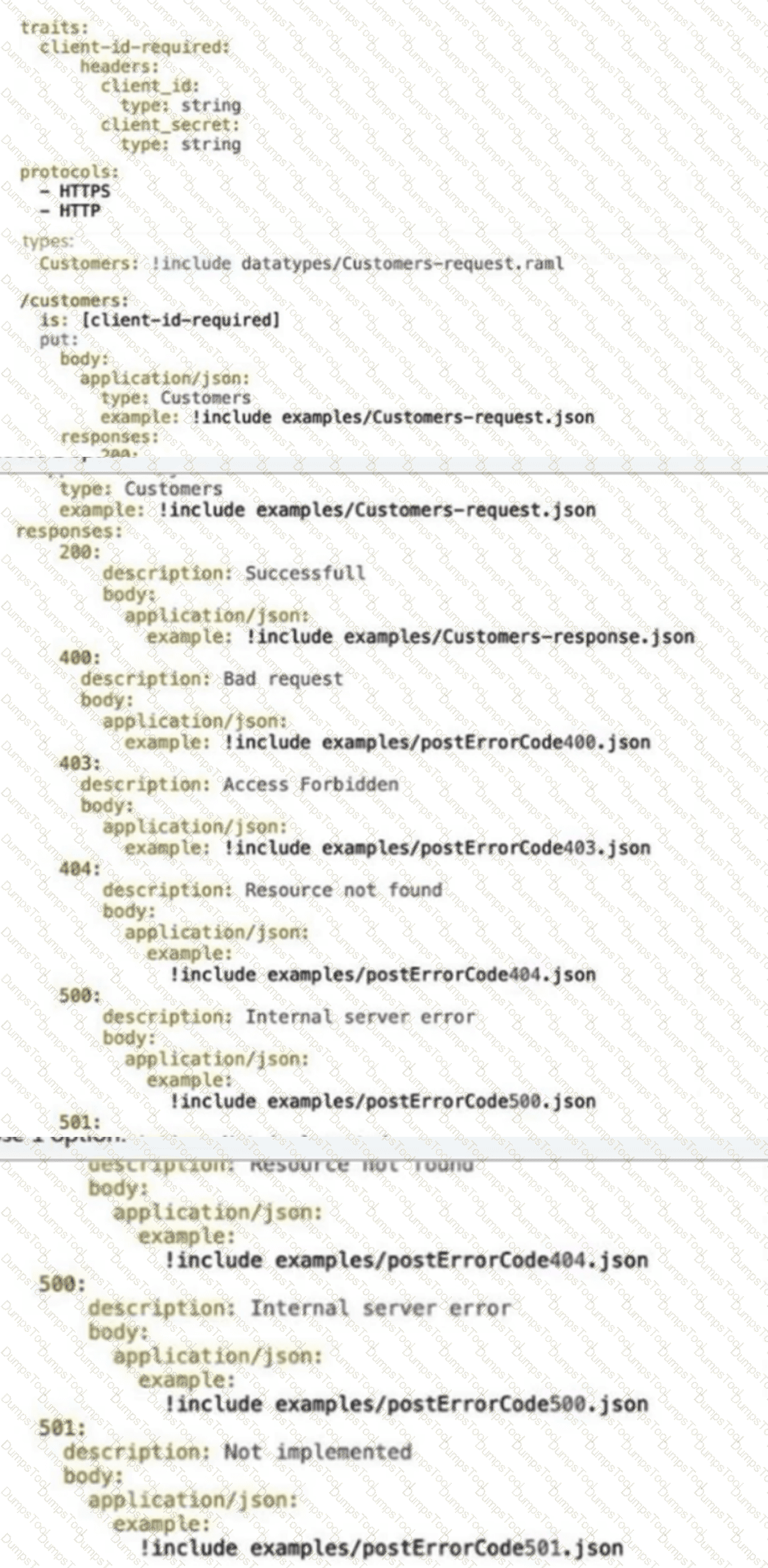
Refer to the exhibit.
A developer generates the base scaffolding for an API in Anypoint Studio.
Which HTTP status code is returned while testing using the API Kit console if no values are entered in client-id and client-secret?
Exhibit:
HTTP status code: 403
HTTP status code: 500
HTTP status code: 400
HTTP status code: 200
The RAML trait shown in the exhibit declares client_id and client_secret as headers and applies that trait to the /customers resource. Because these headers form part of the API contract, APIkit Router validates the inbound request against the specification before routing it to the generated implementation flow.
If the required request structure is not honored, APIkit raises an APIKIT:BAD_REQUEST error. MuleSoft's APIkit error-handling reference maps APIKIT:BAD_REQUEST directly to HTTP 400, and APIkit scaffolding generates the corresponding error-handling logic with httpStatus set to 400.
A 403 response would normally represent a request that was understood but rejected because of authorization. That is not what is happening here: the request fails API contract validation before successful routing because required request information is absent. A 500 indicates an internal server failure, which is also inappropriate for malformed client input.
Therefore, when the API Console submits the request without the required header values, the APIkit-generated implementation treats it as a bad request and returns HTTP 400.
Reference topics: APIkit Router validation; RAML traits; required headers; APIKIT:BAD_REQUEST; APIkit-generated error handling.
Official documentation: https://docs.mulesoft.com/apikit/latest/apikit-error-handling-reference
===============================================================
An organization uses CloudHub to deploy all of its applications.
How can a common-global-error-handler flow be configured so that it can be reused across all of the organization's deployed applications?
Create a Mule plugin project. Create a common-global-error-handler flow inside the plugin project. Use this plugin as a dependency in all Mule applications. Import that configuration file in Mule applications.
Create a Mule domain project. Create a common-global-error-handler flow inside the domain project. Use this domain project as a dependency.
Create a Mule plugin project. Create a common-global-error-handler flow inside the plugin project. Use this plugin as a dependency in all Mule applications.
Create a common-global-error-handler flow in all Mule applications. Refer to it via flow-ref wherever needed.
Reusable global configuration should be packaged once and consumed as a dependency rather than duplicated across individual Mule applications. A shared Mule project/plugin can contain common flows and global elements, including reusable error handlers. Each consuming application then declares the shared artifact as a dependency.
The crucial additional step is that the Mule configuration containing that global error handler must be imported into the consuming application. Simply placing a JAR/plugin on the Maven dependency graph does not automatically make every Mule XML configuration inside that artifact part of the application's active configuration.
MuleSoft currently documents the same pattern through imported project references: a JAR containing a shared Mule project can expose flows, error handlers, and connection configurations, and the consuming project specifies which Mule configuration file to import. Mule's configuration model also supports < import file="..."/ > for merging shared configuration files such as a global error handler.
A Mule domain is not the appropriate CloudHub reuse mechanism in this scenario. Option C is incomplete because it omits the configuration import step.
Reference topics: reusable Mule configurations; Mule plugin/shared project; Maven dependency reuse; configuration imports; global error handlers.
Official documentation: https://docs.mulesoft.com/anypoint-code-builder/int-global-config-elements
===============================================================
Which pattern should be used to invoke multiple HTTP APIs in parallel and roll back any failed requests in sequence?
Scatter-Gather as central Saga orchestrator for all API requests with compensating actions for failing routes
A Parallel For Each scope with each HTTP request wrapped in a Try scope
VM queues as a reliability pattern with error handlers to roll back any requests
A database as a transactional outbox and an Until Successful router to retry any requests
The requirement combines two architectural concerns: the downstream HTTP calls must execute concurrently, and completed remote operations must be reversible when another operation fails. Scatter-Gather is the appropriate Mule router for the concurrency requirement because it dispatches the event to multiple routes and executes those routes in parallel.
However, independent HTTP APIs cannot generally participate in a single ACID/XA transaction with Mule. Once a remote API successfully commits an operation, Mule cannot simply perform a conventional transaction rollback across that service boundary. The appropriate distributed-transaction pattern is therefore a Saga, where successful steps have defined compensating operations that semantically undo their effects when a subsequent step fails.
Scatter-Gather also provides a composite error model. If one or more routes fail, Mule collects successful route results and route failures into a MULE:COMPOSITE_ROUTING error. A centralized orchestration/error-handling flow can inspect those results and execute compensation logic in the required sequence.
Parallel For Each is designed for elements of a collection, not orchestration of several distinct API operations. VM queues and transactional-outbox patterns address different reliability concerns and do not directly implement distributed compensation.
Reference topics: Scatter-Gather Router; Composite Routing Errors; Distributed Transactions; Compensating/Saga Pattern.
Official documentation: https://docs.mulesoft.com/mule-runtime/4.3/scatter-gather-concept
===============================================================
Refer to the exhibits.
BioInfo System API is implemented and published to Anypoint Exchange. A developer wants to invoke this API using its REST Connector.
What should be added to the POM?
Exhibit / Answer Configurations:
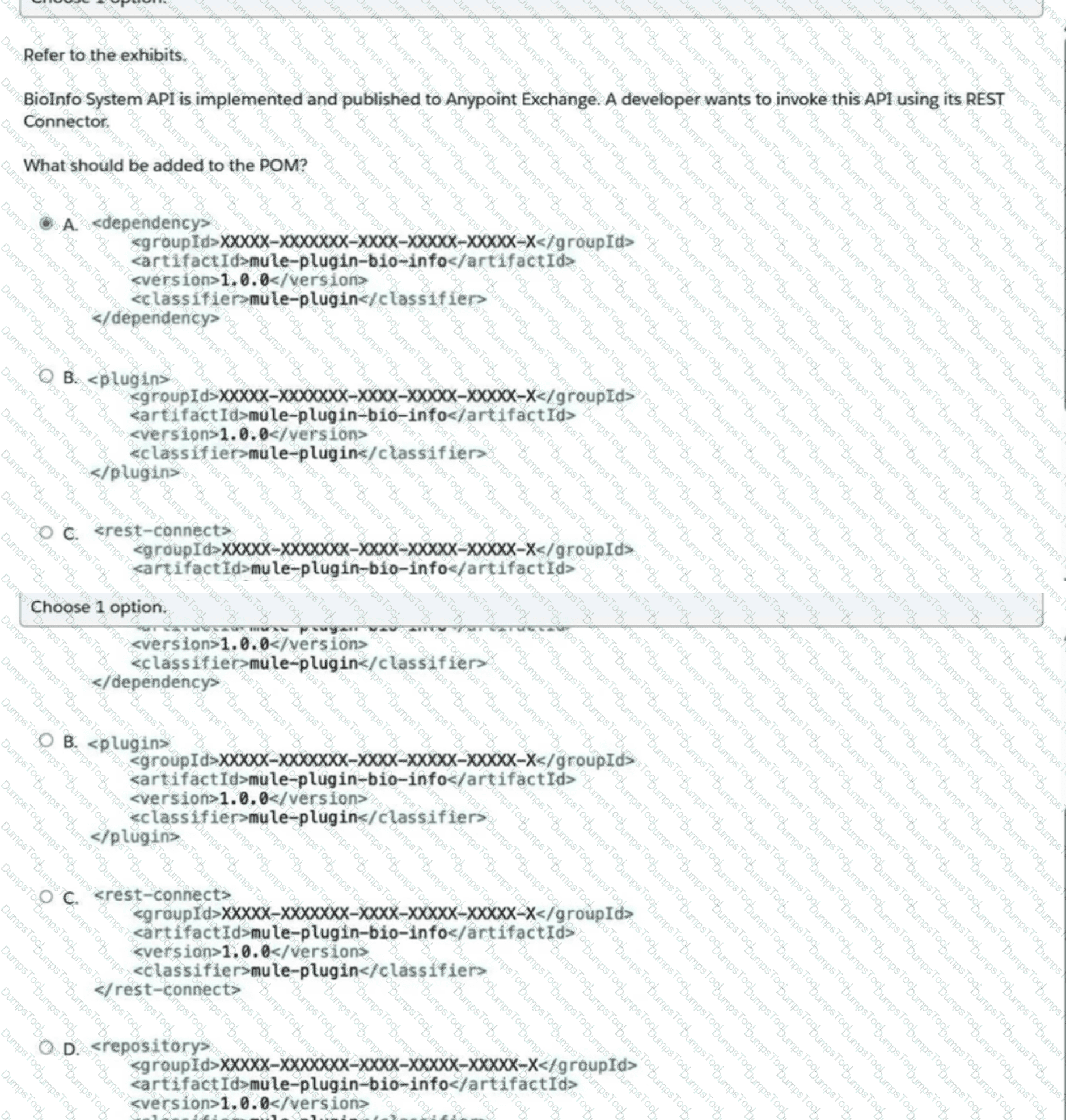

Add the generated asset as a Maven < dependency > with the Exchange groupId, artifactId, version, and < classifier > mule-plugin < /classifier > .
Add the generated asset as a Maven < plugin > .
Add the generated asset through a < rest-connect > element.
Add the generated asset as a < repository > entry.
REST Connect converts a supported REST API specification published in Anypoint Exchange into a Mule 4 connector. MuleSoft states that REST Connect-generated Mule 4 connectors are produced as connector artifacts and can be used in Studio like other Mule connectors.
A Mule connector is consumed by an application through the project's Maven dependencies, not through the Maven build-plugin section. MuleSoft's standard connector Maven model requires the connector's Exchange groupId, artifactId, and version under < dependency > , together with:
< classifier > mule-plugin < /classifier >
The classifier is essential because it identifies the artifact as a Mule extension/plugin that the Mule runtime must load. MuleSoft's connector Maven documentation provides this exact dependency structure and directs developers to Exchange's Dependency Snippets for the current coordinates.
A < plugin > declaration is for Maven build plugins rather than runtime Mule connectors. < repository > merely defines where Maven can resolve artifacts and does not itself add the connector to the application. < rest-connect > is not the POM dependency element used to consume a generated connector.
Reference topics: REST Connect; Anypoint Exchange generated connectors; Maven dependencies; mule-plugin classifier.
Official documentation: https://docs.mulesoft.com/exchange/to-deploy-using-rest-connect
Official documentation: https://docs.mulesoft.com/connectors/introduction/intro-config-xml-maven
===============================================================
TESTED 10 Oct 2026
Copyright © 2014-2026 DumpsTool. All Rights Reserved