Which two inputs are critical when using RUCKUS Wi-Fi Planner to design a predictive wireless network? (Choose two.)
AP model selection
DHCP server IP
Building wall materials
DNS server address
Controller cluster size
RUCKUS Wi-Fi Planner (Wi-R Planner) is a predictive design tool that helps plan AP placement and coverage before physical deployment. It relies on environmental and hardware data to simulate accurate RF propagation.
According to RUCKUS One Online Help – Wi-Fi Planner Configuration , essential inputs include:
AP model selection (A): Determines transmit power, antenna gain, and coverage pattern.
Building wall materials (C): Define RF attenuation and signal propagation characteristics.
Parameters like DHCP/DNS settings or controller cluster size are not required for predictive modeling—they’re part of post-deployment configuration.
Which three Application Policy Rules can be applied to a WLAN? (Choose three.)
QoS
Deny
URL Filter
Rate Limit
Local Breakout
VLAN Assignment
An Application Policy in SmartZone defines actions applied to identified applications or categories of traffic traversing a WLAN. Using Deep Packet Inspection (DPI) , RUCKUS APs recognize application types and enforce predefined behaviors.
According to RUCKUS One Online Help – Application Policy Configuration , the supported rule actions include:
(A) QoS: Assigns priority levels to traffic (Voice, Video, Best Effort, Background) for latency and throughput management.
(B) Deny: Blocks specific applications or categories (e.g., streaming or gaming) to preserve network performance.
(D) Rate Limit: Restricts bandwidth available to defined applications, ensuring fair use of airtime and bandwidth resources.
Local Breakout and VLAN Assignment are functions of traffic forwarding and device policy , not application policy. URL filtering is managed under separate content control modules, not part of Application Policies.
Which feature in SmartZone automates firmware distribution to AP zones with version consistency control?
AP Patch Manager
Image Management
Zone Upgrade Scheduler
AP Provisioning Policy
Image Management in SmartZone automates the firmware upgrade process for APs, ensuring consistent software versions across all zones and AP models.
As detailed in RUCKUS One Online Help – Image Management and Firmware Control , administrators can upload, assign, and schedule firmware images by zone. The system automatically validates version compatibility before deployment to prevent mismatched or unsupported upgrades.
RUCKUS Analytics 3.5 User Guide – Firmware Compliance Monitoring confirms that this ensures version uniformity across large distributed networks.
Options like Zone Upgrade Scheduler and AP Provisioning Policy are part of related workflows but not the primary feature controlling image management.
What happens when enabling spectrum analysis mode on a RUCKUS AP?
New clients won’t be able to join.
The results are shown in a histogram.
Sweeping of the entire 5 GHz band is possible in a single scan.
It will capture energy on both 2.4 and 5 GHz bands at the same time.
When spectrum analysis mode is enabled on a RUCKUS Access Point , the AP’s radios are temporarily dedicated to spectrum scanning and interference analysis, meaning they cannot serve wireless clients during that period. Therefore, new clients will not be able to join , and existing clients are typically disconnected.
According to the RUCKUS One Online Help – Spectrum Analysis Tool and RUCKUS AI Documentation – RF Monitoring and Optimization , spectrum analysis mode captures and reports RF energy utilization , identifying interference sources such as non-Wi-Fi devices, microwave ovens, or Bluetooth. The AP alternates its radio into “sniffer” mode to analyze RF characteristics, during which client association and data traffic handling are suspended .
The output is visualized through graphs and real-time utilization charts , not histograms. Furthermore, an AP can only scan one band (either 2.4 GHz or 5 GHz) at a time — not both simultaneously.
Thus, the correct answer is A , since enabling spectrum analysis prevents new client associations while the AP is in scanning mode.
Which three actions help keep airtime utilization low within a wireless deployment? (Choose three.)
Limiting older/legacy clients
Placing APs for coverage only
Creating extra WLANs to spread usage
Ensuring sufficient AP capacity for clients
Requiring all APs to use full transmit power
Mitigating sources of non-802.11 interference
Maintaining low airtime utilization is key to achieving high efficiency and performance in Wi-Fi networks. RUCKUS recommends minimizing factors that increase channel contention and protocol overhead.
Per RUCKUS One Online Help – Airtime Management and Optimization and RUCKUS AI Documentation – Channel Utilization Insights , the following actions are most effective:
(A) Limiting older/legacy clients: 802.11a/b/g clients transmit at lower rates and occupy more airtime per packet.
(D) Ensuring sufficient AP capacity for clients: Proper AP density ensures users are distributed evenly, reducing per-AP contention.
(F) Mitigating non-802.11 interference: Removing microwave ovens, Bluetooth devices, and other RF noise sources prevents wasted airtime from retries.
Adding more SSIDs (WLANs) increases management frame overhead, and full transmit power causes excessive cell overlap—both raise airtime use.
Using the trace tool in the SmartZone UI, which two pieces of information are needed to troubleshoot client connectivity? (Choose two.)
AP model
Name of the device
Client MAC address
Correct APs to select
Client operating system
The SmartZone Trace Tool is used to capture and analyze packets related to specific client connectivity sessions, helping administrators identify association, authentication, and DHCP issues.
According to RUCKUS One Online Help – Troubleshooting Tools and Packet Capture and RUCKUS Analytics 3.5 User Guide – Client Connectivity Tracing , the following two pieces of information are required to initiate a trace:
Client MAC Address (C): Identifies the exact device on the network to filter relevant packet captures and session details.
Correct AP(s) to select (D): Specifies the access point(s) currently or recently serving that client, ensuring the trace targets the correct radio interface for capturing traffic.
Other details like device name , AP model , or client OS are useful for contextual understanding but not required inputs for running the trace. The trace tool uses these two core identifiers to isolate logs and generate capture data efficiently for troubleshooting connectivity issues.
Using the Client Troubleshooter trace tool in the SmartZone UI, which two pieces of information are needed to troubleshoot client connectivity? (Choose two.)
Client WLAN
Client MAC address
One or more APs
Client name
Client operating system
SmartZone ' s Client Connection troubleshooting workflow requires the administrator to identify the affected client and specify the APs that will participate in the connectivity trace. The client is identified using its MAC address, which allows SmartZone to filter frames specifically associated with that device. The administrator then selects one or more APs capable of hearing or communicating with the client. When the trace begins, these APs relay matching frames to the controller, enabling SmartZone to reconstruct the client ' s connection sequence and identify problems during discovery, authentication, association, key exchange, DHCP, or related stages. The client ' s hostname and operating system may appear as contextual information, and the WLAN becomes visible during analysis, but these are not the two required trace inputs. Therefore, B and C are correct. rcw 3 Ruckus Wireless Documentation
================
Which task will throttle download speeds on all ChromeOS devices on the STUDENT SSID and segment their device traffic into a separate VLAN?
Create a Device Policy and apply it to the WLAN.
Create a Layer 2 Access Control Policy and apply it to the WLAN.
Create a new WLAN for ChromeOS with a rate-limited VLAN.
Create an Application Control Policy and apply it to the WLAN.
To throttle download speeds for specific device types—such as ChromeOS devices—and assign them to a dedicated VLAN , the appropriate configuration is to create a Device Policy and apply it to the target WLAN .
According to the RUCKUS One Online Help – Device Policy Management , and RUCKUS AI documentation – Policy Control and Device Analytics , Device Policies can classify client devices based on operating system, MAC OUI, or fingerprinting data . Once identified, administrators can enforce rate limits, VLAN tagging, and access restrictions for that device type.
By applying this policy to the STUDENT SSID , all detected ChromeOS clients will have bandwidth limits applied and their traffic segmented into the configured VLAN for management and security isolation.
Other options—such as Layer 2 ACLs or Application Control Policies —manage packet-level permissions or app-level prioritization, not per-device bandwidth or VLAN segmentation. Creating a new WLAN is unnecessary since RUCKUS policy management allows dynamic device-based enforcement on a single SSID.
Which RUCKUS solution can control and manage 10,000 access points? rcw 2
vSZ-E
Unleashed
ZoneDirector
vSZ-H
Virtual SmartZone High Scale (vSZ-H) is designed for very large enterprise and service-provider deployments and supports up to 10,000 managed APs per controller. Current RUCKUS SmartZone specifications also document scaling of up to 30,000 APs when vSZ-H is deployed as a supported cluster. In comparison, Virtual SmartZone Essentials is designed for smaller environments and supports substantially fewer APs per controller. Unleashed is a controller-less architecture intended for considerably smaller deployments, while ZoneDirector is a legacy controller family and does not provide vSZ-H ' s high-scale capacity. RUCKUS specifically positions vSZ-H as its virtual high-scale SmartZone solution for large distributed networks requiring centralized wired and wireless management. Therefore, among the supplied options, vSZ-H is the solution capable of managing 10,000 access points. RUCKUS Networks
================
Which 802.11 PHY layer feature allows Wi-Fi 6 (802.11ax) to efficiently serve multiple clients simultaneously on both uplink and downlink?
MU-MIMO
OFDMA
QAM256
RTS/CTS
OFDMA (Orthogonal Frequency Division Multiple Access) is one of the core features introduced in IEEE 802.11ax (Wi-Fi 6) . It divides a channel into smaller subcarriers called Resource Units (RUs) , allowing an AP to communicate with multiple clients simultaneously, both on uplink and downlink.
According to the RUCKUS One Online Help – Wi-Fi 6 Features Overview , OFDMA improves spectrum efficiency, reduces latency, and increases throughput in high-density environments. RUCKUS APs such as the R750 and R850 use OFDMA in coordination with RUCKUS AI’s client traffic analysis to allocate resources dynamically.
In contrast, MU-MIMO also supports multi-user communication but only in one direction (downlink for 802.11ac Wave 2, both for 11ax). QAM256 enhances modulation efficiency but doesn’t enable concurrent multi-client service.
Which RUCKUS feature in RUCKUS Analytics automatically identifies the root cause of service-impacting events using correlation analysis?
SmartCast
AI Anomaly Detection
Event Timeline Viewer
Health Summary Dashboard
AI Anomaly Detection in RUCKUS Analytics uses machine learning to detect, classify, and correlate service-impacting events such as authentication failures, RF interference, and backhaul latency.
According to RUCKUS Analytics 3.5 User Guide – AI-Driven Insights , this feature correlates telemetry across APs, clients, and switches to isolate root causes automatically. It identifies deviations from normal baselines and links related issues under unified incident reports.
RUCKUS One Online Help – Anomaly Detection and Correlation Engine confirms this system dramatically reduces troubleshooting time by surfacing the exact source of network degradation.
Other tools like Event Timeline Viewer and Health Dashboard visualize events but do not perform automatic RCA (Root Cause Analysis).
What is one advantage of RUCKUS BeamFlex+ over Transmit Beamforming?
It eliminates hardware PHY errors.
It increases radio Tx power.
It eliminates channel interference.
It does not require supported client drivers.
RUCKUS BeamFlex+ is an advanced adaptive antenna technology that dynamically selects from thousands of possible antenna patterns to optimize signal quality and performance for each client connection. Unlike Transmit Beamforming (TxBF) , which depends on feedback from client devices that must support specific beamforming protocols, BeamFlex+ operates entirely on the access point side .
The key advantage of BeamFlex+ is that it does not require any client-side support or compatible drivers . It continuously analyzes signal characteristics and client locations to select the optimal antenna pattern in real time, enhancing both range and throughput without additional client configuration.
According to the RUCKUS One Online Help and RUCKUS AI documentation , BeamFlex+ combines adaptive antenna pattern selection with polarization diversity (PD-MRC) to improve performance in dynamic environments. In contrast, Tx Beamforming requires explicit feedback (channel state information) from clients—limiting its effectiveness when clients lack driver or chipset compatibility.
Thus, the correct answer is D , as BeamFlex+ provides all the benefits of adaptive beamforming without the need for client-side dependencies.
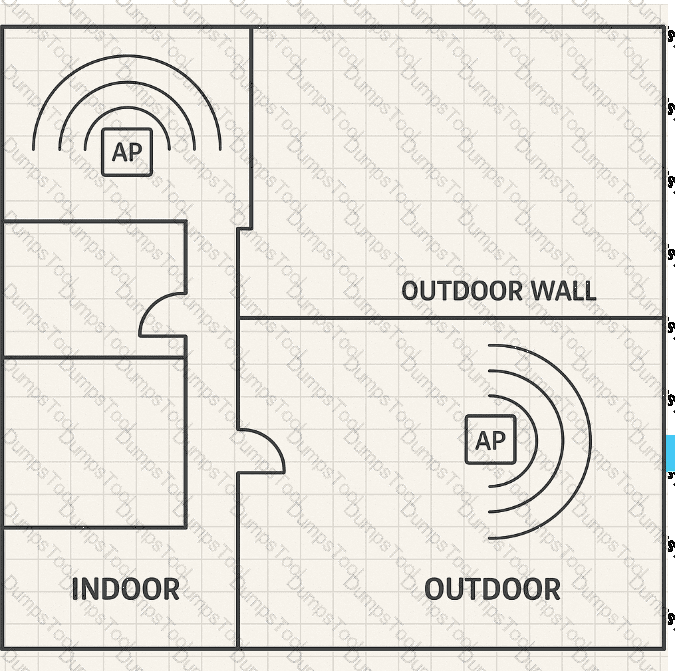
Review the exhibit.

Based on the AP mounting locations, which AP antenna types provide complete coverage to both the indoor and outdoor areas?
The indoor space should use Omni-Directional, while the outdoor space should use a Yagi antenna.
The indoor space should use Semi-Directional, while the outdoor space should use a Yagi antenna.
The indoor space should use Omni-Directional, while the outdoor space should use a Patch antenna.
The indoor space should use Semi-Directional, while the outdoor space should use a Patch antenna.
In this layout, the indoor APs are centrally mounted to provide even signal distribution in all directions, while outdoor APs are wall-mounted facing the exterior coverage zone.
According to RUCKUS One Online Help – Antenna Selection and Deployment and RUCKUS AI Documentation – RF Design Guidelines , the best configuration for complete coverage is:
Indoor space: Use Omni-Directional antennas , which radiate uniformly in 360° for even indoor coverage and minimal dead zones.
Outdoor space: Use Patch antennas , which are semi-directional with a 60°–90° beamwidth ideal for covering patios, courtyards, or building perimeters without wasting signal behind the AP.
Yagi antennas are highly directional and suited for long-distance point-to-point links, not area coverage. Semi-directional indoor antennas are unnecessary unless indoor partitioning or wall density requires focused energy.
This combination— Omni indoors and Patch outdoors —provides optimal performance for mixed indoor-outdoor designs and aligns with RUCKUS high-density deployment best practices .
An administrator has completed a new install of SmartZone-Essentials for switch management, and has configured the SmartZone IP as the registrar IP on an ICX 7450. Which condition explains why the switch is not connecting?
SNMPv3 is not enabled on SmartZone.
DHCP options are not properly configured for the switch.
SmartZone is not configured to allow self-signed certificates.
SmartZone High Scale is required for ICX switch management.
When deploying SmartZone-Essentials (SZ-100/SZ-144) for RUCKUS ICX switch management , the switches establish a secure HTTPS-based connection to the controller using the SmartZone registrar IP . A common issue preventing connection occurs when SmartZone is not configured to accept self-signed certificates —which are typically used by ICX switches by default for initial onboarding.
As described in the RUCKUS One Online Help – SmartZone Switch Management Setup and RUCKUS AI documentation , administrators must explicitly enable the option to “Allow Self-Signed Certificates” in the controller’s Switch Management settings . Without this configuration, the SmartZone rejects the ICX connection request during SSL/TLS handshake, causing registration failure.
SNMPv3 configuration and DHCP options are unrelated to initial controller registration. Additionally, SmartZone-Essentials fully supports ICX management; SmartZone High Scale is not required.
Thus, the correct answer is C — the connection fails because the controller is not set to accept self-signed certificates from the switch.
The Background Scanning interval is increased to 90 seconds. Which three processes will take longer to update their data? (Choose three.)
Spectrum analysis
Rogue AP detection
Auto-channel selection
Connected client count
Auto power adjustment
Channel throughput measurement
Background Scanning in RUCKUS APs allows radios to periodically scan other channels to collect RF environment data while still serving clients. The scan interval determines how often the AP samples channel information for features like ChannelFly , Auto Cell Sizing , and rogue detection .
According to RUCKUS One Online Help – Background Scanning and RF Management , and RUCKUS Analytics 3.5 User Guide – RF Monitoring , increasing the Background Scanning interval to 90 seconds delays updates for processes that depend on real-time RF sampling, specifically:
Rogue AP Detection (B): Takes longer to discover unauthorized or neighboring APs.
Auto-Channel Selection (C): Updates channel quality metrics less frequently, slowing responsiveness to interference changes.
Auto Power Adjustment (E): Depends on scanning results to optimize transmit power for coverage balance, so adjustments occur less frequently.
Processes such as client count and throughput measurement rely on active client data, not background scanning, and spectrum analysis operates in a dedicated analysis mode outside of normal scanning intervals.
In an Active-Active redundancy topology, what is the role of the source (leader) cluster? rcw 2
To prevent cluster failover
To manage APs and switches without redundancy
To distribute and synchronize data to all target clusters
To act as a backup cluster in read-only mode
In SmartZone Active-Active cluster redundancy, one active cluster acts as the configuration source while the other active clusters operate as target clusters. The source cluster periodically creates and pushes configuration backups to the target clusters so that configuration remains synchronized across the redundancy topology. Unlike Active-Standby operation, every Active-Active cluster remains operational rather than placing target clusters into a read-only state. RUCKUS documentation specifies that only one cluster can enable scheduled configuration synchronization, and administrators are advised to make configuration changes primarily on that source cluster. Target clusters periodically receive and restore the synchronized configuration. Therefore, the source cluster ' s defining role is to distribute and synchronize configuration data to its target clusters, making option C correct. Ruckus Wireless Documentation
================
What is a valid option when configuring non-Proxy authentication in SmartZone?
Active Directory (AD)
OWE
OAuth
TACACS+
Active Directory is a valid authentication-server type that can be configured under SmartZone ' s Non-Proxy, or AP Authenticator, authentication settings. In non-proxy operation, the AP communicates directly with the external authentication infrastructure rather than sending authentication requests through the SmartZone controller. RUCKUS SmartZone documentation lists RADIUS, Active Directory, and LDAP as configurable non-proxy AAA server types, although actual compatibility depends on the WLAN authentication mechanism being used. OWE is a Wi-Fi encryption mechanism for enhanced open networks, not an external AAA server. OAuth is primarily an authorization framework for applications and APIs, while TACACS+ is generally associated with administrative device access rather than SmartZone WLAN non-proxy client authentication. Therefore, Active Directory is the valid option among the choices provided. rcw 3 Ruckus Wireless Documentation
================
Which three Ethernet Port Profile configuration options are available in SmartZone for APs? (Choose three.)
Port speed
LAG creation
Number of clients
Spanning Tree mode
802.1X Authentication
Tunnel Profile selection
An Ethernet Port Profile in SmartZone defines wired interface behavior and port settings for access points that have multiple Ethernet ports. These profiles are used to configure connectivity, security, and redundancy on wired links between APs and the upstream network.
According to the RUCKUS One Online Help – AP Ethernet Port Profiles and SmartZone 5.x Configuration Guide , the following parameters are supported:
Port Speed (A): Defines link negotiation—Auto, 10/100/1000 Mbps, or fixed rate.
Spanning Tree Mode (D): Controls loop prevention through STP configuration on AP Ethernet ports.
802.1X Authentication (E): Enables port-based authentication for secure wired access on AP Ethernet interfaces, commonly used in hospitality and MDU deployments.
Other listed options— LAG creation (handled via controller-side link aggregation configuration), number of clients (a WLAN-level setting), and Tunnel Profile selection (handled under WLAN or Zone configuration)—are not part of the Ethernet Port Profile feature.
Thus, the correct answers are A (Port speed) , D (Spanning Tree mode) , and E (802.1X Authentication) .
Which two statements are true regarding roaming on RUCKUS WLANs? (Choose two.)
802.11ac Aggregate MMPDUs decrease roam times.
802.11u Hotspot integration increases roaming speed.
Roaming can be enhanced by building 802.11k neighbor AP lists.
Use of 802.11r Fast-Transition depends on the Encryption option.
802.11w PMF enables additional probe responses for faster roaming.
Seamless roaming on RUCKUS WLANs is achieved through support for 802.11k , 802.11r , and 802.11v enhancements, which collectively improve handoff efficiency and reduce latency when clients move between APs.
According to RUCKUS One Online Help – Fast Roaming Configuration and RUCKUS AI Documentation – Client Mobility Optimization , the following statements are true:
802.11k (C): Enables APs to provide Neighbor Reports listing surrounding APs and their channels, allowing clients to make faster and more intelligent roaming decisions.
802.11r (D): Implements Fast BSS Transition (FT) , reducing authentication delay during roaming by pre-establishing encryption keys. However, its operation depends on the encryption type —it is supported only with WPA2-Enterprise (802.1X) and WPA2/WPA3-Personal modes, not open WLANs.
The other options are incorrect: 802.11ac aggregation does not affect roaming; 802.11u supports Hotspot 2.0, not fast transition; and 802.11w (PMF) adds management frame protection, not roaming enhancements.
Thus, the correct answers are C (802.11k neighbor lists) and D (802.11r depends on encryption type) .
What is a true statement regarding MIMO in Wi-Fi networks?
It uses a single transmitter.
It was introduced in 802.11n.
It is supported upstream only.
It needs support on the AP only.
MIMO (Multiple Input, Multiple Output) is a fundamental wireless technology that enhances Wi-Fi throughput and reliability by transmitting multiple data streams simultaneously using multiple antennas on both the transmitter and receiver. It was introduced in the IEEE 802.11n standard , which marked the beginning of high-throughput (HT) Wi-Fi.
According to RUCKUS One Online Help and the RUCKUS Analytics 3.5 User Guide , MIMO enables spatial multiplexing , diversity gain , and beamforming , allowing higher data rates and improved signal quality in multipath environments. Subsequent standards (802.11ac and 802.11ax) expanded this concept to MU-MIMO (Multi-User MIMO) , allowing simultaneous communication with multiple clients.
MIMO requires support on both the AP and client for full functionality; otherwise, the connection falls back to single-stream operation. It is used in both uplink and downlink directions (especially in Wi-Fi 6 and later). Thus, option B —introduced in 802.11n—is correct, while options A, C, and D are incorrect.
Which feature in RUCKUS One or SmartZone allows automatic AP firmware updates without administrator intervention?
Cloud Auto-Upgrade
Image Management Scheduler
AP Lifecycle Policy
Zone Firmware Automation
Cloud Auto-Upgrade is a RUCKUS One feature that automatically updates AP firmware to the latest stable release without requiring manual scheduling.
According to RUCKUS One Online Help – Firmware and Lifecycle Automation , this capability ensures security compliance and performance optimization across managed APs. Administrators can opt in or out of automatic updates per site or organization.
SmartZone uses manual scheduling via Image Management , while RUCKUS One provides hands-free upgrades integrated into its cloud management platform.
When planning a Wi-Fi network in RUCKUS Wi-Fi Planner, what is the primary purpose of defining attenuation values for wall materials?
To calculate client RSSI thresholds
To simulate RF signal loss for coverage prediction
To adjust AP channel width automatically
To determine DHCP lease distribution zones
In RUCKUS Wi-Fi Planner , defining attenuation values for wall materials enables the simulation of RF signal loss across physical barriers such as drywall, concrete, or glass.
According to RUCKUS One Online Help – Wi-Fi Planner RF Modeling , accurate wall attenuation data allows the planner to predict signal propagation and coverage maps with greater accuracy. This ensures optimal AP placement and reduces coverage overlap or dead zones.
The RUCKUS Analytics 3.5 User Guide – RF Validation Reports confirms that modeling real-world materials provides reliable pre-deployment visibility of expected SNR and throughput performance.
Other options—like RSSI thresholds or DHCP zoning—are not part of RF prediction modeling.
Which two actions can be applied using an Application Policy? (Choose two.)
Rate limiting
URL filtering
Assign VLAN
Packet capture
Quality of Service
A RUCKUS Application Policy allows administrators to control network performance and user experience by classifying, prioritizing, and managing traffic based on the type of application detected on the network.
According to RUCKUS One Online Help – Application Control and Policy Management , and RUCKUS AI documentation , Application Policies can:
Apply rate limiting (A): Control the bandwidth allocated to specific applications or application groups (e.g., limit video streaming or social media traffic).
Apply Quality of Service (E): Mark or prioritize application traffic using DSCP or internal QoS levels to ensure latency-sensitive applications such as voice or conferencing receive higher priority.
RUCKUS leverages Deep Packet Inspection (DPI) for identifying over 2,500+ applications, enabling precise enforcement per SSID or per user.
Other options— URL filtering , VLAN assignment , and packet capture —are handled through separate mechanisms (Web filtering, Device Policy, and diagnostic tools, respectively), not via Application Policies.
Therefore, the correct answers are A (Rate limiting) and E (Quality of Service) .
Using the Rule of 10s and 3s for quick mW-to-dBm conversions, to what value in dBm does 500 mW convert?
27 dBm
30 dBm
28 dBm
23 dBm
Using the Rule of 10s and 3s, begin with the known reference that 30 dBm equals 1,000 mW, or 1 watt. A reduction of 3 dB approximately halves the absolute power. Therefore, subtracting 3 dB from 30 dBm gives 27 dBm, while halving 1,000 mW gives 500 mW. Consequently, 500 mW corresponds to approximately 27 dBm, making option A correct. The exact logarithmic calculation, \(10 \log_{10}(500)\), produces approximately 26.99 dBm, which rounds to 27 dBm. RUCKUS access-point specifications use dBm extensively for transmitter power and receiver sensitivity, while RF design calculations use these logarithmic relationships to evaluate link budgets, coverage, EIRP, attenuation, and acceptable operating power levels. RUCKUS Networks
================
Which current RUCKUS AP family features an AP model with a PoE output port?

E Series
H Series
M Series
R Series
The RUCKUS H Series access points are specifically designed for environments such as hospitality, student housing, and multi-dwelling units, where compact, in-room installation is ideal. A distinctive feature of the H Series—such as the RUCKUS H550 and H510 models—is their PoE output port , allowing the AP to power downstream devices like IP phones, set-top boxes, or security cameras directly through Ethernet.
This design minimizes cabling and infrastructure costs while maintaining enterprise-grade Wi-Fi performance. According to the RUCKUS One Online Help and the official RUCKUS AI documentation , the H550 supports 802.3af/at PoE input and provides 802.3af PoE output on one of its Ethernet ports. The feature is highlighted as part of RUCKUS’s integrated wired and wireless connectivity solution, combining dual-band Wi-Fi 6 access with switch-like wired connectivity for room-based deployments.
The R Series and E Series are ceiling-mounted APs primarily used for large-area coverage and typically do not include PoE passthrough functionality. The M Series (outdoor mesh APs) are designed for outdoor coverage extension, also lacking this downstream PoE capability.
Which three statements are true of BeamFlex+ technology? (Choose three.)
It is solely a radio-based technology.
It delivers up to 6 dB of additional gain to clients.
It requires clients to be 802.11ac capable.
It is intended for use in sparse client areas.
It will match the polarization of client devices.
It can reduce RF interference.
BeamFlex+ is RUCKUS ' s adaptive antenna technology and combines sophisticated software algorithms with an antenna array rather than relying solely on conventional radio-based beamforming. RUCKUS states that BeamFlex can provide up to approximately 6 dBi of additional signal gain by dynamically selecting optimized antenna patterns for each client. BeamFlex+ also incorporates adaptive polarization diversity through PD-MRC, enabling the AP to adapt to horizontal and vertical client orientations and improve reception from mobile devices. In addition, it can select patterns that direct RF energy away from interference sources, providing significant interference mitigation. BeamFlex+ does not require an 802.11ac-capable client because its antenna adaptation occurs on the AP and remains client independent. It is useful across many deployment densities rather than being intended specifically for sparse environments. Therefore, B, E, and F are correct.
What are two ways to reduce contention in 802.11 networks? (Choose two.)
Enable Client Isolation for the WLAN.
Reduce the number of client devices per contention domain.
Use non-overlapping channels in the same physical spaces.
Implement 802.1Q VLAN tagging profiles.
Set the lowest BSS minimum rate possible for clients.
802.11 networks use a shared-medium contention mechanism, meaning devices operating within the same contention domain must compete for airtime. One direct way to reduce contention is therefore to decrease the number of clients sharing that contention domain. Another is to design channel reuse carefully so neighboring cells use non-overlapping channels, reducing interference and unnecessary competition between nearby radios. RUCKUS design guidance emphasizes that co-channel interference forces devices capable of hearing each other to defer transmissions, effectively causing multiple cells to share the same airtime resource. Client isolation affects Layer 2 communication between clients but does not eliminate RF contention. VLAN tagging separates logical broadcast domains but does not create additional wireless airtime. Using excessively low minimum data rates can actually consume additional airtime. Therefore, B and C are correct. rcw 3 RUCKUS Networks
================
Which RUCKUS management platform supports Partner Domains?
vSZ-Essentials
vSZ-High Scale
Unleashed
ZoneDirector
Partner Domains are associated with the high-scale SmartZone architecture and are supported by Virtual SmartZone High Scale, or vSZ-H. They provide hierarchical multi-tenant administration so that service providers or large organizations can separate customers, administrators, zones, WLANs, and resources within a single scalable management platform. Administrators belonging to Partner Domains can be assigned permissions and resources independently, while a system-level administrator retains overall control. RUCKUS SmartZone documentation specifically discusses Partner Domain configuration and migration functionality in the vSZ-H/SZ300 architecture. vSZ-Essentials is targeted at smaller deployments and does not provide the same Partner Domain multi-tenancy model. Unleashed provides controller-less AP management, while ZoneDirector is an older controller platform. Consequently, the correct answer is vSZ-High Scale. rcw 3 Ruckus Wireless Documentation
================
TESTED 16 Oct 2026
Copyright © 2014-2026 DumpsTool. All Rights Reserved