What does the exhibit indicate when you have configured a single IPsec VPN on an SRX Series Firewall?
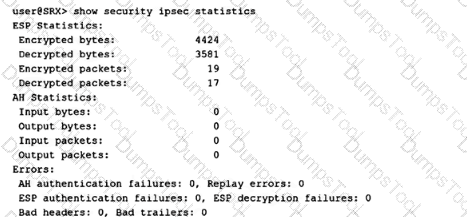
The IPsec VPN has encountered errors during packet transmission.
The IPsec VPN is established, and traffic is passing through.
The IPsec VPN is not established.
The IPsec VPN is established, but no traffic is passing through.
The correct answer is B. The IPsec VPN is established, and traffic is passing through . The exhibit shows nonzero ESP encrypted bytes , ESP decrypted bytes , encrypted packets , and decrypted packets . On an SRX Series Firewall, those counters indicate that the device is both encrypting outbound traffic into the IPsec tunnel and decrypting inbound ESP traffic from the remote peer. Juniper’s show security ipsec statistics reference identifies ESP statistics as the counters for encrypted/decrypted bytes and packets, and Juniper troubleshooting guidance states that incrementing encrypted and decrypted packet counters confirm traffic flow across the VPN.
Option A is wrong because the error counters show AH authentication failures: 0, Replay errors: 0, ESP authentication failures: 0, ESP decryption failures: 0, Bad headers: 0, and Bad trailers: 0. Option C is wrong because encrypted and decrypted ESP packet counters would not increment if the IPsec tunnel were not established. Option D is wrong because traffic is clearly passing; the nonzero ESP counters prove packet movement through the tunnel. Reference topics: IPsec VPN, ESP statistics, encrypted/decrypted counters, tunnel verification, IPsec troubleshooting.
Which two statements are correct about a chassis cluster? (Choose two.)
If the cluster ID is set to 0, the HA configuration is ignored.
You must reboot the device anytime you change the node ID configuration.
If the node ID is set to 0, the HA configuration is ignored.
You must have multiple Layer 2 domains if you require more than 255 node IDs.
The correct answers are A and B. In an SRX chassis cluster, the cluster ID identifies the chassis cluster, and valid operational cluster IDs are nonzero values. Juniper’s chassis cluster command documentation states that the system uses the chassis cluster ID and node ID to apply the correct node-specific configuration, and the command writes the chassis cluster ID and node ID to EPROM. When the cluster ID is set to 0, clustering is disabled; therefore, the HA cluster configuration is effectively ignored because the device is no longer operating as a chassis-cluster member.
Option B is also correct because Juniper states that chassis cluster ID and node ID changes take effect only after the system is rebooted. That is why the operational command format includes the reboot behavior when setting cluster-id and node. Option C is wrong because node ID 0 is valid; it identifies node0 in the two-node cluster. Option D is wrong because SRX chassis clusters use node IDs 0 and 1 only; the 1–255 range applies to cluster IDs, not node IDs. Reference topics: HA Clustering, cluster ID, node ID, EPROM, chassis cluster enablement, node-specific configuration.
You are asked to set up SSL proxy in SRX Series devices. An SSL proxy profile is already defined for you.
Which two steps are required to complete the setup? (Choose two.)
Enable host-inbound-traffic HTTPS in the security zone in which SSL proxy is referenced.
Reference the SSL proxy profile in a security zone.
Reference the SSL proxy profile in a security policy.
Enable any Layer 7 services in the security policy in which SSL proxy is referenced.
The correct answers are C and D. Once the SSL proxy profile already exists, the SRX still needs a security policy that matches the SSL/TLS traffic and applies the SSL proxy profile as an application service. Juniper’s SSL proxy configuration procedure explicitly shows creating the security policy match criteria and then applying the SSL proxy profile with then permit application-services ssl-proxy profile-name. It also states that SSL forward and reverse proxy require the profile to be configured at the firewall rule level.
Option D is correct because SSL proxy is not an end goal by itself; it decrypts SSL/TLS traffic so Layer 7 security services can inspect it. Juniper states that decrypted SSL traffic is available for security services and provides examples where the SSL proxy profile and a Content Security/UTM policy are both attached to the same security policy. Option A is wrong because host-inbound-traffic HTTPS controls HTTPS access to the SRX itself, not transit SSL proxy inspection. Option B is wrong because SSL proxy profiles are not referenced under a security zone for this function; they are applied under the matching security policy. Reference topics: SSL Proxy, SSL proxy profile, security policy application-services, Layer 7 inspection, UTM/IDP/ATP integration.
You want to use user identity information to secure your network.
Which two actions must you perform on your SRX Series Firewall to accomplish this task? (Choose two.)
Create security policies that include user identity configuration
Add user accounts to the Active Directory Domain Users group
Configure an identity provider on your SRX Series Firewall.
Add the user identity feature license to your SRX Series Firewall.
The correct answers are A and C. To use user identity information on an SRX Series Firewall, the firewall must first be able to obtain identity mappings from an identity source or identity provider, such as Active Directory, JIMS, Aruba ClearPass, or another supported identity-aware firewall component. Juniper’s identity-aware firewall documentation states that identity parameters are used to configure security policies so authenticated users receive the correct level of access, and that firewalls can query JIMS, obtain user identity information, and then enforce security policy decisions.
Option A is required because identity-aware enforcement only happens when security policies include user identity match criteria, such as source identity, users, roles, or groups. Juniper’s source-identity policy reference states that source identities are used as match criteria in security policies, and when configured, traffic is matched against authentication-table entries before policy lookup completes. Option C is required because the SRX must be configured with an identity source/provider so it can populate or query identity mappings. Option B is not an SRX configuration task and is not generally required because users may already exist in appropriate AD groups. Option D is wrong for this question; the required SRX tasks are configuring identity integration and identity-aware policies, not adding a separate “user identity” license. Reference topics: Identity-Aware Security Policies, identity source/provider, authentication table, source-identity policy matching.
Which IDP action is also referred to as a silent discard?
no action
close client and server
ignore connection
drop packet
The correct answer is D. drop packet. In IDP terminology, a silent discard means the offending packet is discarded without sending reset packets or other connection-closing signals back to the endpoints. Juniper defines the Drop Packet IDP action as dropping a matching packet before it reaches its destination while not closing the connection. That is the closest and correct IDP action for “silent discard” in the listed choices.
Option A, no action, is wrong because it does not discard anything; Juniper describes No Action as taking no enforcement action, typically used when the administrator only wants logging. Option B, close client and server, is wrong because that action actively closes the session by sending TCP RST packets to both sides, which is explicitly not silent. Option C, ignore connection, is wrong because it stops further IDP scanning for the rest of the connection; it does not discard the packet. Juniper distinguishes these actions clearly: drop packet discards the offending packet, drop connection blocks the whole connection, and close actions send reset packets. Reference topics: IDP actions, drop packet, close client and server, ignore connection, silent discard behavior.
A pair of branch SRX Series devices are booted up in cluster mode.
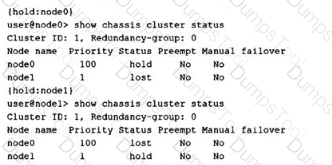
Referring to the exhibit, which statement is correct?
the devices are not running the same version of Junos.
the devices are not the same hardware.
fxp0 or fxp1 on either device has an existing configuration.
node1 is running a "factory-default config".
The correct answer is C. fxp0 or fxp1 on either device has an existing configuration. The exhibit shows each node reporting itself in hold state and the peer as lost under redundancy group 0. Juniper’s chassis cluster troubleshooting documentation shows this same hold/lost symptom and states that when a node is in hold, it is not ready to operate in a chassis cluster. For branch SRX devices, when cluster mode is enabled, specific physical interfaces are automatically converted into fxp0 for out-of-band management and fxp1 for the HA control link. These interfaces cannot retain normal transit or standalone interface configuration. If the ports that become fxp0 or fxp1 already have configuration, the cluster can enter the hold/lost condition shown in the exhibit.
Option A is wrong because the output does not indicate a Junos version mismatch. Option B is wrong because hardware mismatch is not the symptom being shown. Option D is too specific: a factory-default configuration can cause this problem because it may include configuration on interfaces that become fxp0/fxp1, but the exhibit does not prove specifically that node1 alone is running factory-default configuration. The tested issue is the existing configuration on the interfaces reserved for chassis-cluster management/control. Reference topics: HA Clustering, chassis cluster hold/lost state, fxp0, fxp1, branch SRX cluster initialization.
Which statement is correct about Active Directory as an identity source for identity-aware security policies?
It supports a maximum of two domains.
It supports logical systems.
It supports 20 Active Directory servers per domain.
It tracks non-Windows Active Directory users.
The correct answer is A. It supports a maximum of two domains. Juniper’s Active Directory identity-source configuration guidance states that an SRX Series Firewall using the integrated user firewall/Active Directory identity source can be configured for a maximum of two domains. That is the exact limit relevant to this question. The same Juniper configuration page separately states that a maximum of 10 domain controllers can be configured, which directly eliminates option C because the supported figure is not 20 Active Directory servers per domain.
Option B is wrong because Active Directory identity source is not presented as a logical-systems feature in the JNCIS-SEC identity-aware firewall context. Option D is wrong because the primary Active Directory mechanism reads Windows domain controller event logs and uses WMI/DCOM plus LDAP to build IP-to-user and group mappings. Juniper describes the SRX as reading and monitoring the Windows event log on the domain controller, then using LDAP to obtain user/group information. Non-domain or non-Windows cases typically require alternate authentication behavior such as captive portal, not native Active Directory event-log tracking.
Reference topics: Identity-Aware Security Policies, Active Directory identity source, integrated user firewall, domain limits, domain controllers, WMIC, LDAP mapping.
Using Junos Space Security Director, you want to configure a unique firewall policy for a specific SRX Series device.
Which firewall policy rule would satisfy the requirement?
all devices policy prerules
group policy prerules
device policy rules
all devices policy postrules
The correct answer is C. device policy rules. In Junos Space Security Director, a firewall rule that must apply uniquely to one SRX Series device belongs in the device-specific policy layer, not in global or group-level policy. Juniper’s Security Director documentation states that a device can have a device-specific policy and can also be part of multiple group policies; the rule processing order places policies applied before device-specific policies first, then device-specific policies, then policies applied after device-specific policies. Juniper also explains that rules applied before device-specific policies take priority and cannot be overridden, while rules applied after device-specific policies can be overridden by adding a rule in the device-specific policy.
Option A is wrong because all-devices prerules are global mandatory rules applied before device-specific policy, not unique device exceptions. Option B is wrong because group policy prerules apply to a group of devices, not one specific SRX. Option D is wrong because all-devices postrules are still global policy rules, although they can be overridden. For a unique policy requirement on one SRX device, device policy rules are the precise Security Director construct. Reference topics: Security Director, firewall policies, device-specific policies, policy rule precedence, global/group/device rule hierarchy.
How does Juniper’s identity-aware firewall facilitate compliance with security policies and regulations?
by granting access based on user roles or identities
by simplifying the design of the network architecture
by increasing network capacity to accommodate user requirements
by enforcing the need for user confidentiality
The correct answer is A. by granting access based on user roles or identities. Juniper identity-aware firewall moves enforcement beyond simple IP-address-based policy by associating traffic with authenticated users, groups, devices, and roles. Juniper states that identity parameters can be used to configure security policies so that policies provide the appropriate level of access to authenticated users. It further explains that identity helps secure access to resources based on username, roles, and groups, and that firewalls can create and enforce rules based on user identity rather than only an IP address.
This directly supports compliance because regulated environments usually require least-privilege access, auditable user-based control, and role-based authorization. Option B is wrong because identity-aware security might simplify policy operations in some cases, but network architecture simplification is not its compliance function. Option C is wrong because capacity expansion has no direct relationship to identity-based regulatory enforcement. Option D is too vague and not the mechanism being tested; confidentiality is a security goal, but identity-aware firewall enforces access decisions by mapping traffic to users and groups. Reference topics: Identity-Aware Security Policies, user identity, role-based access control, group-based policy enforcement, authentication table.
Which two services would an SRX Series device use to connect to an LDAP server for identity-aware security policies? (Choose two.)
Active Directory
TACACS+
RADIUS
JIMS
The correct answers are A and D. For identity-aware security policies, Junos can obtain user identity information from supported identity sources such as Active Directory and Juniper Identity Management Service (JIMS). Active Directory is the direct identity-source option where the SRX integrates with Microsoft Windows Active Directory and uses directory information for user and group mapping. Juniper’s identity-aware firewall documentation states that the firewall obtains user information from identity sources including Active Directory and JIMS, and then uses that identity data in policy decisions.
JIMS is also correct because it centralizes identity collection and provides SRX enforcement points with user, device, IP address, and group-mapping information. Juniper describes JIMS as providing SRX firewalls with high-scale identity data so they can make user-firewall policy decisions. Option B, TACACS+, is wrong because TACACS+ is primarily an administrative authentication, authorization, and accounting protocol, not the LDAP identity-source service used for identity-aware firewall mappings. Option C, RADIUS, is also wrong in this context because RADIUS can authenticate users, but it is not the LDAP directory integration service being tested here. Reference topics: Identity-Aware Firewall, Active Directory identity source, JIMS, LDAP user/group mapping, SRX authentication table.
Which two statements describe how Juniper ATP Cloud improves security? (Choose two.)
It tracks and logs malicious traffic.
It offers real-time threat analysis and mitigation.
It simulates real user environments to trigger malicious code execution.
It increases performance speeds.
The correct answers are B and C. Juniper ATP Cloud improves security by delivering cloud-based threat detection, malware analysis, and enforcement integration with SRX Series Firewalls. Juniper describes ATP Cloud as using shared cloud intelligence so customers benefit from new threat intelligence in near real time. It also provides zero-day threat protection, machine-learning-based malware detection, inline malware blocking, and policy actions that can stop malware, quarantine infected systems, prevent data exfiltration, and disrupt lateral movement.
Option C is also correct because Juniper ATP Cloud uses dynamic analysis, commonly called sandboxing. In this process, a suspicious file is executed in a secure environment while tools monitor its activity. Juniper further explains that ATP Cloud uses deception techniques to make the sandbox appear like a real user environment, including simulated mouse movement, keystrokes, common software packages, realistic network access, stored credentials, and vulnerable OS areas. This encourages evasive malware to execute and reveal malicious behavior.
Option A is weaker and not the best answer because logging alone is not the key ATP Cloud security-improvement mechanism being tested. Option D is wrong because ATP Cloud is a threat-prevention service, not a performance-acceleration technology. Reference topics: ATP Cloud, malware analysis, dynamic sandboxing, machine learning, threat intelligence, inline malware blocking.
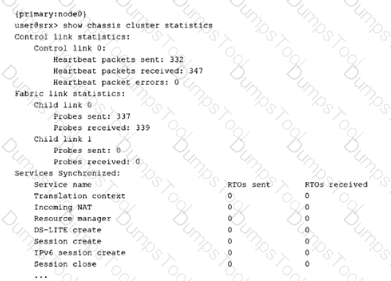
Referring to the exhibit, which two statements are correct? (Choose two.)

Fabric link 0 is working.
The control link is working.
Fabric link 1 is failing.
The control link is failing.
The correct answers are A and B. The exhibit shows show chassis cluster statistics. Under Control link statistics, Control link 0 has heartbeat packets sent and received, with heartbeat packet errors: 0. That is the clearest indication that the control link is operating normally. Juniper describes chassis-cluster control-plane verification as checking control-link heartbeat packets sent and received, along with heartbeat errors. If both send and receive counters are incrementing and errors are zero, the control link is functioning.
Option A is also correct because under Fabric link statistics, Child link 0 shows probes sent and probes received. Juniper uses fabric-link probe counters to verify fabric-link operation; nonzero sent and received probe counters indicate that the link is participating in fabric monitoring. Option C is not the safest conclusion from this exhibit alone. Child link 1 shows zero probes sent and received, but the output does not prove that a second fabric child link is configured and failing; it could simply be unused or not configured in this deployment. Option D is directly contradicted by the healthy heartbeat counters. Reference topics: HA Clustering, chassis cluster statistics, control-link heartbeat, fabric-link probes, cluster health verification.
You work on the security operations team that manages firewalls only. In your data center, there are two SRX chassis clusters. These clusters operate on VLAN 1042. The network team advises you that they see the same MAC address coming from both chassis clusters for reth0.
Why is this occurring?
The same cluster ID was used on both clusters.
RGO is active on both node0 and node1 due to split-brain.
Chassis clusters must be on separate VLANs.
Link Aggregation Control Protocol is not synchronized.
The correct answer is A. The same cluster ID was used on both clusters. In an SRX chassis cluster, a redundant Ethernet interface, or reth, uses a cluster-derived virtual MAC address. When two separate chassis clusters are placed in the same Layer 2 domain and use the same cluster ID, their corresponding reth interfaces can generate the same virtual MAC address. That is exactly why the network team sees the same MAC address for reth0 from both clusters on VLAN 1042. Juniper community guidance states bluntly that the reth interface MAC address is derived from the cluster ID and that two clusters using the same ID produce identical MAC addresses.
Option B is wrong because split-brain would describe both nodes inside the same cluster thinking they are primary, not two separate chassis clusters producing the same reth MAC address. Option C is wrong because multiple SRX clusters can exist on the same VLAN if their cluster IDs are unique. Option D is wrong because LACP synchronization affects bundled link operation, not the generation of the reth virtual MAC address. The correction is to assign unique cluster IDs to clusters sharing the same Layer 2 segment. Reference topics: HA Clustering, chassis cluster ID, reth virtual MAC address, duplicate MAC prevention, Layer 2 cluster design.
You are asked to onboard an SRX Series device to Junos Space Security Director, but it is not working.
In this scenario, what are three areas that should be reviewed? (Choose three.)
chassis serial number
SSH port number
active security policies
authentication credentials
IP address
The correct answers are B, D, and E. Security Director device onboarding depends on management reachability and valid administrative access. Juniper’s device discovery documentation states that Junos Space discovers network devices using SSH, with optional ping and SNMP, and connects to the physical device to retrieve running configuration and status information. It also explains that device authentication uses administrator login credentials, SSH credentials, SNMP settings, or keys depending on the discovery method.
Option E is required because Security Director must target a reachable management IP address or hostname. Juniper’s discovery-profile workflow explicitly uses the target IP address, hostname, IP range, or subnet to locate devices. Option D is required because invalid username/password or insufficient privileges prevent discovery and management; Juniper’s device-management guidance identifies credentials as required input for discovering devices. Option B is required because onboarding uses SSH, so the correct SSH service and port must be reachable. Juniper’s device access procedure explicitly includes a Port field for the SSH connection.
Option A is wrong because chassis serial number is not the normal troubleshooting field for Security Director discovery. Option C is wrong because active security policies do not determine whether Security Director can initially discover and onboard the device. Reference topics: Security Director, device discovery, SSH access, management IP reachability, authentication credentials.
In Juniper high availability (HA) SRX Series device implementations, which interface will be used to exchange session state, configuration files, and ensure session continuity across nodes using the proprietary Trivial Network Protocol?

fab
fxp0
fxp1
swfab
The correct answer is A. fab. In SRX Series chassis clustering, the fabric interface, shown as fab0/fab1, is the data-plane HA link used between cluster nodes. Juniper states that SRX chassis clusters use the fabric interface for session synchronization and traffic forwarding, and that the fabric link synchronizes dynamic runtime state, including session-state objects created by NAT, ALG, authentication, and IPsec processing. This is what enables stateful failover and session continuity when traffic processing moves between nodes.
Option B, fxp0, is wrong because fxp0 is the out-of-band management interface, not the chassis-cluster synchronization path. Option C, fxp1, is tempting but wrong for this question: fxp1 is the control-link interface used for control-plane cluster functions such as heartbeats and cluster control communication, not the main session-state synchronization path. Option D, swfab, is not the standard SRX chassis-cluster fabric interface name used for this function. Juniper’s clustering configuration examples specifically define fab0 and fab1 as the interfaces used for the fabric connection and data-plane RTO/session synchronization.
TESTED 13 Oct 2026
Copyright © 2014-2026 DumpsTool. All Rights Reserved