Which FortiSASE feature monitors SaaS application performance and connectivity to points of presence (POPs)?
Operations widgets
FortiView dashboards
Event logs
Digital experience monitoring
According to the FortiSASE 7.6 Administration Guide and Digital Experience Monitoring (DEM) documentation, the feature specifically designed to monitor SaaS application performance and connectivity to PoPs is Digital Experience Monitoring (DEM).
SaaS and Path Visibility: DEM assists administrators in troubleshooting remote user connectivity issues by providing enhanced health check visibility for SaaS applications, endpoint devices, and the network path. It provides real-time insights into application performance and latency issues.
PoP Connectivity: It monitors the digital journey from the end-user device through the Security Points of Presence (POPs) to the final application, identifying hops where degraded service (packet loss, delay, or jitter) is detected.
Proactive Management: By establishing thresholds and simulating user activities through Synthetic Transaction Monitoring (STM), DEM allows IT teams to identify performance problems before they impact the business.
Why other options are incorrect:
Option A: Operations widgets provide general status overviews but do not offer the granular per-hop path analysis or specific SaaS transaction monitoring found in DEM.
Option B: FortiView dashboards provide traffic visibility and session data but are not dedicated performance monitoring tools for end-to-end digital experience.
Option C: Event logs record system occurrences and security events but do not provide real-time performance metrics or health check probes for SaaS applications.
Refer to the exhibit.

Which conclusion can you draw from the exhibit?
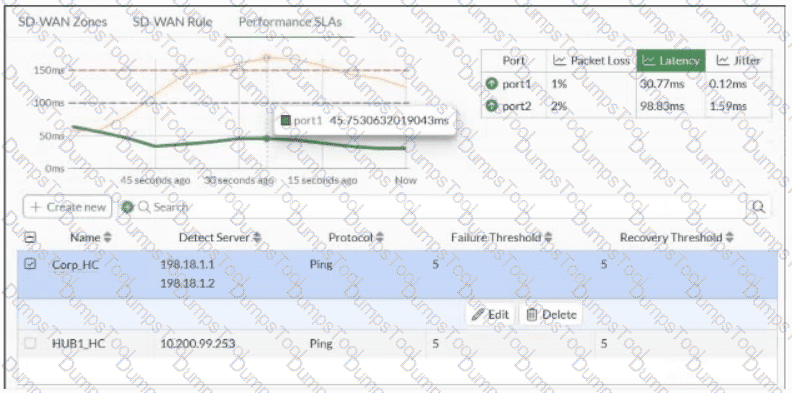
Over the past 60 seconds, the member port2 latency was temporarily above the latency criteria defined for HUB1_HC.
The administrator configured the Corp_HC performance service-level agreement (SLA) with SLA targets for the three criteria: packet loss, latency, and jitter.
Over the past 60 seconds, the member port1 was monitored healthy for both latency criteria of the Corp_HC definition.
The administrator configured the packet loss threshold for Corp_HC and HUB1_HC to 5%.
The selected performance SLA in the exhibit is Corp_HC , and the Latency view shows two configured latency criteria as horizontal threshold lines. Throughout the displayed 60-second interval, the green port1 latency remains below both thresholds, so port1 remains healthy against both Corp_HC latency criteria. Fortinet explains that the FortiGate GUI displays measured member performance and highlights when a member fails a configured SLA target; configured latency values can therefore be compared directly with measured latency. SD-WAN_7.6_Enterprise_Administr… Option A incorrectly associates the graph with HUB1_HC when Corp_HC is selected. Option B cannot be inferred merely because packet loss, latency, and jitter metrics are displayed; those metrics can be measured without all three being configured as SLA targets. Option D confuses the displayed failure/recovery threshold values of 5 with a 5% packet-loss SLA threshold .
================

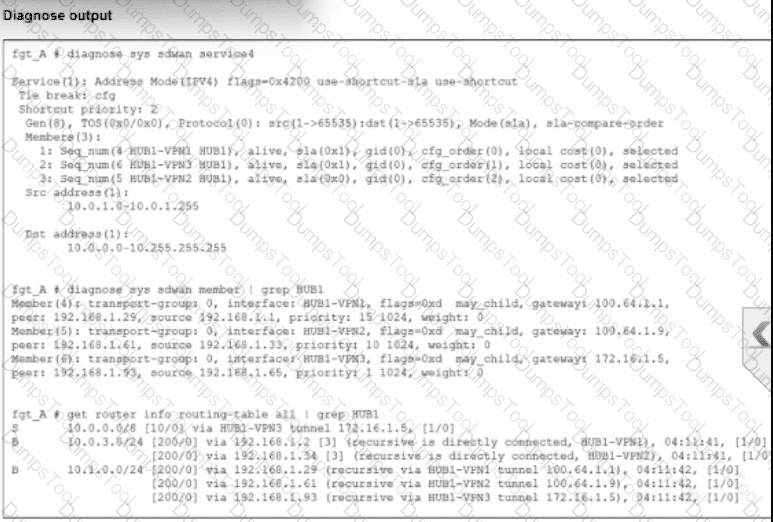
An administrator is troubleshooting SD-WAN on FortiGate. A device behind branch1_fgt generates traffic to the 10.0.0.0/8 network. The administrator expects the traffic to match SD-WAN rule ID 1 and be routed over HUB1-VPN1. However, the traffic is routed over HUB1-VPN3.
Based on the output shown in the exhibit, which two reasons, individually or together, could explain the observed behavior? (Choose two.)
HUB1-VPN1 does not have a valid route to the destination.
HUB1-VPN3 has a higher member configuration priority than HUB1-VPN1.
HUB1-VPN3 has a lower route priority value (higher priority) than HUB1-VPN1.
The traffic matches a regular policy route configured with HUB1-VPN3 as the outgoing device.
According to the SD-WAN 7.6 Core Administrator curriculum and the diagnostic outputs shown in the exhibit, the reason traffic is steered to HUB1-VPN3 instead of the expected HUB1-VPN1 (defined in SD-WAN rule ID 1) can be explained by two core routing principles in FortiOS:
Valid Route Requirement (Option A): In the diagnose sys sdwan service 4 output (which corresponds to Rule ID 1), it shows the rule has members HUB1-VPN1, HUB1-VPN2, and HUB1-VPN3. A key principle of SD-WAN steering is that for a member to be " selectable " by a rule, it must have a valid route to the destination in the routing table (RIB/FIB). If the routing table output (the third section of the exhibit) shows a route to 10.0.0.0/8 via HUB1-VPN3 but not through HUB1-VPN1, the SD-WAN engine will skip HUB1-VPN1 entirely because it is considered a " non-reachable " path for that specific destination.
Policy Route Precedence (Option D): In the FortiOS route lookup hierarchy, Regular Policy Routes (PBR) are evaluated before SD-WAN rules. If an administrator has configured a traditional Policy Route (found under Network > Policy Routes) that matches traffic destined for 10.0.0.0/8 and specifies HUB1-VPN3 as the outgoing interface, the FortiGate will forward the packet based on that policy route and will never evaluate the SD-WAN rules for that session. This " bypass " occurs regardless of whether the SD-WAN rule would have chosen a " better " link.
Why other options are incorrect:
Option B: While member configuration priority (cfg_order) is a tie-breaker in some strategies, the SD-WAN rule logic is only applied if the routing table allows it or if a higher-priority policy route doesn ' t intercept the traffic first.
Option C: Lower route priority (which means higher preference in the RIB) affects the Implicit Rule (standard routing). However, SD-WAN rules are designed to override RIB priority for matching traffic. If HUB1-VPN1 was a valid candidate and no Policy Route existed, the SD-WAN rule would typically ignore RIB priority to enforce its own steering strategy.
Refer to the exhibit.

Which two statements about the Vulnerability summary dashboard in FortiSASE are correct? (Choose two.)
The dashboard shows the vulnerability score for unknown applications.
Vulnerability scan is disabled in the endpoint profile.
The dashboard allows the administrator to drill down and view CVE data and severity classifications.
Automatic vulnerability patching can be enabled for supported applications.
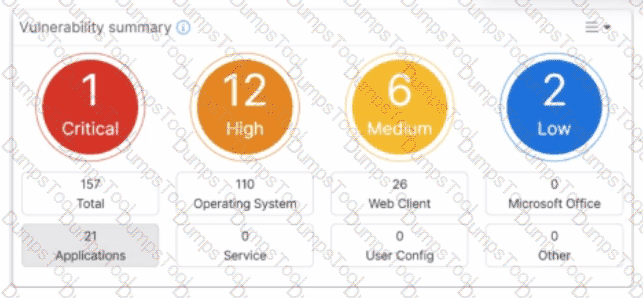
Based on the FortiSASE 7.6 (and later 2025 versions) curriculum and administration guides, the Vulnerability summary dashboard is a key component of the endpoint security posture management.
Drill Down Capability (Option C): According to the FortiSASE Administration Guide, the Vulnerability summary widget on the Security dashboard is interactive. An administrator can click on specific risk categories (e.g., Critical, High) or application types (e.g., Operating System, Web Client) to drill down. This action opens a detailed pane showing the specific affected endpoints, associated CVE identifiers, and severity classifications based on the CVSS standard.
Automatic Vulnerability Patching (Option D): In the FortiSASE 7.6/2025 feature sets, the endpoint profile configuration (under Endpoint > Configuration > Profiles) includes an " Automatic Patching " section. This feature allows the system to automatically install security updates for supported third-party applications and the underlying operating system (Windows/macOS) when vulnerabilities are detected. Furthermore, administrators can schedule these patches directly from the Vulnerability Summary widget by selecting specific vulnerabilities.
Why other options are incorrect:
Option A: The dashboard categories (Operating System, Web Client, Microsoft Office, etc.) are based on known software signatures. While there is an " Other " category, the dashboard primarily provides scores for recognized applications where CVE data is available.
Option B: The exhibit shows active data (157 total vulnerabilities), which indicates that the vulnerability scan is enabled and currently reporting data from the endpoints. If it were disabled, the widget would be empty or show zeros.
What is a key use case for FortiSASE Secure Internet Access (SIA) in an agentless deployment? (Choose one answer)
It provides secure web browsing by isolating browser sessions and enforcing data loss prevention for temporary employees.
It acts as a secure web gateway (SWG) distributing a PAC file for explicit web proxy use, securing HTTP and HTTPS traffic with a full security stack, and is ideal for unmanaged endpoints like contractors.
It distributes a PAC file to secure non-web traffic protocols and applies antivirus protection only for managed endpoints.
It requires FortiClient endpoints and supports ZTNA tags to secure all network traffic for unmanaged endpoints.
According to the FortiSASE 7.6 Administration Guide and the FCP - FortiSASE 24/25 Administrator curriculum, the Agentless deployment mode—commonly referred to as Secure Web Gateway (SWG) mode—is a vital component of the Secure Internet Access (SIA) framework.
Deployment Mechanism: In an agentless deployment, FortiSASE functions as an explicit web proxy. This is achieved by distributing a PAC (Proxy Auto-Configuration) file to the user ' s browser, which instructs the device to send its web traffic to the nearest FortiSASE Point of Presence (PoP).
Target Use Case: This mode is specifically designed for unmanaged endpoints, such as those used by contractors, partners, or temporary workers, where the organization does not have the authority or capability to install the FortiClient agent.
Security Capabilities: Even without an agent, FortiSASE applies a full security stack to the redirected traffic. This includes Web Filtering, Anti-Malware, SSL Inspection, and Inline-CASB to secure HTTP and HTTPS sessions.
Protocol Limitations: Because it relies on proxy settings, this mode is limited to web protocols (HTTP/HTTPS) and does not inherently secure non-web traffic like ICMP, DNS, or custom TCP/UDP applications unless they are specifically proxied.
Why other options are incorrect:
Option A: While it provides secure browsing, session isolation (RBI) is a specific feature that can be used in either mode; the defining characteristic of the agentless use case is the proxy-based redirection for unmanaged devices.
Option C: A PAC file can only secure web traffic (protocols that support proxying), not non-web traffic protocols.
Option D: Agentless mode is the opposite of requiring FortiClient; ZTNA tags generally require the FortiClient agent to provide the necessary telemetry for tag evaluation.
Refer to the exhibit.

You want the performance service-level agreement (SLA) to measure the jitter of each member. Which configuration change must you make to achieve this result?
No change is required.
Add an SLA target and define a jitter threshold.
Specify the participant members.
Set the protocol to HTTP.
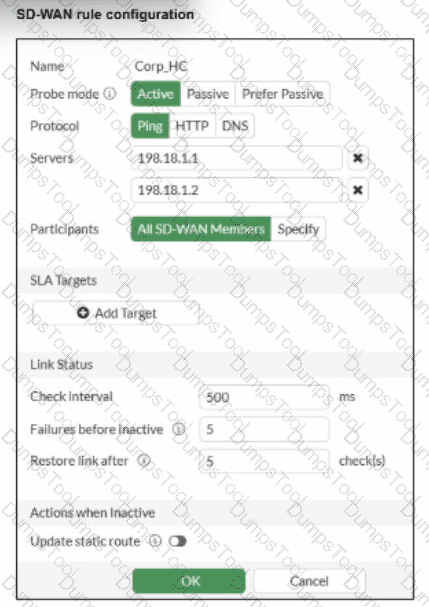
According to the SD-WAN 7.6 Core Administrator study guide and FortiOS 7.6 Administration Guide, no configuration change is required to simply measure jitter.
Implicit Measurement: In FortiOS, once a Performance SLA (Health Check) is configured with an Active probe mode (as seen in the exhibit with Ping selected), the FortiGate automatically begins calculating three key quality metrics for every member interface: Latency, Jitter, and Packet Loss.
Visibility: Even without an SLA Target defined, these real-time measurements are visible in the SD-WAN Monitor and via the CLI command diagnose sys virtual-wan-link health-check < SLA_Name > .
Active Probes: Because the probe mode is set to Active using the Ping protocol, the FortiGate sends synthetic packets at the defined Check interval (500ms in the exhibit). It calculates jitter by measuring the variation in the round-trip time (RTT) between these consecutive probes.
Why other options are incorrect:
Option B: Adding an SLA target and defining a jitter threshold is only necessary if you want the SD-WAN engine to make steering decisions based on that metric (e.g., " remove this link from the pool if jitter exceeds 50ms " ). It is not required just to measure the jitter.
Option C: While you can specify participants, the current setting is " All SD-WAN Members, " which means it is already measuring jitter for every member.
Option D: HTTP is an alternative probe protocol, but Ping (ICMP) is perfectly capable of measuring jitter and is often preferred for its lower overhead.
Which configuration is a valid use case for FortiSASE features in supporting remote users?
Enabling secure SaaS access through SD-WAN integration, protecting against web-based threats with data loss prevention, and monitoring user connectivity with shadow IT visibility.
Monitoring SaaS application performance, isolating browser sessions for all websites, and integrating with SD-WAN for data loss prevention.
Enabling secure web browsing to protect against threats, providing explicit application access with zero-trust or SD-WAN integration, and addressing shadow IT visibility with data loss prevention.
Providing secure web browsing through remote browser isolation, addressing shadow IT with zero-trust access, and protecting data at rest only.
According to the FortiSASE 7.6 Architecture Guide and FCP - FortiSASE 24/25 Administrator materials, the solution is built around three primary use cases that support a hybrid workforce:
Secure Internet Access (SIA): This enables secure web browsing by applying security profiles such as Web Filter, Anti-Malware, and SSL Inspection in the SASE cloud. It protects remote users from internet-based threats regardless of their location.
Secure Private Access (SPA): This provides granular, explicit access to private applications hosted in data centers or the cloud. It is achieved through ZTNA (Zero Trust Network Access) for session-based security or through SD-WAN integration where FortiSASE acts as a spoke to an existing corporate SD-WAN hub.
SaaS Security: FortiSASE utilizes Inline-CASB and Shadow IT visibility to monitor and control the use of cloud applications. Data Loss Prevention (DLP) is integrated into these workflows to prevent sensitive corporate data from being uploaded to unauthorized SaaS platforms.
Why other options are incorrect:
Option A: While it mentions SD-WAN and Shadow IT, it misses the core definition of SIA (secure web browsing) which is the primary driver for SASE deployments.
Option B: Remote Browser Isolation (RBI) is typically applied to risky or uncategorized websites, not " all websites, " due to the high performance and resource overhead.
Option D: FortiSASE is designed to protect data in motion (via security profiles) as well as data stored in sanctioned cloud apps, not " at rest only " .
Which three FortiSASE use cases are possible? (Choose three answers)
Secure Internet Access (SIA)
Secure SaaS Access (SSA)
Secure Private Access (SPA)
Secure VPN Access (SVA)
Secure Browser Access (SBA)
According to the FortiSASE 7.6 Architecture Guide and the FCP - FortiSASE 24/25 Administrator study materials, the FortiSASE solution is structured around three primary pillars or " use cases " that address the security requirements of a modern distributed workforce.
Secure Internet Access (SIA) (Option A): This use case focus on protecting remote users as they browse the public internet. It utilizes a full cloud-delivered security stack including Web Filtering, DNS Filtering, Anti-Malware, and Intrusion Prevention (IPS) to ensure that users are protected from web-based threats regardless of their physical location.
Secure SaaS Access (SSA) (Option B): This use case addresses the security of cloud-based applications (like Microsoft 365, Salesforce, and Dropbox). It leverages Inline-CASB (Cloud Access Security Broker) to identify and control " Shadow IT " —unauthorized cloud applications used by employees—and applies Data Loss Prevention (DLP) to prevent sensitive information from being leaked into unsanctioned SaaS platforms.
Secure Private Access (SPA) (Option C): This use case provides secure, granular access to private applications hosted in on-premises data centers or private clouds. It can be achieved through two main methods: ZTNA (Zero Trust Network Access), which provides session-specific access based on identity and device posture, or through SD-WAN integration, where the FortiSASE cloud acts as a spoke connecting to a corporate SD-WAN Hub.
Why other options are incorrect:
Secure VPN Access (SVA) (Option D): While SASE uses VPN technology (SSL or IPsec) as a transport for the Endpoint mode, " SVA " is not a formal curriculum-defined use case. The SASE framework is intended to evolve beyond traditional " Secure VPN Access " into the SIA and SPA models.
Secure Browser Access (SBA) (Option E): Although FortiSASE offers Remote Browser Isolation (RBI), it is considered a feature or a component of the broader Secure Internet Access (SIA) use case rather than a separate, standalone use case in the core administrator curriculum.
Which three reports are valid report types in FortiSASE? (Choose three.)
Web Usage Summary Report
Endpoint Compliance Deviation Report
Vulnerability Assessment Report
Shadow IT Report
Cyber Threat Assessment
According to the FortiSASE 7.6 Administration Guide and the FCP - FortiSASE 24/25 training materials, FortiSASE leverages a cloud-native FortiAnalyzer instance to provide specialized reports. These reports are designed to give administrators visibility into remote user behavior, endpoint health, and cloud application usage.
The three valid and standard report types available directly within the FortiSASE portal are:
Web Usage Summary Report (Option A): This report provides a high-level overview of web activity across the SASE deployment. It categorizes traffic by website categories (e.g., Social Media, Streaming, Malicious Sites), top users by bandwidth, and blocked requests, helping IT teams understand how internet resources are being consumed by remote workers.
Vulnerability Assessment Report (Option C): Since FortiSASE integrates with FortiClient and an embedded EMS, it can aggregate vulnerability scan data from managed endpoints. This report lists software vulnerabilities found on user devices (OS-level and application-level), providing a " Security Rating " or posture assessment that is critical for Zero Trust Network Access (ZTNA) enforcement.
Shadow IT Report (Option D): Leveraging the built-in CASB (Cloud Access Security Broker) capabilities, this report identifies " unsanctioned " or " risky " SaaS applications being used by employees. It helps organizations discover hidden security risks by cataloging cloud applications that have not been explicitly approved by the IT department.
Why other options are incorrect:
Endpoint Compliance Deviation Report (Option B): While FortiSASE performs compliance checks via ZTNA tags, this specific name is not a standard " Report Type " template in the portal; compliance is typically monitored via the Endpoint Management or ZTNA Dashboards.
Cyber Threat Assessment (Option E): The Cyber Threat Assessment Program (CTAP) is a specific Fortinet sales and auditing tool used to generate a one-time report on a network ' s security posture (often used for FortiGate evaluations). It is not a native, recurring report type within the day-to-day FortiSASE administration interface.
Refer to the exhibit.

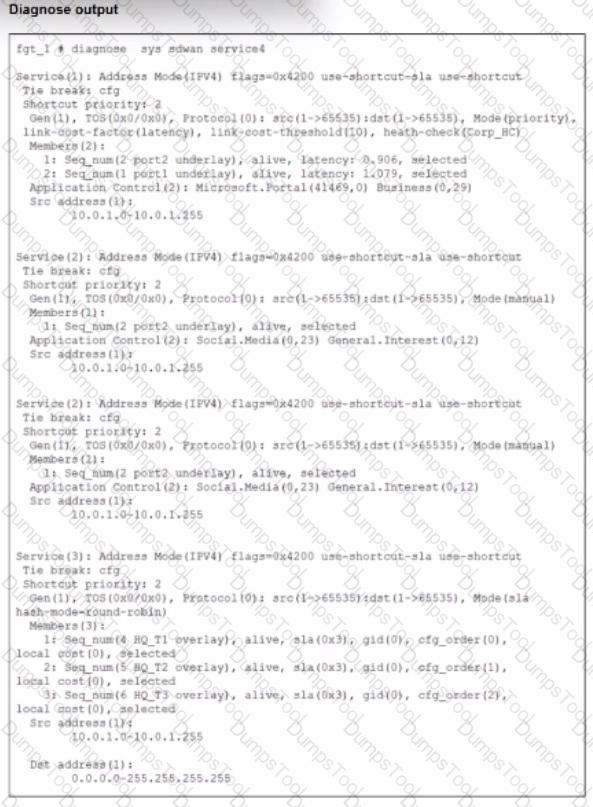
The exhibit shows output of the command diagnose sys sdwan service collected on a FortiGate device.
The administrator wants to know through which interface FortiGate will steer traffic from local users on subnet 10.0.1.0/255.255.255.192 and with a destination of the social media application Facebook.
Based on the exhibits, which two statements are correct? (Choose two.)

FortiGate steers traffic for social media applications according to the service rule 2 and steers traffic through port2.
There is no service defined for the Facebook application, so FortiGate applies service rule 3 and directs the traffic to headquarters.
When FortiGate cannot recognize the application of the flow, it load balances the traffic through the tunnels HQ_T1, HQ_T2, HQ_T3.
When FortiGate cannot recognize the application of the flow, it steers the traffic through the preferred member of rule 3, HQ_T1.
" If a flow is identified as belonging to a defined application category (such as social media), FortiGate will match it to the corresponding service rule (rule 2) and route it through the specified interface, such as port2. However, if the application is not recognized during the session setup, the system defaults to load balancing the traffic using the available tunnels according to the policy for unclassified traffic, ensuring continuous connectivity while waiting for application classification. "
This guarantees both performance and resilience.
TESTED 09 Oct 2026
Copyright © 2014-2026 DumpsTool. All Rights Reserved