Pre-Summer Sale - Special 70% Discount Offer - Ends in 0d 00h 00m 00s - Coupon code: 70dumps

FCP_FMG_AD-7.6 Questions and Answers

Question # 6

Company policy dictates that any time a change is made to a policy package on FortiManager an ADOM revision is created before the change installed, and that revision is held for a minimum of 90 days.

Over the past three months, each installed change has resulted in several unused policies and duplicate objects.

The FortiManager administrator plans to upgrade the FortiGate devices and then upgrade the FortiManager ADOM from version 7.4 to 7.6.

Which action can the administrator take to avoid slow ADOM upgrades?

A.

Check and repair the global configuration database before upgrading.

B.

Export firewall policies to Excel, delete them on the ADOM. then reimport them after upgrading the ADOM.

C.

Find unused firmware templates, then delete them before upgrading.

D.

Limit ADOM revisions before upgrading.

Full Access
Question # 7

Push updates are failing on a FortiGate device located behind a network address translation (NAT) device?

Which two settings should the administrator check to correct this problem? (Choose two.)

A.

Make sure the NAT device IP address and the correct ports are configured on FortiManager.

B.

Make sure FortiGuard updates and web service are enabled on the FortiGuard service interface.

C.

Make sure the virtual IP address and the correct ports are configured on the NAT device.

D.

Make sure the Bind to IP address option on the FortiGuard service interface is set to the virtual IP address from the NAT device.

Full Access
Question # 8

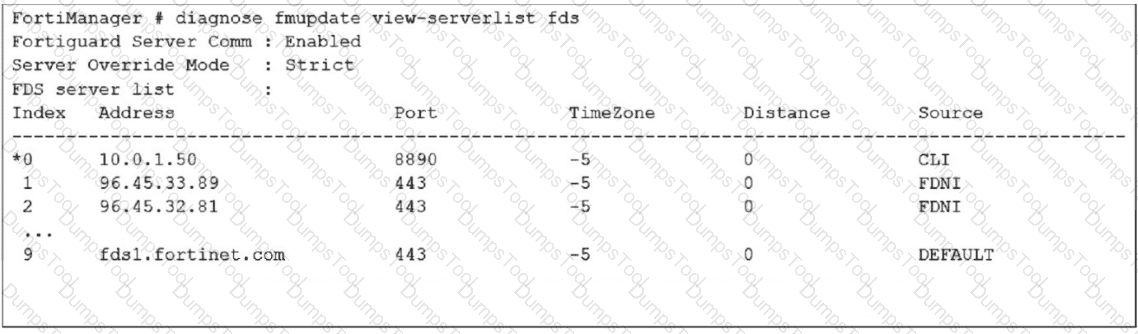
Refer to the exhibit.

Question # 8

How does FortiManager get antivirus and IPS updates? Choose one answer

A.

It uses all URLs in the list that contain the fds host name.

B.

It gets updates from the server with IP address 10.0.1.50.

C.

It connects to all servers marked as FortiGuard Distribution Network through Internet FDNI sources.

D.

It connects to the public FortiGuard servers listed in the configuration

Full Access
Question # 9

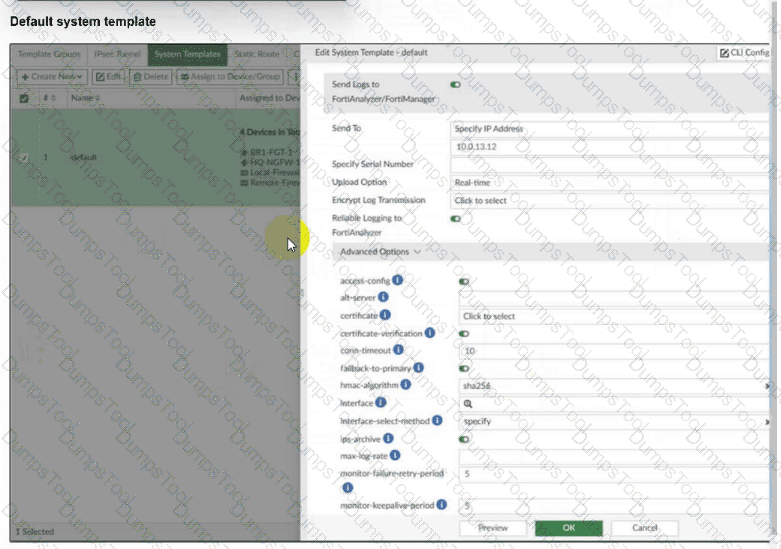
Refer to the exhibit.

Question # 9

An administrator has assigned the default system template to install all devices with the FortiAnalyzer IP address 10.0.13.12. However, not all FortiGate devices can reach FortiAnalyzer using the default interface. Some devices may use the LAN interface, while others may use the WAN interface. How can the administrator change the source interface for FortiGate devices using the default system template? Choose one answer

A.

Use per-device dynamic object configurations at the ADOM level and apply them in the template.

B.

Configure a metadata variable at the ADOM level and use it in the template.

C.

Create a different system template for each FortiGate, if the configuration is different.

D.

Create a meta field on FortiManager system settings of type Device and use it in the template.

Full Access
Question # 10

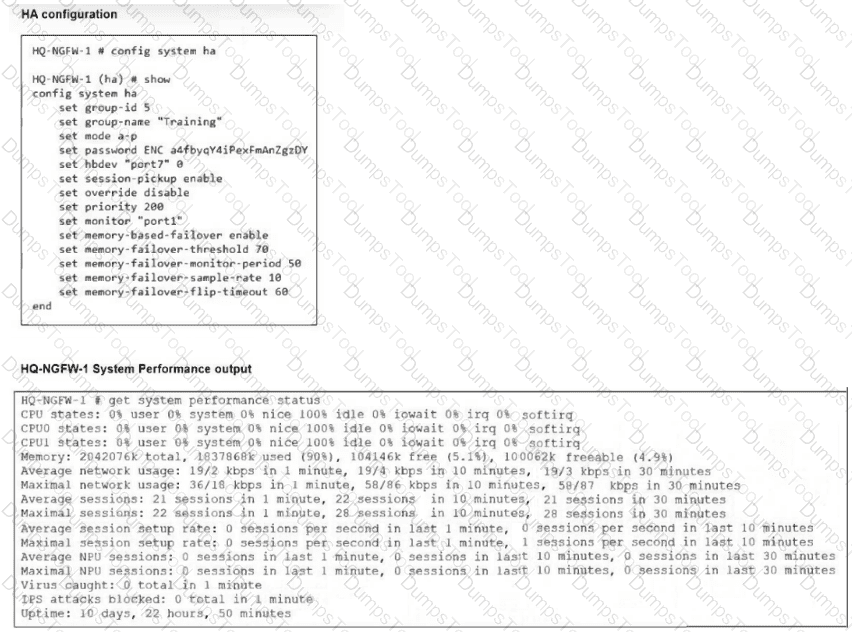
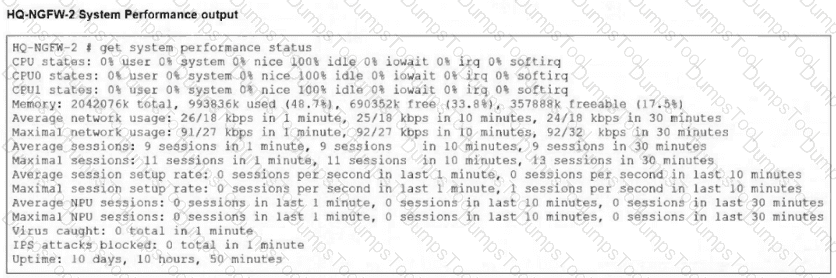
Refer to Exhibits:

Question # 10

Question # 10

An administrator has observed the performance status outputs on an HA cluster for 55 seconds.

Which FortiGate is the primary?

A.

HQ-NGFW-2 with the parameter memory-failover-threshold setting

B.

HQ-NGFW-2 with the parameter priority setting

C.

HQ-NGFW-1 with the parameter memory-failover-flip-timeout setting

D.

HQ-NGFW-1 with the parameter override setting

Full Access
Question # 11

An administrator is copying a system template profile between ADOMs by running the following command:

execute fmprofile export-profile ADOM 3547 /tmp/Backup_File

output dump to file: [/tmp/Backup_File]

Where does this command export the system template profile from?

A.

FortiManager /tmp/Backup_File folder

B.

FortiManager ADOM policy database

C.

ADOM device database

D.

FortiManager configuration backup file

Full Access
Question # 12

An administrator notices that CLI scripts are failing on some FortiGate devices because they use different FortiOS versions.

Which two actions should the administrator take to fix the failing CLI scripts? Choose two answers.

A.

Create separate ADOMs for each FortiOS version.

B.

Disable CLI scripts for devices using older firmware.

C.

Modify the CLI scripts to include conditional commands based on FortiOS version.

D.

Create version-specific CLI script groups and assign them to the appropriate devices.

Full Access
Question # 13

Refer to the following configuration. FortiManager # config system global global# set workspace-mode normal global# end FortiManager # What are two results from the configuration shown in the exhibit? Choose two answers

A.

The same administrator can lock more than one ADOM at the same time.

B.

Multiple administrators can lock and work on separate ADOMs at the same time.

C.

All changes must be approved before they can be installed on a device.

D.

Concurrent read-write access to an ADOM is disabled.

Full Access
Question # 14

An administrator wants to configure and manage multiple objects in the FortiManager database and give access to other users who work in the same database.

To stay in control of the changes made to firewall policies by other team members, the administrator needs a setup where all modifications go through a central check before they can be installed.

How can the administrator create this setup?

A.

Enable the prompt asking the administrator to accept firewall policies changes before saving.

B.

Enable the workspace (for all ADOMs) to control all changes made by any administrator.

C.

Enable device lock and the advanced mode feature in the ADOM.

D.

Enable workflow mode and the ADOM lock feature.

Full Access
Question # 15

While attempting to push a NetFlow configuration script through the FortiManager policy package: an administrator encounters an error stating that an object is unrecognized in line 4.

Question # 15

What must the administrator do to successfully apply the NetFlow configuration script and avoid the object unrecognized error?

A.

Make sure the user running the script has full access to the VDOM—AGEUSR.

B.

Run the script on the device database.

C.

Use metadata variables if they use VDOMs in the script.

D.

Create a normalized interface on the policy layer before running the script.

Full Access
Question # 16

A FortiManager administrator has moved a FortiGate device to a new ADOM, but they cannot see the policy or object configurations for that FortiGate.

What should the administrator do to see the policy or object configurations?

A.

Use ADOM shared objects to restore all missing data.

B.

Reset the device and add it to the new ADOM again.

C.

Import the policy package manually using the Import Configuration wizard.

D.

Use ADOM sync to restore the missing configurations.

Full Access
Question # 17

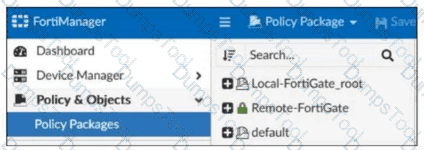
Refer to the exhibit.

Question # 17

Which two statements about the configuration shown in the exhibit are true? Choose two answers.

A.

An administrator can lock the Local-FortiGate_root policy package.

B.

The administrator created a snapshot of the Remote-FortiGate policy package.

C.

The FortiManager ADOM workspace mode is set to normal.

D.

The FortiManager is in workflow mode.

Full Access
Question # 18

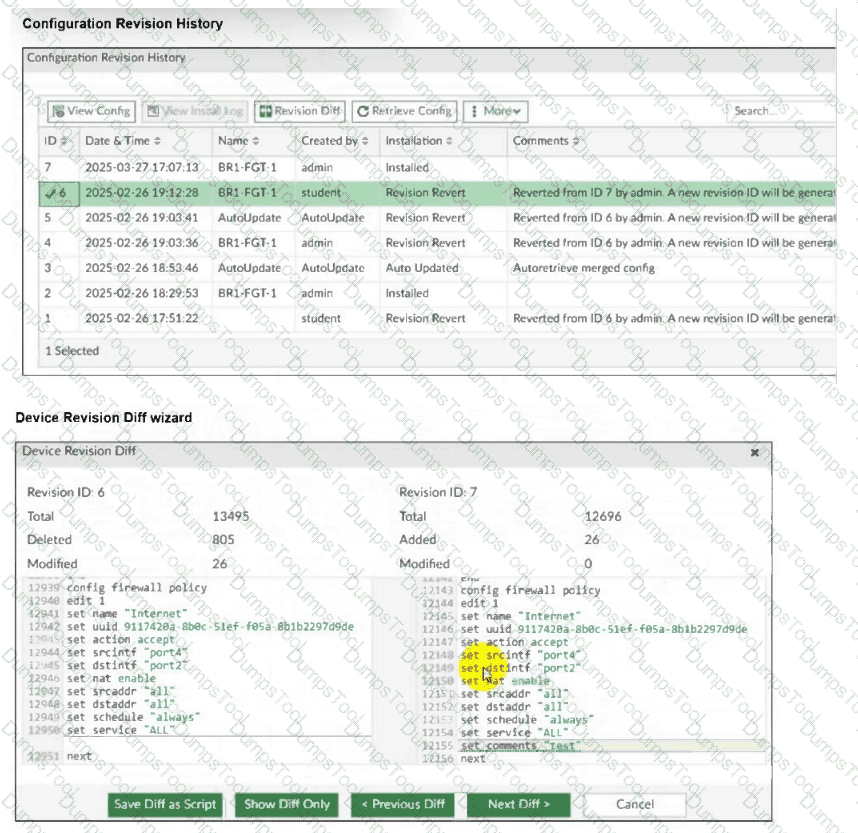
Refer to Exhibit:

Question # 18

An administrator admin used the Configuration Revision History window to revert the FortiGate device configuration to revision ID 6. After running the reinstall policy package, the administrator noticed problems with the firewall policy- they could not see the unset comment on policy ID 1.

Why did FortiManager not remove the comment from policy ID 1 when the administrator ran reinstall policy package?

A.

Because the administrator student must install the configuration changes to correctly see the expected results.

B.

Because the administrator must import the firewall policies to update the firewall policy package.

C.

Because every time the administrator uses the revert config file, they must use the Install Wizard instead of running the reinstall policy package.

D.

Because the administrator used the Revision Diff view, which shows what changed, not what will be installed.

Full Access
Question # 19

FortiGate is integrated with FortiAnalyzer and FortiManager.

When creating a firewall policy, which attribute must an administrator include to enhance functionality and enable log recording on FortiAnalyzer and FortiManager?

A.

Policy ID

B.

Log ID

C.

Universally Unique Identifier

D.

Sequence ID

Full Access