The following message appears in a log: PSMSV1230E: Vault files download completed with errors. Some of the files may be missing.
On which system would you most likely see this message?
PSM for SSH
CPM
PSM
Vault
CyberArk components use distinct message prefixes to identify the originating service or subsystem. These identifiers help administrators determine where a problem occurred and which diagnostic records should be examined.
The message PSMSV1230E belongs to the Privileged Session Manager service message family.
Privileged Session Manager (PSM) establishes and controls privileged sessions, isolates credentials from users, and supports monitoring and recording of administrative activity.
During initialization and normal operations, PSM communicates with the Digital Vault to obtain configuration data and other files required by its services.
The error indicates that a Vault file download operation completed unsuccessfully and that some expected files may not have been retrieved.
Potential causes include Vault connectivity problems, insufficient Safe permissions, unavailable objects, authentication failures, or incomplete component configuration.
Administrators should investigate the corresponding PSM service logs and correlate the event with Vault connectivity and authentication records.
PSM for SSH uses a different service architecture and message families, while CPM primarily produces password-management and credential-processing diagnostics.
Although the underlying communication involves the Digital Vault, the PSMSV prefix identifies the PSM component as the expected logging source.
A customer has asked you to onboard more than 1,000 Local Admin accounts. All of the accounts are used by the same team and are in a control zone.
Which CyberArk feature provides an automated way to accomplish this task?
Password Upload Utility
Auto-Detection
Auto-Reconcile
Remote Control Agent
CyberArk Password Upload Utility (PUU) supports bulk onboarding of privileged accounts into the Digital Vault, reducing the administrative effort associated with manually creating large numbers of managed accounts.
In this scenario, the customer needs to onboard more than 1,000 local administrative accounts belonging to the same operational team and security control zone.
The Password Upload Utility allows administrators to prepare structured account information, typically using a delimited input file containing target addresses, usernames, passwords, Safe assignments, and relevant platform information.
The utility processes the supplied information and creates the corresponding account objects within CyberArk, subject to the configured permissions and supported platform requirements.
Before executing the bulk import, administrators should confirm the Safe design, account ownership, platform assignments, and password-management configurations.
After onboarding, CPM can manage the accounts according to the assigned platform policies, including automated password verification, rotation, and reconciliation.
Auto-Detection concerns account discovery rather than the direct bulk import of a prepared account inventory. Auto-Reconcile is associated with credential recovery operations, while the Remote Control Agent supports Vault administration and monitoring.
Modern CyberArk environments can also use REST APIs for automated account onboarding, but the Password Upload Utility is the correct option among those provided.
What is required for a Privilege Cloud Connector Server?
Public Facing IP
IIS Server 10
IPv6 Address
Joined to the domain
In standard CyberArk Privilege Cloud deployments, the Connector server (which hosts the CPM and PSM components) is typically joined to the corporate Active Directory domain . This allows the connector to leverage domain Group Policy Objects (GPOs) for server hardening and properly manage Windows domain accounts and target systems. (Note: While an "out-of-domain" deployment option exists for specific isolated environments, domain-joined is the standard requirement tested on the CyberArk Guardian
What are the three Guiding Principles of the CyberArk Blueprint?
Credential Theft, Lateral and Vertical Movement, Privilege Escalation and Abuse.
Identity Security, Credential Theft, Lateral and Vertical Movement.
Attack and Defend capability, Credential Theft, Least Privilege.
Quick return on investment, Password Management, Credential Theft.
The CyberArk Blueprint is based on three security principles designed to interrupt the identity attack chain used by malicious actors to compromise enterprise systems.
The first principle is preventing credential theft . Attackers frequently obtain passwords, authentication tokens, SSH keys, and other privileged credentials through phishing, malware, exposed configuration files, or credential repositories. CyberArk mitigates these risks through secure credential storage, controlled retrieval, password rotation, and session isolation.
The second principle is stopping lateral and vertical movement . After obtaining initial access, attackers attempt to move between systems or cross security boundaries to reach more valuable resources. Unique privileged credentials, segmentation, and controlled privileged sessions reduce opportunities for such movement.
The third principle is limiting privilege escalation and abuse . Attackers may attempt to elevate compromised identities into administrative roles or misuse existing privileges. Least-privilege controls, session monitoring, application control, and just-in-time access help restrict these activities.
Together, these principles support the Blueprint's phased implementation methodology. Organizations can prioritize security controls according to their ability to reduce identity-related attack risk.
Option A correctly identifies all three areas, although CyberArk commonly presents them as preventative actions rather than simply naming the attack techniques.
Communication is an integral component of any PAM program and includes these two elements.
Choose two
Getting buy-in from leadership and communicating this from the first stakeholder meeting.
Allowing each level to develop their own messaging so that we can build a specific message catered to each group's goals: leadership, management, different organizations, IT Administrators, etc..
Developing a PAM sponsor to evangelize the project goals with the CTO and the entire technology organization.
"One and Done" communication so we don't overwhelm users.
Developing all training materials in Stage 2 of the program so that we can include 'lessons learned'.
Successful Privileged Access Management implementation requires organizational commitment in addition to technology deployment. PAM initiatives affect administrators, application owners, operations teams, business stakeholders, and executive leadership.
Establishing leadership buy-in from the beginning is essential because privileged-access controls can change established administrative procedures and introduce new approval, authentication, and session-management requirements.
Communicating executive support during initial stakeholder engagement establishes a clear organizational mandate and reduces uncertainty regarding the program's importance.
A dedicated PAM sponsor provides continuing executive advocacy. This individual communicates objectives to senior technology leadership, helps resolve organizational barriers, and ensures the program receives the necessary operational support.
Options A and C therefore describe complementary elements: executive commitment and sustained sponsorship.
Option B introduces an important distinction. Communication should be tailored to different audiences, but allowing every organizational level to independently define its own message can create conflicting expectations. A centrally coordinated communication strategy is preferable.
Option D is incorrect because adoption requires continuous engagement rather than a single announcement. Option E is also unsuitable because enablement and training preparation should begin before the second stage.
You need to implement a solution that requires users to verify they have run an application.
Which solution is best?
EPM Step-up authentication.
Accounts with Least Privilege configured.
Ad Hoc Access and Ad Hoc Connections.
PTA Risky Commands.
CyberArk Endpoint Privilege Manager (EPM) provides application-control and privilege-management capabilities designed to reduce unnecessary administrative access on endpoints.
Step-up authentication introduces an additional identity-verification requirement before an application is launched or executed with elevated privileges, depending on the configured policy.
When an application matches a policy requiring step-up authentication, EPM can prompt the user to complete an additional authentication challenge.
Supported integrations can use identity providers and authentication mechanisms capable of verifying the user's identity through methods such as multifactor authentication.
Only after the required authentication succeeds does the endpoint permit the application action specified by the policy.
This provides a stronger control than simply allowing an authenticated workstation user to execute applications without further verification.
Least-privilege account configuration reduces standing administrative permissions but does not independently require additional authentication for a particular application.
Ad Hoc Access controls privileged access workflows, while PTA Risky Commands focuses on detecting potentially dangerous privileged-session activities.
Therefore, EPM Step-up Authentication is the appropriate solution for enforcing additional identity verification at application execution.
A customer must retain all privileged-access records for 7 years. The environment has approximately 2000 users who create nearly 100 GB of session recordings each day.
How should CyberArk PAS be designed to meet this requirement for PSM recordings?
Set a low PSM Recording Retention period and use Secure Replicate to offload recordings for archival storage.
Connect Vault servers to SAN storage and increase disk size whenever free disk space monitoring sends an alert.
Connect external storage to PSM servers to more evenly distribute the storage requirements.
Set Audit Retention Master Policy and PSMRecording Safe object retention to 2555 days (365 days * 7 years).
CyberArk Privileged Session Manager records administrative sessions and stores completed recordings in designated Recording Safes within the Digital Vault.
At approximately 100 GB per day, retaining seven years of recordings requires substantial storage capacity.
The estimated volume is:
100 GB × 365 × 7 = 255,500 GB
This represents approximately 255.5 TB before accounting for filesystem overhead, additional metadata, growth, and redundancy.
Retaining this entire volume within the operational Digital Vault would introduce considerable storage, backup, and recovery requirements.
The more appropriate approach is to establish a shorter operational recording-retention period and use CyberArk replication or supported archival processes to transfer recordings into secure long-term storage.
Secure Replicate can support the transfer of Vault data into an external backup environment, reducing dependence on continuously expanding primary Vault storage.
However, the archival solution must independently enforce the required seven-year retention period, integrity protection, recoverability, and audit requirements. A backup copy alone does not automatically establish regulatory compliance.
Option B relies on reactive storage expansion. Option C incorrectly treats PSM servers as the permanent recording archive. Option D does not address practical capacity management and incorrectly combines different retention mechanisms.
What does a SCIM Server refer to?
Secure for CyberArk Identity Manager.
System for Cross Identity Management.
System for CyberArk Identity Management.
Secure Compute Information Manager.
SCIM stands for System for Cross-domain Identity Management , an open standard designed to simplify the automated exchange and management of identity information between different systems and identity domains.
SCIM defines standardized REST-based interfaces and resource schemas for provisioning, retrieving, modifying, and deprovisioning identities.
In CyberArk environments, SCIM integrations can connect identity governance solutions with privileged access management services. This enables organizations to automate identity lifecycle processes, including account creation, access provisioning, group membership updates, and removal of privileges when users change roles or leave the organization.
CyberArk's SCIM capabilities can also support management of privileged-access resources, including users, groups, Safes, and relevant permissions, depending on the integration and product capabilities.
The primary security benefit is consistent identity governance. Instead of manually maintaining privileges across independent systems, administrators can implement controlled provisioning and deprovisioning processes that reduce orphaned accounts and excessive entitlements.
SCIM complements privileged credential management; it does not replace CPM password rotation or PSM session isolation.
The enterprise-scale client has a large team of 10 Vault administrators. In accordance with the principle of least privilege, you have advised the client to create separate local CyberArk accounts for managing CyberArk. You created an account named VaultAdmin for activities such as deploying a new platform, and SafeAdmin solely for creating and managing safes. You will then add SafeAdmin to all target-account safes.
You then grant access to the VaultAdmin account to 5 Vault administrators, and grant the other 5 Vault administrators access only to the SafeAdmin account.
The primary benefit of this is:
To follow the principle of Least Privilege.
To follow the principle of separation of duties.
To follow the principles of both least privilege and separation of duties.
'SafeAdmin' now has full access to view the passwords stored in all of the safes, removing this access that is generally granted natively to the 'VaultAdmin' team.
CyberArk privileged-access administration should follow the principles of least privilege and separation of duties to reduce security risks associated with excessive administrative permissions.
Least privilege requires each administrator to receive only the permissions necessary to perform assigned responsibilities.
In this scenario, the VaultAdmin role is responsible for broader platform administration activities, while SafeAdmin is restricted to Safe creation and management responsibilities.
This prevents administrators responsible exclusively for Safe operations from automatically receiving broader platform-management capabilities.
Separation of duties introduces another security boundary by assigning these responsibilities to different administrative groups.
Dividing the ten administrators into two groups reduces the concentration of administrative authority and limits the ability of a single team to modify both platform configuration and Safe access controls.
However, Safe membership must be configured carefully. Managing a Safe does not inherently require retrieving or viewing the passwords stored within it.
SafeAdmin should therefore receive only the relevant Safe-management permissions.
Architectural qualification: For production implementations, administrators should use individually attributable identities rather than routinely sharing the VaultAdmin or SafeAdmin credentials. This preserves personal accountability, auditing, and access revocation.
Option C correctly identifies both security principles.
The customer currently has a Primary and DR vault. They have heard that another DR vault can be deployed for additional redundancy, so they order a physical server and rack and stack it in a Co-Iocation.
However, when installing the DR module on the new vault, the installation fails. What is the most likely cause?
None of the PVWAs can communicate with the new vault.
The customer does not have enough DR licenses.
The vault has not been hardened correctly.
Unless the configuration is using the Distributed Vault architecture, you can only have 2 total vault servers.
CyberArk distinguishes between traditional Digital Vault disaster recovery and the Distributed Vault architecture. These architectures provide different forms of availability, replication, and workload distribution.
In a conventional disaster recovery deployment, a standby Vault replicates information from the active Primary Vault through the CyberArk Disaster Recovery service. Additional disaster recovery servers can be supported subject to applicable licensing, compatibility, and deployment configuration.
Consequently, the assertion in option D that a non-distributed deployment is universally limited to two Vault servers is not a reliable architectural rule.
Each additional DR Vault requires appropriate licensing and configuration. If the organization has acquired only the entitlements needed for its original Primary and DR deployment, attempting to install another DR instance can encounter licensing restrictions. This makes option B the strongest available explanation.
PVWA connectivity is not a prerequisite that independently determines whether the DR module can be installed. Likewise, Vault hardening must be implemented correctly, but the scenario provides no evidence that hardening caused the failure.
The installation logs and license entitlements must ultimately establish the actual failure.
Where should the Master Private Key be stored?
A physical safe or similar solution.
USB drive.
On the Vault server.
In a Safe in the Vault.
The CyberArk Digital Vault uses cryptographic key material to protect sensitive information stored within its secure repository.
The Master Private Key is a highly sensitive recovery asset associated with emergency access and cryptographic recovery operations.
Because compromise of this key could undermine the security of protected Vault information, its storage requires controls substantially stronger than those applied to ordinary operational files.
The recommended approach is to maintain the Master Private Key offline, protected by strict physical access controls.
A physical safe or equivalent secure custody solution provides protection against remote compromise and reduces the likelihood that an attacker who gains access to an operational system can also obtain the recovery key.
Organizations should establish formal procedures governing key custody, authorized access, recovery operations, and access auditing.
Depending on organizational requirements, additional safeguards may include dual-person authorization, controlled key backups, tamper-evident storage, and geographically separated recovery materials.
A USB drive alone does not provide adequate protection unless incorporated into an appropriately controlled custody process.
Storing the Master Private Key on the Vault server or within the same Vault it protects would introduce unnecessary security dependencies.
The selected storage arrangement must support both strong confidentiality and reliable recovery during a major infrastructure failure.
How can a Secondary PTA server be promoted to a Primary PTA Server?
A manual procedure.
Automatically using the PTA Network Sensors.
This is not possible.
Automatically using a BASH script.
CyberArk Privileged Threat Analytics (PTA) provides security analytics for privileged account activity, identifying suspicious behavior, anomalous access patterns, and potential credential misuse.
In the traditional PTA disaster recovery architecture, the Primary PTA server processes incoming security events and performs the active analytics functions. A Secondary PTA server maintains replicated information and provides a recovery capability if the Primary PTA becomes unavailable.
Promoting the Secondary server requires an administrator-controlled failover procedure. The administrator must confirm the failure, assess replication consistency, activate the secondary environment according to the supported recovery procedure, and ensure that relevant integrations direct their traffic to the newly active server.
PTA Network Sensors collect network authentication information for analytics. They do not independently manage PTA server promotion or provide automatic high-availability orchestration.
Although Linux shell scripts may be involved in PTA disaster recovery configuration and recovery operations, the presence of such scripts does not mean that unattended automatic promotion is supported.
Manual promotion provides operational control over recovery and helps prevent inconsistent analytics environments or an unintended simultaneous-primary condition.
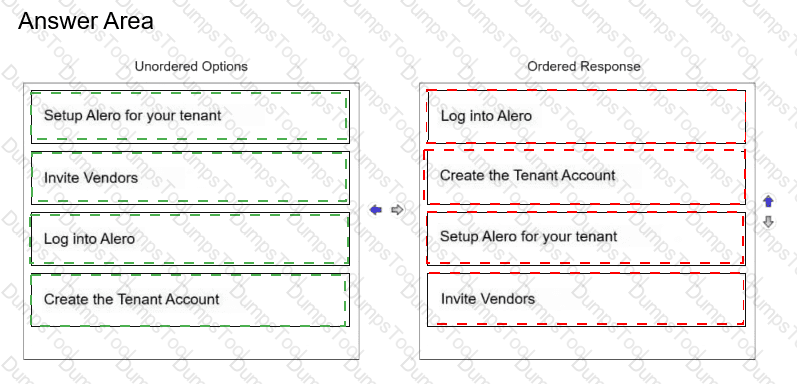
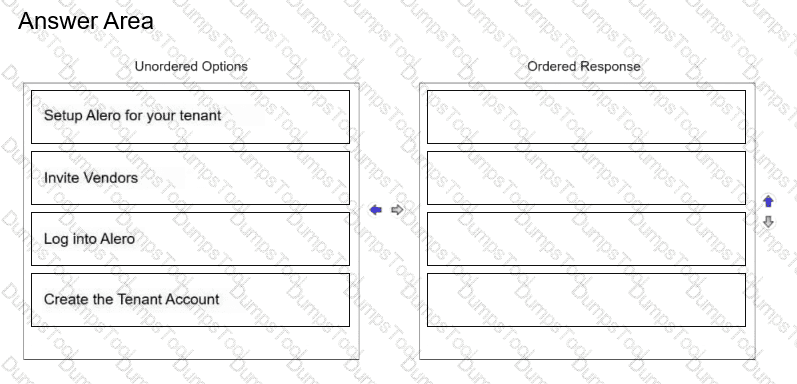
Place the steps for creating a new Alero tenant in the correct sequence.
Drag & Drop

See correct matching / sequence below.
Original description / order
Correct match
1
Log into Alero
2
Create the Tenant Account
3
Setup Alero for your tenant
4
Invite Vendors
CyberArk Alero, the former product name associated with CyberArk Remote Access, provides secure remote access for external vendors and privileged employees without relying on traditional VPN-based access.
The tenant creation workflow establishes the administrative and security foundation required before external users can access managed enterprise resources.
The process begins by logging in to the Alero administration environment using an appropriately authorized account.
Next, the administrator creates the tenant account. The tenant represents the organization's logical Remote Access environment and provides the administrative scope for configuring users, applications, and access policies.
After tenant creation, the administrator configures the tenant environment. This includes the applicable authentication settings, Remote Access configuration, privileged-access integration, and permissions required for the intended deployment.
Once these foundational settings are established, external vendors can be invited into the environment.
Vendor invitations should be issued only after the required access configuration has been completed. This reduces the risk of users entering an incompletely configured environment or receiving unintended permissions.
The sequence therefore follows the dependency chain of authentication, tenant creation, tenant configuration, and vendor onboarding.
Technical warning / qualification: Alero is legacy product terminology. The process should be interpreted in the context of the product generation represented by the question.
TESTED 16 Nov 2026
Copyright © 2014-2026 DumpsTool. All Rights Reserved