Pre-Summer Sale - Special 70% Discount Offer - Ends in 0d 00h 00m 00s - Coupon code: 70dumps

AD0-E911 Questions and Answers

Question # 6

How would a project manager create a custom Workfront report to show information about issues logged to the projects they own?

A.

Visit the Dashboard page, create a new Issue report, and update the Issue Owner ID filter with their name, and group by project name.

B.

Visit the Reports page, create a new Project report, update the Project Owner ID filter with their name, and add a column for issues.

C.

Visit the Reports page, create a new Issue report, update the Project Owner ID filter with their name, and group by project name.

Full Access
Question # 7

A resource manager wants to review how resources are utilized across multiple projects to make staffing decisions.

Which Workfront tool should the resource manager use?

A.

Scenario Planner

B.

Timesheets

C.

Workload Balancer

Full Access
Question # 8

An organization has created unique data fields relevant to their projects. Starting by navigating from a project ' s landing page, where is this data found?

A.

Project Details > Custom Forms

B.

Project Details > Overview

C.

Business Case > Project Info

Full Access
Question # 9

A team lead wants to see all hours that have been logged this month by members of the team lead’s home team, organized by project. How should the team lead create this view?

A.

Navigate to a specific project and open the Hours tab. Filter the view by Owner > Home Team ID > Equal > [Name of Home Team] and Hour > Entry Date > This Month. Repeat on all projects in which team members are assigned.

B.

Visit the Reports area and create a new Hour report. Add the filters for Owner > Home Team ID > Equal > [Name of Home Team] and Hour > Entry Date > This Month. Group the results by Project > Name.

C.

Visit the Reports area and create a new Hour report. Add the filters for Hour > Entry Date > This Month and Project Status > Equal > Complete. Group the results by Project > Name.

D.

Visit the Teams landing page and on the Workload Balancer select the users ' home team. Add the user filters for Task > Actual Start Date > This Month, click Apply. Update view settings and toggle on the Show remaining time setting.

Full Access
Question # 10

A team member has five days to complete a critical path task, and the task requires only one hour. Today is the fourth day in the timeframe, and the team member has not yet worked on it.

What impact does this have on the project progress status?

A.

The next team member cannot start his task.

B.

No impact as the task is not overdue.

C.

The project shows an At Risk automatic condition.

Full Access
Question # 11

A project manager is managing a project and realizes a task is delayed. They want to see how downstream tasks are impacted.

Which feature of the Gantt chart will help them understand this?

A.

Actual Dates

B.

% Complete

C.

Critical Path

Full Access
Question # 12

Which Workfront collection of users allows a task or issue to be assigned to multiple people?

A.

Team

B.

Group

C.

Project Team

Full Access
Question # 13

Given this information regarding a Task:

    Planned Start Date: May 14

    Actual Start Date: May 14

    Planned Completion Date: May 20

    Projected Completion Date: May 22

    Percent Complete: 50%

    Duration: 5 Days

    Planned Hours: 8 Hours

    Status: In Progress If today ' s date were May 19, what would be the Task ' s progress status?

A.

Behind

B.

On Time

C.

At Risk

Full Access
Question # 14

A project owner creates a project with the Schedule Mode set to Start Date.

Which task constraint is the default when creating new tasks in this scenario?

A.

As Soon As Possible

B.

As Late As Possible

C.

Must Start On

Full Access
Question # 15

A project manager is assigned to a new Workfront request. The request specifies that the management team’s sign-off is needed before the project can begin.

What is the appropriate action for the project manager to take?

A.

Convert the issue into a project using a project template.

B.

Email the management team and request their approval.

C.

Use a customized approval process to route the issue for approval.

Full Access
Question # 16

A creative team accesses their assigned work in a My Tasks list report. The team would like to easily see any New tasks highlighted for visibility. How can the project manager accommodate the team’s request?

A.

Schedule a daily automatic report delivery of the New tasks in the report to the team.

B.

Create a grouping for task Progress Status and use a custom color pie chart for visibility.

C.

Create a Filter that uses conditional formatting to display New tasks only.

D.

Create a View that uses Column Rules to format the New tasks for visibility.

Full Access
Question # 17

A portfolio owner has asked to see milestone statuses for all projects in their portfolio. The report must filter out any complete projects. What steps should the project manager take to create this view?

A.

Visit the Dashboards page and create a Milestone Path report. In the filter, update the Portfolio Owner ID to the Portfolio Owner’s name and update the Project Status to exclude complete projects.

B.

Visit the Projects page and create a Milestone Path report. In the filter, update the Portfolio Owner ID to the Portfolio Owner’s name and update the Project Status to exclude complete projects. In Report Options, select " Show the Milestone view on the Details tab. "

C.

Visit the Reports page and create a Project report. In the filter, update the Portfolio Owner ID to the Portfolio Owner’s name and update the Project Status to exclude complete projects. In Report Options, select " Show the Milestone view on the Details tab. "

Full Access
Question # 18

Which project status defaults the project condition to On Target?

A.

In Progress

B.

Idea

C.

New

Full Access
Question # 19

A stakeholder has identified a potential scheduling conflict on a current project. This conflict may affect the completion date by pushing it out two weeks. The stakeholder wants to document this timeline risk.

Which action should the stakeholder take to log the risk?

A.

Log a risk as part of the project business case and identify it as a " schedule " risk.

B.

Log an issue on the project and explain that the completion date is at risk.

C.

Create a task in the project and set the Planned Completion Date for 2 weeks.

Full Access
Question # 20

A project manager needs to locate the fixed revenue and costs of a project. Where should the project manager look to find this information?

A.

Business Case

B.

Billing Records

C.

Project Details

Full Access
Question # 21

Which element is defined as a reportable variable determined by the relationship between the planned, projected, and estimated dates of the project?

A.

Status

B.

Condition

C.

Progress Status

Full Access
Question # 22

A portfolio manager has inadvertently given too much access to all the projects in their portfolio to Program Manager A.

How does the portfolio manager rectify the situation to ensure that Program Manager A has Manage access only on their own program?

A.

Share the program with Program Manager A with Manage access and ensure the system administrator adjusts Program Manager A ' s access level.

B.

Share the program with Program Manager A with Manage access and ensure Program Manager A understands they cannot manage the rest of the portfolio.

C.

Share the program with Program Manager A with Manage access and remove Program Manager A ' s Manage access on the portfolio.

Full Access
Question # 23

A project manager is updating a project in Workfront that is behind schedule.

Which action could be taken so that all tasks are completed by the requested completion date?

A.

Give all tasks a Task Constraint of “Must Start On”

B.

Reduce the durations of the tasks.

C.

Adjust all of the Planned Start Dates to the same day.

Full Access
Question # 24

Which group of project elements can be used to monitor an active project’s progress?

A.

Gantt chart, project Condition, and Metrics

B.

Risks, planned hours, and resource utilization

C.

Project status, Updates, and Sharing

Full Access
Question # 25

Which date type on tasks can a project manager manually modify?

A.

Planned

B.

Estimated

C.

Projected

Full Access
Question # 26

A project manager would like to assign tasks across projects to a team without having to navigate to each project.

How can the project manager do this?

A.

Assign work using the Resource Planner.

B.

Assign work by drag-and-drop.

C.

Assign work in bulk.

Full Access
Question # 27

The vice president of operations asks one of their project managers to create a Workfront report that automatically sums columns so that it is similar to a Microsoft Excel file. The project manager decides to use a matrix grouping to show the data, but one of the columns isn’t showing in the report.

What did the project manager forget to do?

A.

Summarize the columns.

B.

Update the grouping using text mode.

C.

Update the conditional formatting of the column.

Full Access
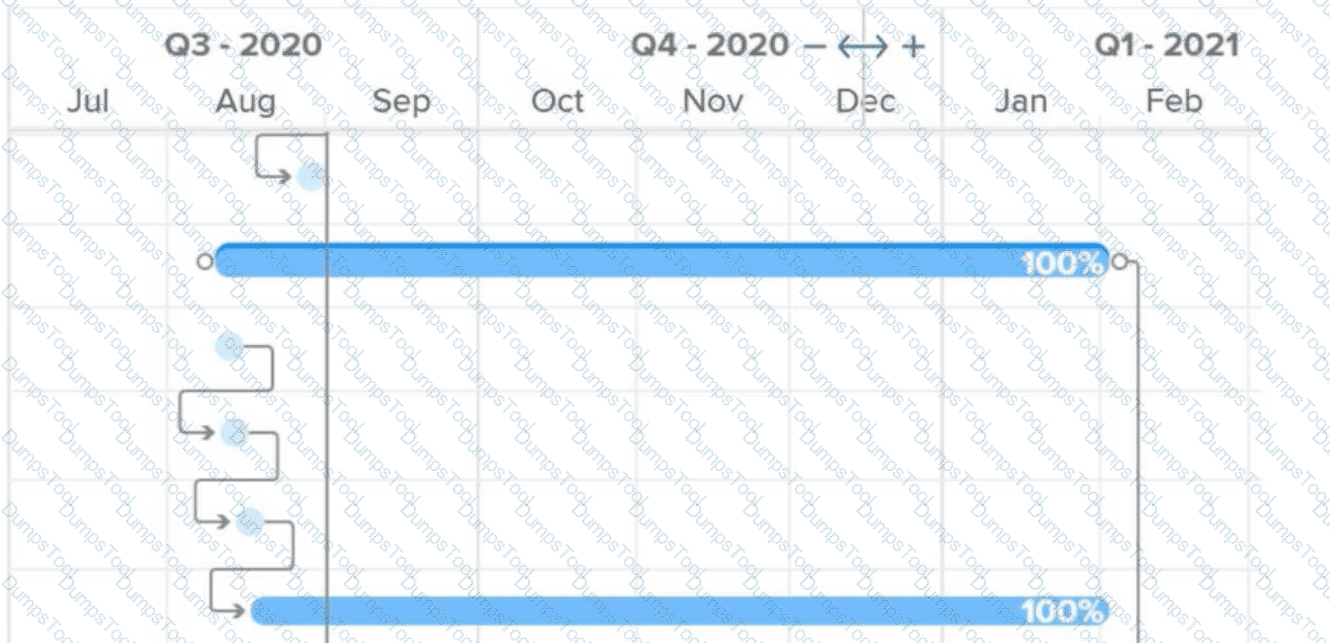
Question # 28

What do the connector lines between tasks in a Gantt chart represent?

A.

Critical path

B.

Multiple assignments

C.

Predecessor relationship

Full Access